Hello everyone and a happy new year!
I am just starting to use HA and I need some help. I want to control an existing switch (switch.superclean_dreammachine_charge) to start charging my car by sending MQTT commands from another application. I have been searching the forum but cannot find a solution. Can anyone point me in the right direction? Thanks, JP
Do you know what the other application will send or can you come up with something yourself?
If you havent got an MQTT broker already, install the Mosquito add-on from the official add-on store.
In the helper section of Home Assistant you can then define an MQTT switch. You can also do it in yaml if you wish. If you can define your own topics then invent some topic name you understand, otherwise you need to know what the other application uses.
Then write n automtion that controls the real switch using the mqtt switch.
You can also skip the creation of the MQTT switch entity and just create an automation that triggers directly based on the MQTT topic:
Thanks Rick, seems like a good plan! First problem on the way: when trying to connect to my existing mosquito broker on another Rpi, I get the message “Unknown error occurred”. I can listen to that mqtt broker with MQTT explorer, so it is definetely up and running. No password needed either. Any idea what is wrong? Must add that I am running HA in docker on a Rpi.
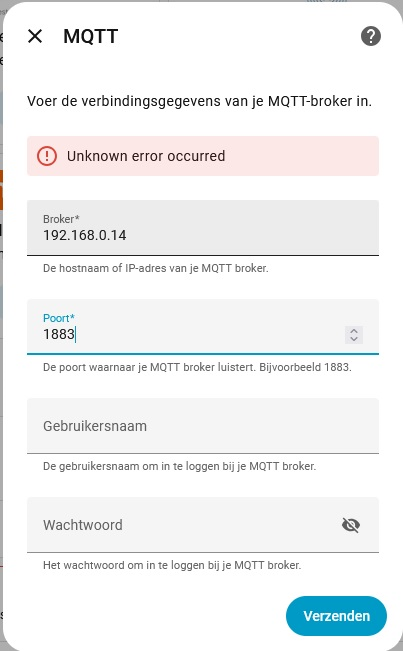
The MQTT add-on doesn’t allow anonymous connections. I realize you’re not running the addon but instead running MQTT as a stand-alone docker container, but I mention this just to highlight that you should check to ensure there isn’t a special configuration that is needed (both on the docker container as well as the HA integration) to allow anonymous connections. If it were me, I’d add a user/password just to eliminate that as a potential problem, even if only temporarily for troubleshooting.
Another thing to verify is that HA and the MQTT container are networked together on the same subnet and can ping each other.
This tripped me up as well. I had been running Mosquitto on a Raspberry Pi3 for five years without a password. I discovered this annoyance when the Raspberry started failing slowly and I added the Mosquitto add-on. Just use your Home Assistant name/password. (Easier to remember).
Hello Rick, thanks for the advice. The error came because the Rpi was out of memory. I had 2 containers on a 128 Gb SD-card, 1 for HA and another for Domoticz, because I want to migrate from Dz to HA. The file manager said: 117 Gb available, 0 bytes free. So I removed the DZ container, which was there only for testing purposes and now I have 63 Gb free memory. The Mqtt integration went flawless. Second problem: Following your advice for the mqtt trigger, I added two automations to the configuration.yaml for testing:
automation
triggers:
- trigger: mqtt
topic: “switch.superclean_dreammachine_charge”
payload: “on”
encoding: “utf-8”
value_template: “{{ value_json.state }}”
automation:
triggers:
- trigger: mqtt
topic: “switch.verwarming_badkamer_tasmota”
payload: “on”
encoding: “utf-8”
I suspect that on restart of HA the mqtt listener subscribes to the topics mentioned and when I send a message to the broker with the right topic and the message “on”, the switch must change state to the “on” status.
Unfortunately nothing happens.
I would recommend creating automations through the web interface if they are new to you, rather than using YAML. You can always toggle the automation editor to display the YAML code that it generates, and edit it there as well.
An automation always has at least one trigger and at least one action. The two automations you show above have only a trigger. Even if you set up the trigger correctly, the automation would do nothing because it has no actions defined. The whole point of an automation is to do something automatically. In your case you are wanting to turn ON (or OFF) a switch. So that should be your action. The trigger defines when you want the action to occur.
The easiest thing for a beginner would be to create two automations; one to turn the switch ON when the “ON” payload is received via MQTT, and then another automation to do the opposite (turn OFF). This would be an example of the ON automation:
alias: Turn switch ON when MQTT payload of ON is received
triggers:
  - trigger: mqtt
    options:
      topic: dreammachine/switch
      payload: "ON"
conditions: []
actions:
  - action: switch.turn_on
    target:
      entity_id: switch.superclean_dreammachine_charge
mode: single
(In the user interface, click “create automation” → “create new automation” → click 3 dots in upper right → “edit in YAML” → delete all text and paste in the code from above. Then you can switch back to “edit in visual editor” when done.)
–
You could reduce the two automations down to a single automation by adding both triggers to the same automation and then using a choose block in the automation.
But a more advanced method would be to just have a single trigger and use templates to choose the behavior based on the MQTT payload. Something like this would be all you would need:
alias: Switch state based on MQTT payload
triggers:
  - trigger: mqtt
    options:
      topic: dreammachine/switch
conditions: []
actions:
  - action: switch.turn_{{ trigger.payload | lower }}
    target:
      entity_id: switch.superclean_dreammachine_charge
mode: single
When you create or edit automations in the UI, you don’t need to restart (or do anything else) to make them active. They will start working immediately.
If you create an automation instead by editing your configuration.yaml, you can go to developer tools → YAML and click “Automations” to reload your automations.
Wow Rick, you are the best. That works like a charm! I can now start and stop charging the car based on electric power production and consumption.
Thank you for pointing me in the right direction.
The next project will be setting up a peak shaving automation.
So stakes are high, I will be knocking on your door again in the future.
Over here it is 13:30 and I do not know what time you have, but anyway I wish you a nice day and thanks again very much.
Hello Rick, just encountered a small problem: when the switch changes state in Domoticz, the same change is mirrored in HA, but sometimes the car operates the switch via HA, because f.i. the desired battery charge level has been reached, and that change is not refelected in Domoticz. So there it looks like the car is still charging, which causes problemes in the logic. Is there a way to synchronize the change back to Dz? Thanks in advance, JP
I don’t have any experience with Domoticz so I can’t help much. I would have expected Domoticz would know the on/off state of the dreammachine charger. Regardless of what HA is doing.
Since you’re saying that isn’t the case, you could create an automation in HA that communicates the state of the charge to Domoticz every time the charger turns on or off. However, since I don’t know Domoticz, I don’t know how to communicate with it. Can it monitor an MQTT topic? Do you need to send a REST command to it?
There are a million ways HA can communicate to the outside world. You’d need to pick the appropriate one and use it in an automation.
Hello Rick, I tried this, but it doesn’t work. When I check with mqtt explorer, I see no messages, so I think the problem lies with the trigger:
alias: Tesla charge feedback
description: ""
triggers:
  - type: changed_states
    device_id: f95456b34437a06f68a44848cd83cbf7
    entity_id: switch.superclean_dreammachine_charge
    domain: switch
    trigger: device
conditions: []
actions:
  - action: mqtt.publish
    metadata: {}
    data:
      evaluate_payload: false
      qos: 0
      retain: false
      topic: domoticz/in
      payload_template: >-
        {"command": "switchlight", "idx": 433, "switchcmd": "{{ switch.superclean_dreammachine_charge_state.state }}"}
mode: single
Do you have an idea?
Figure out the action first before trying to use it in an automation.
Go to developer tools → actions, and select the MQTT publish action. You can fill out the parameters in the UI and then press “edit in YAML” to see the YAML code that it generates.
Test it out and get it working, and then you can copy that YAML code into your automation.
I can tell you that payload_template was deprecated some time ago, and you should be using payload instead. Here are the docs that would tell you the viable options for mqtt.publish: https://www.home-assistant.io/integrations/mqtt#action-mqttpublish
Your trigger is probably fine, but I would recommend using entities instead of devices, it will save you from pain in the future:
https://community.home-assistant.io/t/why-and-how-to-avoid-device-ids-in-automations-and-scripts/605517
Hello Rick, thganks again for the clear and useful answer. The main problem was that HA uses single quotes for strings and JSon only accepts double quotes. Your suggestion to use the developer tools allowed me to find out and remedy. Here is what is working now:
alias: Tesla charge feedback if off
description: ""
triggers:
  - entity_id:
      - switch.superclean_dreammachine_charge
    from:
      - "on"
    to:
      - "off"
    trigger: state
conditions: []
actions:
  - action: mqtt.publish
    data:
      qos: "0"
      topic: domoticz/in
      payload: "{ \"command\": \"switchlight\", \"idx\": 433, \"switchcmd\": \"Off\" }"
mode: single
I had to make a second automation for the “on” status, because Domoticz only accepts “On” and HA is sending “on” as the switch status, but that is Ok for me. Have a nice sunday!