Spartacus
November 12, 2025, 8:20pm
1906
Hi all,
I noticed that there were changes in the mushroom-card and all my card-mods do not work anymore. Yes I can switch back to the old template, but I think this will not help for the future!
I’m currently a bit overwhelmed with the situation, and it would be great if someone could show me how to transfer the old code into the new one. At the moment, neither the font size adjustments nor the hover effects are working.
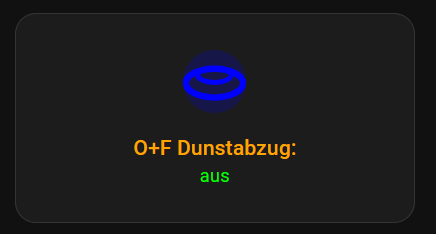
and currently everything looks like this example!
Thank you!
card_mod:
  style:
    mushroom-shape-icon$: |
      .shape
        {
         --icon-symbol-size: 22px;
         --icon-size: 22px;
         --shape-color: transparent !important;
        }
    mushroom-state-info$: |
      {% if is_state(config.entity,'off') %}
       .secondary {
        font-style: italic;
        }
      {%endif%}
       .container {
         --card-primary-font-size: 12px;
         --card-secondary-font-size: 10px;
        }
    .: |
      ha-card
      {
       margin-top: 0px;
       margin-bottom: 0px;
       height: 90px !important;
       # border: none !important;
        --mdc-icon-size: 20px;
        --ha-card-border-radius: 0px;
        --ha-card-border-color: #3c3c3c;
        --ha-card-border-width: 1px;
        --card-primary-font-weight: normal;
        --card-primary-line-height: 2.0;
        --card-secondary-line-height: 1.3;
       {% if is_state(config.entity,'on') %}
         --card-primary-color:;
         --card-secondary-color:#00CC00;
       {%else%}
         --card-primary-color:#7E7E7E;
         --card-secondary-color:#7E7E7E;
       {% endif %}
      }
      ha-state-icon
      {
        rotate: 0deg;
        {% if is_state(config.entity, 'on') %}
          opacity:
          {% set state = (state_attr(config.entity, "brightness")|
                float(0)/ 128 *100) %}
          {% set y = (((state/10) | int) +1) * 10 %}
          {{ ([30, y, 100] | sort)[1] }}%
        {%endif%}
      }
      ha-state-icon:hover
         {
          --icon-symbol-size: 30px;
         }
Spartacus
November 12, 2025, 8:52pm
1907
.I’ve made some progress, but where can I set
the secondary font style to italic
card_mod:
  style: |
    ha-card {
      height: 120px !important;
       }
    ha-tile-icon {
       --tile-icon-color: blue !important;
       --mdc-icon-size: 44px;
       }
    #info {
      --tile-info-primary-font-size: 12px;
      --tile-info-secondary-font-size: 10px;
      --tile-info-secondary-font-style: italic;
      --tile-info-primary-color: orange;
      --tile-info-secondary-color: lime;
       }
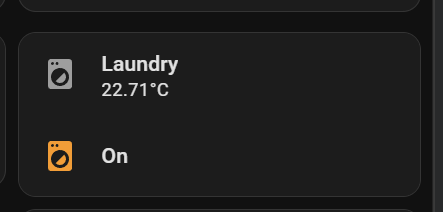
trying to apply this myself and follow along with dev tools in edge.
type: custom:simple-swipe-card
show_pagination: false
card_spacing: 15
cards:
  - type: custom:vertical-stack-in-card
    cards:
      - type: custom:mushroom-template-card
        primary: Laundry
        secondary: "{{ states('sensor.0x54ef441000684c17_temperature') }}°C"
        icon: mdi:washing-machine
        tap_action:
          action: navigate
          navigation_path: laundry
        picture:
        card_mod:
          style: |
            ha-card {
              border-radius: 16px 16px 0px 0px;
            }
      - type: custom:mushroom-template-card
        entity: binary_sensor.washer_running
        primary: |-
          {% if is_state(config.entity, 'off') %}
          Idle
          {% elif is_state(config.entity, 'on') %}
          On
          {% else %}
          Full
          {% endif %}
        icon: mdi:washing-machine
        icon_color: |-
          {% if is_state(config.entity, 'on') -%}
            orange
          {%- else -%}
            blue
          {%- endif %}
        card_mod:
          style:
            mushroom-shape-icon$: |
              .shape:before {
              content: '';
              z-index: 1;
              position: absolute;
              justify-content: center;
              align-items: center;
              width: 22%;
              height: 11.5%;
              border: 1px solid black;
              border-radius: 1rem 1rem 0 0;
              background: {{ 'deepskyblue' if
                is_state(config.entity, 'on') else
                'black' }};
              animation: {{ 'circle 2s linear infinite alternate'if
                is_state(config.entity, 'on') else
                'animation: none;' }};
              transform-origin: 50% 85%;
                  }
              @keyframes circle {
              0% {transform: rotate(0deg);}
              100% {transform:rotate(360deg);}
                }
              .shape:after {
              content: '';
              position: absolute;
              width: 27%;
              height: 27%;
              border-radius: 100%;
              border: 1px solid white !important;
              background:black;
              top: 14px;
              justify-content: center;
              align-items: center;
                }
  - type: custom:stack-in-card
    cards:
      - type: custom:button-card
        entity: sensor.0x54ef441000684c17_temperature
        name: "Laundry"
        styles:
          card:
            - border-style: none
            - box-shadow: 0px 0px 10px -9px black
          custom_fields:
            temp:
              - filter: opacity(100%)
              - justify-self: start
              - margin-left: 10px
              - margin-top: 20px
              - padding-bottom: 10%
              - font-size: 65%
            graph:
              - padding-top: 0%
              - width: 100%
              - height: 100%
              - margin-bottom: "-3%"
          icon:
            - width: 25px
            - color: auto
          name:
            - font-size: 87%
            - font-weight: var(--mcg-title-font-weight, 500)
            - justify-self: start
            - margin-top: 6px
            - margin-left: 12px
            - opacity: 0.65
          grid:
            - grid-template-areas: '"n n" "temp temp" "graph graph"'
            - grid-template-columns: 1fr min-content
            - grid-template-rows: 1fr min-content min-content min-content
        custom_fields:
          temp: |
            [[[
              return `<ha-icon
                icon="mdi:thermometer"
                style="width:18px; height: 18px; color:#ff8c00;">
                </ha-icon><span style="font-size:120%; font-weight: 300;">
                ${states['sensor.0x54ef441000684c17_temperature'].state}°C </span>`
            ]]]
        card_mod:
          style: |
            ha-card {
              z-index: 1;
              height: 86px !important;
            }
      - type: custom:mini-graph-card
        entities:
          - entity: sensor.0x54ef441000684c17_temperature
            name: Temperature
            color: "#ff8c00"
        height: 50
        hours_to_show: 24
        line_width: 3
        font_size: 50
        animate: true
        show:
          name: false
          icon: false
          state: false
          legend: false
          fill: fade
        card_mod:
          style: |
            ha-card {
              position: absolute !important;
              height: 100%;
              width: 100%;
              top: 0px;
              --ha-card-border-width: 0;
            }
            ha-card:after {
              content: "";
              position: absolute;
              width: 100%;
              height: 100%;
              background: linear-gradient(to right, var(--card-background-color) 20%, transparent);
            }
        alignment: end
      - type: custom:mini-graph-card
        entities:
          - entity: sensor.0x54ef441000684c17_temperature
            name: Temperature
            color: "#ff8c00"
        height: 50
        hours_to_show: 24
        line_width: 3
        font_size: 50
        animate: true
        show:
          name: false
          icon: false
          state: false
          legend: false
          fill: fade
        card_mod:
          style: |
            ha-card {
              position: absolute !important;
              height: 100%;
              width: 100%;
              top: 0px;
              --ha-card-border-width: 0;
            }
            ha-card:after {
              content: "";
              position: absolute;
              width: 100%;
              height: 100%;
              background: linear-gradient(to right, var(--card-background-color) 20%, transparent);
            }
Hi there, I have this compact slider that I want to fix. The icon gets overlapped by the slider when sliding over it. I want the icon on top of the slider like the text currently is.
The code is a very vibecoded mess, feel free to change everything around, so long as the final look stays similar.
type: custom:mushroom-number-card
entity: input_number.e_akse_motor_number
fill_container: false
icon_color: blue-grey
name: Roller Shade 1
grid_options:
  rows: 2
  columns: 9
icon: mdi:roller-shade
layout: horizontal
card_mod:
  style:
    mushroom-number-value-control$:
      mushroom-slider$: |
        .slider {
          position: absolute !important;
          top: 0 !important;
          left: 0 !important;
          height: 100% !important;
          width: 100% !important;
          border-radius: 12px !important;
        }
        .slider-track { height: 100% !important; }
        .slider-track-active { z-index: 0 !important; }
        .slider-track-background { z-index: 0 !important; }
        .slider-thumb { z-index: 1 !important; }
    .: |

      ha-card {
        background: none !important;
        box-shadow: none !important;
        border: none !important;
        height: 100% !important;
        position: relative !important;
        padding: 0 !important;
        isolation: isolate !important;
      }
      ha-card > div {
        height: 100% !important;
      }
      mushroom-state-item {
        position: absolute !important;
        top: 0 !important;
        left: 0 !important;
        width: 100% !important;
        height: 100% !important;
        justify-content: center !important;
        pointer-events: none !important;
        z-index: 1000 !important;
      }
      mushroom-number-value-control {
        position: absolute !important;
        top: 0 !important;
        bottom: 0 !important;
        left: 0 !important;
        right: 0 !important;
        height: 100% !important;
        width: 100% !important;
        padding: 0 !important;
        margin: 0 !important;
        z-index: 1 !important;
      }
      mushroom-shape-icon, mushroom-state-info {
        transform: none !important;
      }
Any help is appreciated
This is the code one of my frontend sections.
type: sections
max_columns: 4
title: temp
path: temp
card_mod:
  style: |
    /* modern part selector (preferred) */
    :host ::part(badges) {
      padding-top: 50px !important;
    }

    /* common fallback selectors */
    :host ::slotted(hui-view-badges),
    hui-view-badges,
    .view-badges,
    .header .view-badges {
      padding-top: 50px !important;
    }

    /* fallback targeting the badge container inside the view */
    :host ::slotted(*) hui-view-badges {
      padding-top: 50px !important;
    }
header:
  layout: responsive
  badges_position: top
  badges_wrap: scroll
badges:
  - type: custom:mod-card
    card:
      type: custom:mushroom-chips-card
      chips:
        - type: menu
      card_mod:
        style: |
          .chip-container {
            --chip-icon-size: 20px;
            --chip-padding: 0 8px;
            --chip-border-radius: 9px;
            --chip-spacing: 5px;
            --chip-border-width: 0px;
          }
  - type: custom:mod-card
    card:
      type: custom:mushroom-chips-card
      chips:
        - type: template
          entity: sensor.sockets_on
          icon: mdi:power-socket-uk
          icon_color: |
            {% if is_state(entity, '0') %}
              disabled
            {% else %}
              orange
            {% endif %}
          tap_action:
            action: more-info
      card_mod:
        style:
          mushroom-template-chip:nth-child(1)$:
            mushroom-chip$: |
              ha-card:after {
                {% if is_state('sensor.sockets_on', '0') %}
                  display: none;
                {% else %}
                  display: flex;
                {% endif %}
                content: "{{ states('sensor.sockets_on') }}";
                position: absolute;
                justify-content: center;
                align-items: center;
                background: rgb(var(--rgb-orange));
                color: var(--card-background-color);
                font-weight: bolder;
                border-radius: 50%;
                top: -7px;
                right: -2px;
                width: 17px;
                height: 17px;
                font-size: 13px;
              }
          .: |
            .chip-container {
              --chip-icon-size: 20px;
              --chip-padding: 0 8px;
              --chip-border-radius: 9px;
              --chip-spacing: 5px;
              --chip-border-width: 0px;
            }
sections:
  - type: grid
    cards:
      - type: heading
        heading: New section
cards: []
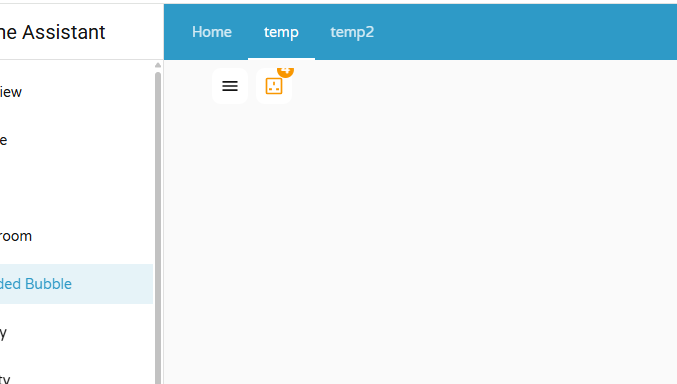
And this is the output i get
The sockets sensor gives the number of sockets which are ON. If none are on, the icon gets disabled.The count is shown as content.
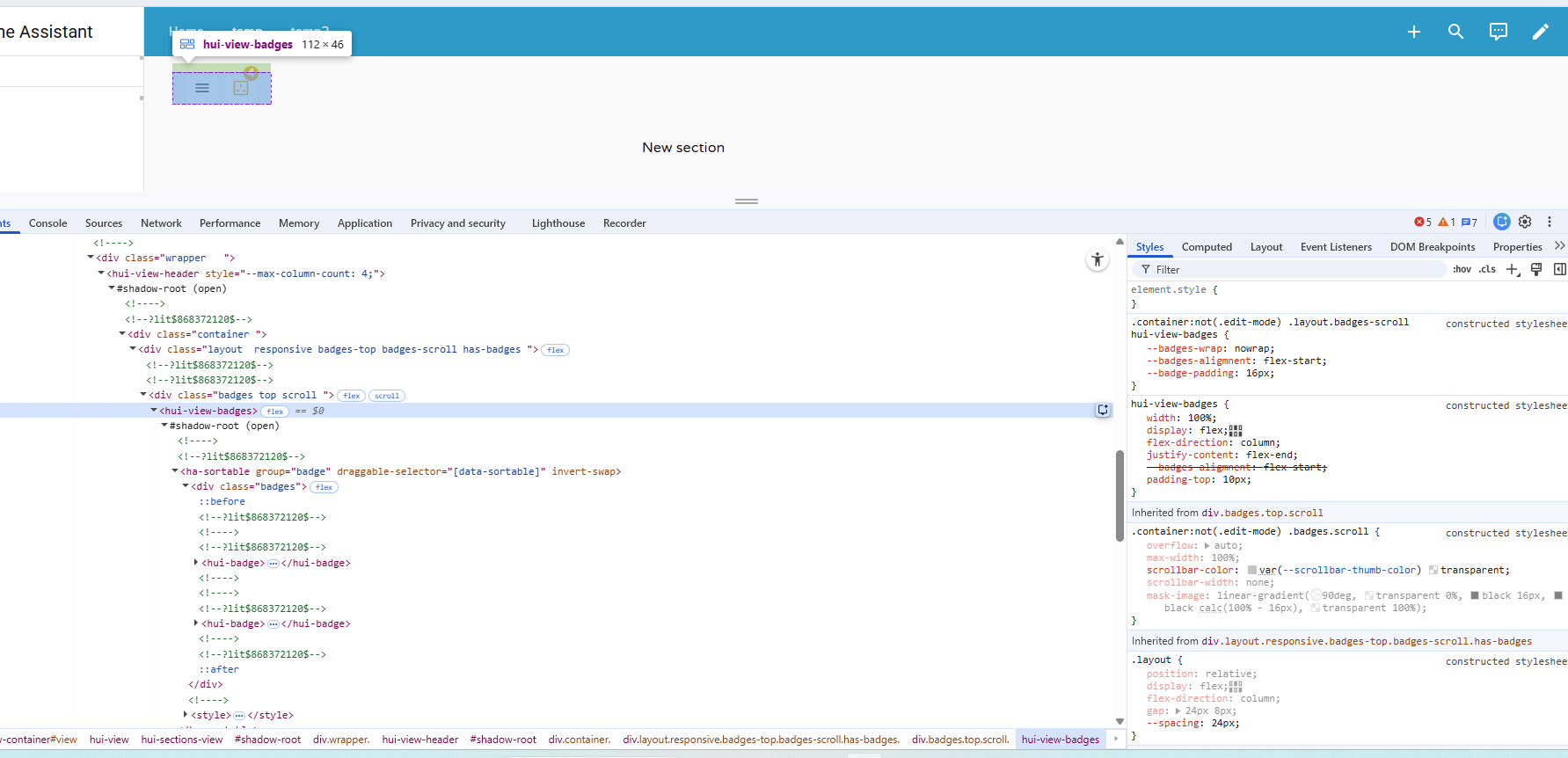
As attached, the portion of content is partially visible. To increase the top padding, i went throught the developer options and found the target element to be hui-view-badges. I tried several methos in chargpt to add the padding. but not working.
How can i implement this in the code.
i tried different approaches hwihc are alread in the code above
card_mod:
  style: |
    /* modern part selector (preferred) */
    :host ::part(badges) {
      padding-top: 50px !important;
    }

    /* common fallback selectors */
    :host ::slotted(hui-view-badges),
    hui-view-badges,
    .view-badges,
    .header .view-badges {
      padding-top: 50px !important;
    }

    /* fallback targeting the badge container inside the view */
    :host ::slotted(*) hui-view-badges {
      padding-top: 50px !important;
    }
Can someone help.
turns out I was just stupid and didnt think about the fact that the slider had the same color as the icon. Replacing it with a custom icon with a different color fixed the issue i had.
dcapslock
November 30, 2025, 3:41am
1912
Apply 10px padding to ha-card at the mushroom-chips-card level for each of the custom mod-card badges. Below I have added this after your .chip-container styling.
type: sections
max_columns: 4
title: temp
path: temp
header:
  layout: responsive
  badges_position: top
  badges_wrap: scroll
badges:
  - type: custom:mod-card
    card:
      type: custom:mushroom-chips-card
      chips:
        - type: menu
      card_mod:
        style: |
          .chip-container {
            --chip-icon-size: 20px;
            --chip-padding: 0 8px;
            --chip-border-radius: 9px;
            --chip-spacing: 5px;
            --chip-border-width: 0px;
          }
          ha-card {
            padding-top: 10px;
          }
  - type: custom:mod-card
    card:
      type: custom:mushroom-chips-card
      chips:
        - type: template
          entity: sensor.sockets_on
          icon: mdi:power-socket-uk
          icon_color: |
            {% if is_state(entity, '0') %}
              disabled
            {% else %}
              orange
            {% endif %}
          tap_action:
            action: more-info
      card_mod:
        style:
          mushroom-template-chip:nth-child(1)$:
            mushroom-chip$: |
              ha-card:after {
                {% if is_state('sensor.sockets_on', '0') %}
                  display: none;
                {% else %}
                  display: flex;
                {% endif %}
                content: "{{ states('sensor.sockets_on') }}";
                position: absolute;
                justify-content: center;
                align-items: center;
                background: rgb(var(--rgb-orange));
                color: var(--card-background-color);
                font-weight: bolder;
                border-radius: 50%;
                top: -7px;
                right: -2px;
                width: 17px;
                height: 17px;
                font-size: 13px;
              }
          .: |
            .chip-container {
              --chip-icon-size: 20px;
              --chip-padding: 0 8px;
              --chip-border-radius: 9px;
              --chip-spacing: 5px;
              --chip-border-width: 0px;
            }
            ha-card {
              padding-top: 10px;
            }
sections:
  - type: grid
    cards:
      - type: heading
        heading: New section
cards: []
kalhimeo
December 1, 2025, 9:40am
1913
Hi piitaya ,
First, thank you very much for your nice cards
If I may ask a small request, at the moment the addition of card “features” is only possible with the Mushroom Template card, would it be possible to allow that possibility to all other mushroom card as well ?Nerwyn ’s Custom Card Features in order to create advanced customized tile cards.
Thanks for consideration and keep up the great work !
PS: I also read your reddit post about why using Mushroom cards instead of the official tile card, and I think that the default tile card should have the possibility to add “features” both vertically and inline. That would also allow us to create very advanced and customized cards and no need for mushroom cards or my feature request above
If I’ve understood you correctly, this is already possible
kalhimeo
December 1, 2025, 2:34pm
1915
No you can do vertical OR inline but not both together on the same tile
Got it - apologies, I clearly hadn’t understood you correctly.
Thank you… Works well. So i will have to add this padding to each and every chip card i put irrespective of weather the chip has this additional badge info projecting outside the chip or not so that the vertical alignment remains same for all the cards added in the badge area.
1 Like
Good afternoon,
I’m trying to make the below fit for a mobile dashboard, but for some reason I can’t size the “back-arrow” to suit.
What is the correct way to “size the back - button”.
type: horizontal-stack
cards:
  - type: custom:mushroom-template-badge
    tap_action:
      action: navigate
      navigation_path: home
    icon: mdi:arrow-left

  - type: custom:mushroom-template-badge
    entity: sensor.daily_pvprod_energy_peak
    icon: mdi:solar-power-variant
    color: yellow
    label: Production
    content: "{{ states(entity)|round(2) }} kWh"
    tap_action:
      action: more-info
Hackjaz
December 22, 2025, 2:13am
1920
Hello all!
As many others have stated, I am eternally grateful for the advice & examples in this (and other related) threads that I have learned so much from—thank you! I am still fairly new to all of this, but learning as I go!
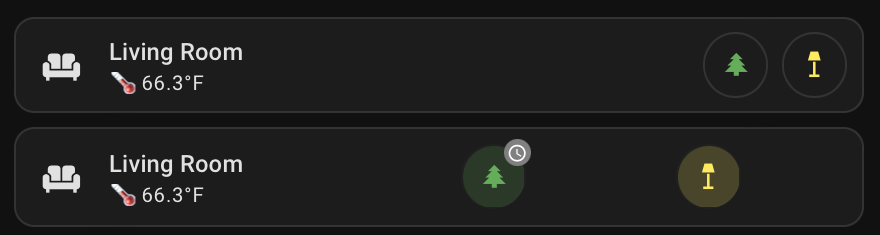
It is my understanding that mushroom chips do not support badging so I am in the process of converting some of my mushroom chip cards to mushroom template cards. Alignment has proven to be a stumper. I would like to right-align all of my mushroom template cards (like is easily done with mushroom chip cards using ‘alignment: end’) as well as have any alignment solutions continue to function in the absence of any conditional mushroom template cards. Nothing that I’ve tried seems to work. Is anyone able to provide a possible solution?
Here is a photo of the same card using mushroom chips (top) and mushroom templates (bottom) as well as the yaml for both. Thanks in advance for any help!
type: custom:stack-in-card
mode: horizontal
cards:
  - type: custom:mushroom-template-card
    icon: mdi:sofa
    icon_color: default
    primary: Living Room
    secondary: >-
      {{"🌡️ "}}{{states('number.s_autelis_living_room_temp') | int /
      10}}{{"°F"}}
    multiline_secondary: false
    fill_container: true
    tap_action:
      action: none
    card_mod:
      style: |
        ha-card {
          border: none
        }
  - type: custom:mushroom-chips-card
    alignment: end
    grid_options:
      columns: 6
      rows: 1
    card_mod:
      style: |
        ha-card {
          padding-top: 8px !important;
          padding-right: 9px !important;
        }
    chips:
      - type: conditional
        conditions:
          - entity: input_boolean.christmas
            state: "on"
        chip:
          type: template
          entity: switch.christmas_tree
          icon: mdi:pine-tree
          icon_color: |-
            {% if is_state('switch.christmas_tree', 'on') %}
              green
            {% else %}
              default
            {% endif %}
          tap_action:
            action: more-info
          hold_action:
            action: none
          double_tap_action:
            action: none
      - type: template
        entity: light.floor_lamp_ii
        icon: mdi:floor-lamp
        icon_color: |-
          {% if is_state('light.floor_lamp_ii', 'on') %}
            yellow
          {% else %}
            default
          {% endif %}
        tap_action:
          action: more-info
type: custom:stack-in-card
mode: horizontal
cards:
  - type: custom:mushroom-template-card
    icon: mdi:sofa
    icon_color: default
    primary: Living Room
    secondary: >-
      {{"🌡️ "}}{{states('number.s_autelis_living_room_temp') | int /
      10}}{{"°F"}}
    multiline_secondary: false
    fill_container: true
    tap_action:
      action: none
    card_mod:
      style: |
        ha-card {
          border: none
        }
  - type: custom:stack-in-card
    mode: horizontal
    card_mod:
      style: |
        ha-card {
          border: none !important;
        }
    cards:
      - type: custom:mushroom-template-card
        entity: switch.christmas_tree
        icon: mdi:pine-tree
        icon_color: |
          {% if is_state('switch.christmas_tree', 'on') %}
            green
          {% else %}
            default
          {% endif %}
        primary_info: none
        secondary_info: none
        badge_icon: |
          {% if is_state('input_boolean.christmas_is_running', 'on') %}
            mdi:clock-outline
          {% elif is_state('input_boolean.christmas_is_running', 'off') %}
            none
          {% endif %}
        badge_color: |
          {% if is_state('input_boolean.christmas_is_running', 'on') %}
            gray
          {% else %}
            transparent
          {% endif %}
        tap_action:
          action: none
        hold_action:
          action: none
        double_tap_action:
          action: none
        icon_tap_action:
          action: more-info
        visibility:
          - condition: state
            entity: input_boolean.christmas
            state: "on"
        card_mod:
          style:
            ha-tile-icon$: |
              .container {
                background: transparent !important;
                border: 1px solid;
                @media (prefers-color-scheme: dark) {
                  border-color: #343434; /* Color in dark mode */
                }
                @media (prefers-color-scheme: light) {
                  border-color: rgba(52,52,52,0.2); /* Color in light mode */
                }
              }
            .: |
              ha-tile-icon {
               --mdc-icon-size: 18px;
              }
              ha-card {
                border: none !important;
              {
      - type: custom:mushroom-template-card
        entity: light.floor_lamp_ii
        icon: mdi:floor-lamp
        icon_color: |
          {% if is_state('light.floor_lamp_ii', 'on') %}
            yellow
          {% else %}
            default
          {% endif %}
        primary_info: none
        secondary_info: none
        tap_action:
          action: none
        hold_action:
          action: none
        double_tap_action:
          action: none
        icon_tap_action:
          action: more-info
        view_layout:
          grid-area: two
        card_mod:
          style:
            ha-tile-icon$: |
              .container {
                background: transparent !important;
                border: 1px solid;
                @media (prefers-color-scheme: dark) {
                  border-color: #343434; /* Color in dark mode */
                }
                @media (prefers-color-scheme: light) {
                  border-color: rgba(52,52,52,0.2); /* Color in light mode */
                }
              }
            .: |
              ha-tile-icon {
               --mdc-icon-size: 18px;
              }
              ha-card {
                border: none !important;
              {
Hackjaz
December 22, 2025, 4:51am
1921
FYI, I think the most mushroom chips that I currently have for any given room is five. Of course, with only one mushroom template card, it’s easy to just use ‘float: right’. I’ve tried a few other card types as well as many card-mods to no avail. My next thought is a to use a grid layout-card with blank conditional mushroom cards to the left that fill space & push content to the right based on the number of other conditional mushroom cards visible. I started working on it, but decided to ask before heading too far down that rabbit hole.
dcapslock
December 22, 2025, 6:43am
1922
You can try custom:button-card which has flexible grid options.
e.g. Simple example I created from your code…
type: custom:button-card
section_mode: true
styles:
  grid:
    - grid-template-areas: "\"tile badge1 badge2\""
custom_fields:
  tile:
    card:
      type: custom:mushroom-template-card
      secondary: 🌡️ 15 °C
      icon: mdi:sofa
      features_position: bottom
      primary: Living Room
      tap_action:
        action: none
      card_mod:
        style: |
          ha-card {
            border: none
          }
  badge1:
    card:
      type: custom:mushroom-template-card
      icon: mdi:door
      features_position: bottom
      color: red
      badge_icon: mdi:lock
      badge_color: orange
      tap_action:
        action: toggle
      card_mod:
        style:
          ha-tile-icon$: |
            .container {
              background: transparent !important;
              border: 1px solid;
              @media (prefers-color-scheme: dark) {
                border-color: #343434; /* Color in dark mode */
              }
              @media (prefers-color-scheme: light) {
                border-color: rgba(52,52,52,0.2); /* Color in light mode */
              }
            }
          .: |
            ha-tile-icon {
             --mdc-icon-size: 18px;
            }
            ha-card {
              border: none !important;
            }
  badge2:
    card:
      type: custom:mushroom-template-card
      icon: mdi:door
      features_position: bottom
      color: red
      badge_icon: mdi:lock
      badge_color: orange
      tap_action:
        action: toggle
      card_mod:
        style:
          ha-tile-icon$: |
            .container {
              background: transparent !important;
              border: 1px solid;
              @media (prefers-color-scheme: dark) {
                border-color: #343434; /* Color in dark mode */
              }
              @media (prefers-color-scheme: light) {
                border-color: rgba(52,52,52,0.2); /* Color in light mode */
              }
            }
          .: |
            ha-tile-icon {
             --mdc-icon-size: 18px;
            }
            ha-card {
              border: none !important;
            }
grid_options:
  rows: 1
  columns: full
Hackjaz
December 22, 2025, 5:04pm
1923
Well, that looks promising and it’s a card type I haven’t tried yet! I’ll give it a go & let you know how it works. Thank you so much!
Hackjaz
December 22, 2025, 7:15pm
1924
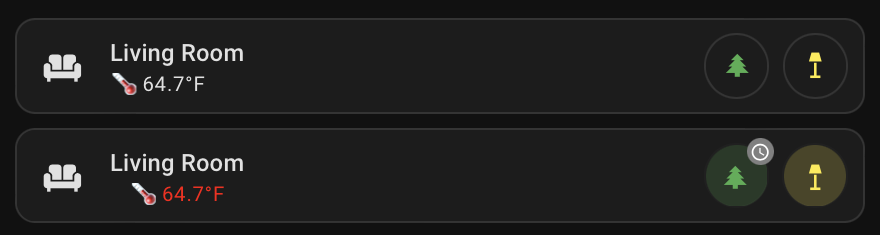
I believe this is the way! It has yielded far better results than anything else I’ve tried—thank you again!
One thing I haven’t been able to remove is the leading space before the secondary information. Not sure why using a mushroom template card within a custom button card has any affect on this but it does. I know that I am able to target the secondary information as I can successfully change the text color to red, but nothing I’ve tried seems to left justify it with the primary information. Here’s what my code looks like currently:
type: custom:button-card
section_mode: true
styles:
  grid:
    - grid-template-areas: "\"tile badge1 badge2\""
custom_fields:
  tile:
    card:
      type: custom:mushroom-template-card
      icon: mdi:sofa
      icon_color: default
      primary: Living Room
      secondary: >
        {{"🌡️ "}}{{states('number.s_autelis_living_room_temp') | int /
        10}}{{"°F"}}
      multiline_secondary: false
      fill_container: true
      features_position: bottom
      tap_action:
        action: none
      card_mod:
        style:
          ha-tile-info$: |
            .secondary {
              color: red !important;
              margin-left: -10px !important;
            }
          .: |
            ha-card {
              border: none !important;
            }
  badge1:
    card:
      type: custom:mushroom-template-card
      entity: switch.christmas_tree
      icon: mdi:pine-tree
      icon_color: |
        {% if is_state('switch.christmas_tree', 'on') %}
          green
        {% else %}
          default
        {% endif %}
      primary_info: none
      secondary_info: none
      badge_icon: |
        {% if is_state('input_boolean.christmas_is_running', 'on') %}
          mdi:clock-outline
        {% elif is_state('input_boolean.christmas_is_running', 'off') %}
          none
        {% endif %}
      badge_color: |
        {% if is_state('input_boolean.christmas_is_running', 'on') %}
          gray
        {% else %}
          transparent
        {% endif %}
      tap_action:
        action: none
      hold_action:
        action: none
      double_tap_action:
        action: none
      icon_tap_action:
        action: more-info
      visibility:
        - condition: state
          entity: input_boolean.christmas
          state: "on"
      card_mod:
        style:
          ha-tile-icon$: |
            .container {
              background: transparent !important;
              border: 1px solid;
              @media (prefers-color-scheme: dark) {
                border-color: #343434; /* Color in dark mode */
              }
              @media (prefers-color-scheme: light) {
                border-color: rgba(52,52,52,0.2); /* Color in light mode */
              }
            }
          .: |
            ha-tile-icon {
             --mdc-icon-size: 18px;
            }
            ha-card {
              border: none !important;
              margin-left: -10px !important;
              margin-right: -10px;
              background: transparent;
            }
  badge2:
    card:
      type: custom:mushroom-template-card
      entity: light.floor_lamp_ii
      icon: mdi:floor-lamp
      icon_color: |
        {% if is_state('light.floor_lamp_ii', 'on') %}
          yellow
        {% else %}
          default
        {% endif %}
      primary_info: none
      secondary_info: none
      tap_action:
        action: none
      hold_action:
        action: none
      double_tap_action:
        action: none
      icon_tap_action:
        action: more-info
      card_mod:
        style:
          ha-tile-icon$: |
            .container {
              background: transparent !important;
              border: 1px solid;
              @media (prefers-color-scheme: dark) {
                border-color: #343434; /* Color in dark mode */
              }
              @media (prefers-color-scheme: light) {
                border-color: rgba(52,52,52,0.2); /* Color in light mode */
              }
            }
          .: |
            ha-tile-icon {
             --mdc-icon-size: 18px;
            }
            ha-card {
              border: none !important;
              background: transparent;
            }
grid_options:
  rows: 1
  columns: full
dcapslock
December 22, 2025, 8:42pm
1925
button-card sets text-align on the container for custom_fields and this is not set by the mushroom-template. Easiest way is to set style for custom_field in button-card config.
type: custom:button-card
section_mode: true
styles:
  custom_fields:
    tile:
      - text-align: left !important
  grid:
    - grid-template-areas: "\"tile badge1 badge2\""
...
Hackjaz
December 22, 2025, 9:44pm
1926
Ah, that was it! I was headed down that path since my last post, but hadn’t yet found the correct syntax. Thanks again!
1 Like