New Integration: Home Maintenance – Track Recurring Tasks in Home Assistant

Hey mvanlijden i have added your idea but my dashboard shows an error: configuration failure. I don’t have any idea how to fix it.

I have installed the 3 add-on over HACS and added your code in my dashboard.

In maintenance I have added some todos.

Thank you very much

Did you install the easy time?
Otherwise throw your own yaml and error in Gemini or ChatGPT to support in solutioning :wink:

I used ChatGPT and it doesn’t help. Everytime error. I have now a low version and it’s fine for me

Just installed this and am rather excited to have found it! I noticed the buttons for things like adding a task are really awkward on mobile (I was in the iOS Companion app)… is this something you could look into?

Any way to import multiple items from a csv file?

Hello ! Thanks a lot about your integration!

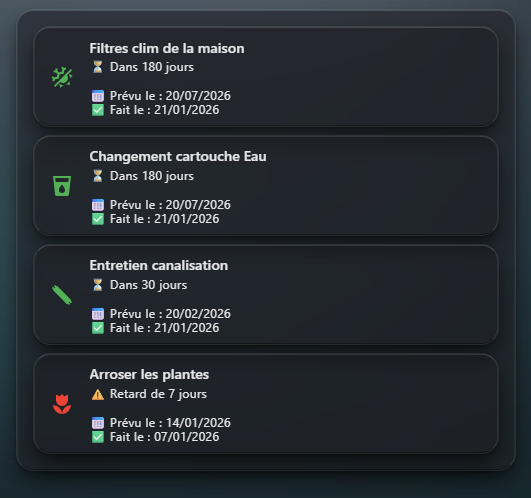
based on @Hugobosss post, i post mine here :

You have :

  • the number of day left
  • the day of the last day
  • the last day where the maintenance was done
  • when late, the number of days
  • action is when you tape or double tape (with confirmation)
type: custom:auto-entities
card:
  type: entities
filter:
  include:
    - integration: 01KE48XB3MH0PAZ6R2676CR2YD
      options:
        type: custom:mushroom-template-card
        entity: this.entity_id
        fill_container: false
        multiline_secondary: true
        primary: "{{ state_attr(config.entity, 'friendly_name') }}"
        secondary: >
          {% set next_due = as_datetime(state_attr(config.entity,'next_due')) %}
          {% set last = as_datetime(state_attr(config.entity,'last_performed'))
          %} {% set today = now().date() %} {% set days = (next_due.date() -
          today).days %}

          {% if days < 0 %} 
            ⚠️ Retard de {{ -days }} jours
          {% elif days == 0 %} 
            🔔 À faire aujourd'hui
          {% else %} 
            ⏳ Dans {{ days }} jours 
          {% endif %}

          📅 Prévu le : {{ next_due.strftime('%d/%m/%Y') }}

          ✅ Fait le : {{ last.strftime('%d/%m/%Y') }}
        icon: "{{ state_attr(config.entity, 'icon') }}"
        icon_color: >
          {% set next_due =
          as_datetime(state_attr(config.entity,'next_due')).date() %} {% set
          today = now().date() %} {% set days = (next_due - today).days %} {% if
          days <= 0 %} red  {% elif days <= 3 %} orange  {% else %} green  {%
          endif %}
        tap_action:
          action: perform-action
          perform_action: home_maintenance.reset_last_performed
          target:
            entity_id: this.entity_id
          confirmation:
            text: Confirmer la réalisation de cette tâche
        double_tap_action:
          action: perform-action
          perform_action: home_maintenance.reset_last_performed
          target:
            entity_id: this.entity_id
          confirmation:
            text: Confirmer la réalisation de cette tâche ?
sort:
  method: state
  numeric: true

Take care!

3 Likes

Love this, and am working on setting up some tasks here, and working on developing a simple and clean table view. Display is great, but my click to clear isn’t functioning, giving the error message shown below.
I am using the flex-table-card as follows:

type: custom:auto-entities
filter:
  include:
    - options: {}
      integration: 01KFS5D0HFAEX055HWD4QVAX0H
      label: pets
card:
  type: custom:flex-table-card
  title: Routine Pet Tasks
  clickable: false
  sort_by: next_due+
  columns:
    - data: icon
      name: " "
    - data: friendly_name
      name: Task
    - data: last_performed
      name: Last Done
      clickable: true
      modify: (([y, m, d]) => `${m}-${d}-${y}`)(x.split('T')[0].split('-'))
    - data: next_due
      name: Next Due
      modify: (([y, m, d]) => `${m}-${d}-${y}`)(x.split('T')[0].split('-'))
    - data: state
      name: " "
      modify: |-
        if (x == "off")
          "Done?"
        else
          "Done."
      tap_action:
        action: perform-action
        perform_action: home_maintenance.reset_last_performed
        data:
          entity_id: this.entity_id
        confirmation:
          text: Mark col[1] as complete?

After confirming that I want to mark the item complete, this message appears:

Failed to perform the action home_maintenance/reset_last_performed. value should be a string for dictionary value @ data['entity_id']

Is it possible to have the task “reset” on a certain day. I’d like the tasks to become due on the first of the month, and then track when I do them.

But if I use the one month interval and Im late, it resets it for next month.

1 Like

Hello everybody!

I’ve created a dashboard with mushroom lovely cards to see and mark them as done.

2 Likes

Anyone else having problems with their integration? I’ve been using it for a few months without issue (and love it by the way), however it recently stopped allowing me to edit all of the tasks I’ve created.

The tasks themselves seem to be working correctly. I can manually click the check box to mark something complete, although I typically utilize NFC tags that I’ve set up. What I can no longer do however is click the 3 dots to show the menu and edit them. I visibly see the three dots, but nothing happens with I click them.

I’m running the latest version of both HA OS (Core 2025.3.2, Supervisor 2026.03.0) and Home Maintenance (v1.5.4)

Any help would be amazing.

same issue - help would be appreciated @TJPoorman

I switched to using this. Very early in development, but seems promising. Has a nice GUI and the dev fixed a couple things I requested pretty quickly. ChoreOps just seems too heavy for what I’m looking for.

1 Like

UPDATE:
so for everyone who is struggling
I looked for all types of similar integrations, but non came close to this one.
so here is what I did.

just download the mian.js file from her

and use file editor in HA to replace the corrent implementation
be sure to clean your cache (or try using incognito browser)

you also need to go to seetings, Entities and rename all existing entities, because they will be namen Home Maintenance…

then everything should work just fine.

Love this evolution of this integration and your card! :grin:
Keep up the work!

I’ve added a few bugs and feature requests on GitHub. Hope this helps this integration develop :slight_smile:

I replaced the file, but i still can't click on the three dots of every task. Renaming the entities manualy replaces their name "Home Maintenance" to the name I want, but if I make a new task, the standard name is stille "Home maintenance". So nothing changed by replacing te main.js code... or am I doing something wrong?

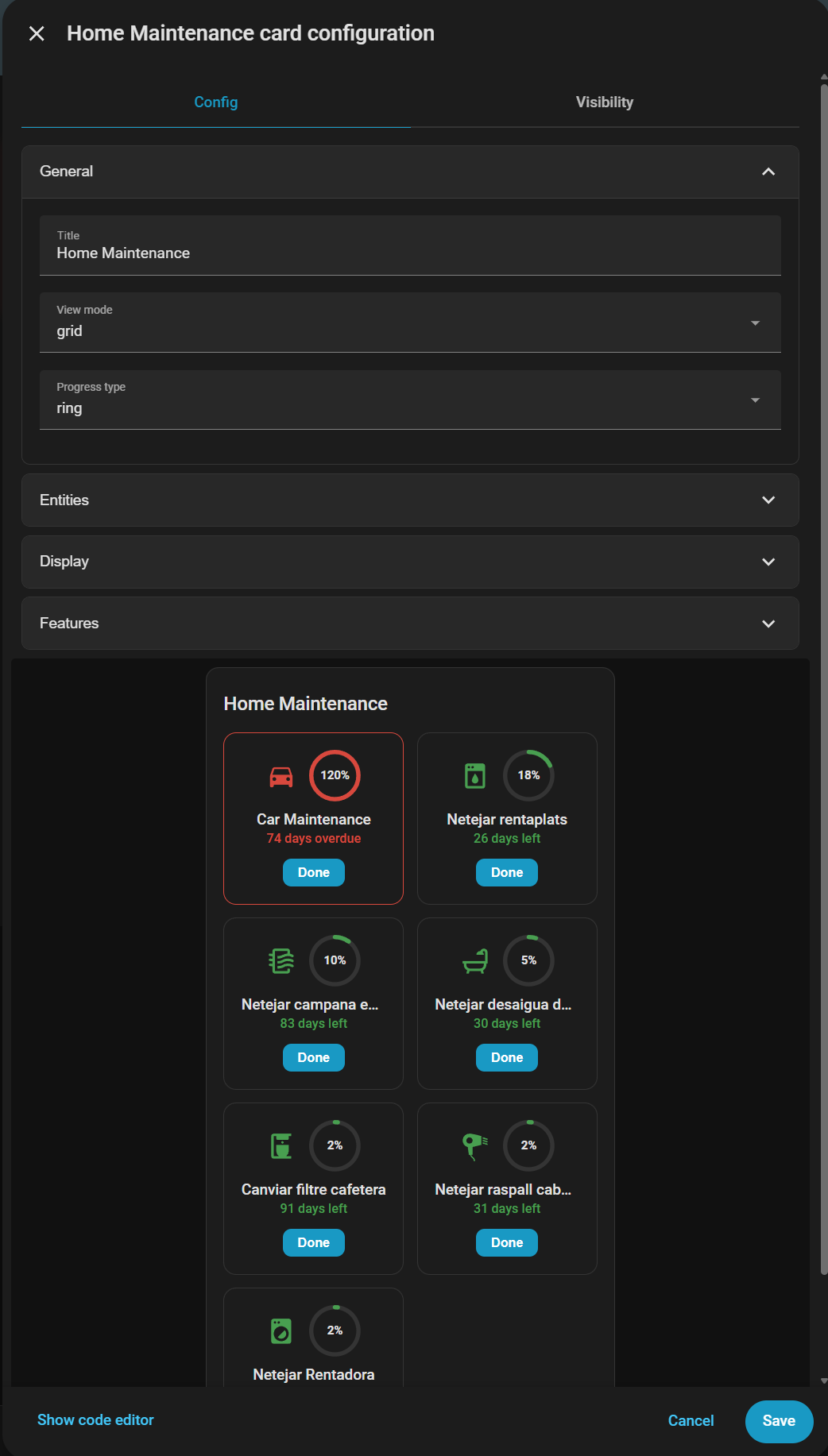
Hello, I once created a custom card for this integration.

Looks better than mine.

is it possible that you add a screenshot of the card to the git repo?
it don’t want to install something where i don’t know how it looks like

1 Like

I now have two representations to choose from. Buttons for edit and delete can also be hidden. The number of columns can be adjusted in the tile display.