Interesting.
I’ve never heard of any reference to “warnzone” in any of the NWS documentation. And they are calling “zoneid” your timezone (I tested it on several locations). I think they are more confused about this stuff than the rest of us. 
Interesting.
I’ve never heard of any reference to “warnzone” in any of the NWS documentation. And they are calling “zoneid” your timezone (I tested it on several locations). I think they are more confused about this stuff than the rest of us.
Unfortunately that is an artefact of the changes made in the switch from yaml config to the UI config flow and some other later updates. I had a conversation with the person who was helping me do all that (mostly all of that part since I’m not smart enough to do it on my own  and thanks again to @firstof9 who should get more credit here too) but it was decided it couldn’t be changed easily so we let it go like that.
The DWD integration uses warncell_name and warncell_id, but I have also never before seen mention of “warnzone” with respect to NWS. Odd for sure.
Perfect 
Multiple entities for selection would be also great
DWD has actual and advance warnings, now i need a extra vertical stack
Hey all — v2.9.0 is out with a handful of quality-of-life improvements, mostly around the editor and text readability.
Text reflow — NWS alert text has been hard-wrapped at 69 characters since the teletype era, which made descriptions look choppy in the card. The new reformatText option (on by default) joins those mid-sentence breaks while preserving paragraph structure. Works cleanly with DWD’s bullet-style formatting too. Set reformatText: false if you prefer the raw text.
Detail panel visibility toggles — Inspired by a feature request from @stephanschleichstr13, you can now hide all individual sections of the expanded detail panel (showDescription, showMetadata, showInstructions) or hide the entire “Read Details” panel with showDetails: false. All configurable from the visual editor.
Editor section dividers — The visual editor now groups related controls under labeled sections (Entity & Provider, Filtering, Appearance, Detail Panel, Behavior, Tools) so it’s easier to find what you’re looking for. Translated in all five supported languages.
Expanded alert state preserved in editor — Previously, if you had an alert expanded and changed any config option, HA would recreate the card and collapse everything. The expanded state now persists across config changes, making it easier to validate what you’re configuring. This also fixed a flash/resize issue due to card mod post-processing.
CI/HACS validation fixes — Resolved a race condition where HACS validation would fail immediately after a release because it ran before the release asset finished uploading. Also bumped CI to Node.js 22 ahead of the June 2026 Node.js 20 deprecation.
Available through HACS as usual — search for “Weather Alerts Card” or update from your existing installation.
Full changelog: GitHub releases
I’ve been wanting to add multiple-entity support for a minute (especially since DWD support), but haven’t been happy with my solutions yet. Best workaround path for the moment will be a separate card instance for each entity.
This is coming though, so stay tuned!
Currentlly im using custom:nina-dwd-card maybe it helps for ideas in this case (there im using the Integration as entity)
I’ve implemented a first pass at this in v2.10.0-alpha.1. Give it a shot and let me know what you think.
Still no NINA support for the moment, but at least this should handle the current/advance DWD scheme. You should be able to mix and match entities from different providers as well.
Looks good 
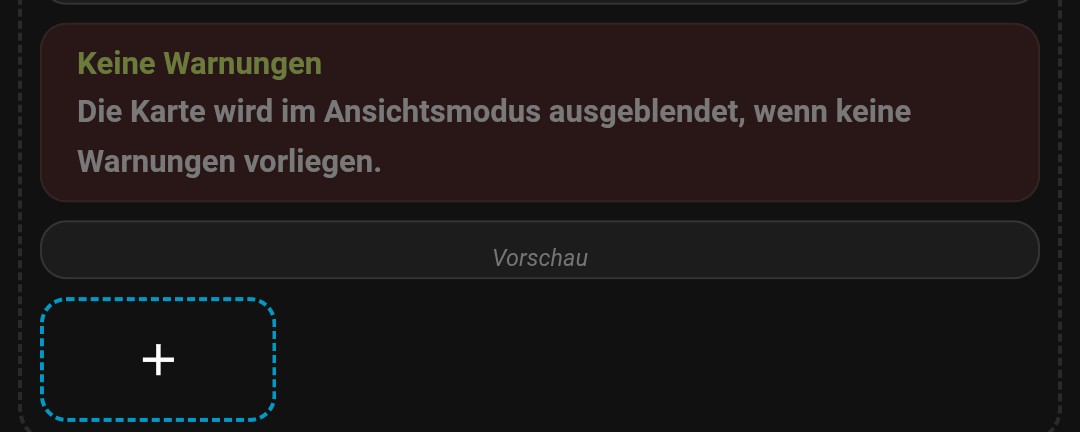
Preview Option ist a littlebit buggy
Glad to hear it!
Regarding the _preview option: it only exists to allow you to set up the card if your entity has no active alerts. Along with entirely fake data, it includes a “Preview” header just to drive the point home.
I do want to make sure it allows you to actually see what the settings do. If something in particular isn’t behaving like you’d expect, let me know so I can tune it up.
The Preview Button Pops Back to disabled, on reopen.
And i think we need a Default preview Message, currentlly we see only a empty space so we dont know directly what it is in lovelance edit Mode. You know what i mean?
I do understand what you’re saying regarding the toggle disabling on editor open. That was intended functionality, but it doesn’t really manage the state properly. The behavior would be more predictable if it just acted as a standard toggle. Putting that one on the docket!
With respect to the default preview message, there is already a preview header on the card itself, which shows when the sample data is enabled:
It’s pretty subtle though, is it not appearing at all in your case? I think what you’re suggesting is that we could add another alert/info box to the editor (which is very doable). Please correct me if I’ve got the wrong idea.
Ah thats new in the actual Version
A little bit more conext for the Preview would be great i think.
Here an example:
And it should be activ always, not only when the Preview Option ist activ.
Thanks for the screenshot. That orphaned “Vorschau” header is a separate papercut I’ll look at, but the bigger issue you’re hitting is just that the sample-data toggle was buried at the bottom of the editor where nobody finds it.
I just released v2.10.0-alpha.2 which displays it properly: the toggle now sits right under the entity selector, and when your entities report zero alerts an improved context hint appears next to it: “No active alerts, enable to preview the card layout.” Flip it on and you get sample alerts to tweak colors, fonts, layout against. Flip it off and you’re back to the real state.
I considered auto-enabling it, but _preview flows through the config to every instance of the card, so auto-forcing would also render sample data on your actual dashboard card while the editor was open. Not great with hideNoAlerts or multiple instances. Explicit toggle keeps the dashboard honest.
Also fixed a bug where the toggle reset to off every time you reopened the editor. Give it a shot, eager to hear your feedback!
Nice
The last Option Switch “dont Show when No activ warning” should be ignored in lovelance edit Mode
I’ll have to think about how best to accomplish this. The card rendered in-editor and the card rendered on the dashboard necessarily have to use the same code paths. The most important thing is to not break the dashboard, secondarily to be honest as to what the dashboard displays. For now, the “Sample Data” toggle will override the “don’t show when there are no active alerts” toggle, so you can still configure the editor with some idea of what the configuration will look like. You should always disable “Sample data” for your final configuration, assuming you only want to see real data on your dashboard.
If you are displaying real data in the editor (by disabling the sample data toggle) and there is no real data, I don’t have many options beyond respecting the selected configuration. HA unfortunately doesn’t provide any built in methods to determine whether the card is displaying in the editor or on the dashboard. I will keep investigating this, but it may require upstream changes to get to the desired end state.
v2.10.0 is out — two things worth calling out since the v2.9 post:
Multiple entities per card. You can now point a single card at more than one alert entity and it will merge and dedupe them. Handy if you’re watching multiple zones, or combining providers (e.g. NWS + PirateWeather for overlap coverage).
Editor quality-of-life. The config editor now shows a “Sample Data” toggle with a nudge when there are no active alerts, so you can actually see what you’re styling against while configuring. Turn it off for production dashboards. There’s also a clearer hint when no compatible provider entities are found on your system.
Under the hood the card version is now injected from package.json at build time so the displayed version can’t drift from the release, and a few dependency/build fixes landed along the way.
Full changelog on GitHub as always — bug reports and feature requests welcome.
Works Great! Thanks for all your hard work!
Mikeym
This is FANTASTIC! Thank you for all of your work on this project. Where do I send coffee money??
v2.11.0 is out
Two new options:
showProvider, off by default so existing setups aren’t affected)Full changelog in the release notes. As always, feedback and bug reports welcome!
P.S. - added a Support section to the README if you want to tip development or donate to The Y’all Squad to support direct aid for families hit by severe weather (no affiliation, just a cause I care about).