When I cleared exclusions it started to show those devices (3 of them are inactive so I excluded them)
YAML from automation:
alias: ⛔ Offline Devices Report with Notification Actions
description: ""
use_blueprint:
  path: Ltek/offline-devices-report-ltek.yaml
  input:
    time: "17:00:00"
    include_time: time_enabled
    exclude_entities: []
    notify_message: all_sensors
    notify_device:
      - ###device entity was there
    include_easy_notify: enable_easy_okay_notify
    notify_data: []
    include_custom_actions: enable_custom_actions
    custom_actions:
      - action: telegram_bot.send_message
        metadata: {}
        data:
          config_entry_id: ###telegram entitity was there
          message: Батарейка `{{sensors}}` разряжена, нужно заменить
    include_persistent_notification: enable_persistent_okay_notification
Ltek
January 11, 2026, 12:21am
22
I dont see any exclusions in your YAML so I cant see what could be causing the problem
alias: ⛔ Offline Devices Report with Notification Actions
description: ""
use_blueprint:
  path: Ltek/offline-devices-report-ltek.yaml
  input:
    time: "17:00:00"
    include_time: time_enabled
    exclude_entities:
      - sensor.miaomiaoce_t2_bb68_battery_level
      - sensor.miaomiaoce_t2_b828_battery_level
      - sensor.miaomiaoce_t2_8670_battery_level
      - sensor.thermometer_cabinet_battery
      - sensor.thermometer_living_room_battery
      - sensor.thermometer_bedroom_battery
    notify_message: all_sensors
    notify_device:
      - e6ff3cbbbd29a63aa7e9c3e7be3b9719
    include_easy_notify: enable_easy_okay_notify
    notify_data: []
    include_custom_actions: enable_custom_actions
    custom_actions:
      - action: telegram_bot.send_message
        metadata: {}
        data:
          config_entry_id: 01K3TJRA3TJEHA7B4K45A5VNJG
          message: Батарейка `{{sensors}}` разряжена, нужно заменить
    include_persistent_notification: enable_persistent_okay_notification
Ltek
January 11, 2026, 1:55pm
24
I dont know why you would have a problem with you exclude entities. I have not see anyone else with that problem. I tested it with all different variations, and never have an empty list
alias: Offline Devices Report
description: ""
use_blueprint:
  path: LTek/offline-devices-report-ltek.yaml
  input:
    time: "06:00:00"
    enable_persistent_notifications: true
    mobile_notification_services: notify.s23
    enable_mobile_notifications: false
    format_option: combined
    days_to_run:
      - sat
      - sun
    notify_device:
      - 4c405513584e73a3a8a3a9996bc35562
    display_options: both
    include_persistent_notification: enable_persistent_notification
    include_easy_notify: enable_easy_notify
    include_logbook_debug: enable_logbook_debug
    notify_message: all_sensors
    exclude_strings: |-
      shuffle
      repeat
      battery
      Battery
      disturb
      schedule
      indication
    include_custom_actions: disable_custom_actions
    include_time: time_enabled
    weekday_options:
      - sat
    include_debug: debug_enabled
    debug_offline_delay:
      hours: 0
      minutes: 0
      seconds: 0
    include_button: disable_button_trigger
    exclude_entities:
      - binary_sensor.2nd_floor_smoke_and_co_alarm_carbon_monoxide_detected
      - sensor.node_44_battery_level
      - sensor.aeon_labs_dsc06_electric_kwh
I have this running and get an iOS notification but am not getting anything added
This error is logged
logger:%20homeassistant.components.automation.offline_devices_report_with_notification_actions_2%0ASource%3A%20helpers/script.py:2070%0Aintegration:%20Automation%20(documentation,%20issues)%0AFirst%20occurred:%2006:26:44%20(2%20occurrences)%0ALast%20logged:%2006:26:44%0A%0A%E2%9B%94%20Offline%20Devices%20Report%20with%20Notification%20Actions:%20Choose%20at%20step%205:%20Auto-add%20to%20To-Do%20list%20when%20enabled:%20Error%20executing%20script.%20Invalid%20data%20for%20call_service%20at%20pos%201:%20not%20a%20valid%20value%20for%20dictionary%20value%20@%20data%5B'entity_id'%5D%0A%E2%9B%94%20Offline%20Devices%20Report%20with%20Notification%20Actions:%20Errorjj%20executing%20script.%20Invalid%20data%20for%20choose%20at%20pos%205:%20not%20a%20valid%20value%20for%20dictionary%20value%20@%20data%5B'entity_id'%5D%0A
I don’t think the todo list is setup correctly. I added the local todo list integration. Local to-do - Home Assistant
What did I do wrong?
Ltek
January 15, 2026, 5:47pm
26
fixed it. To-Do Lists are a only 255 characters so I now truncate the output to it works properly.
Hello, how i can see offline daschboard?
Ltek
January 18, 2026, 12:52pm
28
Please explain, I dont know what that is. This blueprint detects the entity domains listed in the first post.
Hi, could you please let me know where I can find the dashboard notifications for offline devices ?
Ltek
January 18, 2026, 7:40pm
30
section labeled “Notification Settings”. There are a lot of options, browse all the sections, you might find some you want to use
jsalas
January 18, 2026, 11:19pm
31
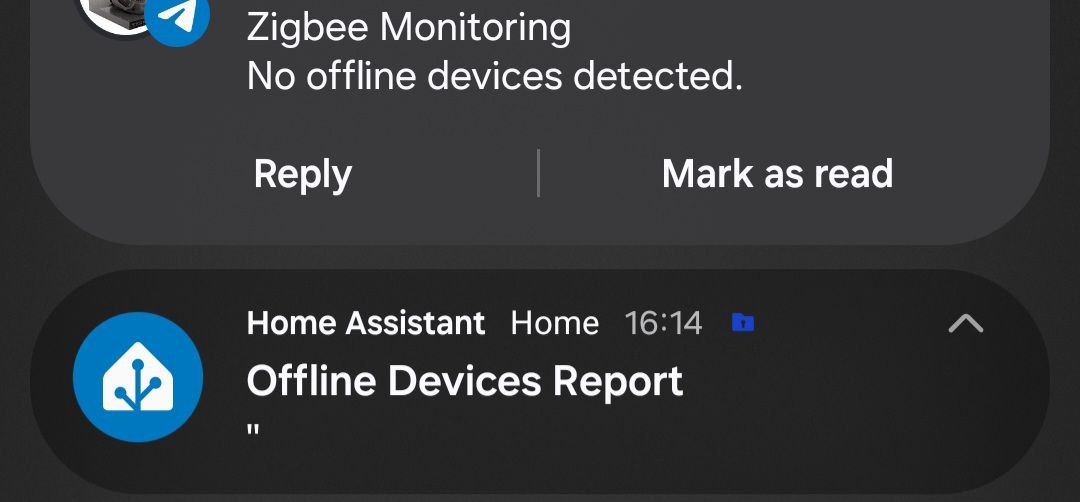
Hi @Ltek , congrats on this great blueprint.
If there is no issues:
If there are issues ( some device offline )
Hope you can fix those.
Ltek
January 19, 2026, 2:30pm
32
“Enabled with No Issues confirmation” means you will always get a notification, even if there are ‘No Issues’
Not sure why the Android is not giving you the same text as the telegram. Please turn on Notification Setting >> Persistent UI Notifications (Enabled with No Issues) and lets see what that gives you.
jsalas:
If there are issues ( some device offline )[/quote]
I’ll look into that, never knew about it
jsalas
January 20, 2026, 10:41pm
33
@Ltek Persistent UI Notifications wont have any change in the behaviour.
Ltek
January 21, 2026, 4:13pm
34
@jsalas try Version 2026.01.21.39c, I just uploaded.
jsalas
January 21, 2026, 11:36pm
35
@Ltek Where can I download it ? Cant find it.
Ltek
January 21, 2026, 11:37pm
36
Link button at the top, same as your initial install
jsalas
January 21, 2026, 11:40pm
37
@Ltek Working perfectly now. Thanks!
1 Like
jsalas
January 21, 2026, 11:53pm
38
@Ltek btw, just to let you know , the report low battery blueprint faces the same problems.
Ltek
January 22, 2026, 12:30am
39
same code base, I’ll fix that too… thank you for testing
Ltek
January 23, 2026, 1:10am
40
I cannot find any documentation showing that Home Assistant support Android’s BigTextStyle
if you know of any please point me. thx
 Persistent Web UI Notifications feature, specifically the dashboard notifications for offline devices?