Strange… this is a fresh install of the latest version of HAOS on a VM?
yes as of a week or so ago
It’s missing Apps, too. I’m thinking you downloaded and installed the container version.
Did you follow this tutorial? I’d start from scratch one more time following it. Download a new image from that link and try again is my recommendation.
i will do that later and then post. TY
Ahh, no.
A static ip is assigned on the device.
The other is a dhcp reservation.
These are not the same.
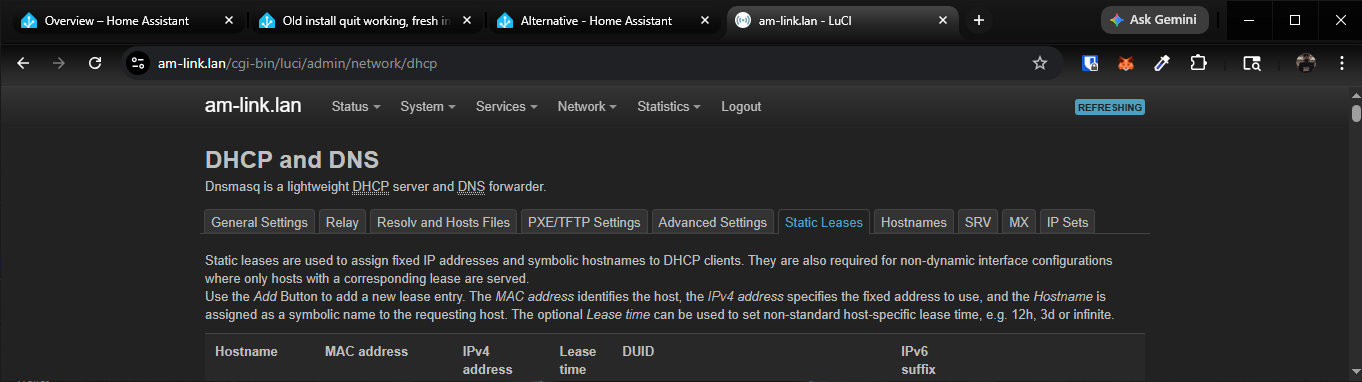
The fact that you’re not smart enough to even recognize the fact that you posted an image that proves you’re wrong is hilarious.
Quit while you’re behind.
Listen here and listen close. Idgaf about what you think. Very few things get under my skin more than some traditional intellectual snob with their nose high in the air. The facts of the matter are that they both accomplish the same thing. A fixed IP address. Now go on with your rude attitude unless you actually have something of value to share.
I love when people get mad that they’re wrong, and then refuse to learn. It’s even better when the person that’s wrong pretends they are on some moral high ground, as if it’s their god given right to run around spouting incorrect nonsense and anyone who actually points out their lunacy is somehow at fault. The icing on the cake is when they say even dumber stuff like “listen here and listen good”, like somehow that makes things different. “maybe if I scream louder people will believe me more!”
Nope. Doesn’t work that way.
You can be wrong all you like, but don’t go teaching other people your incorrect nonsense. The only thing it accomplishes is to make the entire world dumber. You’re like the living embodiment of AI. “I read it on the internet, so now I’m going to confidently repeat this incorrect shenanigans to other people.”
Just take the L and move on, kid. Or you can continue responding in the same predictable manner. Whatever floats your boat. Either way, you’re still wrong.
For everyone else that actually wants to learn:
No, a static IP and a dhcp reservation are not the same.
A DHCP reservation provides the same IP to a device every time it requests an IP, and only the the device with the MAC address listed on that lease will be provided that IP address.
A static IP address is an address that is manually configured on the device.
The difference between these two is that one of the devices will continue working when the DHCP server is unavailable, and the other will not. It is up to you to decide if you want to introduce yet another dependency and potential failure point into whatever device it is you are adding to your network. For something like your laptop or your phone, it may not matter. For something more important like a NAS, a proxmox host, or a Home Assistant server, this may be more important.
Choose wisely, but at least now you can make an informed decision.
So instead of providing this insight right off the bat, you were short and insulting? You may be good with technology, but you are horrible with people. My intentions were nothing but selfless in trying to help another soul. My lived technical experience is completely organically self-taught. My focus was completely on the end-game result, not the specific semantics. Next time, try being human, instead of… whatever it is you are. You can’t help but be insulting… 'tis a shame.
And you can’t help but be rude and ignorant.
We are who we are.
Further, if you think my original post was insulting, that explains why you’ve never learned anything.
Good pupils seek knowledge, not pretend they already have it and get offended when proven contrary.
Look up the Dunning Kruger effect.
Many say the best way to learn is to teach. What do you think I’m here for? Therapy? lol!!!
but enough is enough, we’ve hijacked this thread off course. Let us BOTH be respectful to the OP’s post and move on. Thanks for the knowledge.
Good point. Lol
Maybe THIS will help to get you on the right track.
1 Like
A backup/restore doesn’t work?
Adguard’s presence seems to be a common issue with networking issues and remote access. Try uninstalling it and see what happens.
After that thread diversion, it would appear you should try for consistent IP addresses, regardless of which method you attempt. It will make troubleshooting far easier, not just for HomeAssistant, but for all your networked devices.
Constantly repeating the same mistakes will not make them go away. Read the vendor documentation closely and understand what you are trying to achieve. You have many layers of complexity to master with your choice of setup. Tackle them one by one, getting each layer working before you move up the ladder.
Start with your local LAN. Get that working well. Then move to remote access. Running your setup in a virtual environment is where your networking skills become critical, and understanding subLANs and routing is imperative.
HomeAssistant works well in a flat LAN environment. Shoehorning it into your environment calls for lots of configuration mastery.
Be sure to update to the latest version. A byproduct of updating should be a backup you can restore to. Before making changes, a further backup will ensure you have a fallback if you mess it up and want to try again.
Thank you mmstano for the patience you have given me. Not sure what all got corrupted with the fairly fresh install, but after another clean install, all seems to be well and now I can see the Home Assistant Cloud and the Areas, labels & zones tabs again. The web site now shows me logged in too, so all good. I can also log in from my phone when not on my wifi, as it should be. I was hating paying for the cloud and not being able for it to work. I have never attempted a backup, but my last one is from December, so I may try that, it would save a ton of work if it works. Then again I may not as I am so stoked that it is running again and I don’t want to mess it up. I will be retiring at months end and will be moving to a different home, so I may have to do all this over again perhaps, we will see. I may get the basics going for my home and our phone tracking and be happy. Didn’t see alll the ruckus from above as I was eating dinner and working on reinstall. I thank the others for making suggestions as well. I marked your suggestion of a reinstall above as the solution. Thanks again.
Brian
1 Like
You’ve had plenty of practice to fall back on!
Excellent! You’re very welcome and I’m glad you got it working! You can always create a backup of your new one, then try the old one. If it works, great! If not, you can go right back to were you were.
Also - since you’re using a VM, you might be able to create a copy of the VM in your hypervisor. Just a different way to back it up and it could be a more simple option. Good luck!
Got brave enough to attempt using my backup. Made a new backup first and then tried to download from the cloud. It said my encryption key is wrong even though i copied and pasted it from their web page. Manually typed it and same thing. I will save that for another topic. Just happy I got over the hump.
Cheers