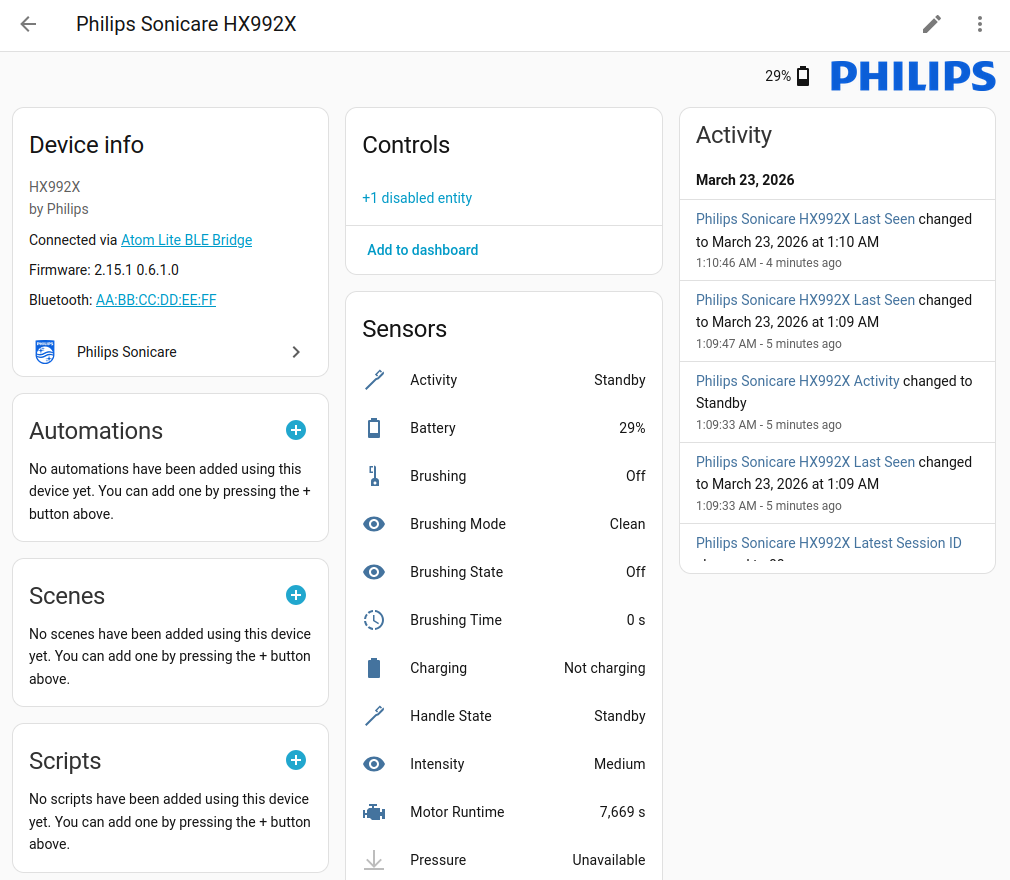
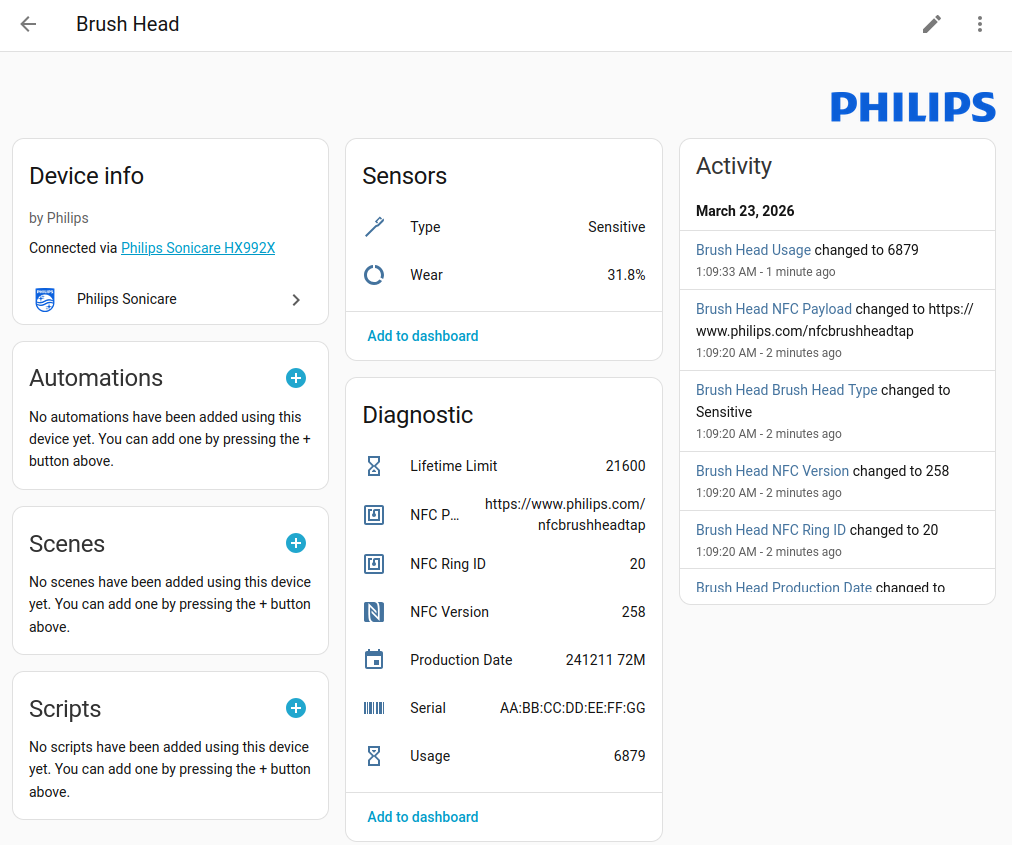
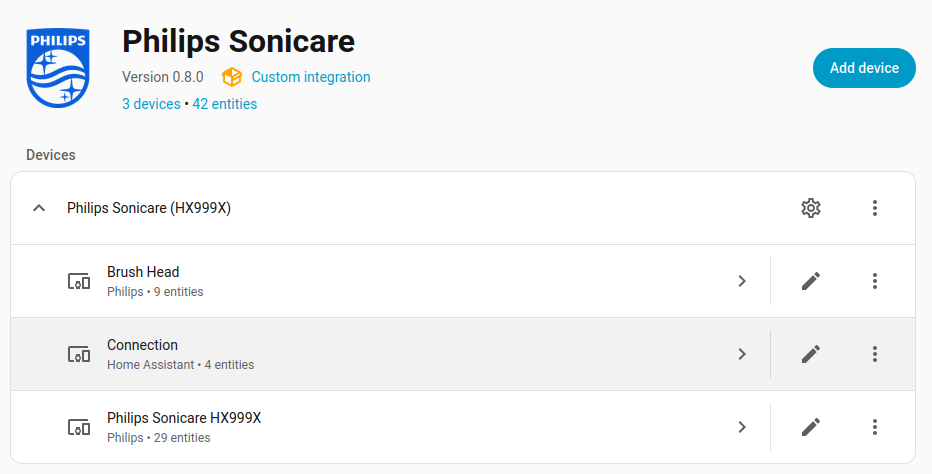
I’ve built a new HACS integration from scratch that aims to solve these problems — Philips Sonicare BLE brings 30+ sensors into Home Assistant, fully local via Bluetooth, no cloud required.
What’s different?
Built from the ground up with an event-driven architecture — no polling loops, instant updates
Robust connection management tailored to Sonicare’s quirky BLE behavior (short advertisement windows, subscribe-first pattern)
Native ESP32 Bridge support for bathrooms out of Bluetooth range
30+ entities including live brushing data most previous solutions couldn’t access
Features
Battery — Level in percent, charging status
Live Brushing Data — Duration, pressure (in grams!), pressure alert, temperature
Brush Head Tracking — Wear %, type, serial number (NFC), color ring ID (who’s brushing?)
Session Tracking — Current and stored brushing sessions
Brushing Mode & Intensity — Clean, White+, Gum Health, Deep Clean+, Sensitive, Tongue Care
Motor Runtime — Cumulative operating hours for maintenance predictions
Diagnostics — Firmware, model, RSSI
Two Connection Methods
Direct Bluetooth — HA connects directly to the toothbrush
ESP32 Bridge — For toothbrushes out of BLE range, via ESPHome
The toothbrush is auto-discovered as soon as it’s placed on the charging stand (BLE advertisement active).
No pairing required — Sonicare uses open GATT.
Tested Models
Model
Status
DiamondClean 9000 (HX992B)
Fully tested
Any BLE-enabled Sonicare using the same BLE protocol should work (DiamondClean Smart, FlexCare, HX992X series). If you have a different model — happy to hear your test results!
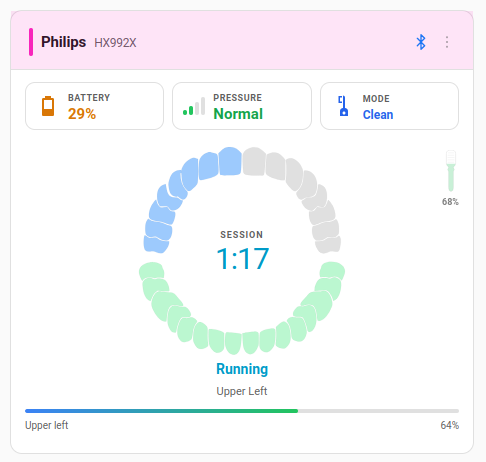
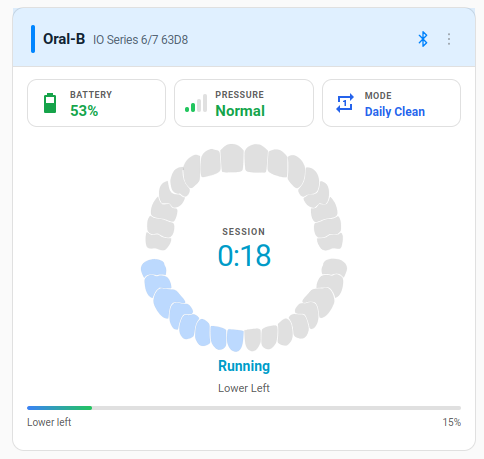
Toothbrush Card — Dashboard Visualization
There’s also a matching Custom Lovelace Card that visualizes your toothbrush live on the dashboard:
Animated tooth SVG with live sector tracking (4 quadrants)
Great timing! We need to replace an old Sonicare and I was curious if there were any that integrate with HA like our Oral-Bs.
It looks like the model you tested with is discontinued. I saw your note:
Other BLE-enabled Philips Sonicare toothbrushes using the Legacy protocol (service UUID 477ea600-a260-11e4-ae37-0002a5d50001) should also work. The integration auto-discovers compatible devices via BLE.
Do you know if there is a reference for what those models might be? For example, they still use the DiamondClean Smart name, but a current model would be HX9903/05.
Alternatively, is supporting a newer model just a potential development effort or do you suspect newer models might not be supportable?
Thank you for putting this together - it looks great.
Short answer: The HX9903/05 (DiamondClean Smart) should work — it’s the same model family as my HX992X that I’m testing with.
Compatible models: The integration works with any BLE-enabled Sonicare toothbrush that advertises the Sonicare GATT service (477ea600-a260-11e4-ae37-0002a5d50001). This includes at least:
DiamondClean Smart (HX99xx) — tested and confirmed
Expert Clean (HX96xx)
Sonicare 6500/7100 (HX74xx)
9900 Prestige (HX999x)
Basically any Sonicare with a Bluetooth symbol on the packaging should be discovered automatically. The integration uses BLE auto-discovery, so if HA sees the toothbrush, it will offer to set up.
Note: You need either a Bluetooth adapter on your HA host or an ESP32 as a BLE bridge (recommended for range/stability). The README has setup instructions for both.
Let me know if you run into any issues — I’m happy to help debug!
Update: I’ve removed the “Legacy protocol” wording from the README and docs — that was a misleading label on my part. There’s just one Sonicare BLE protocol that all current models share. Sorry for the confusion!
Martin, Thanks for the clarification. The “legacy” bit was throwing me off. The models I am considering are all in the list you provided. I’ll report back after I get the new toothbrush. Our Oral-Bs are connected via ESPHome BLE proxies already, so we are good for connectivity.
Thank you for the excellent Lovelace card. I’ve already added it to a dashboard.
For folks who might be wondering why bother with an HA-integrated toothbrush, for us it’s:
Brush head replacement reminders
Charging reminders (it happens…)
Gamification of brushing to get the kiddo to do it correctly - nothing like beating mom and dad in a competition
I’ve just barely tested the integration so far, and it seems to work well with my Sonicare prestige 9900 (HX999X) I’ve got loads of different bluetooth proxies (both shelly and esp32), so that’s how it’s connected. probably a shelly device used as a proxy.
I see all sensors go to unavailable aftere a while.
At least some of them I think should retain the last known value, like firmware/model/motor runtime.
I did have a little struggle connecting the toothbrush, and after reading the updated manual I see that it’s probably becase I put it back on the charger.
thanks for testing with your Prestige 9900 — great to hear it works!
Regarding sensors going unavailable:
You’re right — static values like firmware, model number and motor runtime should retain their last known value instead of going unavailable when the toothbrush is out of range. This is now fixed in v0.2.1. Static sensors (firmware, model number, motor runtime, session count, handle time and all brush head sensors) will keep their last known value. Only dynamic sensors (battery, brushing state, pressure, etc.) go unavailable when disconnected.
The Sonicare only advertises via BLE when it’s not on the charger. Once placed on the charger, it stops advertising and can’t be discovered. To set up the integration, make sure the toothbrush is off the charger — a quick button press wakes it up and starts BLE advertising for about 30 seconds.
quick question about your Prestige 9900 (HX9992) — did you pair it manually via bluetoothctl or the Bluetooth settings before setting up the integration? Or did it work right away without any pairing?
I’m investigating which Sonicare models require BLE bonding. My HX992B works without pairing, but an ExpertClean 7500 (HX962V) user needs authentication before characteristics can be read. Trying to figure out if the Prestige falls into the same category.
I did not pair my Prestige 9900 first.
It was discovered by the philips sonicare integration stragiht away and I set it up there.
I guess my connection is what you call Direct Bluetooth in your first post, since I’ve not flashed any espe32 especially for my toothbrush. it’s just picked up through one of my many proxies.
Thanks for confirming! Good to know the Prestige 9900 works without bonding — same as my DiamondClean 9000. So it seems to be model-dependent: ExpertClean (HX962V) and HX991M require
bonding, while yours and mine don’t.
v0.4.0 is out now with:
BLE pairing support for models that require bonding (auto-detected during setup)
Fixed “not in range” warning — now DEBUG level instead of WARNING (#2)
Your Prestige 9900 is now listed as a tested model in the README
so after one of the previous releases I decided to remove my toothbrush and re-add it.
It din’t work at the first attempt and seemed stuck at wanting to pair.
I dind’t have time to try again before today and it connected flawlessly without pairing.
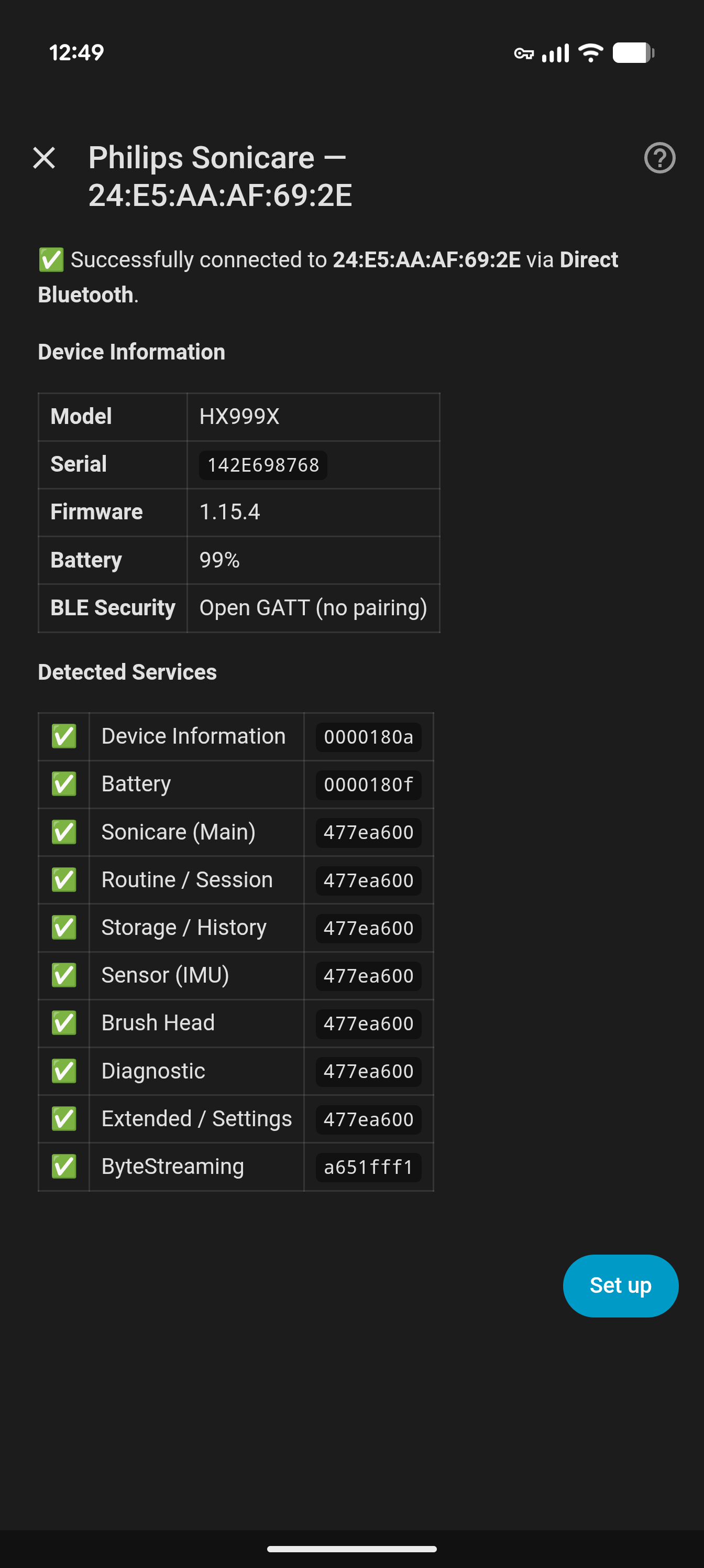
I see in the notes that Prestige 9900 require bonding, but apparently not mine as you can see from this screenshot:
Thanks for the report, @doffen — really useful data point, and it turned out to point at a bug I just fixed.
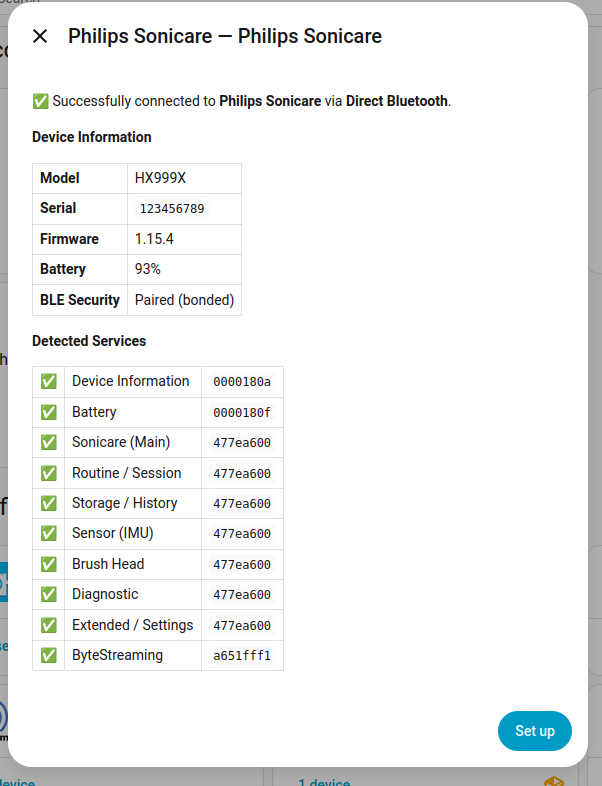
Small disclosure first: I recently got a Prestige 9900 (HX999B) myself, and that’s actually what made me dig into this. When I re-added it in Home Assistant, I saw the exact same thing you did — the setup dialog cheerfully claimed “Open GATT (no pairing)” even though the bond was still there from a previous install. That’s what put me on the trail.
What likely happened on your side: when you removed the config entry the first time, Home Assistant cleared its own state, but the BlueZ-level bond on your host stayed behind. On the second re-add, Bleak could connect transparently using the leftover LTK, so every probe read worked without triggering a pairing dialog. My code then (wrongly) labelled it “Open GATT” because it only looked at whether the reads succeeded, not at whether a bond already existed.
So your Prestige 9900 is bonded — the integration was just silently reusing the old keys. The docs are correct about your model; the status display was misleading.
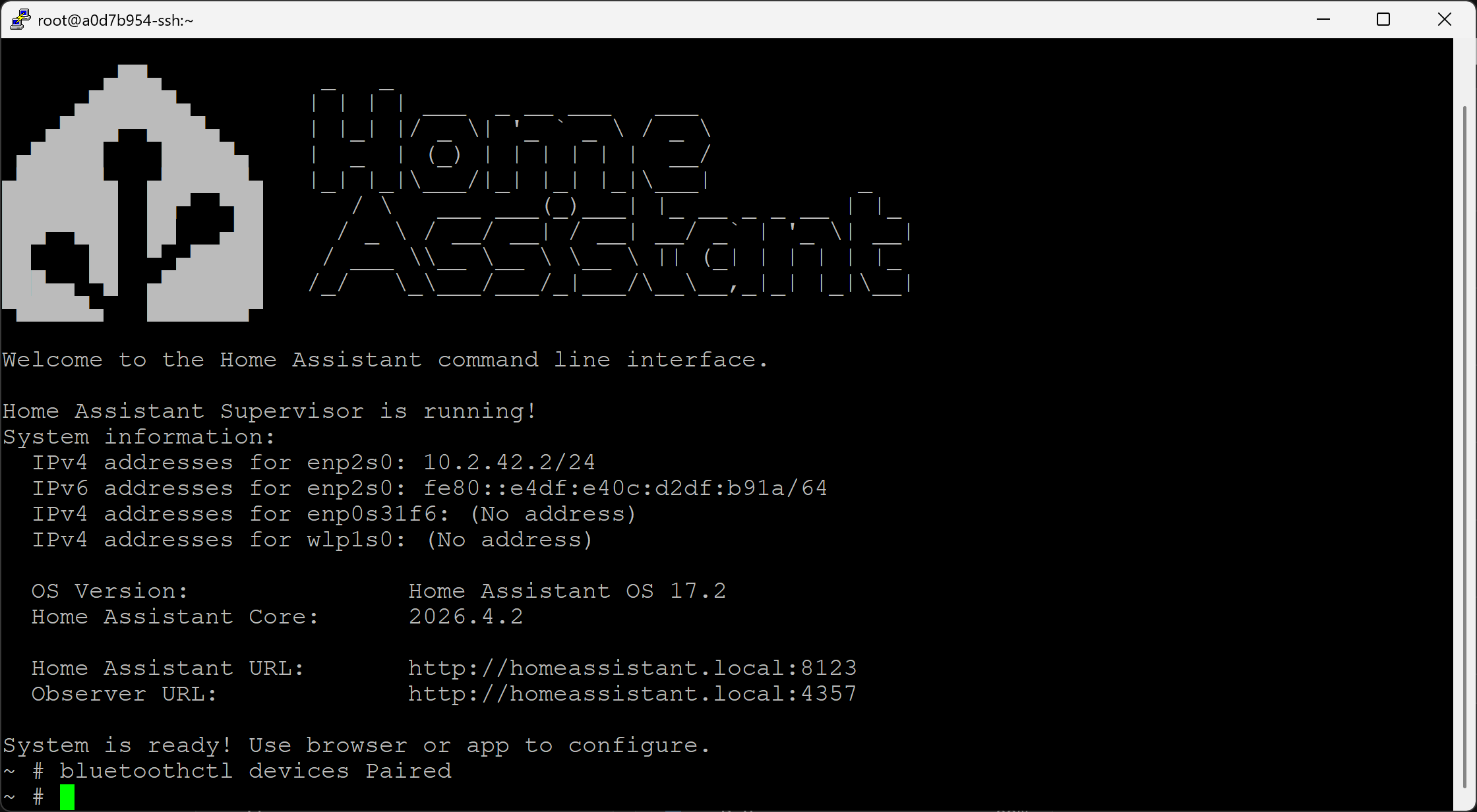
You can verify with:
bluetoothctl devices Paired
If your toothbrush shows up there, it is bonded and the “Open GATT” label was a false negative.
Fixed in v0.7.2 (just released): after a successful probe, the integration now asks BlueZ directly for the bond state and labels “Paired (bonded)” vs. “Open GATT” based on that.
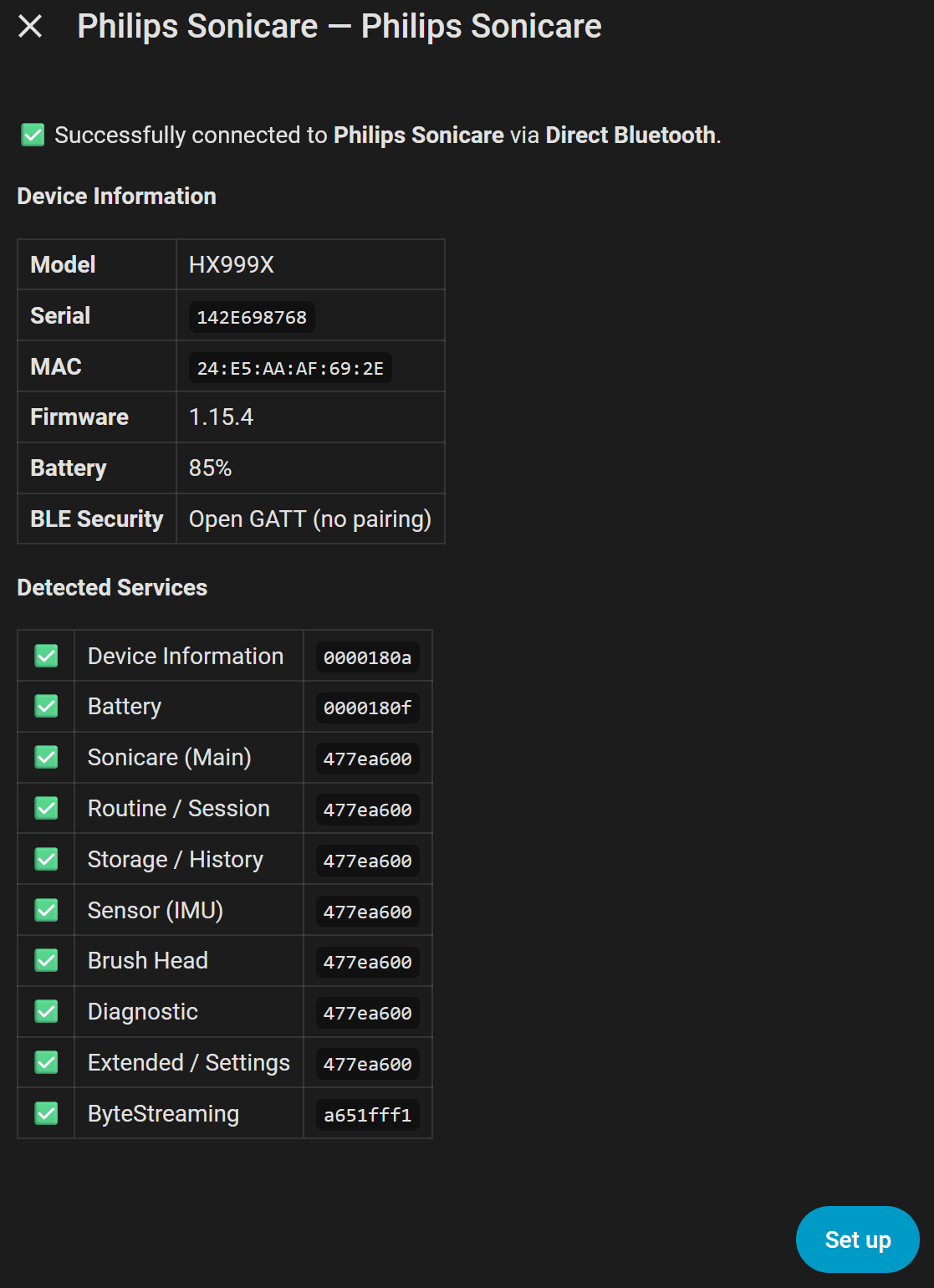
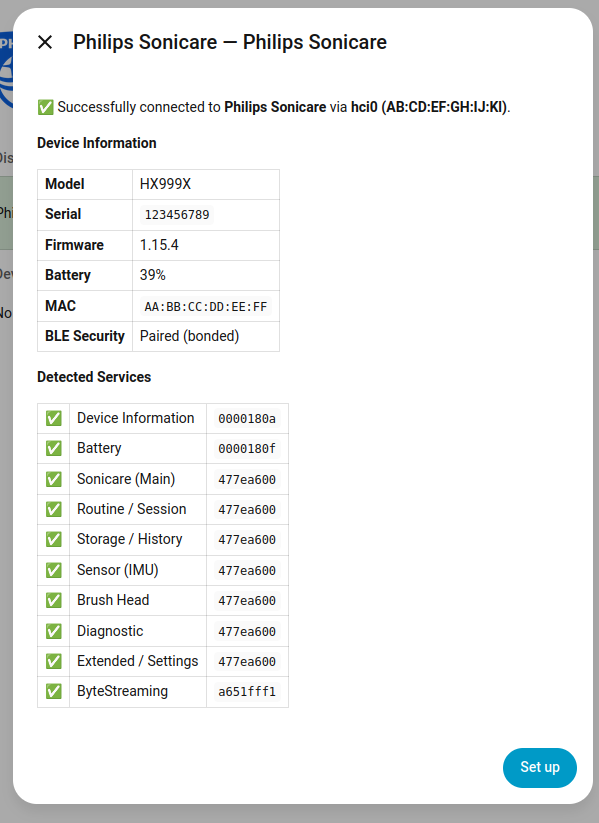
I also added the MAC address to the setup dialog, which made debugging this across my three brushes much easier.
Here’s what it looks like on my Prestige 9900 after a bluetoothctl remove + re-add in v0.7.2 — now correctly identified as bonded:
If you want the cleanest possible re-add (to force a fresh pair), run bluetoothctl remove <mac> before hitting “Add integration” — that clears the stale bond and the auto-pair flow kicks in properly.
I decided I wanted the cleanest possible re-add so I deleted the integration and removed the pairing before installing v.8.0.0 and trying again.
Now I’m stuck, after struggling to actually pair the toothbrush to HA it now shows up in the commandline as paired, but the integration still thinks it’s not paired.
I’m wondering if my many bluetooth proxies might play a part in this, and in that case if I’ve been really lucky the first time I got it paired and connected?
@doffen I replied on the GitHub issue earlier today with the full background — short version: your problem is most likely the connection hopping between different proxies, not an actual pairing failure. When the pairing happens through a proxy (any ESPHome bluetooth_proxy on 2026.2+), the bond key is stored on that ESP’s own NVS, not on the HA host.
That’s why bluetoothctl on the host shows nothing paired even when the toothbrush is fully connected and streaming data — the host simply isn’t the party that holds the key.
With 11 proxies in range and similar RSSI, HA re-picks a scanner on each reconnect and you end up re-pairing against different ESPs over and over — sometimes against a proxy that can, sometimes against one that can’t (depending on firmware version). That pattern matches exactly what you describe.
I’d strongly recommend switching to the dedicated ESP Bridge component from the repo. It pins the toothbrush to one ESP, keeps a single bond, and avoids the proxy roulette entirely.
One important note: if you want that same ESP to keep serving as a regular bluetooth_proxy for your other devices, you also need the Bluedroid null-pointer workaround (bluedroid_null_fix.py) — without it the ESP crashes when both components run on the same chip. Details and YAML snippet are in docs/KNOWN_ISSUES.md. Full setup in docs/ESP32_BRIDGE.md.
@doffen
Once more thank you for your tests! I were thinking of how to make it more transparent, which bluetooth adapter you are using for your connection.
I’ve now released: v0.9.0 makes exactly this visible. The new Adapter sensor on the Connection sub-device …
For your house that means: if the Adapter value changes between reconnects, the flapping is directly visible — no physical isolation needed. A log snippet spanning a few reconnect cycles would be super helpful to confirm this and to see whether specific proxies are consistently more reliable than others.
Thank you!
I’ve tested v0.9.0 for a couple of days, and the connection adapter always shows hic0, which is kinda weird considering it is set to passive scanning.
I will try v0.9.1 now and see if anything changes.
The log snippet you’re asking for, is that just from activating the debug log from the integration page?
On debug logs: yes, enabling debug via the integration page is exactly right — that sets custom_components.philips_sonicare_ble to debug, which is all I need. A log snippet covering a handful of reconnect cycles is the most useful part, because each connect logs a <MAC>: connected via <adapter> line. Comparing those across cycles tells us whether a particular proxy consistently wins (or drops).
On the “always hci0” observation: passive scanning on a BlueZ adapter only affects how advertisements are received (no SCAN_REQ); it doesn’t stop that adapter from carrying GATT connections. habluetooth picks the scanner with the best RSSI for the connect, so if hci0 is physically closer to the brush than any proxy, it’ll win. That said, v0.9.1 changes how the Adapter sensor determines its value — instead of poking at Bleak backend internals, it reads the scanner object habluetooth attaches to the client after connect. So if you were seeing a stale/incorrect label in 0.9.0, v0.9.1 should make it match reality. If it still reads hci0 after the upgrade, hci0 really is serving the link, and the diagnostics +
bluetooth page will show why the proxies aren’t winning on RSSI.
I’ve done a brief test now walking around the house and trying a couple of reconnects.
This is using version 0.9.3
I couldn’t paste the log here, so I added the log and screenshot to this github issue:
I’ve cleaned the log of messages from other integrations. What’s weird is I only see one of the proxies mentioned in the log, even though the screenshot says it’s been connected to three different ones today.
The connection seems to stick with a proxy while active, and not do any flapping except while pairing.
Stock bluetooth_proxy + bonded brushes: the integration now does an eager SMP probe at session setup, so the post-connect subscribe burst doesn’t race the encryption handshake.
The “stop and restart brushing to wake the pressure sensor” workaround should no longer be needed on Prestige 9900, ExpertClean, HX991M, etc.
Two more things in this release worth flagging here:
Series 7100 / HX742X support. The 7000 line uses a different BLE protocol than the rest of the Sonicare range — now auto-detected at setup, with full live monitoring and
control. Big thanks to @lonlazer and @bobbleheadhobo on GitHub for testing on real HX742X hardware through six betas.
Auto-discovery pair flow on the ESP bridge. No more pinning the toothbrush MAC in YAML. Arm pair-mode in the HA setup dialog, wake the brush, the bridge bonds and persists the
identity to NVS. Works for every supported family. Migration: just drop the old ble_client: block — the philips_sonicare: definition stands on its own now.
MIN_BRIDGE_VERSION is now 1.4.0 — please rebuild and flash your ESPHome device alongside the integration upgrade.
HACS update: philips_sonicare_ble is now in the HACS default repository (hacs/default#6571, merged 2026-05-20).
Installation no longer needs a custom repository — just open HACS → Integrations and search for Philips Sonicare BLE.
For everyone already running it from the custom-repo URL: nothing breaks, but you can clean up the custom-repo entry once HACS shows the integration in the default list.
Confirmed working: HX6340 / HX742X (Condor) / HX9912 / HX9991 / HX9990 / HX991M / HX962V — full sensor list and supported models in the README.
Thanks to everyone in this thread who tested betas, dumped GATT scans and sent HCI snoop logs — that's what got this across the HACS line.