Have updated the blueprint, cleaned up the UI and grouped Actions for Movie, TV, Music.
Now options to set actions for Media when it is Rated, New Content Added, Server Owner Actions (Database backup complete or Database corruption detected).
Adjust the Automation to run in Single, Restart, Queued or Parallel mode. Increase/Decrease the trace count.
Struggling to get the Plex Client Name? Not a problem, as long as the webhook has been setup properly on Plex Server to send to Home Assistant. Enable the Plex Client Name? option and Home Assistant notification will be presented (when a Plex webhook is triggered) that will present the client name.
Does the webhook give surround audio details at all (e.g. 2.0, 5.1, 7.1 etc) as this would be damn useful for my current challenge (changing the AVR’s sound mode depending on the media’s surround type)
Thanks for this blueprint, super handy! However I’ve run into an annoying issue. I have two Apple Tv’s in my house and even though each Apple TV is named (in Apple TV settings), in the Plex web hook data it calls the player “Apple TV” for both units. However under the “Player” details in the webhook payload, there is a uuid that seems to be unique. Might try modifying this blueprint to read the uuid instead of player name.
I have updated the blueprint, you can use client uuid or name (just for anyone who updates who is already using it), the uuid takes precedence over the name.
the option to retrieve the client name also gives the uuid as well now.
I want to thank you for this blueprint! I wanted to use n8n, but could not get the Plex communicate with n8n add-on, your way is far better and easier
if someone is interested, here is my example of notification if Play is started and when new media is added to the Library.
alias: Plex Webhook Handler RELEASE (v0.4.4)
description: ""
use_blueprint:
  path: thenextbutton/plex_webhook_release.yaml
  input:
    # This is your unique Home Assistant Webhook ID. You can find it in your Plex Media Server's webhook configuration.
    webhook_id: YOUR_HOME_ASSISTANT_WEBHOOK_ID_HERE # Example: 8f4e2c1a-b05d-4f67-8e90-1234567890ab
    plex_client_uuid:
      # These are the UUIDs for your Plex Libraries (e.g., Movies, TV Shows)
      # You can find a library's UUID by viewing media in that library in Plex and checking its XML.
      - YOUR_PLEX_LIBRARY_UUID_1 # Example: 9c0b1d2e-f34g-5h6i-7j8k-l9m0n1o2p3q4
      - YOUR_PLEX_LIBRARY_UUID_2 # Example: a7b8c9d0-e1f2-g3h4-i5j6-k7l8m9n0o1p2
      # These are the UUIDs for your Plex Playing Devices (e.g., Apple TV, Smart TV, Mobile Phone)
      # Find these in the Home Assistant automation trace data when the device plays media.
      - YOUR_PLEX_PLAYER_UUID_1 # Example: F5E4D3C2-B1A0-9E8D-7C6B-5A4B3C2D1E0F
      - YOUR_PLEX_PLAYER_UUID_2 # Example: p9q8r7s6t5u4v3w2x1y0z9a8b7c6d5e4
      # Add more device UUIDs as needed for any other players you want to trigger notifications.
    plex_client: [] # Leave this empty to rely solely on player UUIDs for client filtering (recommended).
    movie_resume_mimics_play: true
    movie_play_actions:
      # Replace 'notify.mobile_app_your_device_name' with your specific mobile app notification service name.
      # You can find this under Developer Tools -> Services in Home Assistant.
      - service: notify.mobile_app_main_phone # Example: notify.mobile_app_living_room_tablet
        data:
          # Message with bold movie title. Customize player_title if needed (e.g., rename "TV 2022" to "Samsung TV").
          message: "🎬 Movie '<b>{{ payload.Metadata.title }}</b>' started on {{ player_title }}!"
          title: "Plex Playback"
          data: # This 'data' block is for mobile_app specific features.
            html: true # Enable HTML rendering for the message.
            # Replace 'http://YOUR_PLEX_IP:YOUR_PLEX_PORT' with your Plex Media Server's actual IP address and Port.
            # Replace 'YOUR_PLEX_TOKEN_HERE' with your actual X-Plex-Token.
            image: "http://192.168.1.50:32400{{ payload.Metadata.thumb }}?X-Plex-Token=RANDOM_TOKEN_XYZ123ABC" # Example: http://10.0.0.200:32400
            notification_icon: "mdi:movie"
            # Replace '/your-dashboard-path' with the actual path to your desired Home Assistant dashboard (e.g., /lovelace/main, /a_custom_dashboard).
            clickAction: /media-info/plex # Example: /home/overview
    episode_play_actions:
      - service: notify.mobile_app_main_phone # Example: notify.mobile_app_bedroom_tv
        data:
          # Message with bold episode and show title. Customize player_title if needed.
          message: "🎬 Episode '<b>{{ payload.Metadata.title }}</b>' from '<b>{{ payload.Metadata.grandparentTitle }}</b>' started on {{ player_title }}!"
          title: "Plex Playback"
          data:
            html: true
            # Replace 'http://YOUR_PLEX_IP:YOUR_PLEX_PORT' and 'YOUR_PLEX_TOKEN_HERE'.
            # For TV show episodes, 'grandparentThumb' is typically the show's poster.
            image: "http://192.168.1.50:32400{{ payload.Metadata.grandparentThumb }}?X-Plex-Token=ANOTHER_RANDOM_TOKEN_DEF456GHI"
            notification_icon: "mdi:television-play"
            clickAction: /media-info/plex # Example: /automation/logs
    library_new_movie:
      - service: notify.mobile_app_main_phone # Example: notify.mobile_app_home_hub
        data:
          message: "New Movie Added: <b>{{ payload.Metadata.title }}</b> 🎬"
          title: "Plex Library Update"
          data:
            html: true
            # Replace 'http://YOUR_PLEX_IP:YOUR_PLEX_PORT' and 'YOUR_PLEX_TOKEN_HERE'.
            image: "http://192.168.1.50:32400{{ payload.Metadata.thumb }}?X-Plex-Token=YET_ANOTHER_TOKEN_JKL789MNO"
            notification_icon: "mdi:filmstrip-new"
            clickAction: /media-info/plex # Example: /lovelace/library_overview
    library_new_tv_show:
      - service: notify.mobile_app_main_phone # Example: notify.mobile_app_guest_tablet
        data:
          message: "New TV Show Episode Added: <b>{{ payload.Metadata.title }}</b> from <b>{{ payload.Metadata.grandparentTitle }}</b> 🎬"
          title: "Plex Library Update"
          data:
            html: true
            # Replace 'http://YOUR_PLEX_IP:YOUR_PLEX_PORT' and 'YOUR_PLEX_TOKEN_HERE'.
            # For new TV show episodes, 'grandparentThumb' is typically the show's poster.
            image: "http://192.168.1.50:32400{{ payload.Metadata.grandparentThumb }}?X-Plex-Token=FINAL_RANDOM_TOKEN_PQR012STU"
            notification_icon: "mdi:new-box"
            clickAction: /media-info/plex # Example: /tv-shows/new_releases
What are you trying to get the Server Owner Actions to do?
If Webhooks are triggering Ok, then try Admin Playback Started.
The default code I put there as an example should be:
metadata: {}
data:
  title: "{{ payload.Account.title }} -  Playback started"
  notification_id: plex_user_playback_{{ payload.Account.title }}
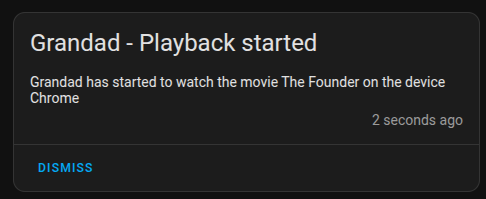
  message: " {{ payload.Account.title }} has started {% if payload.Metadata.type == 'album' %} listening to the album {{ payload.Metadata.title }} by {{ payload.Metadata.parentTitle }} {% elif payload.Metadata.type == 'movie' %} to watch the movie {{ payload.Metadata.title }} {% elif payload.Metadata.type == 'episode' %} to watch the TV show {{ payload.Metadata.grandparentTitle }} {% else %} interacting with Plex Media Server {{ payload.Server.title }} {% endif %} on the device {{ payload.Player.title }}"
action: persistent_notification.create
and when you switch to another user within your plex environment and start playback you should see something along the lines of this within your home assistant notifications:
This is excellent! I love it.
I’ve got Plex triggering lighting controls and updates on the MAX7219 display…
Now, I need to find someone to 3d print a nice enclosure for the display …
corrected the server owner actions for Admin Playback trigger, it was only capturing audio playback, have fixed to media.play from playback.started and it is capturing movies, episodes and movies events. (that was a bad idea, reverted that. Apologies.)
Have also updated the default message for this event as well.
Try using the Generic Playback actions, and under that the playback started option. This is triggered before the player specific actions.
I copied this code, from the Admin Playback Started example in the blueprint to the Generic section (
The Admin Playback Started shows all users minus the main Plex account). I can see notifications appearing :
metadata: {}
data:
  title: "{{ payload.Account.title }} -  Playback started"
  notification_id: plex_user_playback_{{ payload.Account.title }}
  message: >-
    {{ payload.Account.title }} has started {% if payload.Metadata.type ==
    'track' %}listening to {{ payload.Metadata.title}} by {% if
    payload.Metadata.originalTitle is defined and
    payload.Metadata.originalTitle|length > 0 %} {{
    payload.Metadata.originalTitle }} {% else %} {{
    payload.Metadata.grandparentTitle }} {% endif %} from the album {{
    payload.Metadata.parentTitle }}{% elif payload.Metadata.type == 'movie' %}to
    watch the movie {{ payload.Metadata.title }} ({{ payload.Metadata.year }})
    directed by {{ payload.Metadata.Director[0].tag }}{% elif
    payload.Metadata.type == 'episode' %}to watch the TV show {{
    payload.Metadata.grandparentTitle }} Season {{ payload.Metadata.parentIndex
    }} Episode {{ payload.Metadata.index }} ({{ payload.Metadata.title }}){%
    elif payload.Metadata.type == 'album' %}listening to the album {{
    payload.Metadata.title }} by {{ payload.Metadata.parentTitle }}{% else %}
    interacting with Plex Media Server {{ payload.Server.title }}{% endif %}{%
    if payload.Player.title|length > 0 %} on the device {{ payload.Player.title
    }}{% endif %}
action: persistent_notification.create
Wow this is slick. Long ago, I setup plexwebhooks in Homeassistant. The goal is to extract the filename that is being played and then trigger an automation that changes the aspect ratio of the projector, based on the last 3 characters of the filename. (I found an app on the AVSforums that would detect the aspect ratio and append it to the file name Aspect Ratio Detector: Get the real AR and write it into .mkv’s meta data, .nfo files or filename tags | AVS Forum )
anyway all was working well in my homeassistant automation for over a year or more, and then one day I updated homesassitant, and stuff broke.
Now your blueprint gives me hope to bring this functionality back.
I have it up and running, and the basic lights up\down from play/stop are working, and I also kick off the projector automation to set the aspect ratio back to the default 1.85 when stop occurs.
Would your template be able to pass the filename and parse it to trigger the appropriate aspect ratio automation? I assume it would involve the payload metadata, if possible?
Thanks in advance for any guidance you can provide.
So my memory is kind of getting worse as I get older, and I set this up quite some time ago and forgot entirely how it was working. After reviewing the setup, I have to correct myself.
I am indeed using that aspect ratio app to append the aspect ratio to the end of file names. However I’m doing it in a way that plex will use it to place the edition tag of the media. {edition-[_AR235]} for example.
Apparently I tried to use plex webhooks to get either the filename or the edition tag with zero success into home assistant to trigger the automation . Instead i resorted to using Tautalli. This app is a treasure trove of plex media/playing data and can trigger “notifications” based on plex events. Those notifications can involve email, scripts, webhooks, mqqt, etc.
So I’m mqtt notifications from Tautalli to home assistant to trigger my at changes. Turns out Tautalli had and issue and once I reinstalled it, everything is working now.
However it would be great if I could skip the middleman and use the edition tag directly from home assistant and the plex webhooks. Remove a layer of complexity.
Not sure if the edition tag is available via the webhook. I do t see it in you example payloads. I’m doing this at detection and automations for both movies and tv shows.
Thanks for responding and the blueprint.