Problem using secrets in automations

I see in the docs that the secrets file can be used to protect personal info so I’m trying to add more personal info other than just passwords but getting parsing errors in yaml.

Example-

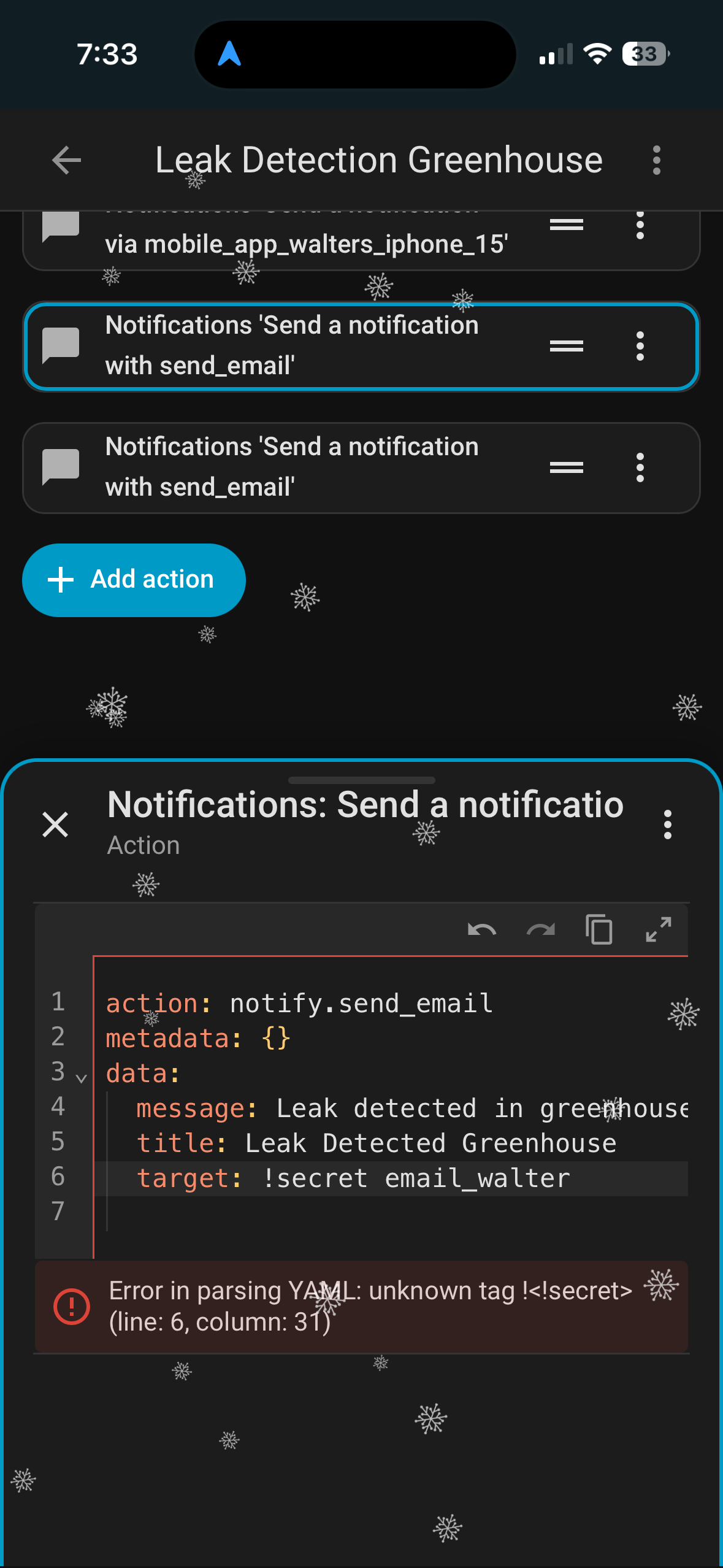
action: notify.send_email
metadata: {}
data:
message: Leak detected in greenhouse.
title: Leak Detected Greenhouse
target: !secret email_walter

The email address has been properly entered in secrets.yaml but when I try to use it I get this-

But why, from whom are your trying to protect your email address.
Is this just for testing & exploring or do you have a use case in mind?

The configuration of automations aren’t something random people will have access to.

If I post an automation (like the case above) it will also include all the email addresses used in the automation. These posts are public. Usually I redact the personal info but the docs for secrets indicate that I should be able to avoid this issue by creating an entry in secrets.yaml. The docs are rather vague though.

Secrets can’t be used in any UI generated automation. It can only be referenced in yaml.

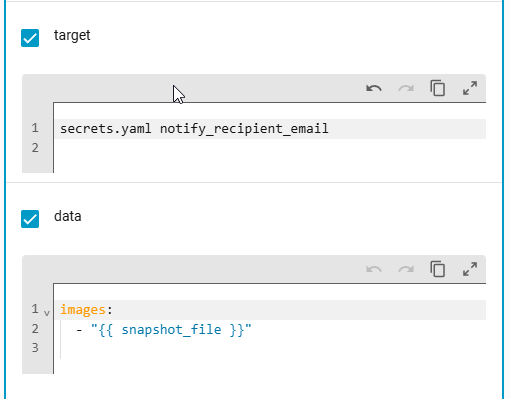
Not quite, I have been able to create it in the UI without issues.

Looks like this in YAML

  - action: notify.isp_email
    metadata: {}
    data:
      message: "waffle "
      title: "Motion Detected "
      data:
        images:
          - "{{ snapshot_file }}"
      target: secrets.yaml notify_recipient_email

The problem I encounter, the email is not sending / or possibly being excepted by the upstream MTA

All is see in the logs are:

Logger: homeassistant.components.smtp.notify
Source: components/smtp/notify.py:252
integration: SMTP (documentation, issues)
First occurred: 3:44:00 PM (8 occurrences)
Last logged: 3:51:20 PM

SMTPException sending mail: retrying connection

Need to try and see if I can see what’s happening at a SMTP level, tried formatting the email with different delimiters, but the didn’t solve the problem.

That ain’t right.

You sure about that?

Sounds like an issue to me.

I created this automation in yaml. Not in the UI.

Your initial post shows the UI.

That’s not how secrets are called, so that might pass some YAML syntax, but it’s not doing what you think…
Use YAML.

I chose “Edit in YAML” within the UI. Should I have edited it directly from File Editor in automations.yaml?

Editing with File Editor also doesn’t seem to work. Now I have an orphaned automation.

Tried testing the action using Dev Tools but that just gives the original error.

You cannot use the UI at all and use !secrets. Using YAML in the UI is still using the UI.

You have to create an automation using 100% yaml that’s not in automations.yaml in order to use secrets.

2 Likes

The simplest work around, is to create a helper that holds the secrets:

For Example:

---
template:
  - sensor:
      # Provides access to location information keeping information private.
      - name: outdoor_location
        unique_id: outdoor_location
        state: !secret location_id
        attributes:
          latitude: !secret location_latitude
          longitude: !secret location_longitude

          elevation: !secret location_elevation
          elevation_unit: "m"

          address1: !secret location_address1
          address2: !secret location_address2
          city: !secret location_city
          postcode: !secret location_postcode
          region: !secret location_region
          country: !secret location_country
          country_code: !secret location_country_code
          country_iso_alpha2: !secret location_country_iso_alpha2
          country_iso_alpha3: !secret location_country_iso_alpha3


Except you now have a sensor with all your secrets. :smiling_imp: Oooh fun. Not a first choice for me.

So the associated values for the secrets are stored in secrets.yaml and then referenced in a helper? Still not sure how to use them in an automation? Honestly, not sure how this works at all?

You now have a sensor that you can access the attributes to get your secrets.

1 Like

Whilst not an automation the below should give you an idea:

multiscrape:
  - name: scraper_sunrise_sunset_day_0
    resource_template: >
      {% set long = state_attr('sensor.outdoor_location','longitude') %}
      {% set lat = state_attr('sensor.outdoor_location','latitude') %}
      {% set dt = (now().date() + timedelta(days=0)) %}
      https://api.sunrise-sunset.org/json?lat={{ lat }}&lng={{ long }}&date={{ dt }}&formatted=0
    scan_interval: 86400   # refresh daily
    sensor:
      - unique_id: outdoor_sun_forecast_day_0
        name: outdoor_sun_forecast_day_0
        value_template: "{{ value_json.results.day_length }}"
        attributes:
          - name: datetime
            value_template: "{{ (now().date() + timedelta(days=0)).strftime('%Y-%m-%dT00:00:00+00:00') }}"
          - name: sunrise
            value_template: "{{ value_json.results.sunrise }}"
          - name: sunset
            value_template: "{{ value_json.results.sunset }}"
          - name: solar_noon
            value_template: "{{ value_json.results.solar_noon }}"
          - name: day_length
            value_template: "{{ value_json.results.day_length }}"

He is suggesting you reveal the secret information in the attributes of a Template Sensor. Then your automation references the attributes using the state_attr() function.

This technique makes your secret information visible in the UI (such as in Developer Tools → States). If you don’t mind having the information visible in the UI then, arguably, you don’t need to use secrets.yaml and can simply hardcode the information directly in the Template Sensor. :man_shrugging:

If you don’t want the information to be visible, then his suggestion is not for you.

Thanks everyone for the info. I hadn’t realized that secrets.yaml would be so hard to make use of in Home Assistant. It’s so easy to use in ESPHome (just works😁).

I think my best solution will be to just continue redacting my posts and hope I don’t miss anything. Having multiple files for automations would likely get complicated really fast, not to mention the lack of ability to test them, and I have no skills when it comes to coding in json.