The Recorder runs in the background and keeps a record of every change event. HA works by keeping the state value of entities, and when these change (for whatever reason) the change is broadcast on the Event Bus, and the recorder makes a note and adds a record of the change to the database.
Since a great deal of change happens all the time, this table grows very quickly and needs to be purged regularly, otherwise it gets too big, leaving insufficient free disk space for HA to run.
As a default, everything that can be is added to the Recorder history. It is possible to exclude items, using the domain, global pattern, or specific entity. Changes for these entities will then not be added to the database at the change-event. This is useful for excluding, for example, entities with a large array in one attribute, which can trigger a warning message as the recorder has a limit to the individual record size.
It is possible to set up the include, so as to define what to add rather than what to exclude. As I read the documentation, when using ‘include’ nothing is recorded by default, only the items specified in the include. Hence I would expect when using both exclude and include, for the include to override and only the include items to be captured. This, as you say, is probably not what you want. It is either “include this lot only”, or “add everything but exclude this lot”
The purge system runs, by default, every day and removes all records older than the retention time, which is 10 days by default. This is a standard and recommended setting.
Anything older than the 10 days is removed. There is no selective remove. If you really want to keep something for 100 days, then you have to keep everything for 100 days (which is really not a good idea).
Of course, one answer lies with the short and long-term statistics. Since the history database grows so quickly, it must be purged (at least at some point).
Every 5 minutes the Recorder runs through all entities that have a numeric state value, and class ‘measurement’ and it generates a statistical record of the entity state value for the past 5 minutes. Average, maximum, minimum, change and the final state value. This summary snapshot is then stored in the short-term history table. Being a summary, it is more compact, but this is also removed at the 10 day purge.
Every hour, the Recorder also runs through the same entities and produces a long-term statistical record, similar to the short-term. This is saved to another table, but will only add 24 small-size records per day per applicable entity. This table is never purged, and therefore this is a summary record of numerical state entities that is kept forever.
As you have already noted, several features of Home Assistant use the Recorder history. The Energy Dashboard being a particular case that takes the raw data required directly from the long-term (hourly) data table for most of the display. Turning off the recorder or excluding entities can mean that parts of Home Assistant stop working.
The HA Recorder does quite a lot, and the default settings are fine-tuned to get the best performance. Changing the settings is not advised.
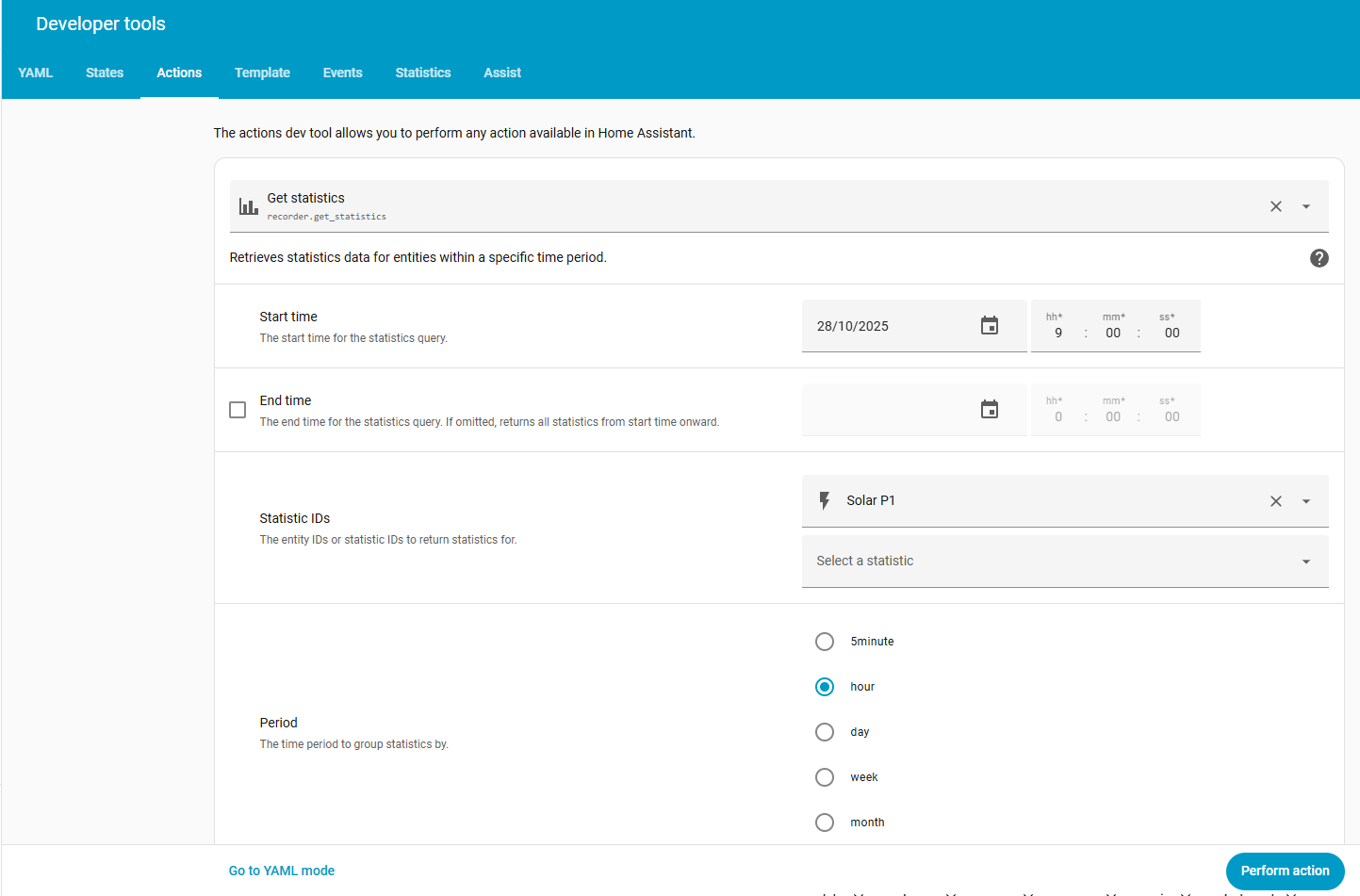
The long-term statistics may well hold sufficient information for you already, for your numeric state entities. There is a new action ‘recorder.get_statistics’ which will return data from the short/long-term database. Using this I can get the end-of-hour state value for any numeric measurement entity since I first turned HA on.
Text, of course, is another matter. Strings are very expensive of computer and disk memory, and any long term storage of text should really be something you do yourself outside of the Recorder. There are notification actions for writing to a file, and it is easy enough to set up an automation, triggered by a state change, to capture and write the new state (and timestamp) to a text-file. This I do for several items of specific interest, and it is then up to me to maintain the size of the text file generated.
2025-10-01T11:45:07.798903+00:00 Operating Mode 51:51 SELF+TIME+BACK+GRID
2025-10-01T11:46:23.077285+00:00 Operating Mode 17:17 SELF+BACK
2025-10-01T20:21:07.794404+00:00 Operating Mode 51:51 SELF+TIME+BACK+GRID
2025-10-01T20:22:23.094825+00:00 Operating Mode 17:17 SELF+BACK
2025-10-03T15:07:37.691605+00:00 Operating Mode 51:51 SELF+TIME+BACK+GRID
2025-10-04T08:42:08.903581+00:00 Operating Mode 19:19 SELF+TIME+BACK
2025-10-04T10:02:22.291024+00:00 Operating Mode 51:51 SELF+TIME+BACK+GRID
2025-10-04T10:12:38.526178+00:00 Operating Mode 19:19 SELF+TIME+BACK
2025-10-04T10:59:38.619411+00:00 Operating Mode 51:51 SELF+TIME+BACK+GRID
2025-10-04T13:13:37.816000+00:00 Operating Mode 17:17 SELF+BACK
2025-10-08T04:57:07.821086+00:00 Operating Mode 51:51 SELF+TIME+BACK+GRID
2025-10-08T04:58:23.200353+00:00 Operating Mode 17:17 SELF+BACK
2025-10-08T11:33:07.798783+00:00 Operating Mode 51:51 SELF+TIME+BACK+GRID
2025-10-08T11:34:23.064152+00:00 Operating Mode 17:17 SELF+BACK
2025-10-08T21:09:07.861178+00:00 Operating Mode 51:51 SELF+TIME+BACK+GRID
2025-10-08T21:10:23.099311+00:00 Operating Mode 17:17 SELF+BACK
2025-10-09T13:45:07.847429+00:00 Operating Mode 51:51 SELF+TIME+BACK+GRID
2025-10-09T13:46:23.094644+00:00 Operating Mode 17:17 SELF+BACK
2025-10-09T16:33:07.851166+00:00 Operating Mode 51:51 SELF+TIME+BACK+GRID
2025-10-09T16:34:23.280715+00:00 Operating Mode 17:17 SELF+BACK
2025-10-10T18:45:07.839695+00:00 Operating Mode 51:51 SELF+TIME+BACK+GRID
2025-10-10T18:46:23.220888+00:00 Operating Mode 17:17 SELF+BACK
2025-10-22T11:45:07.758834+00:00 Operating Mode 51:51 SELF+TIME+BACK+GRID
2025-10-22T11:46:23.261763+00:00 Operating Mode 17:17 SELF+BACK
2025-10-24T12:57:07.845140+00:00 Operating Mode 51:51 SELF+TIME+BACK+GRID
2025-10-24T12:58:23.143144+00:00 Operating Mode 17:17 SELF+BACK
2025-10-24T14:09:07.748325+00:00 Operating Mode 51:51 SELF+TIME+BACK+GRID
2025-10-24T14:10:23.143975+00:00 Operating Mode 17:17 SELF+BACK
Text-based entity value, saved to local file at change. Of course, you can also write to a separate DB entirely and manage that outside of Home Assistant. I run Node-RED, and have flows to capture my entire state for the weather, utility rates, utility readings, solar and battery system figures, and solar forecasts entities, every hour, written to a separate database.
At least that is how I think it all works.

 Thanks for that!!