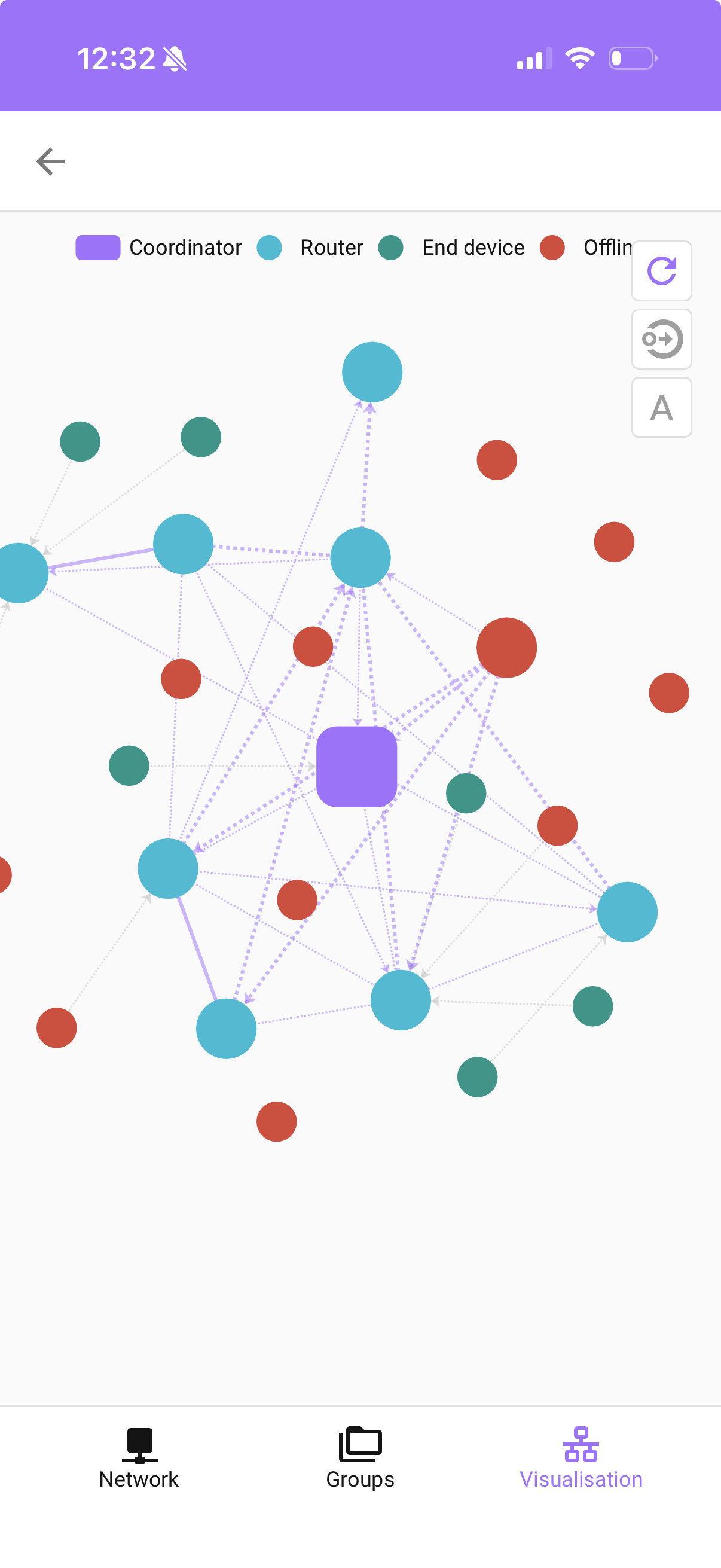
I’ve come to the conclusion that a Home Assistant controller can’t reliably keep devices connected to the network.
I’ve already tried a couple of different controllers, and the result has always been the same: devices that are not part of a dedicated hub (like Hue), for example, Aqara or IKEA devices added directly to the Home Assistant ZHA controller, keep dropping off the network, even when I place multiple repeaters nearby and maintain line of sight.
Frankly, it just doesn’t work for me. I don’t want to keep spending hours re-adding devices to the network. The overall experience is poor and and unreliable.
My current idea is to introduce another hub that can ensure the stability of these sensor devices alongside the Hue hub. The other controller will keep its devices stably, while I will rely on home assistant for automations.
Which controller would you recommend in addition to Hue? I have several Aqara, IKEA, and other devices, but I could gradually phase out Aqara.
This might be why, read below about channels, extension cable, location, etc… But You do You. It’s all good.
No guarantees you won’t have the same interference problems other than the hub will probably pick a quiet channel to talk on, which you could just do now.
I am interested in buying devices off-the-shelf, but more often that not, the devices must be connected to cloud services. Secondly, like the Ikea devices, they require an expensive hub.
Further on Ikea, after reading a number of reviews, I come to the conclusion that the Ikea-o-sphere is problematic. One reviewer noted that if not using the Ikea hub, some features are not available. It was rated 3.7 stars
As for Aqara, it states that it is compatible with Matter and these may work better with the Matter add-on. HA appears to be all in on Matter, so if your Aqara devices don’t work the add-on, let us know about it so it can be fixed.
If moving to a proprietary controller, plan on buying only those devices that explicitly state Works With (though sometimes they don’t) Research suppliers to find one that has excellent customer service. Keep in mind, the risks with essentially closed systems: they can go out of business, they can sell the technology, they can sell your data. Tuya, for example, can control your devices whether you like it or not. (I have no knowledge of them doing this, but they can.)
I am satisfied with the customer service for my home automation … me.
I had a pure Aqara setup and was still experiencing disconnects. And, if you introduce those hubs, you will end up maintaining automatons in several places and possibly create more mess in the airways. If a reliable IoT network is the most important factor, switch to Z-Wave Long Range.
The angle to look at cost is that the hubs are not expensive at all. Mainly compared to the amount of time I need to spend on constant troubleshooting of the ZHA controller and its devices.
They are often bundled with devices too. And you can buy one second hand for pennies. Hey, one Hue sensor is about 35 euros in comparison.
What I should be doing instead is tailoring the automation to my needs, making the home smart, cool, and automated. Instead of worrying about underlying infrastructure.
Because now HA is a synonym of a ‘dumb home’ instead , when yet another device has disconnected and the automation doesn’t run. But this is not deserved; I know that automation capabilities are great but hard to make show for them because of the hardware issues.
That’s good to know.
I’m thinking about slowly getting rid of Aqara. IKEA is a bit better, even with the HA ZHA.
I still have to explore Matter, perhaps in the long term.
Automatons are perfectly fine in HA; it’s where it shines along with the integrations. Thus, there’s no need to fragment them into different hubs. You can discover all Hue devices and write automations as if they are HA native.
Before you split your devices over multiple hubs, try a different channel.
I had a similar issue with devices dropping off again and again, but once I moved to a different channel (channel 20 in my case), all my Zigbee devices are 100% online; with devices from Aqara, Philips, IKEA, Innr, Fingerbot, Nous, Sonoff, Tuya, Third Reality & more.
You never, EVER have to buy the manufacturer’s hub. You buy one controller dongle for each protocol and let Home Assistant be the hub.
Since there are hundreds, probably many more users who have a mixed system with dozens of WiFi, Zigbee and Z-wave all running together just fine, you might want to consider that Home Assistant isn’t the problem.
Well, I tried two already (the second is SonOf on ZHA) and with wired repeaters all over the place, I came to the conclusion that HA is not able to maintain a stable network over three floors for me. The only devices that don’t often drop out of the network are two IKEA ones that are within a two-metre radius from the dongle. The rest all have issues even if repeaters are three metres away.
Now I have to create a trigger and automation that will notify me about dropped devices, so I can go and read them. I was writing my previous post while trying to re-add an IKEA button in three attempts.
I want to stop spending time on this.
In comparison, Hue devices never disconnect.
I want to explore so much within HA and be creative with it. If an extra IKEA etc. hub will solve my issues, I will gladly add it.
Are you following the best practices, with the coordinator on an extension cable and so on? How many routers and battery powered devices do you have?
My Zigbee network with a single SLZB06p7 coordinator streaches over two buildings and five stories in total and the only time devices drop off is when they are out of batteries.
I have to check all the practices, but the HA is connected with Ethernet on the Raspberry Pi and the dongle is on the extension cable of 0.5 m.
There are two or three wired repeaters on every floor, the IKEA ones plus two Sonof plugs. The repeaters mostly stay connected, although in the current version of HA I don’t see the link strength between them, but the mesh is there.
Anything else to try ?
You don’t need more hubs, that will only create more networks that are isolated from each other. You want more routers (devices that join the existing network and can route, ie most mains powered devices).
Remove (all but one) hubs/coordinators (merge multiple networks together) a single large network is typically more stable than multiple smaller ones.
Check your WIFI environment ideally put your Zigbee network at one end of the spectrum (Channel 25) and your 2.4 GHz WIFI at the other (Channel 1).
Ensure some high quality routers are close to your co-ordinator/hub - I prefer Philips Hub Bulbs, but your milage may vary - I have found they have much better LQI scores than my Sonoff coordinator. The idea is that the co-ordinator only needs to get the signal to one of those bulbs and then they take care of boosting it to the rest of the network.
Plan your projects so that you can build out your network from one location, having a cluster of devices together will create a much more robust network than devices scatters around a wide area.
Ensure you have a high ratio of routers (about 1 in 3 of my devices are routers).
As much as I want to believe that it works to have one hub for all devices, it doesn’t work in practice. I have tried to separate the spectrums, have routers near devices, but even those indirect vicinities will not hold a signal long enough.
I believe it’s not the network itself but rather that some devices are optimised to primarily work with their own hubs. If you have a network with assorted devices, it doesn’t work for me at least.
And maybe you can make it work, but the amount of time you need to spend on it is way too much for me.
If you have a problem with Zigbee devices “dropping off” the network, you simply need more routers. PERIOD.
Yes, you can possibly split the network into more networks, but you can only have one controller. That would be the dongle on your Home Assistant server. I can’t imagine the technical difficulties of managing more than one Zigbee network on a controller.
In other words. Bad idea. Just buy more routers (or devices that also perform routing). Problem solved.
Irrelevant. Channel congestion can happen, but it’s really rare in the home, even with a hundreds Zigbee and WiFi devices. The protocols expect collisions and will retry transmissions; usually successful on the second try a couple of milliseconds later.
That is not the optimum location. Routers need to be between the controller and end device. If the distance between an end device-router-hub exceeds two or three meters, then you need another router: end device-router-router-controller.
Not allowed if the manufacturer is a member of the Zigbee alliance.
If I follow some of this advice and add even more signal repeaters, I’ll end up with almost as many repeaters as end devices, which kind of beats the purpose and is rather overkill. )