“paused” implies that Google Assistant explicitly responded “(…) is paused”. Not sure if it’s related: probably a corner case that happened at the source (Navimow’s systems), so I wouldn’t really be worried about it 

great google, every day the answers change. Now I get the answer „isn‘t docked“, while mover is running. OK, not wrong, but not the answer we suspect…….
Yes indeed, saw “isn’t docked” too and updated the original posts yesterday 
problem is, isn’t docked occurs very often in my case….
No worries because we can map both values to the same state 
I mean like this:
"is running": "Running",
"isn't docked": "Running",
For the complete code, see this earlier post: Segway Navimow - #73 by MatrixRewriter
1 Like
Today Segway announced open API for x3 series. According to user page and linked documentation it looks like that the API is only for the expansion connector on the mower. So, we are stucked to Google Home proxying
Some additional documentation here:
After going through the documentation a few times it looks like they’ve provided information to allow someone to design their own accessory, connect it to the device, and to control the X3 through the accessory. Interesting, although I’m not clear why they can’t just expose the same API through the mower directly.
They even include an STL file to assist with creating an ‘accessory’.
Who’s up for creating a plug in ‘accessory’ that integrates the X3 with home assistant?
1 Like
This doc shows that the API is really basic and you can’t do much more control than you can with Google Assistan SDK at the moment.
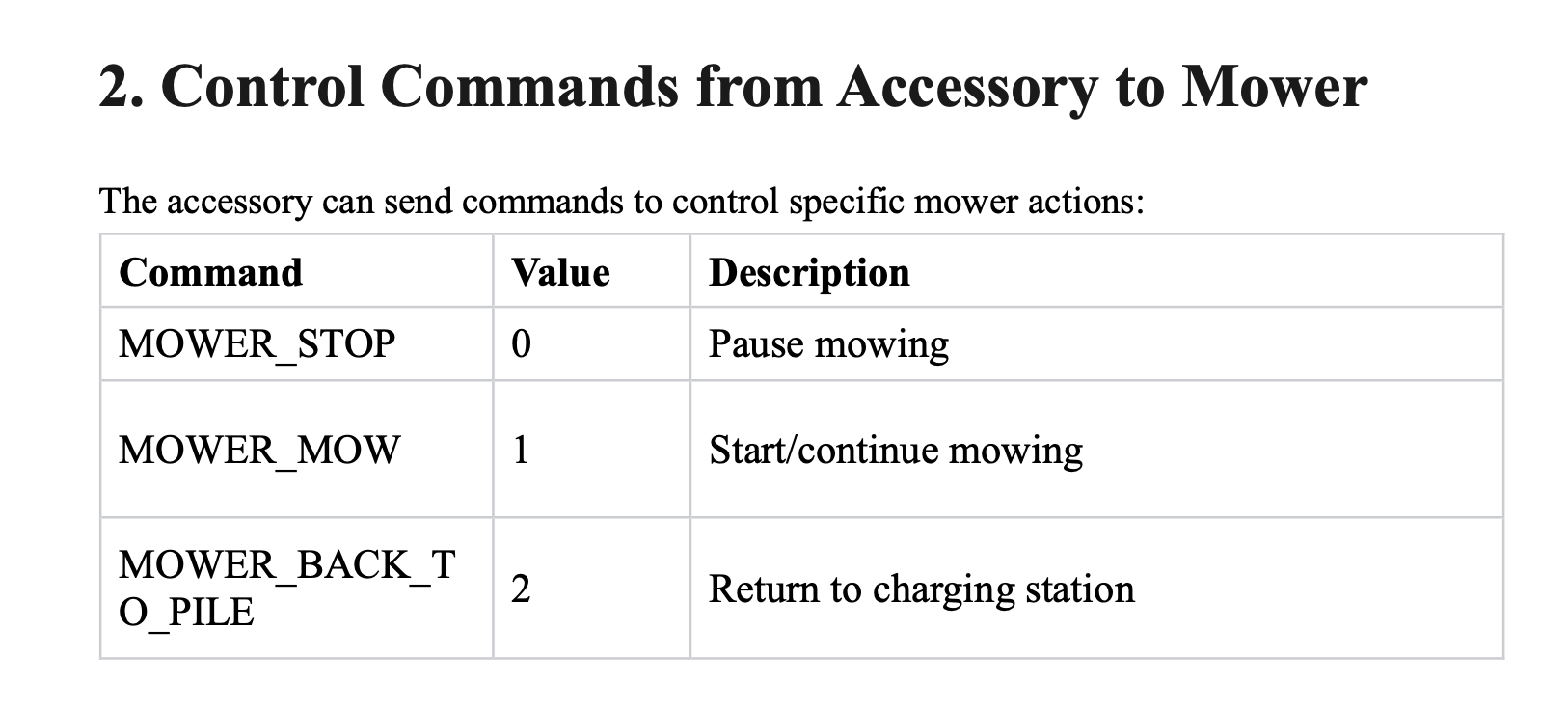
You can’t even choose which zones to mow.
1 Like
Thank you for this amazing work!!
I’ve also been able to use the last notification sensor to derive a few other states from the Navimow app notifications too.
A few other states that maybe useful to include:
‘Returning’ state - “Lawn mower back to charging station” or “Scheduled mowing is completed”
‘Delayed’ state - “Scheduled mowing delayed”
‘Schedule cancelled’ state - “Unable to start schedule mowing”
‘Stuck’ state - “Mower stuck out of boundary (error code: 6109)” or “Mower is unable to move (error code: 6108)” or “Unable to start one-time mowing”
‘Stalled’ state - "Mowing motor stall protection (error code: 1105) or “Wheel motor stall protection (error code: 3101)”
‘Can’t dock’ state - “Mower docking error (error code: 6113)”
‘Come get me’ state - “Mower now stays inside an isolated zone”
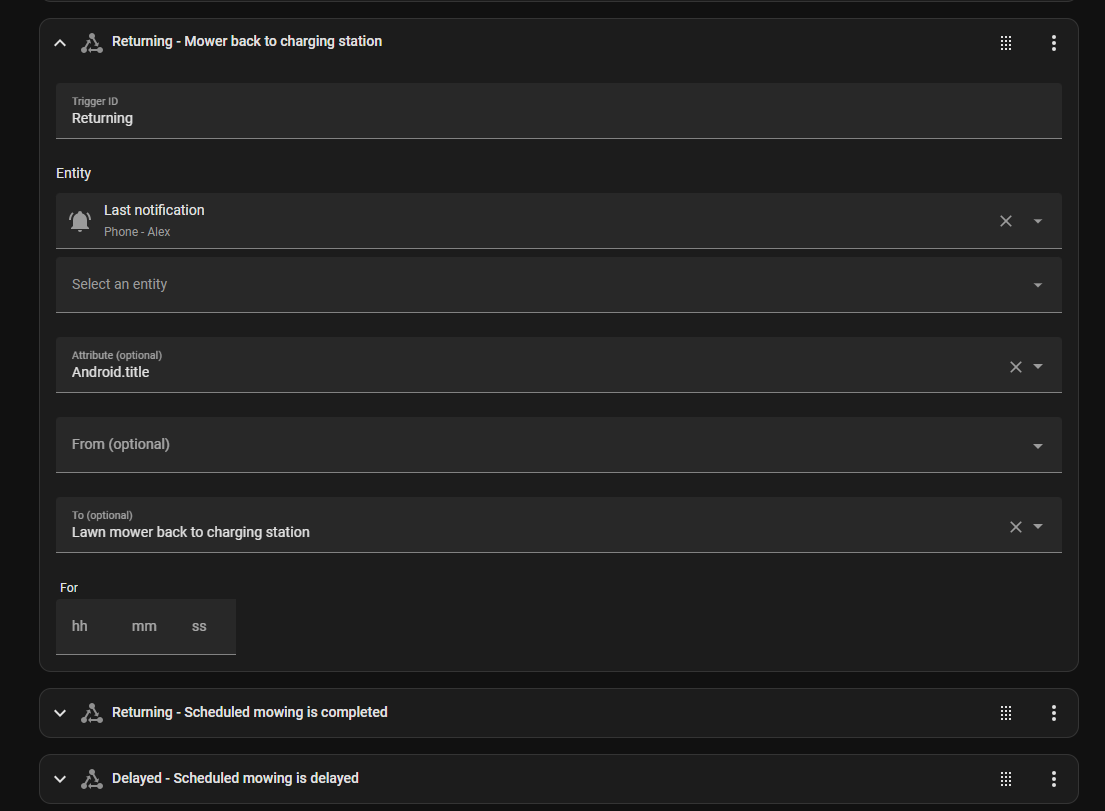

I’ve built an automatic mower gate (that my dog also loves to use  )… so found the delayed and returning states super useful to open/close the gate at the right times - also for influencing fast/slow polling for Google updates too.
Edit:
Spent the morning figuring this out. so here is the additional code for anyone else
Create another automation that maps and sends status to same event type:
alias: "Navimow: App notification parser"
description: ""
triggers:
  - trigger: state
    entity_id:
      - sensor.phone_alex_last_notification # Your entity here
    to: null
    from: null
conditions: []
actions:
  - variables:
      title: "{{ state_attr('sensor.phone_alex_last_notification', 'android.title') }}"
      status: |-
        {% set mapping = {
          "Lawn mower back to charging station": "is returning",
          "Scheduled mowing is completed": "is returning",
          "Scheduled mowing delayed": "is delayed",
          "Scheduled mowing suspended due to rain": "is delayed",
          "Unable to start schedule mowing": "is cancelled",
          "Mower stuck out of boundary (error code: 6109)": "is stuck",
          "Mower is unable to move (error code: 6108)": "is stuck",
          "Unable to start one-time mowing": "is stuck",
          "Mowing motor stall protection (error code: 1105)": "is stalled",
          "Wheel motor stall protection (error code: 3101)": "is stalled",
          "Mower docking error (error code: 6113)": "is not docked",
          "Mower now stays inside an isolated zone": "is waiting"
        } %} {{ mapping[title] if title in mapping else 'unknown' }}
  - event: set_navimow_i108_state
    event_data:
      status: "{{ status }}"
mode: single
Adjust template sensor for new mappings and for battery sensor to conditionally handle the missing update
- trigger:
    platform: event
    event_type: set_navimow_i108_state
  sensor:
    - name: "Navimow i108: Battery level"
      unique_id: "navimow_i108_battery_level"
      device_class: battery
      state_class: measurement
      unit_of_measurement: "%"
      state: "{{ trigger.event.data.battery_level | default(states('sensor.navimow_i108_battery_level')) }}"

    - name: "Navimow i108: Status"
      unique_id: "navimow_i108_status"
      icon: "mdi:robot-mower"
      state: |
        {{
          {
            "is running": "Running",
            "isn't docked": "Running",
            "is paused": "Paused",
            "is docked": "Docked",
            "isn't running": "Docked",
            "is returning": "Returning",
            "is delayed": "Delayed",
            "is cancelled": "Schedule Cancelled",
            "is stuck": "Stuck",
            "is stalled": "Stalled",
            "is not docked": "Not docked",
            "is waiting": "Waiting in isolated zone"
          }[trigger.event.data.status] | default('unknown')
        }}
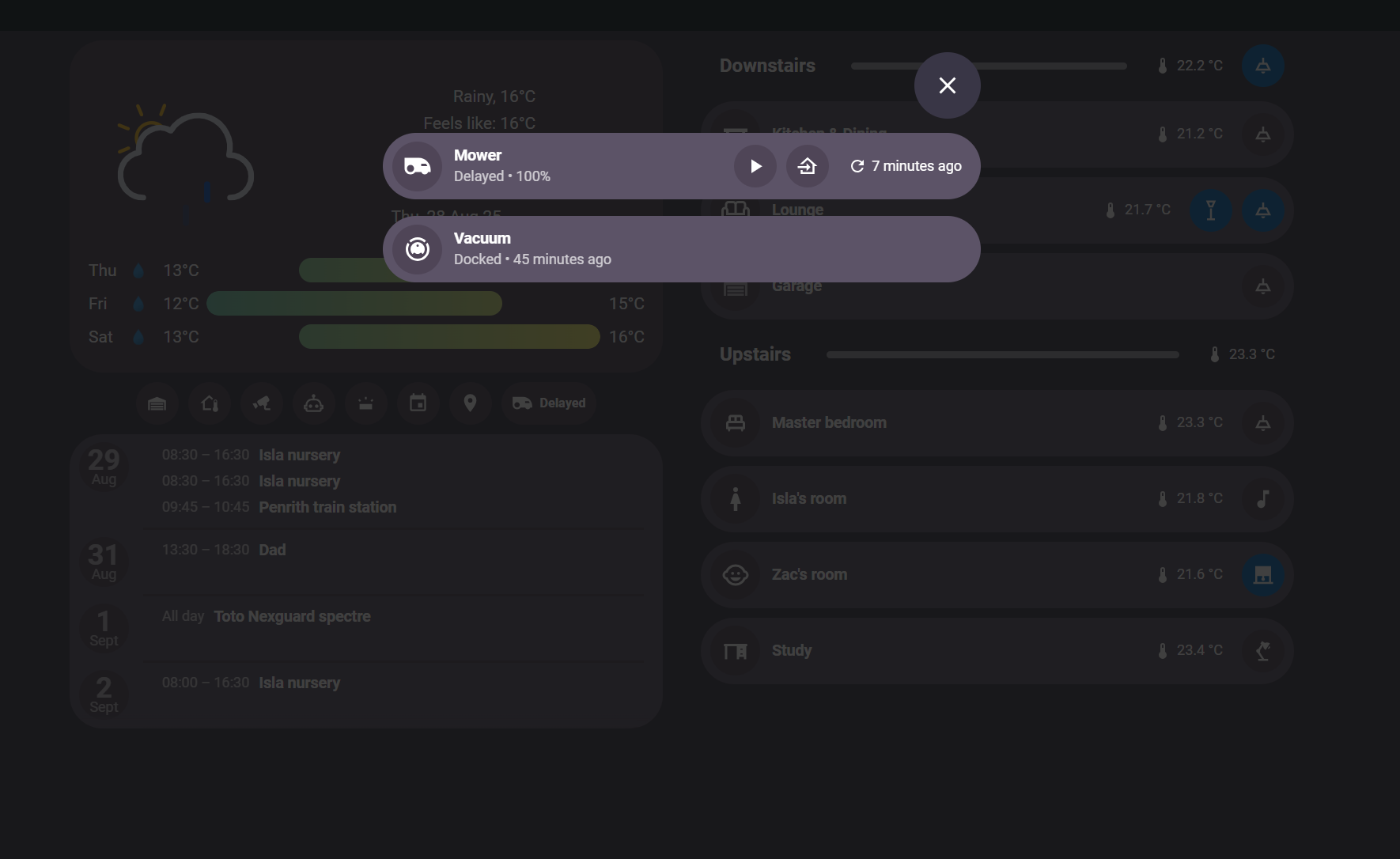
Now the additional status can be used to support automations:
)
1 Like
Thanks all for the great work provided by each of you. I’ve been trying to iterate on it further together with ChatGPT and I now have a working lawn mower object in Home Assistant. The only requirement is that you have MQTT set up next to above mentioned requirements, but that is something you might have already.
I’ve written all steps within a blog article which you can find here: Integrating Segway Navimow with Home Assistant - YASH!
But if you prefer to stay within this page you can also view the additional steps I took here:
Set up a MQTT lawn mower device:
mqtt:
  lawn_mower:
    - name: "navimow i105e"
      unique_id: navimow_i105e
      activity_state_topic: "mower/navimow_i105e/state"
      activity_value_template: "{{ value_json.activity }}"
      start_mowing_command_topic: "mower/navimow_i105e/cmd"
      start_mowing_command_template: '{"action":"start"}'
      pause_command_topic: "mower/navimow_i105e/cmd"
      pause_command_template: '{"action":"pause"}'
      dock_command_topic: "mower/navimow_i105e/cmd"
      dock_command_template: '{"action":"dock"}'
      device:
        identifiers:
          - "12345"
        manufacturer: "Segway"
        model: "Navimow"
        model_id: "i105E"
        name: "Navimow i105E"
        serial_number: "12345"
  sensor:
    - name: "Navimow i105e Battery"
      unique_id: navimow_i105e_battery
      state_topic: "mower/navimow_i105e/state"
      value_template: "{{ value_json.battery | int }}"
      device_class: battery
      unit_of_measurement: "%"
      state_class: measurement
      device:
        identifiers:
          - "12345"
        manufacturer: "Segway"
        model: "Navimow"
        model_id: "i105E"
        name: "Navimow i105E"
        serial_number: "12345"
Make sure the identifiers are the same so the battery level is part of the lawn mower device.
Get status updates of the lawn mower, every 5 minutes:
- id: lawn_mower_update
  alias: "Navimow i105: Get state"
  initial_state: 'on'
  mode: restart
  description: >-
    Notes:

    * Google Assistant API rate limit: 500 requests per 24 hours (seems to reset
    at 7:00am UTC).

    * Quota status:
    https://console.cloud.google.com/apis/api/embeddedassistant.googleapis.com/quotas?...
  triggers:
    - trigger: time_pattern
      minutes: /5
    - trigger: homeassistant
      event: start
  conditions:
    - condition: numeric_state
      entity_id: sun.sun
      attribute: elevation
      above: -15
  actions:
    - action: google_assistant_sdk_custom.send_text_command
      metadata: {}
      data:
        command:
          - what is Navimow i105 battery level
          - what is Navimow i105 doing
      response_variable: result
    - variables:
        raw_status: >-
          {{ (result.responses[1].text | default(''))
             | regex_replace(
                 find='^[\\s\\S]*?Navimow\\s*i\\s*105\\s*([^.?!]+)[.?!]?.*',
                 replace='\\1',
                 ignorecase=True)
             | trim }}
        s: "{{ raw_status | lower | replace('’', \"'\") }}"
        activity: >-
          {# errors first #}
          {% if s is search('lost|error|fault|alarm|stuck|blocked|obstacle|outside|disconnected|offline', ignorecase=True) %}
            error
          {# paused #}
          {% elif s is search("\\bpause(?:d|ing|s)?\\b", ignorecase=True) %}
            paused
          {# explicitly "isn't/is not/not running" → docked #}
          {% elif s is search("\\bisn['’]?t\\s+running\\b|\\bis\\s+not\\s+running\\b|\\bnot\\s+running\\b", ignorecase=True) %}
            docked
          {# docked keywords #}
          {% elif s is search("\\b(charging|charge|base|home|station)\\b", ignorecase=True) %}
            docked
          {# "is running" / running #}
          {% elif s is search("\\bis\\s+running\\b|\\brunning\\b", ignorecase=True) %}
            mowing
          {# mowing keywords #}
          {% elif s is search("\\b(mow|cut|working|in\\s*progress)\\b", ignorecase=True) %}
            mowing
          {% else %}
            docked
          {% endif %}
        battery: >-
          {% set bt = result.responses[0].text | default('') %}
          {% if bt is search('([0-9]{1,3})\\s?(?:percent|%)', ignorecase=True) %}
            {{ bt | regex_replace(find='.*?([0-9]{1,3})\\s?(?:percent|%).*', replace='\\1', ignorecase=True) | int }}
          {% else %}
            0
          {% endif %}
    - service: mqtt.publish
      data:
        topic: mower/navimow_i105e/state
        payload: >
          {"activity":"{{ activity }}","battery":{{ battery | int }}}
        retain: true
Sent commands to the mower through MQTT and Google Assistant:
- alias: "Navimow i105: Command handler (MQTT → Google SDK)"
  id: navimow_i105_cmd_handler
  mode: single
  trigger:
    - platform: mqtt
      topic: mower/navimow_i105e/cmd
  variables:
    action: "{{ trigger.payload_json.action | default('') }}"
  action:
    - choose:
        - conditions: "{{ action == 'start' }}"
          sequence:
            - service: google_assistant_sdk_custom.send_text_command
              data:
                command:
                  - "start mowing with Navimow i105"
                  - "Navimow i105 start mowing"
        - conditions: "{{ action == 'pause' }}"
          sequence:
            - service: google_assistant_sdk_custom.send_text_command
              data:
                command:
                  - "pause Navimow i105"
                  - "Navimow i105 pause"
        - conditions: "{{ action == 'dock' }}"
          sequence:
            - service: google_assistant_sdk_custom.send_text_command
              data:
                command:
                  - "return Navimow i105 to the dock"
                  - "Navimow i105 go to base"
Unfortunately I haven’t been able yet to the lawn_mower card to work with this entity
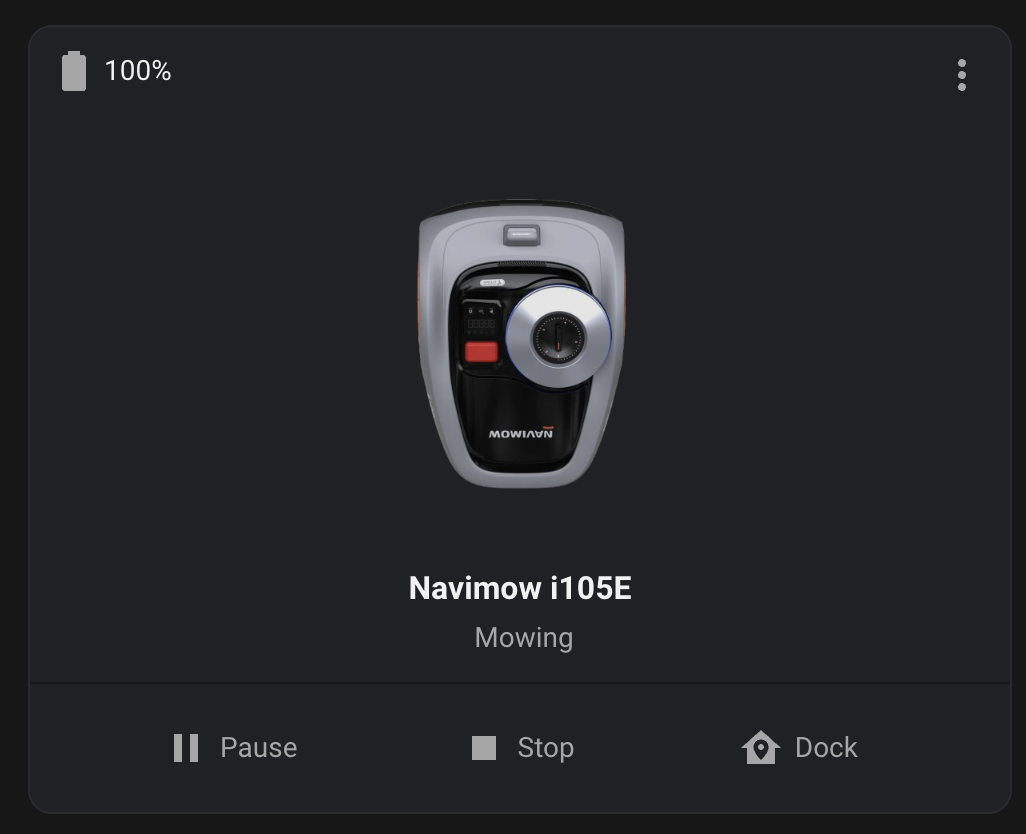
Got the card working. Guess I had some caching issues. Probably you don’t need to set the actions, but nonetheless…
      - type: custom:lawn-mower-card
        entity: lawn_mower.navimow_i105e
        battery: sensor.navimow_i105e_battery
        image: /local/images/navimow-i105e.png?v=2
        show_toolbar: true
        show_shortcuts: false
        actions:
          start:
            service: lawn_mower.start_mowing
            service_data:
              entity_id: lawn_mower.navimow_i105e
          pause:
            service: lawn_mower.pause
            service_data:
              entity_id: lawn_mower.navimow_i105e
          return_to_base:
            service: lawn_mower.dock
            service_data:
              entity_id: lawn_mower.navimow_i105e
2 Likes
Hi,
does anyone know the commands for the Google SDK in German for
- docking and
- resume?
Both are not working for me. The rest is fine…
For me English works well (I am based in the Netherlands) but perhaps that’s due to a setting in my Google Account.
Assuming your Navimow app is in German, go to the configuration page where you’ve configured Google Assistant. Clicking on Google Assistant shows you a page giving some general guidance. There is a link named “use speech assignments” or something similar, which you can click. On this page, there is an explanation of which commands you can use.
Hope my explanation is clear 

I tried all of the given examples for Docking and resume but the mower is not willing to listen to them  … resume doesn´t matter because I can just use “start” again. But Docking would be nice.
Only “starte Navimow” and “pausiere Navimow” are working. I thought maybe someone had the same issue and a solution.
@davesen : Do those commands work for you?
I use the English ones 
That gave me the hint. I added English as a second language in google home. Now I use “dock Navimow” for docking which is working fine. Thanks!
Hi everyone!
Thanks for all the efforts that was taken to get a basic integration working, especially to @MatrixRewriter !
I am getting all data into Home Assistant. However, in the Google Home app, the state of the mower is always “running”, and therefore also incorrectly shown in HA.
Battery level is pretty much in line with the Navimow app. Has anybody seens this issue too? I have unlinked and re-linked the mower in Google Home several times, changed languages to match everywhere but nothing helped. Any advice would be nice, knowingly that this is not a Navimow/Google Home support forum - but you guys are the most competent and experienced in that area
Cheers and thanks
Simon
Hi everyone
I was able to solve the issue myself
The reason was, that I wasn’t “owner” of the mower. My dealer still hat full controls in the app. After transferring the ownership to my Navimow account, the status updates perfectly fine.
Other question: Does anybody know if and how to start the mower in specific zones through Google Assistant?
Cheers
Simon
Hi:) Anyone who experience Home Assistant says “lawn_mower” is not allowed when making the yaml for the MQTT part? I can’t get it to work - even not using the small example in the HA docs for an Matt lawn mower Any help is appreciated 