Hum. I’m not familiar enough with blueprints to know if that’s solvable.
amazing, i will look at it next month
It’s not, when you change inputs it breaks the blueprint, then anyone using this option has to fix it. DL started with just a brightness option and grew from there. It’s also a bit complex to help reduce how much it work the blueprint does under the hood and how it links to other option in the blueprint making it work correctly.
It’s easier to add 3 new selections.
Blacky 
1 Like
Wondering if anyone has ever come across this error when activating a sensor light add-on automation?
Can’t figure out what’s causing it at all but the error only ever occurs when the add-on automation is run.
Effect is the add-on lights routine runs but then after a few seconds the lights return to the normal automation state. Issue has only started happening in the last week or so, can’t pinpoint a change that could have caused it…
Logger: homeassistant
Source: helpers/script.py:974
First occurred: March 28, 2026 at 9:56:07 PM (12 occurrences)
Last logged: 8:10:13 PM

Error doing job: _StopScript exception in shielded future (task: None)
Traceback (most recent call last):
  File "/usr/src/homeassistant/homeassistant/helpers/script.py", line 467, in async_run
    await self._async_step(log_exceptions=False)
  File "/usr/src/homeassistant/homeassistant/helpers/script.py", line 533, in _async_step
    self._handle_exception(
    ~~~~~~~~~~~~~~~~~~~~~~^
        ex, continue_on_error, self._log_exceptions or log_exceptions
        ^^^^^^^^^^^^^^^^^^^^^^^^^^^^^^^^^^^^^^^^^^^^^^^^^^^^^^^^^^^^^
    )
    ^
  File "/usr/src/homeassistant/homeassistant/helpers/script.py", line 563, in _handle_exception
    raise exception
  File "/usr/src/homeassistant/homeassistant/helpers/script.py", line 531, in _async_step
    await getattr(self, handler)()
  File "/usr/src/homeassistant/homeassistant/helpers/trace.py", line 283, in async_wrapper
    await func(*args)
  File "/usr/src/homeassistant/homeassistant/helpers/script.py", line 675, in _async_step_parallel
    raise result
  File "/usr/src/homeassistant/homeassistant/helpers/script.py", line 667, in async_run_with_trace
    await self._async_run_script(script, parallel=True)
  File "/usr/src/homeassistant/homeassistant/helpers/script.py", line 643, in _async_run_script
    result = await self._async_run_long_action(
             ^^^^^^^^^^^^^^^^^^^^^^^^^^^^^^^^^^
    ...<6 lines>...
    )
    ^
  File "/usr/src/homeassistant/homeassistant/helpers/script.py", line 631, in _async_run_long_action
    return await long_task
           ^^^^^^^^^^^^^^^
  File "/usr/src/homeassistant/homeassistant/helpers/script.py", line 1865, in async_run
    return await asyncio.shield(create_eager_task(run.async_run()))
           ^^^^^^^^^^^^^^^^^^^^^^^^^^^^^^^^^^^^^^^^^^^^^^^^^^^^^^^^
  File "/usr/src/homeassistant/homeassistant/helpers/script.py", line 467, in async_run
    await self._async_step(log_exceptions=False)
  File "/usr/src/homeassistant/homeassistant/helpers/script.py", line 533, in _async_step
    self._handle_exception(
    ~~~~~~~~~~~~~~~~~~~~~~^
        ex, continue_on_error, self._log_exceptions or log_exceptions
        ^^^^^^^^^^^^^^^^^^^^^^^^^^^^^^^^^^^^^^^^^^^^^^^^^^^^^^^^^^^^^
    )
    ^
  File "/usr/src/homeassistant/homeassistant/helpers/script.py", line 563, in _handle_exception
    raise exception
  File "/usr/src/homeassistant/homeassistant/helpers/script.py", line 531, in _async_step
    await getattr(self, handler)()
  File "/usr/src/homeassistant/homeassistant/helpers/script.py", line 734, in _async_step_choose
    await self._async_run_script(script)
  File "/usr/src/homeassistant/homeassistant/helpers/script.py", line 643, in _async_run_script
    result = await self._async_run_long_action(
             ^^^^^^^^^^^^^^^^^^^^^^^^^^^^^^^^^^
    ...<6 lines>...
    )
    ^
  File "/usr/src/homeassistant/homeassistant/helpers/script.py", line 631, in _async_run_long_action
    return await long_task
           ^^^^^^^^^^^^^^^
  File "/usr/src/homeassistant/homeassistant/helpers/script.py", line 1865, in async_run
    return await asyncio.shield(create_eager_task(run.async_run()))
           ^^^^^^^^^^^^^^^^^^^^^^^^^^^^^^^^^^^^^^^^^^^^^^^^^^^^^^^^
  File "/usr/src/homeassistant/homeassistant/helpers/script.py", line 467, in async_run
    await self._async_step(log_exceptions=False)
  File "/usr/src/homeassistant/homeassistant/helpers/script.py", line 533, in _async_step
    self._handle_exception(
    ~~~~~~~~~~~~~~~~~~~~~~^
        ex, continue_on_error, self._log_exceptions or log_exceptions
        ^^^^^^^^^^^^^^^^^^^^^^^^^^^^^^^^^^^^^^^^^^^^^^^^^^^^^^^^^^^^^
    )
    ^
  File "/usr/src/homeassistant/homeassistant/helpers/script.py", line 563, in _handle_exception
    raise exception
  File "/usr/src/homeassistant/homeassistant/helpers/script.py", line 531, in _async_step
    await getattr(self, handler)()
  File "/usr/src/homeassistant/homeassistant/helpers/script.py", line 787, in _async_step_if
    await self._async_run_script(if_data["if_else"])
  File "/usr/src/homeassistant/homeassistant/helpers/script.py", line 643, in _async_run_script
    result = await self._async_run_long_action(
             ^^^^^^^^^^^^^^^^^^^^^^^^^^^^^^^^^^
    ...<6 lines>...
    )
    ^
  File "/usr/src/homeassistant/homeassistant/helpers/script.py", line 631, in _async_run_long_action
    return await long_task
           ^^^^^^^^^^^^^^^
  File "/usr/src/homeassistant/homeassistant/helpers/script.py", line 1865, in async_run
    return await asyncio.shield(create_eager_task(run.async_run()))
           ^^^^^^^^^^^^^^^^^^^^^^^^^^^^^^^^^^^^^^^^^^^^^^^^^^^^^^^^
  File "/usr/src/homeassistant/homeassistant/helpers/script.py", line 467, in async_run
    await self._async_step(log_exceptions=False)
  File "/usr/src/homeassistant/homeassistant/helpers/script.py", line 533, in _async_step
    self._handle_exception(
    ~~~~~~~~~~~~~~~~~~~~~~^
        ex, continue_on_error, self._log_exceptions or log_exceptions
        ^^^^^^^^^^^^^^^^^^^^^^^^^^^^^^^^^^^^^^^^^^^^^^^^^^^^^^^^^^^^^
    )
    ^
  File "/usr/src/homeassistant/homeassistant/helpers/script.py", line 563, in _handle_exception
    raise exception
  File "/usr/src/homeassistant/homeassistant/helpers/script.py", line 531, in _async_step
    await getattr(self, handler)()
  File "/usr/src/homeassistant/homeassistant/helpers/script.py", line 974, in _async_step_stop
    raise _StopScript(stop, response)
homeassistant.helpers.script._StopScript: Stop the automation
Look at the bottom line. The automation was stopped. This is okay, just monitor it and maybe an update of HA will fix it.
Blacky
I’d like the lights to not turn off during Night Light hours, because i manually turn off anyway and might want them to stay on low for a while, my pir sensor can’t see the whole room and i might not trigger it in bed either.
I figured i could group the pir and a toggle, but not sure how
Ive been a long time user of this blueprint but have struggled with a recurring issue in my bathroom. When the automation kicks off during night time, it turns on the lights at 100% and then dims them a few seconds later. The net result is it blinds you temporarily instead of just turning on dimmed. Thoughts?
Hi Blacky. I’m having some problem with a new purchase of some new Apollo automation combined 2412 - 2450 sensors. They detect quickly with your blueprint. I also have some SCreek 2410’s as part of the system but they don’t seem to show this issue. Nor do PIR sensors.
Very often, in some locations, I trip the binary helper (combination of Apollo’s 2412 and 2450 motion energy, still energy and movement) and the lights go on. I exist the hall, lights still on, they go off according to a combination of the ESP Apollo timer and Home Assistant automation, let’s say 1 minute total, and then I walk back into the zone 10 seconds later and they don’t come on.
In the Apollo ESP Home settings, there is only 1 timer setting for the 2412 and one for the 2450 in the settings. and it just labels them 2450 timeout or 2412 timeout. Not sure what tthat means, what time is it referring to?
A claude search of this same post gave me this answer. Of course Claude is always trying to keep me happy.
## The Core Issue: State Lockout After Timeout

When your lights turn off after the timeout, the automation is likely in a brief "cooldown" or the binary sensor is stuck in a state that prevents re-triggering. Here are the most probable culprits:

1. **The Blueprint's "Blocking" Logic**

Most popular lighting blueprints (like the widely-used ones by Blacky or others) use a **blocking helper** — an `input_boolean` or similar — that gets set when the lights turn off. If you return within a short window, that blocker hasn't reset yet and suppresses the trigger. Check your blueprint for any "blocking" or "cooldown" input helpers.
Do you have any insight into this?
Hi and Thanks @Blacky for this awesome Blueprint!
edit: Sometimes I am a fool. I forgot to set up the off script. With an off script it’s working.  But maybe it’s possible to integrate Scene Presets by default?
I have been changed for some months ago to this blueprint and it’s working like a charm!
But sometimes I want to have more colourful lights In my own automations I used a mix of fixed light temperature and ambient lights and Scene Presets (Scene Presets: Hue-like scenes for generic light entities).
Scene Presets would be active for some reasons like “not dark enough for all lights but some colourful highlights would nice haha” or something else. I tried to combine your Blueprint with a script which has been set up as light, which should start Scene Presets for a light. The script work (nothing special) if I start it standalone:
sequence:
  - data:
      preset_id: 6550c445-3ed7-46b3-9d06-76f7e9ef7c4e
      targets:
        entity_id: light.stofflampe
      brightness: 138
      shuffle: false
      smart_shuffle: false
    action: scene_presets.apply_preset
alias: Sensor Light Script Ambientesteuerung Wohnzimmer
description: Wendet eine Ambiente-Szene auf einen Raum an
mode: restart
fields: {}
but the script doesn’t start as script in your Blueprint.
Two questions:
- Do I something wrong? Is something else necessary to start a script?
- Maybe it would be possible to add a function in your Blueprint to get a “colourful” ambient light? Maybe in combination with Scene Presets as direct integration or may as add-on (like Movie Lights?)
This would be very nice! 
Bests
Montgomery
Hi All
I love this blueprint and i use it everywhere i have light !!!
for the life of me i can’t find how can we use input_boolean as the “Lights - Switches - Scenes - Scripts *” is yhis not possible ?
I can’t believe I am the only one that would need this feature ? I search the foreum but can’t find anything on this.
thanks for any help
Trying out the Sensor Light blueprint and so far been liking it.
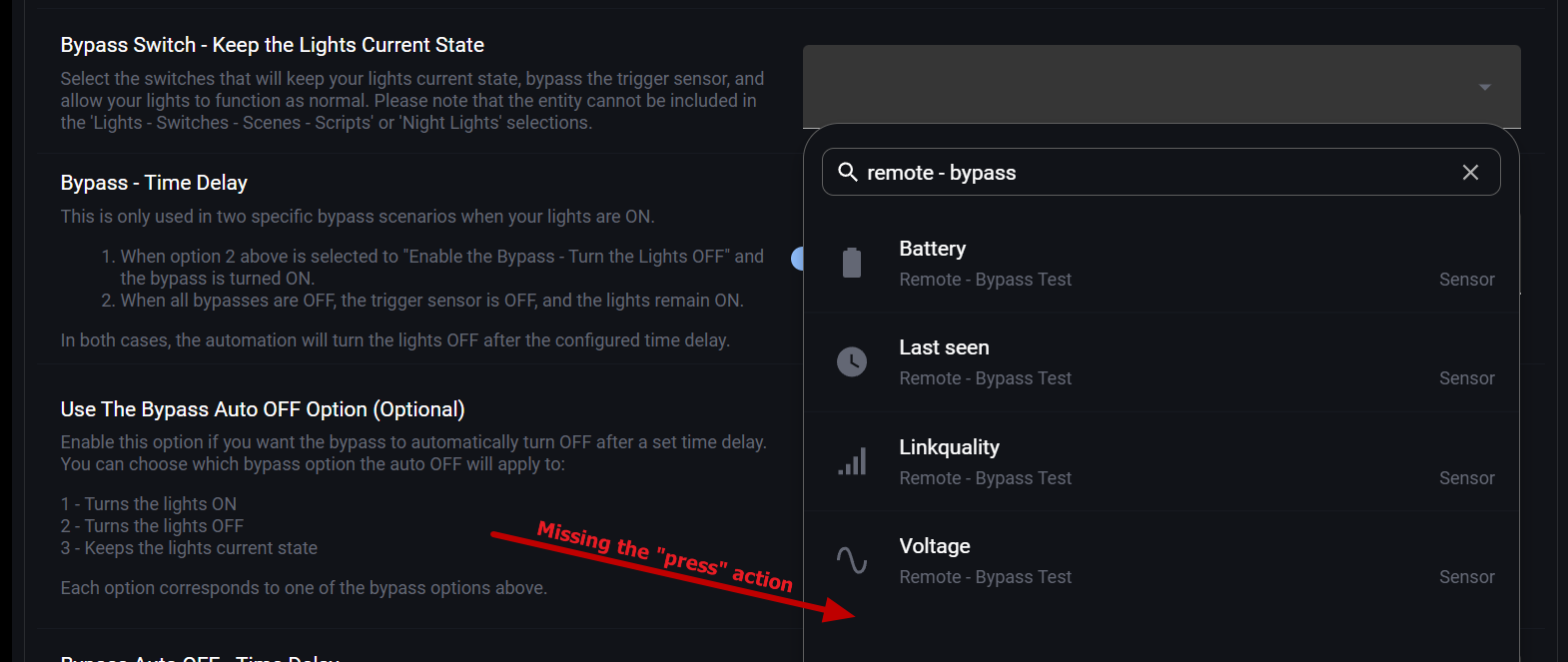
Currently testing the “Bypass Switch - Keep the Lights Current State” option for one of rooms that is controlled by a Lutron Caseta light switch. So I have a dedicated Zigbee button Sonoff SNZB-01 integrated via Zigbee2MQTT. I’m trying to choose the entity on the remote button but it doesn’t show the action (press single/double/long/etc). Z2M deprecated the legacy option for actions that is why actions entity is now missing in HA.
Is it possible to use a dedicated zigbee button to trigger bypass of the light switch?
Is there any particular reason for the crossover variables to check that “exclusion” set is non empty? If we calculate entities that are in a and not in b, b can be empty.
For example, during the night time crossover, it calculates which lights should be turned off, however, it only does so if both day and night lights are non-empty, whereas in my opinion if none of the night lights are defined - then it should turn off all the day lights (well minus the “glow” lights but these are accounted for in a separate variable that does suffer from the same problem though)
Current behavior is that none of the “day” lights are being turned off, but if I add a “fake” light to the night lights, everthing works as I expect.
I’m not sure of course I’m using it right, because what is the purpose of the night mode if you don’t have any night lights, but in my case the purpose is to effectively disable presence trigger.
Lastly both these lines [1 and 2] contain likely a typo ({} instead of [])
Is it possible to add these fixes to the next version?
I activated ambient light conditions and set the values. Low lux at 100 and high lux at 120, but if the lux from the sensor is below the 100 no lights turn on. What is the problem? Any ideas?
alias: Presence - EG Gäste-WC
description: ""
use_blueprint:
  path: Blackshome/sensor-light.yaml
  input:
    motion_trigger:
      - binary_sensor.presence_eg_gaeste_wc_presence
    light_switch:
      entity_id:
        - switch.decken_licht_eg_gaeste_wc_switch_1ch
    time_delay: 1
    include_light_control: []
    light_brightness: 1
    include_sun: sun_enabled
    include_device_tracker: zone_people_enabled
    zone: zone.home
    people:
      - person.1
      - person.2
    include_night_lights: night_lights_disabled
    include_night_light_control:
      - use_colour_temperature
      - use_brightness
    night_light_colour_temperature: 2000
    night_light_brightness: 1
    light_colour_temperature: 2000
    sun_elevation_rising: -2
    light_transition_on: 2
    light_transition_off: 3
    include_ambient: ambient_enabled
    ambient_light_sensor: sensor.presence_eg_gaeste_wc_illuminance
    ambient_light_high_value: 120
    ambient_light_options: ambient_light_option_enabled
    ambient_light_low_value_delay: 0
    ambient_light_high_value_delay: 0
    ambient_light_value: 100
    include_dynamic_lighting: disable_dynamic_lighting
Has anyone experienced the sun elevation condition suddenly stopping work after upgrading to HA 2026.4?
Setup:
• Sensor Light Blueprint v8.5
• Sun elevation set to 8°
• include_sun: sun_enabled
• sun_elevation_rising: 4
Expected behavior:
• Lights should only turn on via motion when sun elevation is below 8°
• When sun is above horizon (~30°+), motion should NOT trigger the lights
Actual behavior:
• Since upgrading to HA 2026.4.3, lights turn on via motion even during broad daylight when sun elevation is ~30°
• The sun elevation condition appears to be ignored for motion triggers (t0)
Timeline:
• Worked correctly for months before upgrade
• Problem started immediately after upgrading to HA 2026.4.3 (April 19)
What I’ve checked:
• Sun elevation is correctly reported (30°+ during the incident)
• No changes to automation or blueprint configuration before the issue appeared
• HA was rebooted after the upgrade
Is anyone else seeing this? Could this be related to the “Update state template framework to support options other than state” change in HA 2026.4?
Confirming this one, hit the exact same UndefinedError: 'ReadOnlyDict object' has no attribute 'brightness' here too. One light in my motion-controlled group went unavailable (Matter bulb briefly unplugged), the whole automation crashed, and none of the other lights in the group turned on.
Applied a local patch along the lines of yours, adding selectattr before the brightness map. Unavailable lights are now silently skipped and the rest of the group switches normally.
@Blacky any chance of getting this into the official blueprint? Any transient light outage (Zigbee dropout, Matter reboot, bulb power cycle) currently breaks the whole room’s motion lighting, which is painful when a bulb just briefly loses power. The blueprint has been rock-solid otherwise, happy to help test if needed.
Hi @Blacky :
Sorry for late reply, just returned from my vacation.
To be absolutely clear: so what you’re saying it’s the expected behaviour to turn off lights at the “end time”?
Regarding my 2nd question, I don’t use any DL settings, but I use another integration called adaptive lighting with below configuration:
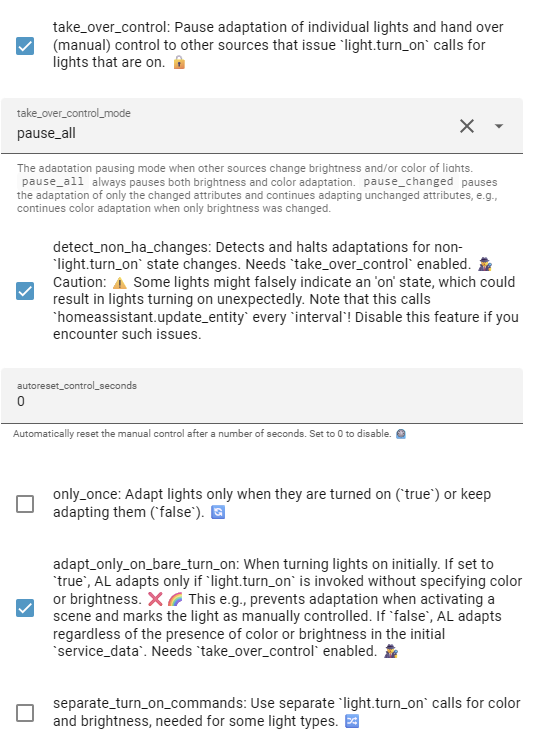
I believe the “adapt_only_on_bare_turn_on” is the problem here, if the light is turned on with brightness it’s getting ignored by AL. When “Dim Before OFF” is used, it might send brightness when turn_on, maybe that’s the issue?
Bob
What bit me initially was that the Sun device/service was installed and active, but the entity for Solar Elevation (and a few others) were disabled. I enabled solar elevation and it then appeared in the dropdown… and now the Sun Elevation function of the Sensor Light add-on is working great!
Cheers,
Ron
Is it possible to add a time after that the lights are turned off even though the trigger hasn’t indicated so? (Sometimes my motion sensor is stuck and doesn’t report occupancy off, so the lights stay on indefinitely)
thanks for the awsome blueprint!
I have a addition automation for turning lights on at 30% at sundown and another automation for turning lights off at sunrise. But when the motion automation detected a motion, the lights turn on. But after my selected time the lights turn off and no night light will be active.
What I can do ?
Struggling a bit with something that I assume is quite straight forward but I am missing. I have a input boolean that detects a person is home. I just want to turn some lights on as they arrive, that I can do. But I just can’t seem to work out a timer/off state after a few minutes. Tried Sensor Light and Smart Light blueprints. Sensor light seems to have all the right smarts but will only pick up sensor booleans. I feel I have a missing link in my thinking. Any help out there. I’m fairly recently descending into the HA rabbit hole after years of simple Tuya/Lifx automations. Thanks