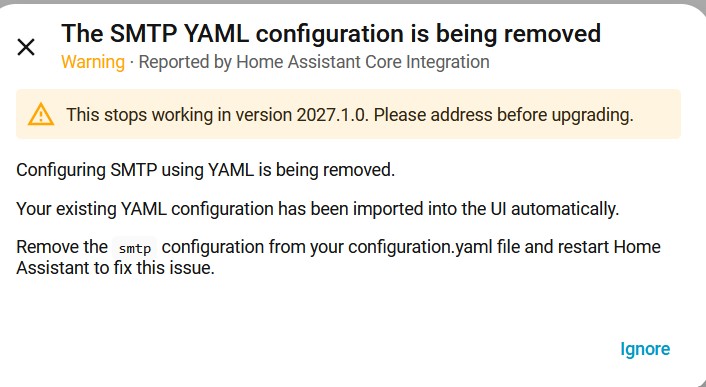
the attached message the other day when I did a system update. I'm not clear about what is happening and how it will affect my automations?
I'm really a beginner with HA. I have set up several automations for your leak detectors which send e-mails. Does this affect them and if so what should I do to insure that e-mail alerts will operate?
Thanks....RDK
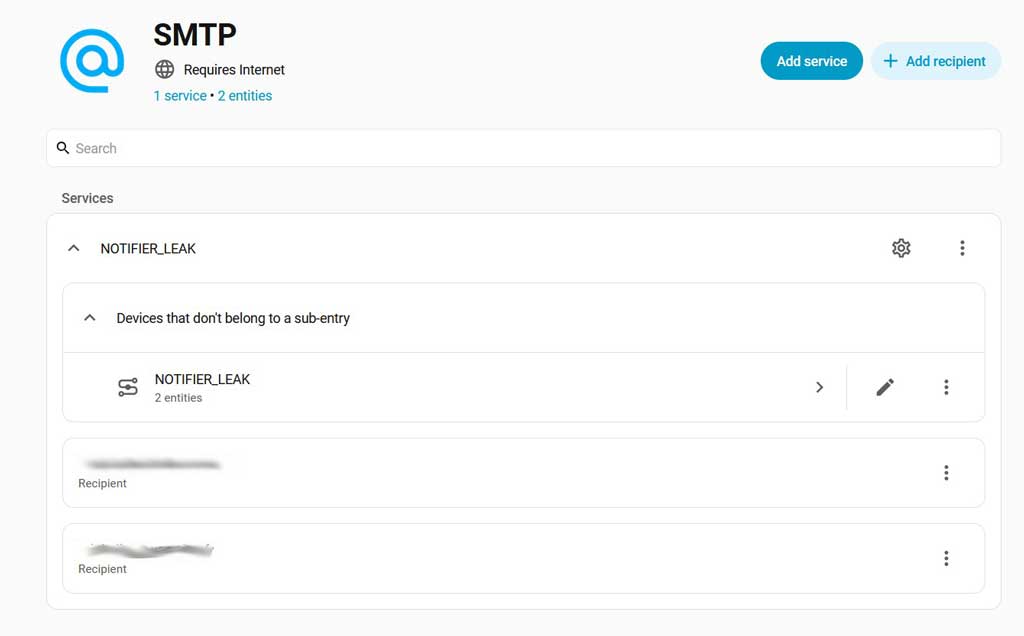
I Means what it says, remove the SMTP-conf, in your YAML, go to /Settings/Device&Services, check the SMTP Integration there, make sure it's configured correct
Another time, try to use the Search function in here, im sure you would have found this.
Also it's a good practice / routine to Read the Release Note,before hitting Update
After verifying your SMTP integration settings, You could go to your Automations and run them manually( or "provoke" them somehow ) ( Beside the one which call 911 )
When older YAML only integrations get updated and moved to being configured in the graphical user interface they will also import your existing yaml into the new GUI integration for you. All you have to do iis check that this worked correctly by looking in Settings -> Devices & Services -> SMTP. If it did then delete your SMTP YAML and restart.
Clear as mud to me as well ...
I checked configuration.yaml and didn't find an reference to smtp ... Digging into my config I found that I had my smtp configuration in a notify.yaml linked to configuration.yaml with an include command.
So the error message could have been clearer ....
I went to the new smtp integration in my devices and services, clicked on one of the entries to check the configuration and it crashed my home assistant .... not a good start
(update) .. .after another restart I could edit the smtp info ... no idea why it failed first time. I was left with three old entities related to the old smtp configuration .. they showed unknown .. no delete option available for the entity so I just had to disable them .. probably leaving more old junk in my config.
I found the SMTP documentation page frustrating at best. I submitted feedback and provided edits to improve usability.
I discovered that the recipient name, once entered cannot be changed internally. By this I mean that I changed it, but the change had no effect. I restarted HA after changing it, still no effect. Please confirm.
Using gmail requires an APP password that is painful to set up. This is probably true of other services.
If one is going to remove the service, if it exists in configuration.yaml it must be removed from there, too.
@tom_l
OK folks, I started this thread last month before going on an extended trip, thus I have not given it any thought until I just ready this thread. I’m still confused and not sure how to proceed!! I have a couple leak detectors which when wet trigger an e-mail to my gmail account and my regular e-mail account. Here is the YAML for that automation:
action: notify.notifier_leak
metadata: {}
data:
message: “{{now().strftime("%Y/%m/%d-%H:%M")}} → Solar Water Heater Leak”
title: Solar Water Heater Leak
target: [email protected]
mode: single
and the YAML for the notify script in the Configuration.yaml:
So now, given the above scripts, what do I have to do now to insure that my notifier scripts will work after the move to Version 2027.1.0? Please understand that I’m a complete novice with HA.
I got the message as well. The UI version of the SMTP configuration contains the email recipient, but not the server address, nor the port. So I’d have to say that the importing of YAML config was done poorly, at best.
You do not have to do anything except remove or comment out the old YAML config for SMTP. In 5-ish months you will start to see an error if you don’t.
The old action will continue to exist for the foreseeable future to handle notifications that require additional data. You will now have the option to use the notify.send_message action for notifications that only need a message with/without a title.
If you want to insure that it is working as it should, use the Action tool to run the action on its own.
@Didgeridrew Ok, some clarification for the novice:
You do not have to do anything except remove or comment out the old YAML config for SMTP. In 5-ish months you will start to see an error if you don’t
Where do I find this “old YAML config for SMTP”? Is is the one in the “Devices and Services” section?
The old action will continue to exist for the foreseeable future to handle notifications that require additional data. You will now have the option to use the notify.send_message action for notifications that only need a message with/without a title.
Does this mean I have to rewrite the automation using the notify.send_message action instead of the “action: notify.notifier_leak” which I have now? Where do I specify the email server, password, etc? I don’t see that in that action description.
Based on what you posted previously, it would be in configuration.yaml.
No… that’s not YAML.
No…
Those are not part of the notify.send_messageaction, just like they weren’t part of your notify.notifier_leakaction… those things are part of the integration configuration.
The main change to be aware of regarding using notify.send_message is that you will need to use the “Add Recipient” option in the SMTP integration dashboard to create additional notify entities if you want to send a message to a new email address… you can’t just add random email addresses to the action’s target list like with the legacy action.
Also, please properly format any configuration using the “Preformatted Text” option not “Blockquote”.
Just delete the existing Recipient and then recreate it with the correct name.
Those and the other configuration variables can be found by clicking the expansion menu for the service, then selecting “Reconfigure”.
IIRC, those include commands essentially merge all the split files into one before the Repair integration runs. As far as it’s concerned, everything was in configuration.yaml… So, it was as clear as it could be.
The old method did not create any entities. Those are the new notify entities that are used with the notify.send_message action. They have a state of unknown because you haven’t sent any notifications using them yet.
Thanks for taking the time to reply .. I am not sure what the purpose of these entities are then because they show as unknown even if mail is sent - can you expand on what should happen please?
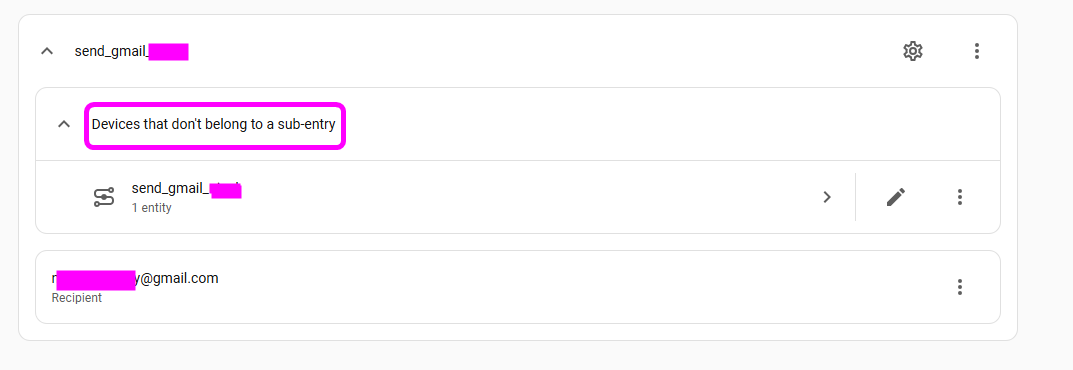
When I look they show as being associated to the SMTP integration but when I open the integration they show up as “not belonging to the sub entry” .. unfortunately I have no idea what that means.
The entities are for use as targets for the notify.send_message action. When you use that action on them, their state will update to a datetime string representing when the notification was sent. If you are only using the legacy action, not notify.send_message, they will not update because they have not been used.
I agree, the wording of that is weird… and I’m not 100% sure what they are trying to get across. I think the point is that the service config entry consists of the main device (in your example send_gmail_###) and the “recipient” sub-entries.
Many thanks - that was indeed correct - I was calling the send mail via a different method .. once I re-wrote the automation to use notify.send_message the entity is correctly populated with the timestamp