I think I’ll just flash from scratch.
I just completely redid the firmware flash via wireless, behavior still the same.
Getting the messages
[16:38:15.123][D][script:090]: Script 'timer_page' restarting (mode: restart)
[16:38:15.124][D][script:090]: Script 'timer_dim' restarting (mode: restart)
[16:38:15.127][D][script:090]: Script 'timer_sleep' restarting (mode: restart)
[16:38:15.355][D][script:090]: Script 'timer_page' restarting (mode: restart)
[16:38:15.359][D][script:090]: Script 'timer_dim' restarting (mode: restart)
[16:38:15.360][D][script:090]: Script 'timer_sleep' restarting (mode: restart)
every time I swipe.
I created an issue over at github.
I’ve been using your blueprint since you first published it and it’s been working great. a couple of weeks ago, I applied some updates and now the NSPanel Pro doesn’t get passed the initializing splash screen. I haven’t changed any of the config from when it was working. Do you have any suggestions for how I can troubleshoot this? Thanks again for all your hard work on this!!
I just finally managed to get this blueprint working, but I have a bit of a general question: is there any way to completely disable the home page (I don’t really need info about the weather) and just show a climate entity? My main use-case would be to just use the panel as an interface for my heating.
Edit: I basically want this from the initial post of this thread:
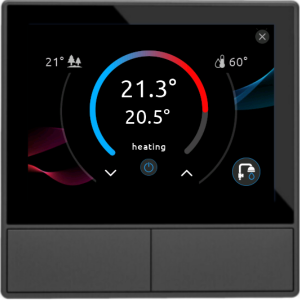
There is an option in the config page to set the first screen. It defaults to home but you can change that to which ever page you need to display first.
I tried setting the wake-up-page to “climate”, but this doesn’t show the thermostat displayed above. I have set the “main climate entity”, it shows the correct entity, but it only displays it with a temperature slider. Also, is there a possiblity to change the background and turn off the lock screen (which again reverts back to the weather + time home screen)
I’m having a massive headache trying to update my NS Panels to ESPhome version higher than back when there were issues (2025.7?) where I’ve had to serial flash multiple times. I finally got the first one fully updated (ESPhome and TFT) but the second one is not playing nice.
When the NS Panel boots, the log shows it connect to wifi and the HA API, but then the log clears and it shows as having no IP address or connection to HA. In the HA settings page for ESPhome, the device sometimes becomes available but then generally disconnects pretty quickly.
With the first NS Panel I managed to do a TFT update whilst it was briefly connected to HA and that seemed to fix things, but he second panel won’t start the TFT update at all.
Any ideas?
hi been having the same issue , not a real solution but i deleted the automation and redone it , also upduting the blueprint before hand , all good now
You must update your blueprint.
The climate page looks different now, but still you can select that as your wake up page, and disable (set to 0) the delay page, so it will start on cli,até page and will never fallback to home page unless you close the climate page.
Anyone? I just cooked another NS Panel trying to update it… it seems to be stuck here:
[10:03:52.962][D][nspanel.boot:143]: Boot: Waiting for TFT version
[10:03:55.286][D][nspanel.base:124]: The watchdog is starting a round
[10:03:55.286][D][nspanel.base:132]: The watchdog completed the round
[10:03:56.441][W][nspanel.base:109]: Waiting for the system to be ready before executing an action
[10:03:57.977][D][nspanel.boot:143]: Boot: Waiting for TFT version
[10:04:01.443][W][nspanel.base:109]: Waiting for the system to be ready before executing an action
[10:04:02.998][D][nspanel.boot:143]: Boot: Waiting for TFT version
[10:04:06.448][W][nspanel.base:109]: Waiting for the system to be ready before executing an action
[10:04:08.017][D][nspanel.boot:143]: Boot: Waiting for TFT version
[10:04:11.449][W][nspanel.base:109]: Waiting for the system to be ready before executing an action
[10:04:13.037][D][nspanel.boot:143]: Boot: Waiting for TFT version
[10:04:16.460][W][nspanel.base:109]: Waiting for the system to be ready before executing an action
[10:04:18.051][D][nspanel.boot:143]: Boot: Waiting for TFT version
[10:04:21.459][W][nspanel.base:109]: Waiting for the system to be ready before executing an action
[10:04:23.063][D][nspanel.boot:143]: Boot: Waiting for TFT version
[10:04:26.465][W][nspanel.base:109]: Waiting for the system to be ready before executing an action
[10:04:28.082][D][nspanel.boot:143]: Boot: Waiting for TFT version
[10:04:31.492][W][nspanel.base:109]: Waiting for the system to be ready before executing an action
[10:04:33.097][D][nspanel.boot:143]: Boot: Waiting for TFT version
[10:04:36.474][W][nspanel.base:109]: Waiting for the system to be ready before executing an action
[10:04:38.121][D][nspanel.boot:143]: Boot: Waiting for TFT version
[10:04:41.483][W][nspanel.base:109]: Waiting for the system to be ready before executing an action
[10:04:43.135][D][nspanel.boot:143]: Boot: Waiting for TFT version
[10:04:46.482][W][nspanel.base:109]: Waiting for the system to be ready before executing an action
[10:04:48.152][D][nspanel.boot:143]: Boot: Waiting for TFT version
[10:04:51.489][W][nspanel.base:109]: Waiting for the system to be ready before executing an action
[10:04:53.172][D][nspanel.boot:143]: Boot: Waiting for TFT version
[10:04:56.488][W][nspanel.base:109]: Waiting for the system to be ready before executing an action
[10:05:36.527][W][nspanel.base:109]: Waiting for the system to be ready before executing an action
[10:05:38.360][E][nspanel.hw.relays:487]: TFT version invalid
[10:05:38.361][D][nspanel.versioning:069]: Versions:
[10:05:38.362][D][nspanel.versioning:070]:   Blueprint: 2025110
[10:05:38.363][D][nspanel.versioning:071]:   ESPHome:   2025120
[10:05:38.364][D][nspanel.versioning:072]:   TFT:
[10:05:38.366][W][nspanel.versioning:075]: TFT Blueprint mismatch!
[10:05:38.369][E][nspanel.versioning:077]: v2025120 or later is required
[10:05:38.376][W][nspanel.versioning:082]: TFT version mismatch!
[10:05:38.377][E][nspanel.versioning:084]: v2025120 or later is required
[10:05:38.386][D][nspanel.component.base:025]: Firing HA event: version
[10:05:38.389][D][nspanel.versioning:096]: Check version completed
[10:05:38.397][D][nspanel.boot:163]: Progress: 100.0%
[10:05:38.397][I][nspanel.boot:165]: Progress: Completed
[10:05:38.429][D][nspanel.boot:143]: Boot: Jump to wake-up page
[10:05:38.463][E][nspanel.hw.relays:487]: TFT version invalid
[10:05:38.464][D][nspanel.boot:143]: Date/Time: Set time zone
[10:05:38.468][D][nspanel.datetime:122]: Current timezone: AWST-8
[10:05:38.470][D][binary_sensor:049]: 'Notification Unread': OFF
[10:05:38.474][W][component:454]: script took a long time for an operation (84 ms)
[10:05:38.475][W][component:457]: Components should block for at most 30 ms
[10:05:38.480][D][binary_sensor:049]: 'Nextion display': ON
[10:06:53.289][D][nspanel.base:124]: The watchdog is starting a round
[10:06:53.294][D][nspanel.base:132]: The watchdog completed the round
I have the latest version of the TFT and BluePrint and have tried the TFT upload but it doesn’t seem to want to work. (not uploading the TFT from my local HA file)
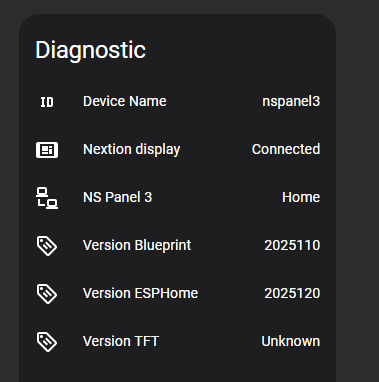
EDIT: it is finally uploading the TFT after muliple attempts, so I think this on is going to be ok.
EDIT (again): I’ve managed to get the first NS Panel to accept the new TFT file as well, it seems it was just a case of being persistent with hitting the ‘update TFT’ button at the right time and hoping for the best…
1 Like
This page seems not to work anymore: https://github.com/Blackymas/NSPanel_HA_Blueprint/blob/eab9e9b50b2a302c2c8ad98a685999dd1c5a04f7/docs/README.md

Github was experiencing problems this morning, along with a big section of the internet. I can get there now.
2 Likes
Apologies if this is already answered, I searched but cannot find.
I want to have my panel display a light brightness and or temp slider on the home screen, as my screen affects only one room, I don’t want to have to long press a button to bring up the slider. Is it possible to have it always displayed?
Thank you
Set that climate entity, set the wake-up page to “climate” and set timeout page to 0.

1 Like
Hi All,
Just got a NSPanel standard and pro.
For the standard do I need to flash the device to get this blueprint to work???
TIA
Yes, as per the docs on the Github repo it needs to be flashed with ESPhome.
1 Like
sorry I dont understand, the entity for temperature set to light…?
Ah!
Sorry!
I misunderstood your original question.
Unfortunately it isn’t possible to show that light control page as default.
You can, however, create some automation on Home Assistant side to open that page with some trigger (or from time to time) and disable timeout sleep and timeout page, so the panel will stay on that page forever.
1 Like
After updating to 2026.1.0, items configured in blueprint for NSPanel_HA_Blueprint seems to have broken and are showing as “Unknown entity selected”
Viewing the automation as yaml still shows the correct items -
alias: NSPanel - Living Room
description: ""
use_blueprint:
  path: NSPanel Configuration.yaml
  input:
    nspanel_name: 027f21303693df6e306e92529f4837c0
    timezone: !Redacted!
    weather_entity: !Redacted!
    home_value01_icon: ""
    climate: climate.livingroom
    qrcode_enabled: true
    qrcode_label: Guest Wifi
    qrcode_value: WIFI:S:!Redacted!;T:WPA;P:!Redacted!;;
    button_page01_label: Climate
    entity02: climate.toilet
    entity03: climate.master_bedroom
    entity04: climate.study
    entity05: climate.guest_bedroom
    entity06: climate.shower_room
    button_page02_label: Lighting - Ground Floor
    entity09: switch.sonoff_zbm5_3c_80_86_switch_5
    entity09_icon: ""
    entity10: switch.sonoff_zbm5_1c_80_86_5
    entity11: switch.sonoff_zbm5_1c_80_86_4
    button_page03_label: Lighting - First Floor
    entity17: switch.sonoff_zbm5_3c_80_86_switch
    entity18: switch.sonoff_zbm5_1c_80_86
    entity19: switch.sonoff_zbm5_1c_80_86_3
    entity21: switch.sonoff_zbm5_3c_80_86_switch_3
    utilities_enabled: false
    left_button_hold_select: Custom Action
    left_button_hold_custom_action:
      - action: automation.trigger
        metadata: {}
        data:
          skip_condition: true
        target:
          entity_id: automation.lights_on
    right_button_hold_select: Custom Action
    right_button_hold_custom_action:
      - action: automation.trigger
        metadata: {}
        data:
          skip_condition: true
        target:
          entity_id: automation.lights_off
    home_button05_icon: mdi:qrcode
    entity01: climate.kitchen
    chip01: light.boiler_control
    chip01_icon: mdi:fire
    chip01_icon_color:
      - 255
      - 0
      - 0
Im going to try reconfiguring the blueprint from scratch and see if the issue persists before reporting back. Another person has raised this issue so im presuming this will affect everyone who uses this project.