Boom, done! All three changes have been made. Thanks for the great feedback! Let me know if you think of any other improvements ![]()
Thanks a lot for providing SpoolmanSync as a HAOS app (aka add-on).
When starting it, I noticed that the default port 3000 conflicts with the one of Uptime Kuma. May I suggest to use a different default? eg 7242 ![]()
Of course I could change the port myself in the configuration section; on the other hand when applying code snippets or sharing URLs for e.g. troubleshooting the changed port has to be considered all the time by everyone.
I just created the automations and helpers via the SpoolmaSync UI.
And it was different than before - no copy/paste anymore. ![]()
But, surprise: homeassistant got rebooted - without warning nor information ![]()
I suggest to let the user decide when to apply the changes and when to reboot.
btw, how did you apply the changes? did you modify the yaml files?
Cheers
I can confirm your latest changes are working great!
I do have a few additional UI suggestions - though admittedly some of this might just be my OCD kicking in. (
)
#1:
In the Print QR Labels section, would it be possible to make the area that lists selectable spools manually resizable?
Right now, only three spools are visible at a time. If you’re generating labels for several spools at once, it would be helpful to expand that area to see more without scrolling.
#2:
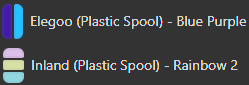
In Spoolman, I have several multi-color filament types:
- Dual-color “Coextruded” filaments (e.g., Silk Blue and Purple)
- Longitudinal multi-color filaments that transition between multiple colors as they print
However, when they appear in SpoolmanSync, their colors default to black - presumably because multiple colors are associated with the spool/filament in Spoolman.
Would it be possible to visually display multi-color filaments in SpoolManSync in a similar way to how Spoolman handles them? For example, Spoolman appears to:
- Display coextruded filaments with colors shown horizontally
- Display longitudinal filaments with colors shown vertically
For reference:
#3:
Under the Dashboard view I wonder if it would make sense to list the word “Remaining” beside the filament remaining stat?
E.G:
- “320g Remaining”
instead of just: - “320g”
#4:
For future functionality, have you considered implementing some form of reporting?
It would be useful to see:
- An overview of which specific filaments were used over a selected time period
- How much of each filament was consumed over that period
This could help with tracking usage trends and when planning restocks.
#5:
Speaking of the above, another feature that would be very helpful is some type of low-filament notification - either through Home Assistant integration or via email.
For example, if you are down to your last active spool of a particular filament type and it drops below 25% remaining, a notification could be triggered to remind you to order more.
This you could achieve already with the HA Integration:
The examples shown in Github are covering exactly your use case.
I hear you on the Uptime Kuma conflict. That said, I’m not sure changing the default to a different port would help much in practice. Any port could conflict with someone else’s setup, and there’s no universally “safe” choice. The configurable port in the add-on Configuration tab is the intended way to handle this. Once you change it there, SpoolmanSync uses the configured port everywhere (including generated QR code URLs), so there shouldn’t be anything else you need to adjust. If I’m missing what you mean about code snippets or shared URLs needing adjustment, let me know — happy to look into it.
Fair point. The restart after configuring automations should be communicated better. Here’s what happens under the hood: SpoolmanSync reads your existing configuration.yaml, finds the SpoolmanSync section (between comment markers), replaces just that section with the updated config, and writes the file back. Your existing configuration outside the SpoolmanSync section is left untouched. The restart is needed because HA requires a full restart to load new YAML-defined entities like input_number, utility_meter, template sensors, and rest_command. automation.reload alone isn’t sufficient for those.
I’ll add a warning/confirmation before the restart so you know it’s coming and can choose to restart later on your own if you prefer.
Great suggestions, thanks for taking the time to write these up. A few thoughts:
#1 Resizable spool list in QR labels: Good idea, I’ll look into making that list expandable or taller so you can see more spools at once without scrolling.
#2 Multi-color filament display: I like this one. I’ll look into how Spoolman stores multi-color data and see if I can replicate the horizontal/vertical color display for coextruded and longitudinal filaments.
#3 “Remaining” label next to weight: Simple and makes sense for clarity. I’ll add that.
#4 Usage reporting: This is on my radar. SpoolmanSync already logs every usage deduction in the Activity Log, so the data is there. A reporting view that summarizes filament consumption by type/spool over a time period would be a natural next step.
#5 Low filament notifications: Definitely something I want to add. SpoolmanSync already knows every spool’s remaining weight from Spoolman, so threshold-based alerts are very doable.
The spoolman-homeassistant integration does offer a low-filament binary sensor, which is cool. Worth noting though that it’s a general-purpose Spoolman ↔ HA data bridge, but it doesn’t track filament usage itself. Its sensors (including the low-filament alert) only update when something else has already deducted filament from Spoolman. You’d need to pair it with SpoolmanSync (or your own custom automations) to actually feed it usage data.
I’d like to build low-filament alerts directly into SpoolmanSync since we already handle the deductions automatically. That way it’s a single integrated workflow without needing to install and configure a separate integration.
Hi @gibz104
I have fixed your comments and released the integration as a standalone repo.
Excellent - it worked like a charm ![]()
I think there’s sth. off with the generated configuration.yaml snippet. After I put it in my configuration.yaml other things in it stop working. Sry, I cannot describe it better… I just noticed a while ago there seemed to be some changes in it, like some things need a “-” in front of it or need “template:” in front of it but idk how to fix it.
Hey @trohnjavolta, I’d love to help troubleshoot this but I need more to go on than a feeling that something is off with the generated config. Could you share:
- Are you running SpoolmanSync as an HA add-on, or via Docker (external/embedded mode)?
- Your SpoolmanSync logs – if you’re using the add-on, go to HA > Settings > Add-ons > SpoolmanSync > Log tab. If you’re running Docker, run
docker logs spoolmansync(or whatever your container name is). - What specifically broke in your existing configuration? Any errors from HA when restarting?
If the generated config is conflicting with your existing configuration.yaml, it’s likely because you already have top-level keys like template:, input_number:, or utility_meter: defined. YAML doesn’t allow duplicate top-level keys, so those sections would need to be merged manually. But I’d need to see the actual errors to confirm.
Hello,
I’m new to the forum and relatively new to HA. Previously I used FHEM and IoBroker.
I’m currently in the process of integrating my Bambu Lab printers and three AMS Pro.
Everything is working so far.
However, I have the following message:
Tray 2 has filament but no assigned spool. AMS reports: PLA - Bambu PLA Basic
Are the spools automatically created in Spoolman? Or do I have to have already created spools in Spoolman and assign them manually?
It’s all about BambuLab coils
And shouldn’t the color be displayed automatically in the HA Bambu app? It only shows which material (PLA, CT …)
I hope you know what I mean and can help me
Greetings and thanks in advance
Totti
I’m running via docker in external mode
That was it thx, already had template: somewhere, it’s been a while since I messed with configuration.yaml.
Another question: You write that NFC tag writing is supported. It doesn’t work for me and I know why: no https
Before I try to solve this and get reverse proxy etc.
I’d like to know: Is also NFC reading possible?
Like scan a NFC Tag (containing spool id from spoolman) with Spoolmansync, then get a popup saying: Please load your filament xy now in the desired ams tray and we can just load the filament and the tray is auto recognized and scanned filament ist auto assigned to the right ams tray?
That would be amazing. I already have nfc tags containing spoolman spool id on my filament spools. I wrote the tags using spoolcompanion android app.
It doesn’t need any https revery proxy stuff, I tried to set that up before and failed. Is there maybe a companion spoolmansync android app planned for easier nfc reading/writing?
Great question! Good news, what you’re describing already works and you don’t need HTTPS or a reverse proxy for it.
HTTPS is only required for NFC writing from within SpoolmanSync’s browser UI since it uses the Web NFC API which requires a secure context. NFC reading, meaning tapping a tag with your phone, doesn’t involve the browser API at all. Your phone’s native NFC reader handles it, opens the URL in your browser, and you’re done. No HTTPS needed.
Here’s the flow that already works today:
- You write a SpoolmanSync URL to your NFC tag in this format:
http://<your-spoolmansync-host>:<port>/scan/spool/<spoolId>(e.g.,http://192.168.1.100:3000/scan/spool/42) - You tap the NFC tag with your phone
- Your phone opens the URL in the browser, no app needed
- SpoolmanSync shows you the spool details (vendor, material, color, weight) and a list of all available AMS trays
- You pick the tray you’re loading it into, hit assign, done
Since you already have NFC tags with Spoolman spool IDs from SpoolCompanion, you’d just need to re-write them with the SpoolmanSync URL format above. You can use any NFC writing app on your phone (like NFC Tools, NXP TagWriter, etc.) to write that URL to each tag. No HTTPS required, and no SpoolmanSync involved in the writing step at all.
The tray isn’t “auto-detected” in the sense that SpoolmanSync knows which physical slot you’re loading. You pick the tray from the list after scanning. But it’s a quick tap-and-select workflow.
No companion app is planned. The whole point is that NFC tag tapping works natively on any phone without installing anything. Just make sure your SpoolmanSync instance is reachable from your phone’s network.
Nice, yeah auto-detecting the tray would be the cherry on top, but no idea if it could be archived and if so, how. I think after loading a new spool wouldn’t be great, since you then would need to find the nfc tag on the loaded spool to scan it…so maybe a popup after a spool gets unloaded from the ams??.. if this can even be recorded somehow via bambulab ha integration.
Do you happen to know if I somehow can automate this? Like creating a field in spoolman once with url+spool id as variable that gets applied to all spools so I then can just rewrite the whole spool info incl. the link with one tap?
Call me lazy but I don’t really want to add the url and spool id by hand für all my ~60 spools
.
Auto-detecting which tray you’re loading into isn’t really feasible unfortunately. SpoolmanSync would need to know which slot you’re about to put the spool in before you put it there, and there’s no way to get that information ahead of time. The current flow (tap tag, pick tray from the list) is about as streamlined as it can get.
For bulk writing your ~60 NFC tags, there’s no built-in way to do that in SpoolmanSync right now. The URL format is http://your-host:3000/scan/spool/{id} where the ID is the Spoolman spool number, so the data itself is simple. There may be NFC writing apps out there that support batch or templated writes where you could automate this, but I haven’t looked into that personally. Your existing tags from SpoolCompanion with just the spool ID would technically work if scanned from within SpoolmanSync’s scan page, but that uses the Web NFC API which requires HTTPS. Since you don’t have HTTPS set up, you’d want to re-write them with the full SpoolmanSync URL so they work by just tapping with your phone’s native NFC reader instead.
Sry to bother you again. What do you mean by “technically”? Here’s an example nfc tag:
If you tell me scanning this from within SpoolmanSync’s scan page will work out of the box, then I’ll try again and have to find a way to get HTTPS working.
Is there some easy way to get https working just for one container? I wouldn’t need it for everything on my host.
I may have missed it, but I am having an issue with the label QR codes.
First, I am running SpoolmanSync inside of HAOS. I had to change the port to something besides 3000. Changed to 3008 and working great.
However, I am running my HA instance through Nginix Proxy Manager and when I scan a generated QR code for a filament, it messes up.
For example, my HA instance can be found on ha.domainname.com instead of its IP address. But when I scan the QR code, it forwards to https://ha.domainname.com:3008, which will not work. However, if I manually type in http://192.168.X.XXX:3008, it works as intended.
Is there a way to use an IP address instead of domain name or is there some other workaround?
Thanks,
Scott
Amazing Integration!! I just finished implementing it to my System.
I have 3 really silly Questions. I use only original Bambulab Spools:
- Can it also “creates” new Spools in Spoolman if a Spool doesn’t exists, or I have to always pre-create everything?
- do I always have to manual choose the trays? for some reason it wont connect match them automatically .
-Also I get that kind of error every time I manual match the spools ( see Pic). Can you please help me?
Kind Regards
Thanks, glad it’s working for you! Not silly questions at all.
-
Creating spools — No, SpoolmanSync doesn’t create spools. You need to add your spools in Spoolman first, then assign them to trays in SpoolmanSync. Spoolman is the source of truth for your inventory.
-
Auto-matching — For Bambu spools with RFID tags, auto-matching kicks in after the first manual assignment. When you assign a spool and a print completes, SpoolmanSync stores that spool’s RFID serial. Next time you insert the same physical spool, it auto-matches. So the first assignment per spool is always manual, but after that it’s automatic.
-
The warning — That’s not an error, it’s a mismatch warning. It’s saying the printer’s RFID reports the color as
#000000(black) but the spool you have in Spoolman has##00000as its color hex — looks like there’s a typo in the color value in Spoolman (extra#or missing digit). Fix the color hex in Spoolman to#000000and the warning will go away. The assignment itself still works fine even with the warning.
@gibz104
I installed the Addon and it works good.
Question:
I was expecting that when the print is finished the used filament it written to Spoolman. But according to the log it seems to be that every few minutes something is written into the database. Is this correct ? does it mean after every layer the used filament is written to the database ?
Thanks for clarification

