Support for LEDs on meeting room tablets?

I came across this tablet: https://www.aliexpress.us/item/3256806258548412.html

2024-12-03 18_18_12-8 Inch Meeting Booking Tablet With 4 LED Light Bars Support POE Power NFC Contac

It’s an Android unit. What makes it interesting are the LEDs around the bezel. It seems like it’d be clever to make use of those for notifications from HA.

Anyone seen/tried/using one of those?

bump. anyone?

The listing mentions you can control the light via an API, though the sole review mentions the light is controlled via an app.

Might be a good idea to get in touch with the seller to clarify how it’s controlled exactly. If it really is via an API and they can provide documentation for it, then it should be possible to use it for HA notifications.

They send you a zip file with instructions to build your own android app to control the led strip. I’m interested in these display as well (this is the one I’m targeting at the moment), but I was wondering the same: has anyone already built an app that expose a simple rest api for these devices? If needed I can forward the zip file in private.

Hallo

Mein Tablet ist baugleich mit dem Allnet Display
Ich habe mir dafür ein Python Script geschrieben.
Dadurch bekomme ich in MQTT 7 Etiniäten des Typs Licht.

`#!/usr/bin/env python3
import os
import json
import paho.mqtt.client as mqtt

# Konfiguration für den MQTT-Broker
MQTT_BROKER = "xxx.xxx.x.xxx"  # IP-Adresse Deines MQTT-Brokers (z.B. Home Assistant)
MQTT_PORT = xxx
MQTT_USER = "xxx"
MQTT_PASSWORD = "xxx"

# Physische LED-Pfade (wie auf deinem Tablet hinterlegt)
LED_PATHS = {
    "red": "/sys/devices/virtual/adw/adwdev/adwgreen",
    "green": "/sys/devices/virtual/adw/adwdev/adwred",
    "blue": "/sys/devices/virtual/adw/adwdev/adwblue"
}

# Definition der einzelnen Lampen (Farbkombinationen)
# 1 bedeutet LED an ('o'), 0 bedeutet LED aus ('c')
LAMP_CONFIGS = {
    "red":    {"red": 1, "green": 0, "blue": 0},
    "green":  {"red": 0, "green": 1, "blue": 0},
    "blue":   {"red": 0, "green": 0, "blue": 1},
    "white":  {"red": 1, "green": 1, "blue": 1},
    "yellow": {"red": 1, "green": 1, "blue": 0},
    "violet": {"red": 1, "green": 0, "blue": 1},
    "cyan":   {"red": 0, "green": 1, "blue": 1}
}

# Für jede Lampe legen wir die zugehörigen MQTT-Topics fest
LAMP_TOPICS = {}
for lamp in LAMP_CONFIGS:
    LAMP_TOPICS[lamp] = {
        "command": f"homeassistant/light/tablet_led_{lamp}/set",
        "state": f"homeassistant/light/tablet_led_{lamp}/status",
        "discovery": f"homeassistant/light/tablet_led_{lamp}/config"
    }

# MQTT-Client einrichten
client = mqtt.Client()
client.username_pw_set(MQTT_USER, MQTT_PASSWORD)

# Funktion, um eine physische LED zu schalten
def set_led(led_color, state):
    """
    Schaltet eine LED (rot/grün/blau) ein ('o') oder aus ('c').
    """
    if led_color in LED_PATHS:
        try:
            with open(LED_PATHS[led_color], 'w') as led_file:
                led_file.write(state)
            print(f"{led_color} LED {'eingeschaltet' if state=='o' else 'ausgeschaltet'}")
        except Exception as e:
            print(f"Fehler beim Setzen der {led_color}-LED: {e}")
    else:
        print(f"Unbekannte LED-Farbe: {led_color}")

# Callback-Funktion für empfangene MQTT-Nachrichten
def on_message(client, userdata, msg):
    try:
        payload = json.loads(msg.payload.decode())
        print("Empfangene Payload:", payload)
        # Wir suchen, zu welcher Lampe (Farbkombination) diese Nachricht gehört
        for lamp, topics in LAMP_TOPICS.items():
            if msg.topic == topics["command"]:
                # Wir erwarten eine Nachricht im Format {"state": "ON"} oder {"state": "OFF"}
                if "state" in payload:
                    if payload["state"].upper() == "ON":
                        # Setze jede LED entsprechend der Konfiguration der Lampe
                        for led in ["red", "green", "blue"]:
                            desired = LAMP_CONFIGS[lamp][led]
                            set_led(led, 'o' if desired else 'c')
                    elif payload["state"].upper() == "OFF":
                        # Schalte alle LEDs aus
                        for led in ["red", "green", "blue"]:
                            set_led(led, 'c')
                    # Rückmeldung über den Status senden
                    client.publish(topics["state"], json.dumps(payload), retain=True)
                break
    except Exception as e:
        print("Fehler beim Verarbeiten der Nachricht:", e)

# MQTT Auto Discovery registrieren – für jede Lampe wird ein eigener Eintrag erstellt
def send_discovery():
    for lamp, topics in LAMP_TOPICS.items():
        config = {
            "name": f"Tablet LED {lamp.capitalize()}",
            "uniq_id": f"tablet_led_{lamp}",
            "command_topic": topics["command"],
            "state_topic": topics["state"],
            "schema": "json",
            "rgb": False,         # Es handelt sich um einfache ON/OFF-Schalter
            "brightness": False,
            "qos": 0
        }
        client.publish(topics["discovery"], json.dumps(config), retain=True)
        print(f"Auto Discovery Nachricht für {lamp} LED gesendet")

# on_connect Callback – beim Verbinden wird Auto Discovery gesendet und alle relevanten Topics abonniert
def on_connect(client, userdata, flags, rc):
    if rc == 0:
        print("Verbunden mit MQTT-Broker")
        send_discovery()
        # Abonniere alle Command-Topics
        for lamp, topics in LAMP_TOPICS.items():
            client.subscribe(topics["command"])
    else:
        print(f"Verbindungsfehler: {rc}")

# Setup der MQTT Callbacks
client.on_connect = on_connect
client.on_message = on_message

# Verbindung zum Broker herstellen und in die Endlosschleife gehen
client.connect(MQTT_BROKER, MQTT_PORT, 60)
client.loop_forever()`
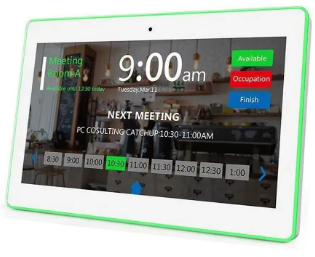
Hello everyone! I received one of these tablets (this) a couple of days ago.
I developed an app that creates an http server on the tablet and a Home Assistant integration that communicates on said server, creating a device in HA with the LED control, the Relays control and the IO control.
Maybe in the future I’ll add the temperature and humidity controls, but since I don’t need them, I didn’t include them just yet.
In the near future I’ll add a guide on how to use them and some documentation, so if you are able to do by yourself (it’s very easy), I would really appreciate some feedbacks, otherwise just wait and I’ll explain the process in details as soon as I have time.

1 Like

Thanks for creating this. Bit lost on how to install the app on the tablet from the source code on github so looking forward to the guide.

In the app repository, if you look at the release, you see the apk file

Thanks, not sure how i missed it but looked for apk file in the folders and could not find it. Thought i had to somehow compile it myself.

For some reason the buttons on the app when i open it does not work for me but when operating it from HA using HA-WallPanelControl both led and relays work.

Thanks again :smiley:

1 Like

Nice to know it works for you too! The buttons on the interface don’t work simply because they are not connected to any function yet, I’ll do it before adding the guide

I updated the android project with a readme with some basic instructions, and a working interface!
Let me know what you think!

I bought this one and it works great with your app!!
Are you still working on the temperature and humidity integration?

Cheers,

Sander

This is perfect, I have this working in the Android App but getting an error while tryign to add the device to the HomeAssistant Integration - @AlessandroTischer any help most appreciated!

Logger: homeassistant.config_entries
Source: config_entries.py:749
First occurred: 09:47:25 (1 occurrence)
Last logged: 09:47:25

Error setting up entry WallPanel for wallpanel_control
Traceback (most recent call last):
File “/usr/src/homeassistant/homeassistant/config_entries.py”, line 749, in __async_setup_with_context
result = await component.async_setup_entry(hass, self)
^^^^^^^^^^^^^^^^^^^^^^^^^^^^^^^^^^^^^^^^^^^^^
File “/config/custom_components/wallpanel_control/init.py”, line 12, in async_setup_entry
hass.config_entries.async_forward_entry_setup(entry, “light”)
^^^^^^^^^^^^^^^^^^^^^^^^^^^^^^^^^^^^^^^^^^^^^
AttributeError: ‘ConfigEntries’ object has no attribute ‘async_forward_entry_setup’. Did you mean: ‘async_forward_entry_setups’?

Would you try again now? I can’t test it, but I think it was a simple typo

I tried the manual edit before posting, async_forward_entry_setup to async_forward_entry_setups

I just redownloaded into HA from Github and see same issue as when I manually edited, the integrationn now loads but “No Device or entities” seen.

Logs show:

``Logger: homeassistant.config_entries
Source: config_entries.py:963
First occurred: 10:29:17 (2 occurrences)
Last logged: 10:29:17

Error unloading entry WallPanel for light
Error unloading entry WallPanel for switch
Traceback (most recent call last):
File “/usr/src/homeassistant/homeassistant/config_entries.py”, line 963, in async_unload
result = await component.async_unload_entry(hass, self)
^^^^^^^^^^^^^^^^^^^^^^^^^^^^^^^^^^^^^^^^^^^^^^
File “/usr/src/homeassistant/homeassistant/components/light/init.py”, line 703, in async_unload_entry
return await hass.data[DATA_COMPONENT].async_unload_entry(entry)
^^^^^^^^^^^^^^^^^^^^^^^^^^^^^^^^^^^^^^^^^^^^^^^^^^^^^^^^^
File “/usr/src/homeassistant/homeassistant/helpers/entity_component.py”, line 237, in async_unload_entry
raise ValueError(“Config entry was never loaded!”)
ValueError: Config entry was never loaded!`
type or paste code here

Ok, then I need to investigate further, but I can’t access my wall tablet right now, and I won’t be able to for at least a month unfortunately. Feel free to try and submit a pull request if you manage to solve the issue, otherwise kindly wait until I can get my hands on the device to test ands debug it. Sorry for the inconvenience…

Thanks for quick reply, will try dig further.

Doesnt look like typo, hass.config_entries.async_forward_entry_setup was just depreciated.

Not sure how to do a pull request but changing ‘init,py’ to below has got it working for me:

"""Smart Home Controller integration."""
import logging

from homeassistant.config_entries import ConfigEntry
from homeassistant.core import HomeAssistant

DOMAIN = "wallpanel_control"

_LOGGER = logging.getLogger(__name__)

# Define the platforms supported by this integration
PLATFORMS: list[str] = ["light", "switch"]

async def async_setup_entry(hass: HomeAssistant, entry: ConfigEntry) -> bool:
    """Set up wallpanel_control from a config entry."""
    hass.data.setdefault(DOMAIN, {})

    _LOGGER.debug("Setting up platforms: %s", PLATFORMS)
    await hass.config_entries.async_forward_entry_setups(entry, PLATFORMS)

    return True

async def async_unload_entry(hass: HomeAssistant, entry: ConfigEntry) -> bool:
    """Unload a config entry."""
    _LOGGER.debug("Unloading platforms: %s", PLATFORMS)
    unload_ok = await hass.config_entries.async_unload_platforms(entry, PLATFORMS)

    if unload_ok:
        hass.data[DOMAIN].pop(entry.entry_id, None)

    return unload_ok

Would love to get the temp/humidity working next.

1 Like

I didn’t receive any notification and honestly forgot about it, sorry. I updated the init file as per your suggestion. Since I still can’t test, let me know if it works! Thank you!