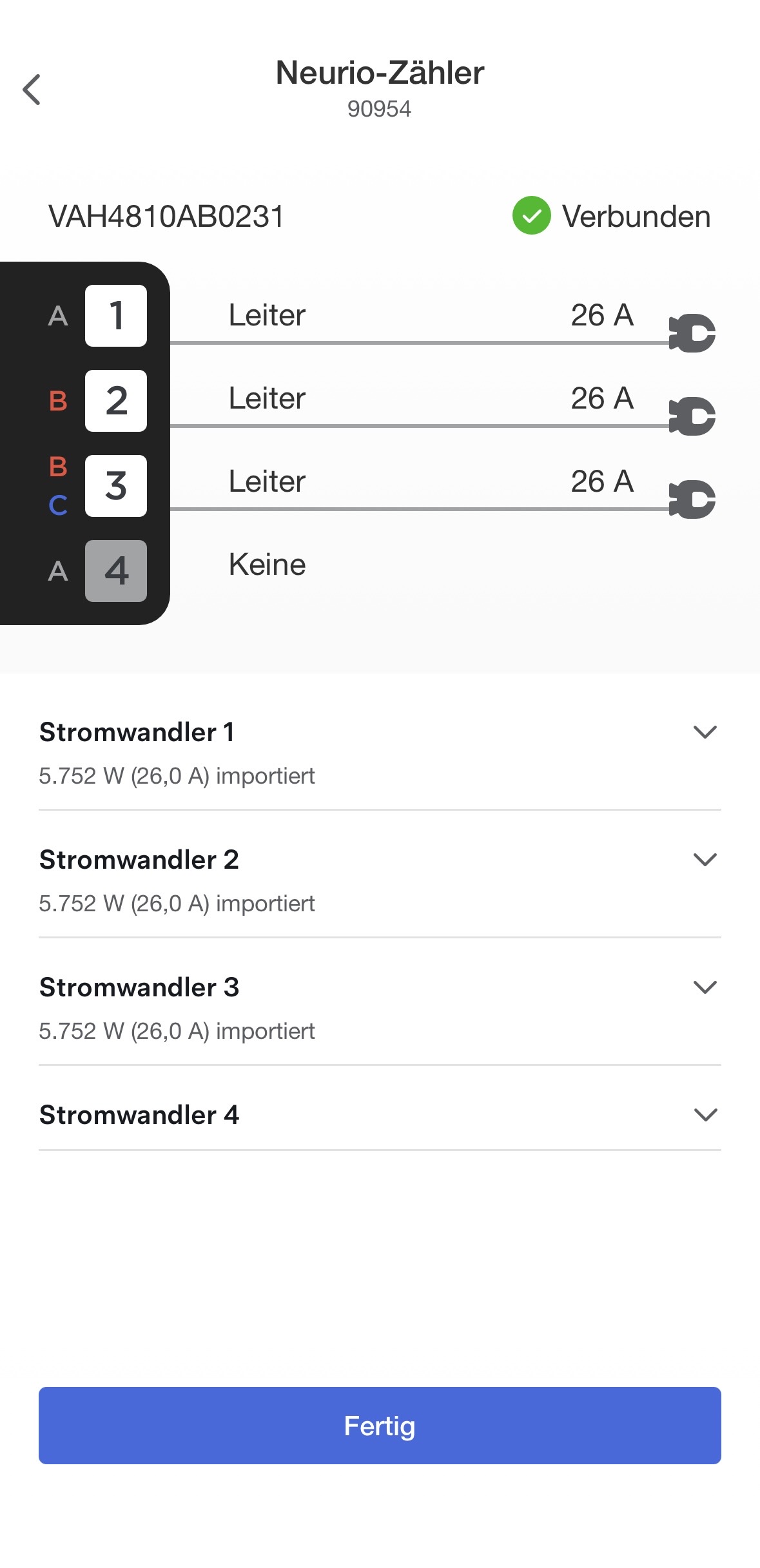
I wanted to share a small project I’ve been working on for controlling a Tesla Wall Connector Gen 3 via ESPHome over RS485, without relying on WiFi.
The idea is to emulate the Neurio energy meter and dynamically control the charging current based on external data, for example Home Assistant sensors, solar production, grid load, etc.
So far, this supports:
Dynamic current limiting of the Wall Connector
RS485 communication using ESP32 (I’m using LILYGO T-CAN485)
No dependency on the Wall Connector’s WiFi
Integration with Home Assistant via ESPHome
Phase configuration (1, 2, or 3 phase depending on installation and country setup)
Repo and config examples:
I haven’t been able to test every setup myself, so feedback and contributions are very welcome.
If anyone else is running a Gen 3 Wall Connector and wants to try this, I’d love to hear your results, setups, and any issues you run into.
If you have questions, suggestions, or improvements, feel free to comment or open issues on GitHub.
Thanks for sharing! That’s very helpful and interesting.
One thing is missing from my point of view, it would be nice to control multiple WC by adjusting the current available.
That would be a global load balancing + a power sharing feature.
For instance, 60A are the main fuse limit, 40A are used by the home, it would be useful to load balance the 20A to each WC if charging, by tweaking the neurio current each WC will see. So, each WC will have 10A.
Calculation will be something like
WC current = Free current/2 so 20/2 =10 A
So the current seen by the WC would be
Limit Current (set in Tesla app) - Free current/2
60A - 10A = 50 A, so it will deliver 10A to the car.
Could be adapted for more WC of course
Could also probably be done in HA with helpers, and conditioning if charging or if idle, but in the sketch it would be easier
Hello, I need to switch from a single phase to a 3 phase wall box and the Tesla Wall Connector 3 was a candidate. However, I am unable to find the officially supported power meter.
Since I’m already invested in Home Assistant, and I have a shelly sensor for all three phases, I guess this is the solution I need. Has anybody already used it successfully?
You can use any power meter as long as it provides sensors that report current in amps in Home Assistant. In my case, I use an ESP device connected to the P1/HAN port on my electricity meter provided by the utility company.
Thanks for the suggestion, @Keryan. I believe this can be set up quite easily in Home Assistant and the sensors can then be exposed to the controller. That said, if you would like to work on it, let me know and I can invite you to the GitHub project so you can develop the feature.
What I don’t fully understand is why you require the current and not the power.
My house meter is limited by total power, not by the highest current on any of the three phase.
The limit is 10kW, but it doesn’t mean that each phase is limited to 3.3kW; I could be drawing 8kW on L1, 1kW on L2 and 1kW on L3 and be ok, but can’t draw 4kW on L1, 4kW on L2 and 3kW on L3
The reason I use current (amps) instead of power is mainly because the Tesla Wall Connector protocol itself works with amps. The value we send to the charger is simply the allowed charging current.
If your installation limit is defined in power (kW) instead, you can easily convert that to current in Home Assistant.
For a 3-phase system the formula is:
I = P / (√3 × V)
Where:
P = power (W)
V = line voltage (400 V in a standard 230/400 V EU system)
I = current (A)
Example with a 10 kW limit:
I = 10000 / (1.732 × 400)
I ≈ 14.4 A
So roughly 14–15 A available per phase.
You could create a simple Home Assistant template sensor to convert power to current, for example:
You can then expose that sensor to the controller.
Also just to clarify: the controller does not prevent drawing higher load on multiple phases. It only limits charging if one individual phase approaches its configured limit. So something like:
4 kW on L1
4 kW on L2
4 kW on L3
would still work fine as long as none of the phases exceeds its limit.
I don’t think that would work in my case, but given I can modify the code, I can probably find a solution.
For example my meter has a 10kW limit (if I exceed it for enough time, it will disconnect and require manual re-arming).
Let’s assume I’m drawing 3kW on L1, 1 kW on L2 and 0kW on L3. (this is without the car charging, just household loads)
That’s a total of 4kW, so I have 6kW remaining for charging; that’s about 8.7A per phase, so the Tesla Wall connector should be limited to 8A.
The final result would be 5kW on L1, 3kW on L2 and 2kW on L3.
With the current logic, if I understand it correctly, it would see that L1 is already at full capacity and not start the charge.
That makes sense, and if your setup is based on a total power contract limit, then your approach is reasonable.
Feel free to modify the code and adapt the logic for your case. If you come up with a clean solution, a PR is of course very welcome.
Just keep in mind one limitation of the Tesla Wall Connector: it cannot set different current per phase. It always applies the same current on all phases. So even if you calculate available power based on total consumption, the final limit still has to work for the most loaded phase.
So depending on the load distribution (for example L1 already being higher than the others), that phase will still end up determining the safe charging current.
This is (Kind of) the thing, what i was looking for. I am an electrician, never programmed except of copy & paste, never used an esp32.
Set up HA a while ago.
This evening i am trying ESP Home and connect your reccomended LILYGO ESP (arrived today)
What is my GOAL?
I want to load my car with excess Solar energy.
How do i want to get there?
I think, i wont change your code (cause I don’t understand).
I think, i will set up an army of sensors and Calculations via helpers in HA, (to trick your code) so your code gives the TWC the wanted values.
If i understood correct, your code calculates
Max allowed amps - load Amps(from Smartmeter, but takes care of the actual Load from TWC) = Amps to TWC
I want to run it more like
PV - Load (from Smartmeter, but takes care of the actual Load from TWC) = Amps to TWC.
To calculate Power Values to Amps is the smallest Problem
Good question. It won’t crash Sorry late replay, been on a ski trip
If the “actual load amps” exceed the “max allowed amps”, the logic will simply result in a negative or very low available current for the TWC. In practice, this means the charger will either reduce charging to the minimum (5A) or stop charging completely, depending on how the final value is handled.
So it’s more of a self-correcting behavior rather than something breaking. The system continuously recalculates, and as soon as there is available capacity again, charging will resume or increase.
If you plan to run it based on PV surplus instead, your approach makes sense. In that case, you would basically feed “available solar amps” into the same control logic instead of grid limits.
The software is running now.
I get the „available solar amps“ into the control logic, calculation is correct - > it shows me, how much current could go to the TWC.
Connected the left and right (not the middle one) rs485 clamps to the TWC connectors.
Green LED is on, green blink is flashing. That’s good, right?
But the TWC doesn’t start to charge
Not sure, if i configured the TWC correct. It blinks blue.
Will have a look on the TWC configuration this afternoon.
If the system runs the way it should, i volunteer to write a manual for beginners like me.
Great, I will check it and test it. I had the idea to do something similar and I saw some projects on the wild analysing the protocol, but I didn’t have the time nor the opportunity to do anything. Thanks a lot @Klangen82 for your work
Yes, did the steps, like your pictures in the Tesla One app (TOA).
Testet again today. Same result.
But: In the moment when I delete in the TOA the configuration of the neurio-meter, the TWC starts to charge. But on the dumb way.
The second, when i configure the neurio Meter in the TOA the TWC stops charging and blinks 2x blue.
Switching Manual/Auto Mode: It doesent change the blue blinks, but the Tesla Wall Connector Control changes Amps.
Your Tesla Wall Connector Control: Calculates the correct values
Do you have any idea?
Screenshot from HA. (In the screenshot i made a mistake; only 2 phases configured. But this is corrected now, still 2 x blue flashes.)
I’m on the same boat as @ein. Actually it’s my friend who bought a Tesla Wall Charger 3 for his non-Tesla vehicle and I have to do something for him!
Anyway, I read the comments and github and still not sure if I understood it.
So first thing first, the goal is to have control over what current the TWC is charging the car - through HA and using excess solar generation.
And here are some questions:
If I don’t change the esphome yaml file, and use it as it is, can I use this Manual Target Setpoint as what I want?
Do I need to set Tesla Wall Connector Auto Mode switch to off so that manual setpoint takes effect?
The Status LED here means the LEDs on the TWC? right? Not the one on the ESP32 pcb?
In our setup, the house main fuse is 63A, but the charger itself has another fuse, I think it’s 30 or 40A. I assume I should set House Main Fuse to 30 or 40A, right? Having said that, I’m assuming in manual mode (TWC Auto Mode = off), that doesn’t matter.
Maybe I’d better read the yaml code anyway and stop being lazy…
And more importantly, well done @Klangen82, for putting this together.
Yes, the overall goal is to control the Tesla Wall Connector charging current from Home Assistant, for example to follow available excess solar or stay within your supply limits.
A few clarifications:
Manual Target Setpoint
Yes, if you use the YAML as provided, “Manual Target Setpoint” is the value used in manual mode.
Auto Mode vs Manual Mode
Yes, if you want the manual setpoint to take effect, “Tesla Wall Connector Auto Mode” should be OFF.
Auto Mode ON = ESP calculates the current automatically
Auto Mode OFF = Manual Target Setpoint is used
Status LED
This is the LED on the ESP32 / RS485 device, not the LED on the Tesla Wall Connector.
House Main Fuse
This should normally be the actual upstream house limit you want the logic to respect, typically your house main fuse.
There is also a separate “Wall Connector Max Current” setting, and that should reflect the charger / circuit capability.
Even in manual mode, House Main Fuse is still used as a hard upper limit, so it is worth setting correctly.
For a first test, I would suggest:
Auto Mode OFF
Set Manual Target Setpoint to a known value
Set Wall Connector Max Current correctly
Set House Main Fuse correctly
Confirm stable RS485 communication first, then move to automation
Thanks for your input. I think, i misconfigured something.
If i set the „ number.esp_wallconnector_house_main_fuse“ to 6A, the TWC immediately starts to charge, blue blink is gone… Will think about it tomorrow.
One and a half questions: GND is the middle connector on the ESP 485 connector, right? Where to connect it? Power for the esp comes from an usb C charger. The left and right 485 connectors are wired to the TWC.

 Sorry late replay, been on a ski trip