YAML? Redact password
nothing created…
this is an expanded error when i try setting configuration settings:
Failed to save add-on configuration, Missing option ‘homeassistant’ in root in texecom2mqtt (c15a2434_texecom2mqtt). Got {‘log’: ‘info’, ‘cache’: False, ‘texecom’: {‘host’: ‘192.168.1.165’, ‘port’: 10001}, ‘mqtt’: {‘host’: ‘mqtt://core-mosquitto’}, ‘areas’: , ‘zones’: }
is it because I’m running HAOS not docker?
Once the add-on has been installed you then set configuration before running the add-on … I copied the YAML from previous posts above into my configuration.
You need to set up the configuration first …and show us your YAML.
If you have not set-up configuration / YAML then you will receive errors.
1 Like
thanks - been tied up at work a bit, but will try this over the weekend…
Just curious to know if anyone has seen this before - I hadn’t/haven’t.
Away for a few days, at more or less (few seconds) bang on 01:00 UK local time, my SmartCOM started returning ‘Connecting Refused’ to the add-on.
My SmartCOM is firewalled from all internet access, but luckily I could remove the firewall restrictions, so it then connected to Texecom Cloud…where I could then reboot it.
I re-firewalled it and restarted this add-on and it reconnected fine. Just a bit odd, that it died more or less bang on 01:00.
Would have been a pain if it wasn’t connected to Texecom Cloud, i.e I wouldn’t have been able to restart it, whilst away.
I understand you need to disable encryption on the Texecom panel to allow it to communicate with the HA add-on, which I have done. However, is disabling encryption risky?
(FYI Google AI responds “disabling encryption for a Texecom alarm system is a very bad idea because it significantly compromises the system’s security, making it vulnerable to interception and manipulation. Texecom utilizes encryption as a fundamental security measure to ensure the reliability and safety of its systems and data transmission.”)
And if disabling encryption is a security risk, is there a way to mitigate it? Thanks!
No. I never heard of touching encryption
The information tab of the HA add-on explicitly refers to disabling encryption - see below screen grab. Is this a security risk and how can this be mitigated?
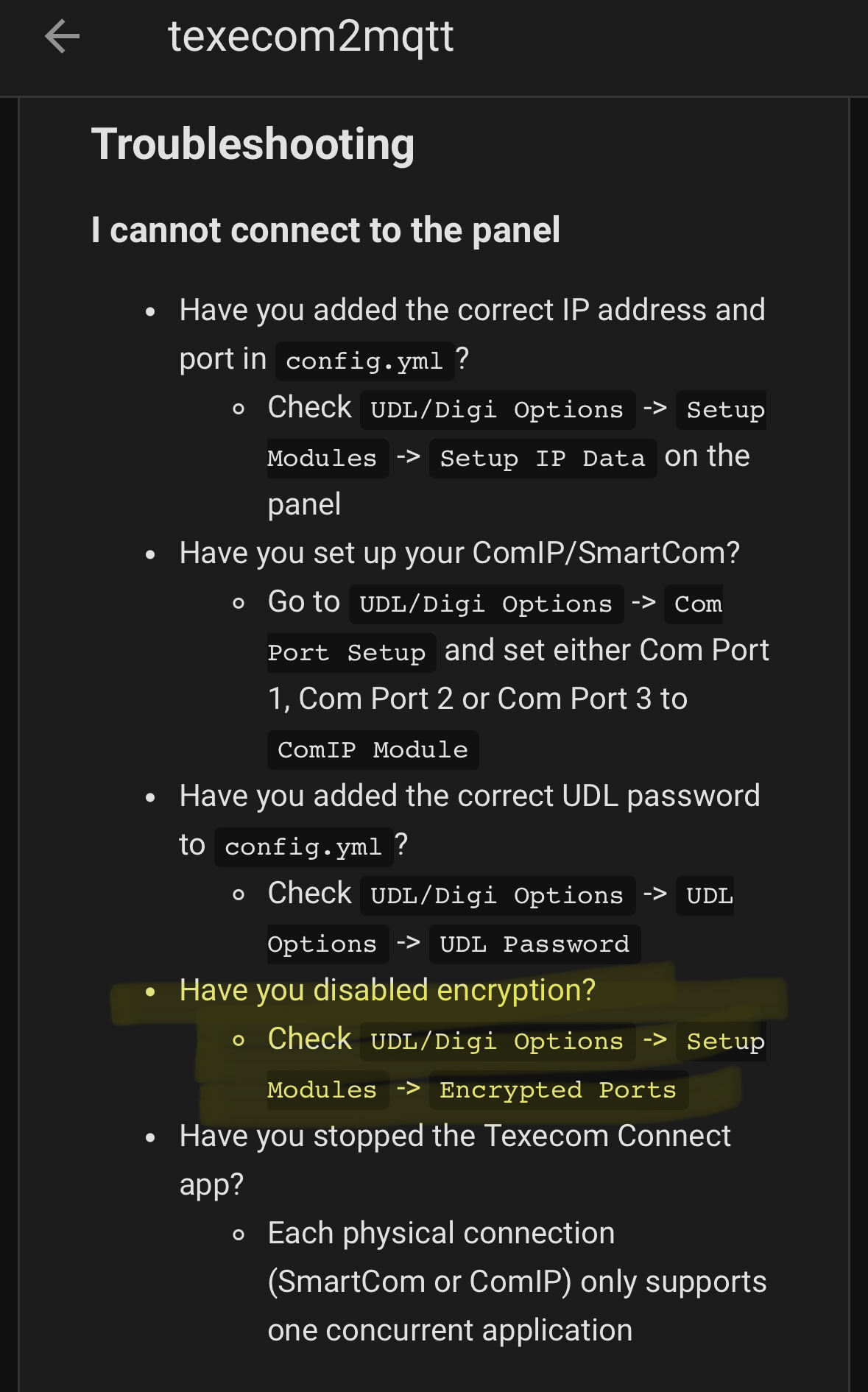
In setting up ComIP (and SmartCom), my alarm engineer and I followed the Texecom manual/ instructions. I can’t remember any instructions to alter encryption.
I may have missed something. I didn’t look at this trouble shooting for this integration because we had it working (eventually!).
Never touched encryption settings, it just works.
I have ComWiFi and SmartCom and have the docker container talking to ComWiFi.
On a side, Texecom confirmed the API can trigger an alarm, so I’d like that in the integration if possible, but no response from author 
1 Like
I have installed the Texecom2MQTT add-on in Home Assistant and it has connected successfully to the ComIP module on COM3 of my Premier Elite 24 and setup the Area A and Sensors as entities into my Home Assistant.
I am having an issue where the Arming->Armed transition is not being picked up by the Area A entity in Home Assistant.
The Texecom2MQTT log reports:
2025-12-16 15:32:16 - INFO: Area A status changed to Armed
Despite this, the Home Assistant Area A entity stays stuck at “Arming” until re-entry - at which point it successfully transitions to ‘Pending’ and then ‘Disarmed’ - so it’s just the ‘Arming’ state which does not seem to be working.
Any ideas on how to resolve would be appeciated.
I solved the issue above. I had not mapped my Texecom zone states to Home Assistant alarm states. The following configuration works:
log: info
cache: false
texecom:
  host: 192.168.1.x
  port: 10001
  udl_password: "xxxx"
mqtt: {}
areas:
  - id: A
    name: House Alarm
    full_arm: armed_away
    code_arm_required: false
    code_disarm_required: false
    code: "xxxx"
zones: []
homeassistant:
  discovery: true
  prefix: homeassistant
1 Like
I have a Premier Elite 48 panel with SmartComm 4G (CEL-0001) currently installed and a Texecom Cloud account. The SmartComm unit is connected to my network via Ethernet cable and I have 4G back-up enabled via a Texecom eSim subscription.
I’d like to add HA integration and preserve cloud access (otherwise the 4G backup is useless and I also like the remote firmware upgrade option). My understanding from reading this thread is that I’ll need to purchase an additional ComIP module to run the two in parallel and have them on their own IP. The WiFi NIC in my SmartComm is not currently connected so wanted to check if this could be used as the second interface instead? I only wired one ethernet cable to the controller so this would be much more convenient.
The second issue I foresee if I need an extra ComIP module, is that the Smartcomm 4G hardware connects to both the Com1 and Com2 sockets on the controller PCB and I can’t see an additional com port available if I need to install the ComIP module. Instructions online suggest the 4 wire connection on Com1 is for the SmartComm and the 2 wire connection to Com2 is for the ComIP module inside the SmartCom. Are both of these needed for cloud access? Is my understanding correct that SmartCom is the 4G connection and ComIP is the Ethernet NIC?
I don’t have easy access to a Windows Laptop so config is via Texecom cloud rather than WinTex.
Thanks!
I have SmartCom for the app and ComIP for HA (MQTT integration). You could use the SmartCom for HA but that disconnects the Texecom Connect App (which I think is now quite good).
SmartCom is installed on Com1 and Com2 and ComIP on Com3. If you do not have a Com3 port, from memory I think you need an expansion board. That is unless the 4G hardware has taken up all available expansion / com ports.
Both SmartCom and ComIP are hard wired. I ditched my SIM hardware as we had poor coverage in our area and went straight to Starlink satellite.
I don’t think I have quite answered your questions. I joined the Texecom forum and my installer has been very patient with me! We had problems getting the ComIP to work. A reboot needed!
Thanks for your reply. Are you using the ComIP that is part of the SmartCom unit (CEL-0001) or did you buy a separate module? I’d be happy if I could access the Connect App via 4G and keep the ethernet connection dedicated to HA but not entirely sure how to set that up. I’ve got texecom2mqtt and connect app both running at the moment but I understand that might give me issues.
Looks like I’ll need a JAL-0001 to convert the on-board digital communicator connector to a third Com port.
I also found I had to turn off monitor mode to get it working. Looking online I’m not entirely sure what the impact of that is.
Separate modules. And separate Ethernet with two separate IP’s. I am no so familiar with your set-up. I think the key is ensuring that your Connect App ALWAYS has a way of accessing the panel. 4G is normally “fall-over”. My fall-over is BT line (which is better than 4G where we live!).
My understanding is that MQTT and Connect App do not run together.
Yes I had an expansion board to allow third Com port. I am not sure of the part number.
I am shooting from the hip a little, so someone else might provide more light. I am following as I have house to convert from scratch an old Texecom panel to newer version.
Edit 1: Definitely join the Texecom forum. Your questions are probably better searched and asked there
I’ve got a Elite 64-w setup with both a SmartCom and a ComIP. I needed to use the ComPort+ to convert the connector at the top of the panel to a com port and then I could plug in the ComIP. Relevant photo:

(That is me holding the ComIP up as I had to workout where to stick it on the panel lid so that it would all fit. The ComPort+ is the tiny (and VERY expensive board plugged into the grey ribbon cable that plugs into the top of the board). That the plugs into the board I’m holding which then plugs into the Ethernet. ComIP looks like this:
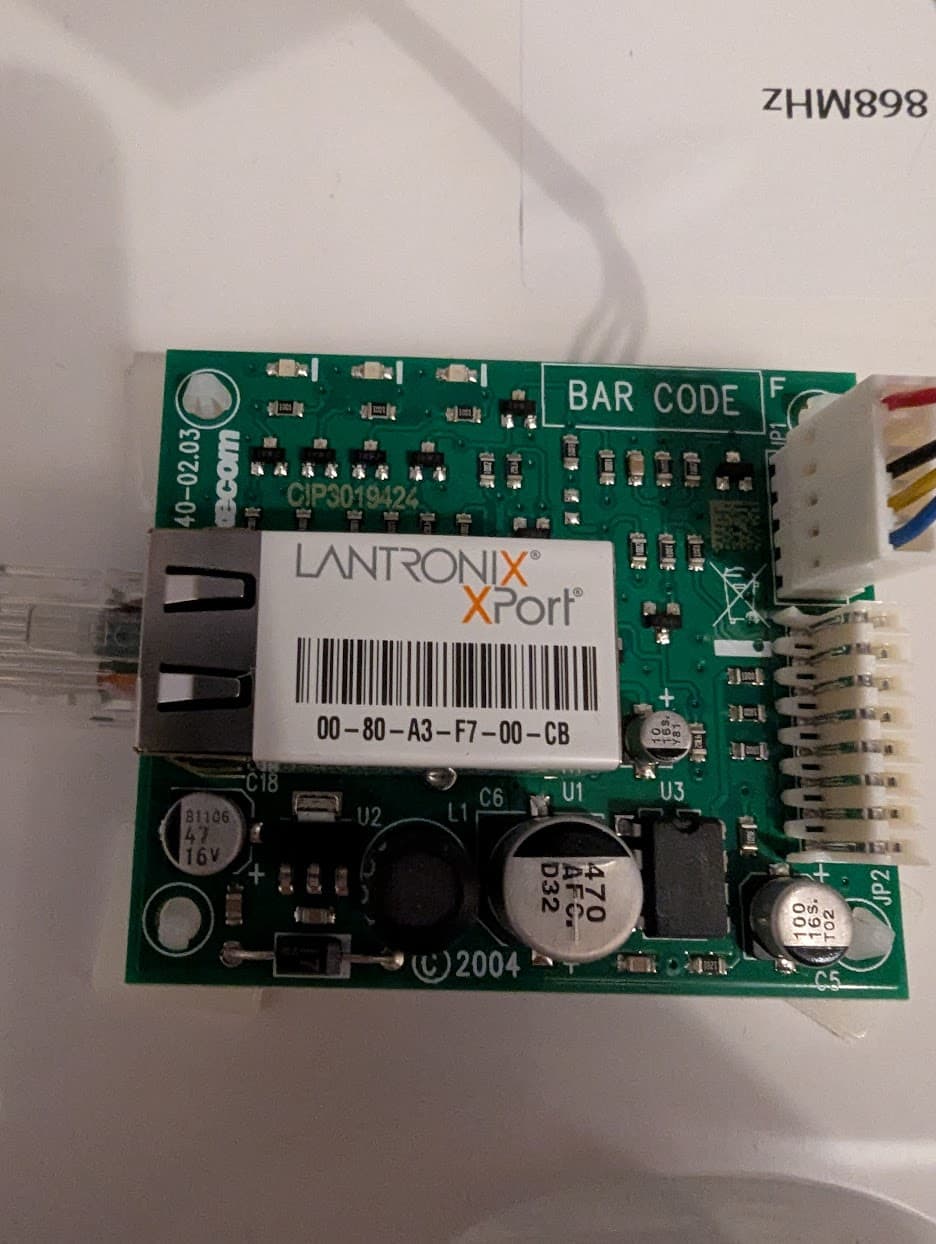
Anyway, hope this is useful.
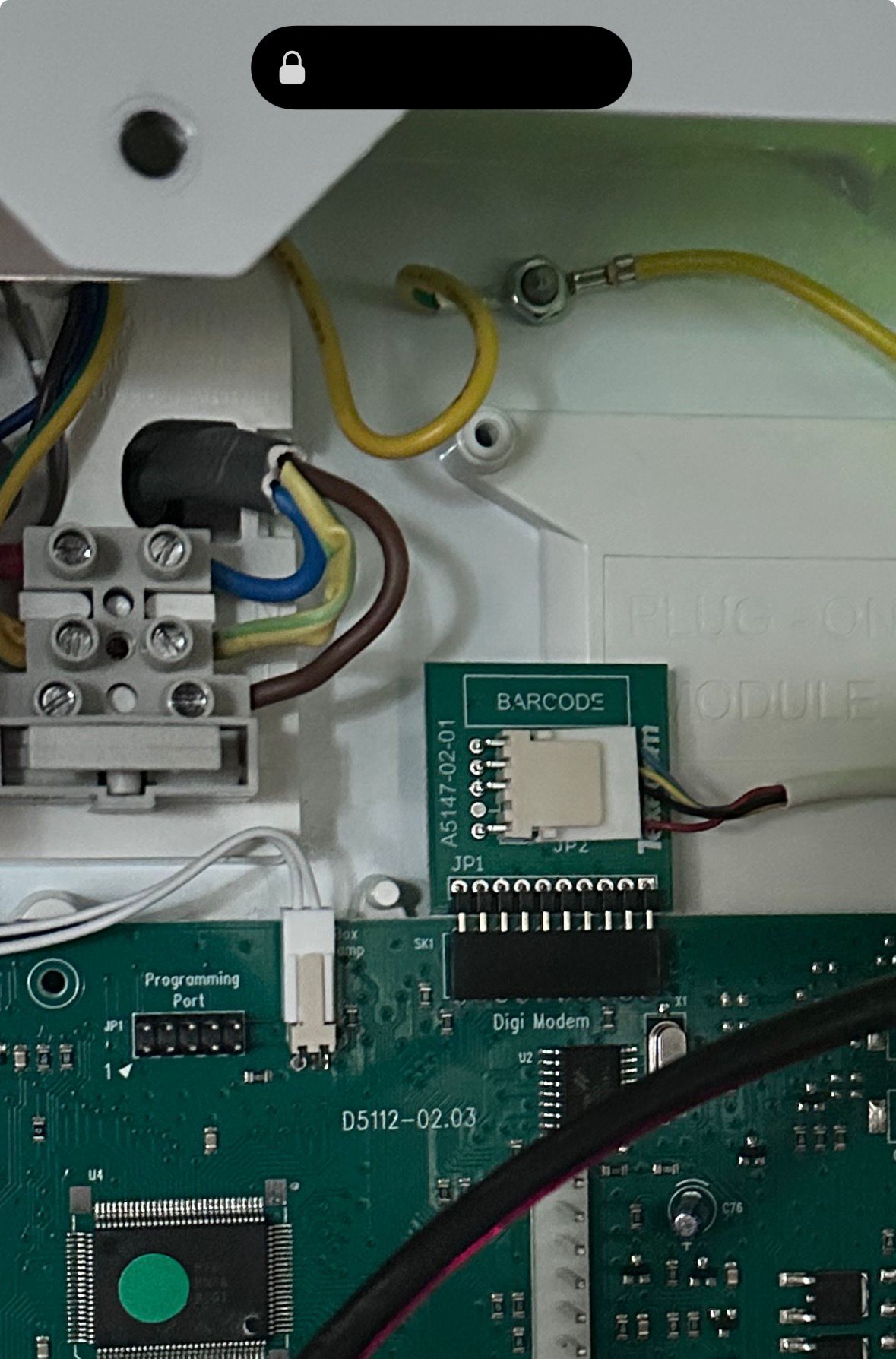
This is great thanks. I’ve just installed the same modules in my Premier Elite 48 and it’s working perfectly! The 10 pin ribbon cable that came with the Com+ confused me as on the Premier 48 it’s not needed and the module plugs directly onto the board!
1 Like
Now I’ve got everything up an running, I’m wondering if there is a way to assign each of the sensors to different HA areas. I can only seem to set the ‘Area’ at the top level for the alarm. I was hoping to assign the PIRs and door contacts to the appropriate room in the house for the auto-generated dashboards.
