Tiemme technical manual in Italian for the NG21 board.
The smoke fan speed can be set by Volt or r.p.m. If you choose Volt, the display will show Vol, and if you select r.p.m, it will show r.p.m, the same as in 30025.
To find the water pump status and airflow data points on your stove and setup, see my post 181 from May 2023, which shows what I did to find them on my test. you also needs a dattalogger for instance Leoshusar dattalogger
Hallo everybody, I have a normal esp32board (esp32dev)
I cannot have this project working. I don’t know if it is my board, the small ttl to rs232 module or the configuration. Dos somebody have the same espboard and can share the configuraion with me? Thanks
I accidentally found at first try that I can get it at J40016 where there are binary sensors from outputs. 0 is off, 1 is on. This is on KEPO stove. Might be also other positions of the J40016 mean some outputs.
@ebagnoli
I don’t think there’s a universal yaml, but you have to customize it for your stove/board, and the datapoints you can use are those you can see on the display.
For instance, the Leoshusar datapoint has airflow, not rpm, while the Kellerman datapoint has rpm, not airflow.
Also, very important parameters like the set room temperature: on some boards it’s 20493 and on others it’s 21700, while on others the boiler target temperature is 20180 and on others it’s 20199
I couldn’t send you a PM, so I’m gonna reply here in English.
Pretty much everything is explained here. Also the fact that 4heat integration is a crap for 200€ and only useful to find the datapoints for specific stove.
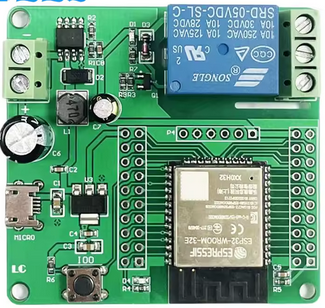
About the devices, I use one ESP32 relayboard at the stove end, like this:
This switches the NO relay on and off. Also the uart of this is connected to this ttl->rs232 adapter:
and then to the RS232 port on the stove. This is the main controller itself.
The other part is my indoor thermostat on another ESP32 which uses AHT20 for temperature input, this toggles the other ESP32. I use HTTP GET requests for toggling the other ESP32 (so it works even without HA) and a simple thermostat configuration.
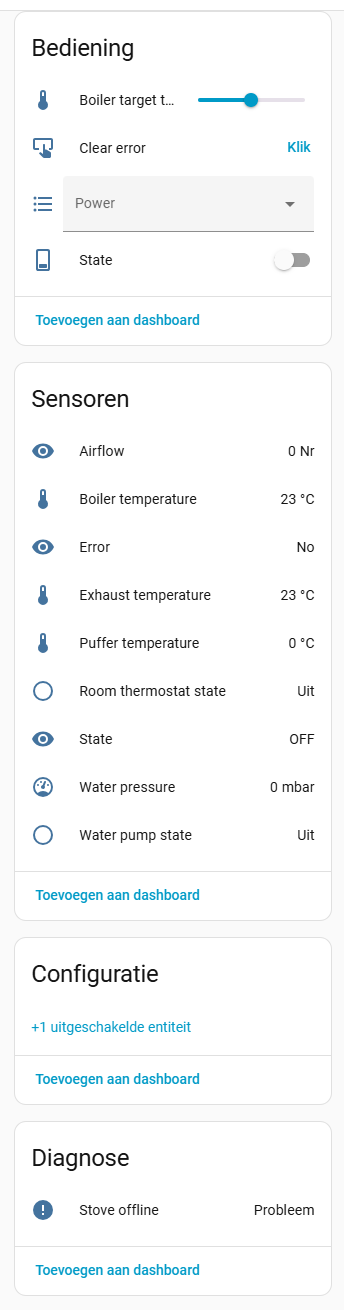
I recently bought and installed a Teba TP30-F. Now I’m trying to get the stove connected to HomeAssistant using ESPHome. Some things are working, some aren’t. Not all the datapoints seem to match my stove. I Can anyone help me?
Attached is also a photo of the motherboard; I suspect it’s a Tiemme MB100.
This is a great manual and can be used to understand all the parameters on the board. Also NG01, MB250 and SY250 manuals can be used to understand things. But is there available the specific manual for the NG21 (non-AIR) version?
I have the MB100 manual and found some information there.
After reading this forum and another one about the 4Heat app, I discovered that the “power” is in register “B20816” instead of “B20364.”
Now I’m still looking for the correct data point for the water pressure sensor; “J30020” doesn’t work for me.
I don’t have the NG21 hydro manual, but if you like the wiring diagram,
I think the board most similar to the NG21 is the MB100 Hydro, which can use the remote control with a display, but the NB100 has two firmware versions: one for use with the radio control display and one without as Ng21.
MB100 Hydro Manual in edit 7 my post 229
To use the manual, you need the password. If you don’t have it, send the datapoint:
Hello, good afternoon. I’m trying to integrate my Dielle hydrostove. After several attempts, I managed to add the integration.
Unfortunately, once installed, when I configure it, the following error appears in the log.
Registrador: homeassistant.config_entries
Fuente: config_entries.py:749
Ocurrió por primera vez: 14:30:23 (1 ocurrencia)
Última vez registrado: 14:30:23
Traceback (most recent call last):
File “/usr/src/homeassistant/homeassistant/config_entries.py”, line 749, in __async_setup_with_context
result = await component.async_setup_entry(hass, self)
^^^^^^^^^^^^^^^^^^^^^^^^^^^^^^^^^^^^^^^^^^^^^
File “/config/custom_components/4heat/init.py”, line 100, in async_setup_entry
hass.config_entries.async_forward_entry_setup(entry, “sensor”)
^^^^^^^^^^^^^^^^^^^^^^^^^^^^^^^^^^^^^^^^^^^^^
AttributeError: ‘ConfigEntries’ object has no attribute ‘async_forward_entry_setup’. Did you mean: ‘async_forward_entry_setups’?
I wanted to know the datapoints that work for my stove and setup. To solve this, made a procedure my post 186, final result is the Excel file.
The hardware is the same as for the esphome integration plus a datalogger.
The software is one I made using the Arduino IDE and dattalogger. For instance you can use leoshussar dattalogger (post 207) without the TTL-RS232 converter.
In your case, if you run the program first on Power 2 with the stove off, you’ll see a datapoint ending in 2 and the water pressure. If you run it again on Power 5, you’ll see a datapoint ending in 5 and another ending with the new water pressure value.
All the mirrors above (20128, 20384, 20640, 20896, 21152, 21408, 21664, 21920, 30128, 30384, and also 50128),
The usual candidates from community posts: 20180 and 20199,
I tested scales 1/10/100 (69 / 690 / 6900).
I confirm using A<DP>… right after the write, and I also watch all the mirrors for a few seconds.
Result:
On some mirrors (e.g. 20128) I do get an immediate ACK (A20128…69) after B20128…69, but the actual value quickly reverts to the previous target (73 in my case), and the mirrors remain at 73.
Writing 20180/20199 doesn’t seem to take effect either (also tried with and without doing a small C/E/G handshake).
I also tried J30255… (which I understand is clear error/ack, not a general unlock), and ensured the setpoint is within min/max range.
My questions
Which exact DP and scale should be used on SY400 to set the stove target temperature via RS-232? Is it 20180 (scale 1) on this board, or another 20xxx/50xxx DP (e.g. 50128 with ×100)?
Is there a required sequence (e.g. enter installer mode, specific “unlock” DP, or handshake) before a write to the setpoint sticks?
Does the chrono/scheduler mode or certain operating phases (Ignition/Safety) prevent setpoint changes? From OFF/Standby I can change the target on the front panel; I’d expect the bus write to be allowed too.
For min/max stove thermostat range, are B20005/B20006 the correct write DPs on SY400? (If yes, what are the definitive readback DPs for this board to verify after writing?)
If anyone has a confirmed write example for SY400 (the exact Bxxxxx… that persists and the corresponding Axxxxx… readback that shows the new value) I’d really appreciate it.
Thanks!
******** UPDATE *******
now I can read and write the stove setpoint and its min/max range reliably.
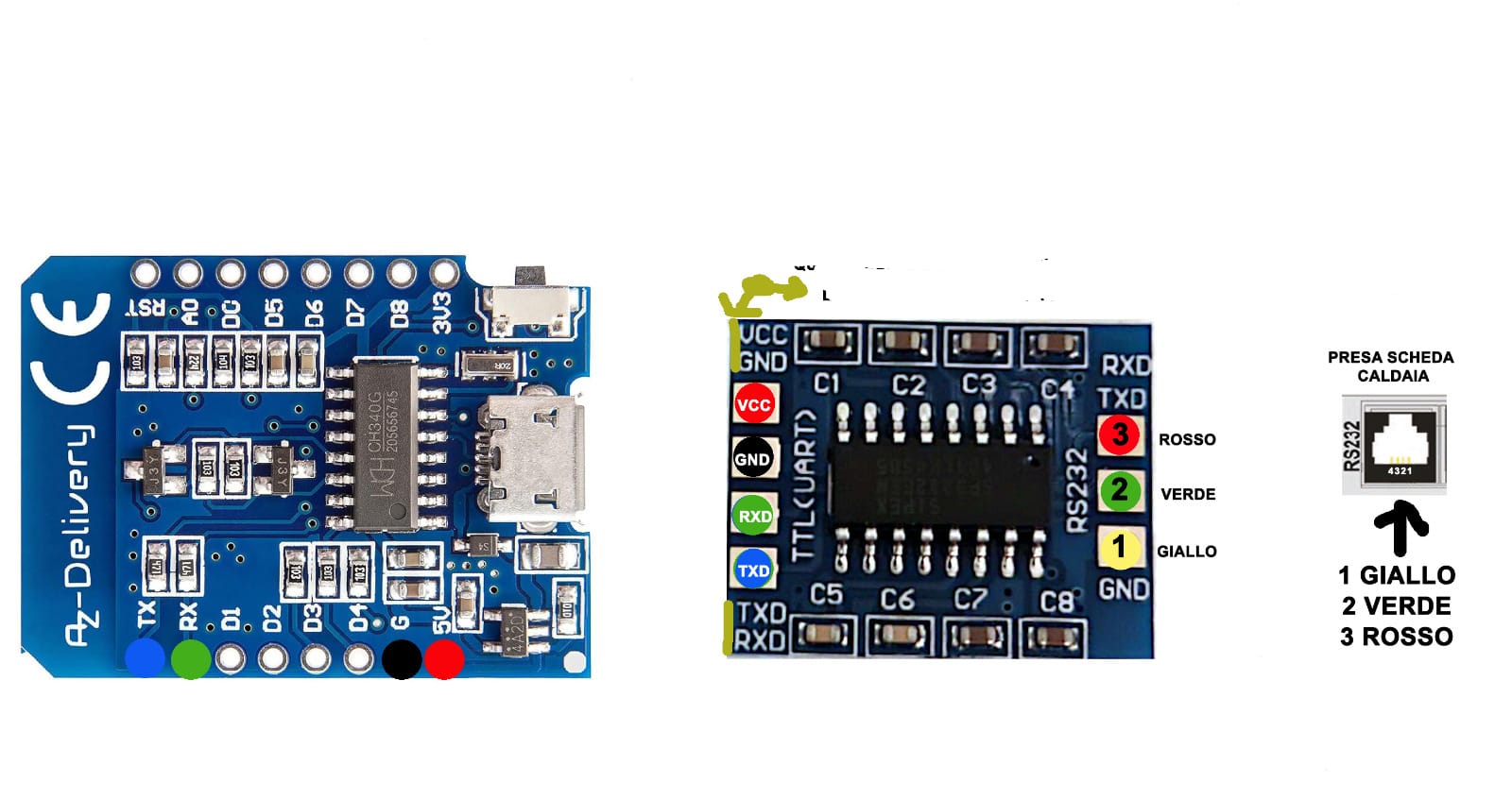
Good morning, I wanted to share my misadventure with you. I have a boiler with an NG21 board. For the configuration, I used the catdogmaus yaml file and the hardware was a D1 Mini and an RS232-TTL converter. Once connected, everything worked right away, but only for a day. After that, the RS232 port on the NG21 board went offline. The boiler board port burned out. Now I’m forced to replace the entire boiler board. I don’t understand what I did wrong. Could you please explain my error? Here’s the diagram of my configuration. Thanks for your help
Hard to tell, I would say there are 2 possible options.
wiring from TTL to RS232 was wrong
faulty board(s)
In your diagram there is data not from TTL to RS232 but to rj11 socket. rj11 should actually connect NG21 board to RS232 outside. I personally would not trust that this manufacturers rj11 wiring follows any standard. RS232, if present should however be standardized. We use for connection only rx, tx and GND. However in RS232 side also vcc is present! Error here could end badly.
However, considering that it actually worked, I would lean to faulty board. I have never used that particular board so it is impossible to say for sure.
Both versions are plausible.