Currently I don’t have a blueprint that would do this.
Blacky 
No worries, I’ve written an automation that does it 
Hey,
is it possible, to change the timer with a slider in the dashboard?
I want to control the time, a device is turned on…
Greets
Yeah, anything is possible it Home Assistant 
I will explain why I develop it like this and how I use it as it may help you or anyone reading this.
My use case is to turn on my electric blanket in my bed. Depending on how cold it is depends on how long I would like my electric blanket ON. When developing it a slider is hard to set on your mobile phone and I just wanted something quick and easy. The electric blanket is plugged into a smart switch and it is turned ON for the max time. Safe guards are in the electric blanket controller so all is good.
It is a blueprint as I use this on all my beds and beds have 2 sides (2 controllers)
I don’t know if that will work for you but I thought I would explain this as it just could be what your looking for.
Blacky
Hello,
I love your blueprint. But I have a problem with it.
When I want it to control climate it will turn it on, but it won’t turn it off.
Here is my config:
alias: "FVE: Turn on boiler for a given duration"
description: ""
use_blueprint:
  path: Blackshome/trigger-run-on-timer.yaml
  input:
    timer_helper: timer.bojler_casovac
    entity_input:
      entity_id: climate.kotelna_bojler
    include_timer_helper: enable_timer_helper
    trigger_one_time:
      hours: 1
      minutes: 0
      seconds: 0
    trigger_two_time:
      hours: 2
      minutes: 0
      seconds: 0
    trigger_three_time:
      hours: 3
      minutes: 0
      seconds: 0
    trigger_four_time:
      hours: 4
      minutes: 0
      seconds: 0
    trigger_state: state
    trigger_one:
      - input_button.bojler_na_1h
    trigger_two:
      - input_button.bojler_na_2h
    trigger_three:
      - input_button.bojler_na_3h
    trigger_four:
      - input_button.bojler_na_4h
    include_extra_triggers:
      - use_trigger_two
      - use_trigger_three
      - use_trigger_four
Did I do something wrong? Or could you fix it, please?
Thank you,
Tomas
All your YAML looks good, just check your timer helper. Below is my one for your reference. Note the duration and the restart must be ticked so it will survive a HA restart.
Let us know how you go.
Blacky
I have the timer set the same. This is a trace that happens when the timer stops and the climate should be turned off:
I’m not sure which parts of the trace are useful.
This is step details:
Executed: January 21, 2024 at 12:20:49
Result:
result: false
conditions/0
Executed: January 21, 2024 at 12:20:49
Result:
result: false
conditions/0/conditions/0
Executed: January 21, 2024 at 12:20:49
Result:
result: false
entities: []
conditions/1
Executed: January 21, 2024 at 12:20:49
Result:
result: false
conditions/1/conditions/0
Executed: January 21, 2024 at 12:20:49
Result:
result: false
entities: []
conditions/2
Executed: January 21, 2024 at 12:20:49
Result:
result: false
conditions/2/conditions/0
Executed: January 21, 2024 at 12:20:49
Result:
result: false
entities: []
conditions/3
Executed: January 21, 2024 at 12:20:49
Result:
result: false
conditions/3/conditions/0
Executed: January 21, 2024 at 12:20:49
Result:
result: false
entities: []
conditions/4
Executed: January 21, 2024 at 12:20:49
Result:
result: false
conditions/4/conditions/0
Executed: January 21, 2024 at 12:20:49
Result:
result: true
entities: []
conditions/4/conditions/1
Executed: January 21, 2024 at 12:20:49
Result:
result: false
conditions/5
Executed: January 21, 2024 at 12:20:49
Result:
result: false
conditions/5/conditions/0
Executed: January 21, 2024 at 12:20:49
Result:
result: true
entities: []
conditions/5/conditions/1
Executed: January 21, 2024 at 12:20:49
Result:
result: false
conditions/6
Executed: January 21, 2024 at 12:20:49
Result:
result: false
conditions/6/conditions/0
Executed: January 21, 2024 at 12:20:49
Result:
result: true
entities: []
conditions/6/conditions/1
Executed: January 21, 2024 at 12:20:49
Result:
result: false
conditions/7
Executed: January 21, 2024 at 12:20:49
Result:
result: false
conditions/7/conditions/0
Executed: January 21, 2024 at 12:20:49
Result:
result: true
entities: []
conditions/7/conditions/1
Executed: January 21, 2024 at 12:20:49
Result:
result: false
conditions/8
Executed: January 21, 2024 at 12:20:49
Result:
result: false
conditions/8/conditions/0
Executed: January 21, 2024 at 12:20:49
Result:
result: true
conditions/8/conditions/1
Executed: January 21, 2024 at 12:20:49
Result:
result: true
entities: []
conditions/8/conditions/2
Executed: January 21, 2024 at 12:20:49
Result:
result: false
entities:
  - climate.kotelna_bojler
conditions/9
Executed: January 21, 2024 at 12:20:49
Result:
result: false
conditions/9/conditions/0
Executed: January 21, 2024 at 12:20:49
Result:
result: false
For the sake of testing, I’ve set the run time for 10s.
It does not work just for the climate. When I change the boiler climate with a switch it works great.
Should I send you anything else?
I see, I will PM you.
Blacky
Hello !
Many thanks Blacky for this really nice blueprint.
I wanted to develop one but yours is so advanced I gave up mine
I would like also to add a condition (SUN condition).
How I could achieve this in your opinion please ?
My use case:
Another request:
could you add a notification system before and after the action ?
For instance, a notification is sent via Telegram or other solution before the light is switched on and another notification after it is back to off.
last question: how do you display remaining time of a timer please ? I can display the duration of the timer in a card but not the remaining time.
Thank you again !
Hi again,
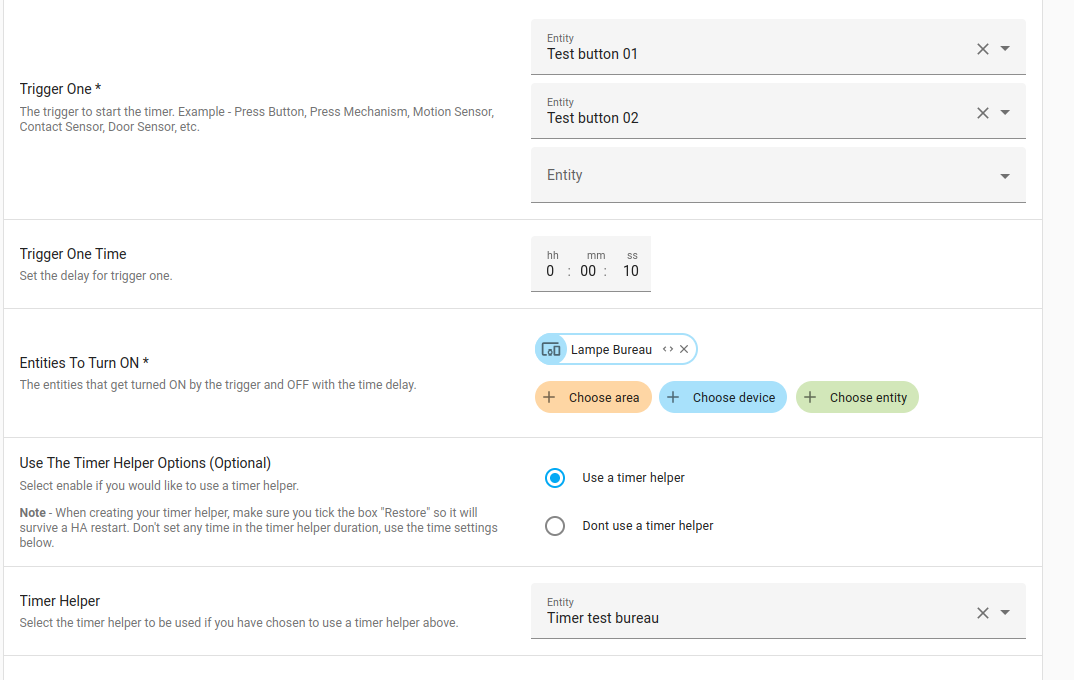
I’m still testing your blueprint. I’m facing an issue when I use a timer helper:
Everything goes well until the timer is over:
When I click on the trigger-button, the timer looks good:

At the end of the timer, the light doesn’t switch off and in the log:
homeassistant  | 2024-02-23 08:45:04.024 WARNING (MainThread) [homeassistant.components.automation] Error evaluating condition in 'Test timer bureau':
homeassistant  | In 'condition':
homeassistant  |   In 'or' (item 9 of 10):
homeassistant  |     In 'and' (item 3 of 3):
homeassistant  |       In 'template' condition: UndefinedError: 'dict object' has no attribute 'entity_id'
I don’t understand my issue… 
Thank you in advance !
It is probably because you are using a device and not an entity. But have a look at this blueprint  Manual light control with auto OFF it may be more inline with what you are trying to do.
Blacky
Hi,
Many thanks !!! I changed to an entity and now it works perfectly !! 
The blueprint you mentioned is not totally what I’m looking for, but I keep it 
Thanks ! 
FAQ - How do I create a timer helper?
To create a Timer Helper, follow these steps:

Your done 
Enjoy
Blacky
Back to FAQ: Click Here
 New Feature - Collapsible Sections
Collapsible Sections - Added collapsible sections to the blueprint. This enhancement improves the blueprint user interface by making it cleaner and more organized, allowing sections to be collapsed.
 This feature was introduced in Home Assistant 2024.6, so you must have this version or later for the blueprint to work.
 Maintenance
If you like this blueprint? Consider hitting the  button in the top post
If you like my blueprints, and would like to show your support or just say thank you? Click Here 
Enjoy
Blacky
My end durations were never triggering the ‘off’ state. I finally recognized I had changed “Use The Timer Helper Options” to ‘Use a timer helper’. I expected that since I hadn’t selected a Timer Helper in the next form item, that it would fall back to the default delay duration triggering the ‘off’ state but this is currently not the case. Basically, if you say you’ll use a timer helper but don’t specify one, your timer will never fire.
I suggest removing the 'Use a Timer Helper Options question altogether. You can infer from the ‘Timer Helper’ question. Use one if one is specified, otherwise don’t.
Welcome to the comunity
If you select to use the Timer Helper then yeah you have to input your timer helper into the Timer Helper input. In the description of Timer Helper input is states that you need to select your timer helper if you opted to use a Timer Helper. I will update it so that if you select to use a Timer Helper and you don’t select one it will not work.
Thanks for your feedback.
Blacky
Maintenance
If you like this blueprint? Consider hitting the button in the top post
If you like my blueprints, and would like to show your support or just say thank you? Click Here
Enjoy
Blacky
New Feature
Trigger Five - Increment Duration - Every time the button helper is pressed, it increments the timer’s remaining time by a specified duration set in the Increment Duration (e.g., 15 minutes). The value is dynamically added to the timer’s remaining time, ensuring the timer’s duration continues to increase with each press of the button helper.
This input is ideal for scenarios where you need to extend the timer’s duration repeatedly, such as when additional time is required for tasks, without resetting the timer completely.
If you like this blueprint? Consider hitting the button in the top post
If you like my blueprints, and would like to show your support or just say thank you? Click Here
Enjoy
Blacky