Trying to remove the space for the icon in Entities card

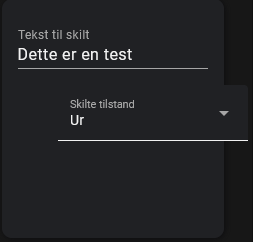
I have an entities card which overflows because of the space for the icon.
billede
The card looks like this:

type: entities
entities:
  - entity: input_text.matrix1_scrolling_text
    name: Tekst til skilt
    type: custom:text-input-row
  - entity: select.displaymode
    icon: none

I need to remove the space for the icon as well, so I tried adding

style: |
  state-badge { display: none; }

To the entity line, but that didn’t work, how do I target that specific state-badge?

Assuming you have Card-Mod installed, this should do the trick:

card_mod:
  style:
    hui-generic-entity-row $: |
      state-badge {
        display: none;
      }

See this post:

3 Likes

Works like a charm

1 Like

edit: Note: As can be seen in the following discussion, the variant I presented in the following is only better at first glance. It is not recommended to use these and instead do the styling per row as mentioned before.


I did not want to repeat the card_mod style for every entity and adapted the code above having a single declaration for the entities card. If you have sensor entities the solution would be like this:

type: entities
entities:
  - entity: sensor.heizung_mode_preset_friendly
    name: Betriebsart
  - entity: sensor.heizung_state_action_program_friendly
    name: Status
  - entity: sensor.heizung_current_hvac_action
    name: Aktuell
  - entity: sensor.heizung_current_state
    name: Modus
card_mod:
  style:
    '#states div':
      hui-sensor-entity-row $:
        hui-generic-entity-row $: |
          state-badge {
            display: none;
          }
          .info {
            margin-left:0 !important;
          }

For other entity row types it has to be changed respectively.

… and if you have together toggles, sliders, input boxes - then you have to list all types)))

Yes, but how is that a disadvantage? The previous solution was to add styles for every single row. My solution only requires the specification for each type of row - if you only have one, as in my example, it is much easier this way. In addition, I define everything in a block at the end and not in between in the card configuration.
If you have a better solution that works generically for every type, then let me know :slight_smile:

The longer DOM path you have - the less persistent & reliable your styles can be.
It is not about “how can I define a path to get to each type of row” - it is EASY with using “:first-child” etc.
So, I would suggest to use a per-row styling - it is less cumbersome with yaml-anchors, classes, decluttering-template etc - but it is more stable.

Hm ok, thank you very much for your explanation. I think this is “advanced programming” :slight_smile: At the moment, I’m already happy if it works at all. At best, I even understand why.

But after reading your post again, I now understand your point of view and agree with you. With my variant, there is a greater chance that it will stop working at some point due to changes in the DOM. I’ll keep that in mind in the future.
1 Like

i am trying to achieve this same thing but it’s not working.

type: custom:button-card
name: Washer
icon: mdi:washing-machine
tap_action:
  action: navigate
  navigation_path: laundry
entity: sensor.washer_machine_state
custom_fields:
  btn:
    card:
      type: vertical-stack
      cards:
        - type: entity
          tap_action:
            action: none
          entity: sensor.washer_cycle
          name: Cycle
          card_mod:
            style:
              hui-generic-entity-row $: |
                state-badge {
                  display: none;
                }
        - type: entity
          entity: sensor.washer_sub_cycle
          name: Subcycle
          card_mod:
            style: |
              ha-card .value{
                weight: 100;
                font-size: 3px !important;
                weight: 500;
                color: rgba(255,255,255,0.7)
              }
              ha-card .name{
                font-size: 9px;
                weight: 600;
                color: rgba(120,171,168,1)
              }
              ha-card {
                width: 170px;
                height: 50px !important;
                align-items: center !important;
              }
        - type: entity
          entity: sensor.washer_time_remaining
          name: Remaining
          card_mod:
            style: |
              ha-card .value{
                weight: 100;
                font-size: 3px !important;
                weight: 500;
                color: rgba(255,255,255,0.7);
              }
              ha-card .name{
                font-size: 9px;
                weight: 600;
                color: rgba(120,171,168,1)
              }
              ha-card {
                width: 170px;
                height: 50px !important;
                align-items: center !important;
              }
styles:
  grid:
    - grid-template-areas: "\"n btn\" \"s btn\" \"i btn\""
    - grid-template-columns: 1fr min-content
    - grid-template-rows: min-content min-content 1fr
  card:
    - padding: 15px 15px 15px 15px
  custom_fields:
    btn:
      - justify-content: end
      - align-self: start
  name:
    - justify-self: start
    - align-self: start
    - font-size: 19px
    - font-weight: 600
    - color: |
        [[[
         if (states['sensor.washer_machine_state'].state == 'Run')
           return 'rgba(102,197,204,0.8)';
         else return 'rgba(96,114,116,0.6)'; 
        ]]]
  state:
    - min-height: 80px
    - justify-self: start
    - align-self: start
    - font-size: 13px
    - font-weight: 500
    - color: rgba(255,255,255,0.7)
  img_cell:
    - justify-content: start
    - position: absolute
    - width: 120px
    - height: 120px
    - left: 0
    - bottom: 0
    - margin: 0 0 -20px -20px
    - background: |
        [[[
         if (states['sensor.washer_machine_state'].state == 'Run')
           return 'rgba(102,197,204,0.8)';
         else return 'rgba(96,114,116,0.6)'; 
        ]]]
    - border-radius: 500px
  icon:
    - width: 60px
    - color: black
    - opacity: "0.5"
show_state: true
grid_options:
  columns: null

The first card still shows the icon.

EDIT: How do you post code so it keeps the coloring?