I have the same Car. Which entities did you use? Many Thanks!
Does anyone know where I can find a image of a 2004 Chevy Trailblazer? That’s what I’m driving right now.
Hi, i use those ones (in french haha), i have some doubt about few status because Renault entities aren’t that much precise :

I’m using this with the Toyota HACS integration and it’s working great. There’s one thing I’d like to add which is the last updated time. I have an entity for each car that shows the last updated time but it’s just a number value and not an actual date/time.
How would I get this to show? See screenshot with area boxed red. Also how do I change out the Icon to state Last Updated? Would really prefer this at the top above the car, but can’t figure out how to get it there either, so I’ll take what I can get if someone can assist.

Really great job. The cards look fantastic.
Is there a way to always use the latest known data when the vehicle (in my case a Tesla) goes to sleep mode and no longer transmits data?
So far, all informations always change to “unknown”, which is a pity and could actually be avoided if in this case the last existing data were displayed in the map.
1 Like
First of all, GREAT JOB on this Card, thanks alot!
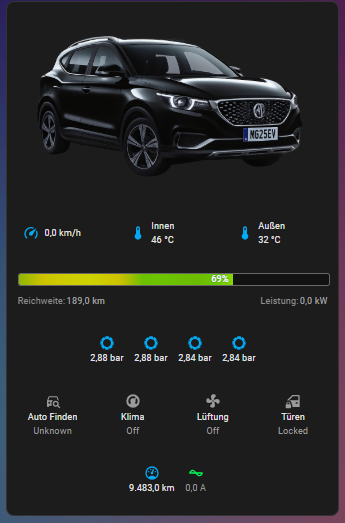
I have an EV, MG4, and everthing works as intended. I just have one issue about on “Icon Grid Configuration” where I want to add an entity, which shows and controls the climatisation of the car.
I am using the entity:
climate.lsjwh4096pn192965_vehicle_climate
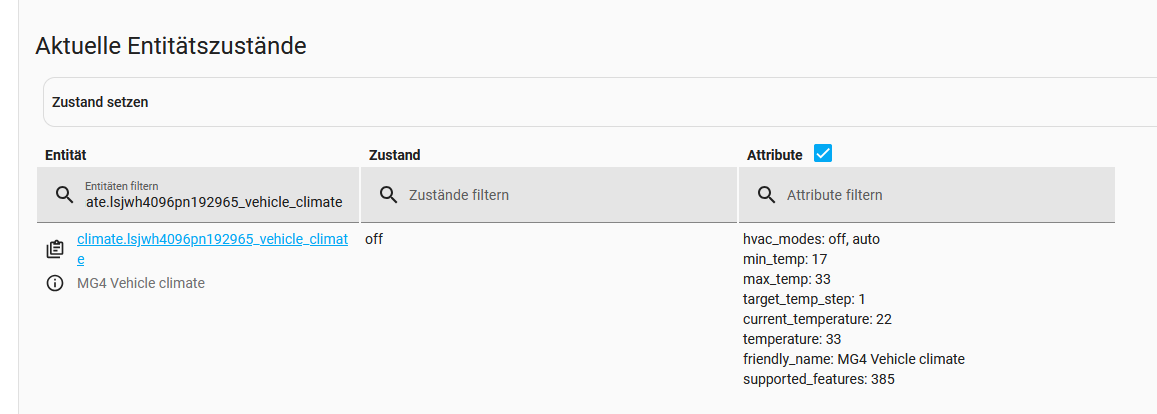
Adding this to the Custom Icon Grid, I get this screen:
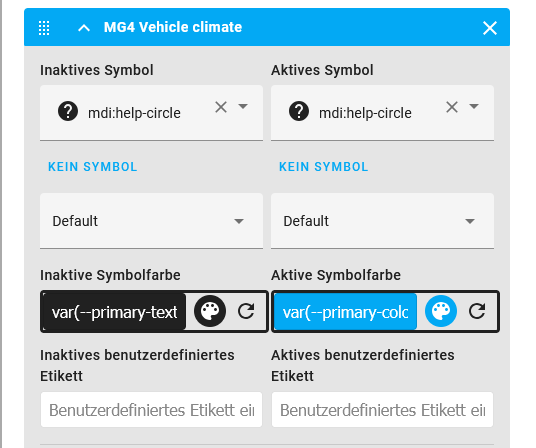
I changed the entries to following state:
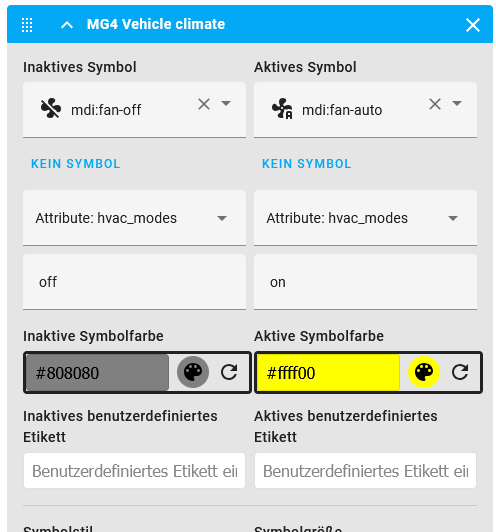
Which did not work, so I changed “on” to “auto”. And it did not work either.
Problem: Climate always shows off, altough its on/auto
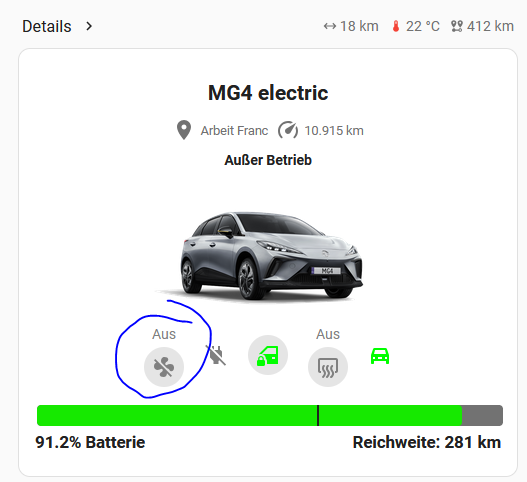
So, I don’t know what to do any more. Any ideas, why its not trigerring, while the other entities are shown properly?
Thanks alot!
1 Like
My best guess is creating a template sensor and doing something described here:
Where are your frunk/trunk icons from?
It’s the Tesla frunk and trunk icons from Custom brand icons in HACS.
Quick question: When I click on the location status on the top of the UV-card, i am getting the more info of the tracker entity, but i don’t get a map.
I think with my previous car i was shown a map in the more info popup, but not with my current VW.
If i go to the MAP dashboard in home assistant the car is on the map. So Latitude and Longitude are interpreted correctly.
Does anyone have a trick to create a popup showing a map?
is it possible to add a tap action to the vehicle image?
how do you get the image on the left, info on the right and the battery level on the bottum across the full width? I only have the option 1 or 2 collums. when I select 2 collums I can’t place a bar across full width. When selected 1 cullom I can’t place different options next to eight other.
1 Like
I updated it yesterday to the latest version and it messed up everything.
I put the default card back and removed my image, charging bar disappeared, and now miles left and % battery disappeared and not able to put it back, any solution?
1 Like
I have the same issue.
Stopped working after last update. I think I read somewhere (lost where) that there was some cache that needs to be cleared? Anyone who knows?

Hey everyone, just getting caught back up here — sorry for disappearing for a bit.
Quick rundown: UVC got a full rewrite from 1.x to 2.x — ground-up rebuild, not just a few patches. We also switched over to Typescript, which has made adding features a lot cleaner and (hopefully) kept us away from any major explosions.
If you’re on 1.x and happy, you can stay there. If you want the newer 2.x features, you’ll need to rebuild your setup. There wasn’t a good way to do a clean upgrade because a lot of the core structure changed, but all the older versions are still available on GitHub if you ever need to roll back.
Most of the day-to-day help happens on GitHub or our Discord, so if you need faster replies, that’s the place to be. Plus, we’ve got a lot of people on there who know the card inside and out and can probably answer quicker than I can some days.
If you’re seeing issues with the latest version, the usual fix-it steps still apply: redownload the card, restart Home Assistant, and clear your cache (browser or app). If you’re not sure how, a quick Google search will have you sorted in no time.
If you’re still running into problems, feel free to post up on GitHub or Discord some bugs, screenshots, feature talk, whatever you’ve got.
Big thanks to everyone who’s tried the card, sent feedback, or thrown ideas my way. I’ve put so many hours into this thing that my wife’s starting to think I’ve moved into my office permanently — but hey, the couch isn’t so bad.
Appreciate you all, enjoy the new versions and the changelogs!
-Wayne
5 Likes
Anyone have an issue when you edit an ICON they all disappear?
Hi everyone,
I have a request/idea regarding the climate entity in the icon row of Ultra Vehicle Dashboard Pro.
Currently, when tapping the icon, we can use more-info or trigger a popup (e.g., via browser_mod). However, these always open a fullscreen modal, centered on the screen.
What I’d love to see is support for a small, contextual popover that opens next to the icon, showing:
- a temperature slider (from a
numberentity) - a toggle button for HVAC mode (
auto/off)
I’ve tried using bubble-card and popover-card, but they don’t work correctly in this case, since the icon inside UVD isn’t a native trigger element – so the popover ends up centered or detached.
Feature suggestion:
Add native support for a popover-like action directly inside UVD, e.g.:
on_click_action: popover
popover_card:
  type: entities
  ...
Would this be possible to support? Or does anyone have a workaround that makes the popover appear relative to the clicked icon, not fullscreen?
Thanks!
Can this card be used to control completely custom entities?
I am not a beginner at HA - but I just can’t mentally make this card happen. Is there a nice Youtube video that will take me gently by the hand and walk me step by step through the entire process??