That had been my hope. Given that one of the main feature bumps is being able to add more devices per bridge, I would expect that Philips would regard users with multiple previous-generation bridges as a key audience for this new product.
I’m getting mine on Friday, so will tinker then and post my experience here.
edit… I think I got it. I was trying to update OS and core via CLI, but trying to jump too many versions ahead I guess. I updated to OS 15.2, and then it finally gave me the option to update to OS 16.2, and then updated core. Thanks
Sorry for my ignorance on this, but how do you update to 2025.9.1?
I’m in the final stages of rebuilding my house that was destroyed in a hurricane, and while my HA hardware survived, it’s been sitting in a box for the last year and I’ve been getting myself back up to speed on the workings of it. I’ve had it back up and running for a couple weeks and it will not show any updates past 2025.8.3. I tried CLI update as well and it says I’m on the current version. Any guidance is very much appreciated.
Reading on through this thread it seems I may have made a mistake by going ahead and installing the Hue bridge pro in my home.
So I first updated my Hue bridge to Pro via the native Philips Hue App and it successfully migrated all my devices to it.
I’m on a version of HA that was 3 months old and just upgraded to latest (9.4).
Now I see that a new bridge in the “Integration” section. Should I add it or it’s going to get all messed up?
I did the migration to the Bridge Pro inside the Hue app before updating HA. Is there any way to still make this work automatically in HA or I’ve messed up the order :(?
To answer to myself:
1.) After a couple of days, it looks at least as good as before, maybe a little bit better, but I need more time (in the past some times some of the lights were not receiving commands, epsecially the non-hue ones)
2.) Yes, it works. But migration needs to be done manually after, by re-registering each of the non-hue light. But not completely, you have the possibility to re-identify the light, by keeping the name/room association (but you still need to go to the ligth itself and manually put it into registering mode)
Just finished doing 6 v2 bridges onto 2 pro’s - around 250 lights. Taken most of a day to do - didn’t bother with the migration - just a simple delete and re-add in the Hue app then grind through the entity ids in HA to put them back where they should be (I had a system so relatively simple to do if not mind numbing !).
Got 5 more v2 bridges to go yet - will wait until the multi bridge migration mechanism is decided (although that’s going to be interesting to see how that’ll work).
So far v3 bridge is much much faster, I’ve managed to collapse the number of zigbee channels (hurray) - it works exactly like a v2 bridge in HA.
Friends of hue switches all worked fine. Exactly as before.
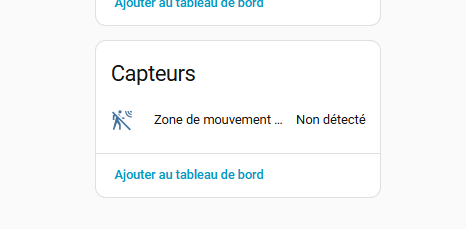
The motion area stuff native on the v3 hub works (even with only ceiling lights) very well - but (and here Is the annoying thing) the automation running on the hue hub doesn’t look like it exposes the trigger… you can set it internally to turn on lights (fine) or you can get a free subscription to Phillips security alert notifications (time limited I suspect) - but no option to expose the output of the trigger to be able to construct something in ha to sense it - at least from the app. I’ll have to do some digging to see if there is anything visible through the api.
I have noticed one issue since migrating to the Bridge Pro. I have an automation using a long press on a dimmer switch that no longer worked. The event name for the long press changed so it was fixable, but something to look out for.
Create the motion area in the Hue app (maximum of 4 areas), set them to turn on lights (the entire room lights or the app creates a new zone for whatever lights you choose) then disable the light turn on when you get to ‘customisation’ (if you want HA to do all the work). Then reload the Hue Bridge config and they appear in the room device (if you call them ‘ROOM Motion Area’ then as binary_sensor.ROOM_motion_area).
I use it when I walk in kitchen. (Already 3 lights on 25%)
When motion is detected those 3 lights go to 100%
With a restart automation with 1 min delay.
It works. But I notice using native hue app settings the motion detection is way quicker. But lags conditions. Like, only do this when light is on.
Great… I am the one who is having the inszallation that does NOT work seamless, just for the statistics?
Seriously, motivated by all the Great Feedback ack I online found out that I now have an old bridge with all light attached, but not working. The new one is recognized but empty.
Any ideal how I can get out of this mess without hours and days of reconfiguration?
Revert to a backup stage? Changing IP of the old bridge within HA?
On the Hue side all went OK (except for 2 devices…).
So leave home assistant alone. Do noticing with it!!
Connect new bridge to your router.
Open hue app. Find new bridge. Setup new bridge.
It will ask to transfer old bridge to new bridge. Say yes! This can take 30 min. When done. Delete and reset old bridge. (Hue app is asking this)
Than reconnect stuff that did not good transferred.
When all is running perfect in hue app. And old bridge is off router.
Now restart Home assistant. Give it some time to start. And after some time the new hue bridge is automatically in your hue devices. And old bridge is gone. All is working like before.
I just went through a succesfull migration today. I followed the steps as mention by @realm. Thank you!
I noticed that some automations with dimmer and switches with scenes did not work after the migration. However, disabling the automation and enabling the automation again, made them work!
The migration took around 40 minutes for me, from start to finished.