Happy to know, thanks 
1 Like
Dear All,
Working on the 2025.05.0 I introduced a couple of new features:
- Colors blending will be a real blending operation.
- We did improve the rooms boundaries search for the vacuums having segments → robot in rooms is now detected more efficiently.
- We started to reorganize the code to assign the responsibilities of each functions / modules / classes in a more linear way also to reduce the load on certain functions.
Currently working on solving issues with Obstacle View and startup issues finalize some of those changes… as I do work basically alone on this and I do have also limited time for it… I decided to postpone the release to the next month if ready. As consequence 2025.05.0 will not happen.
For me the most important think is to deliver stable versions… and as per adding new functions also could introduce, unexpected behaviors I’m trying to clear those before releasing the new version. So if you are beta testing the new releases since now on the 2025.06.0bx will be used… also because we will test in parallel the camera with the new HA beta releases. Please using the beta releases be aware something can go wrong, open then an issue I will be happy to see those.
We can work together, and this make us enjoying later on the new releases of this custom component. Thanks in advance for your cooperation.
On the latest version of home assistant 2025.5.3 when I update mqtt vacuum camera from version 2025.02.2 to 2025.03.0 I get a calibration error and in the camera status I have calibration_points: null if I go back to 2025.02.2 everything starts working again the calibration points are there but the automatic zoom doesn’t work and for a while now even with the previous versions of home assistant of a few months. Version Valetudo of my robot is 2023.05.0
can someone help me? Thank all 
1 Like
@kill_one the issue was fixed as per in the GitHub discussion/issue, as it was a library problem it can work without problems just updating the dependency, as explained in GitHub. Thanks for your report and support on making this project more efficient and reliable
I did recently released the 2025.7.0 and I’m sorry… there is a huge problem in this version. If you have updated the camera version please revert immediately to the previous used version, more on the GitHub repository. Thanks as always.
1 Like
Hi,
Since auto reset trims has been removed, I still have this issue that when I change floors, my S50 doesn’t update the discovered map.
See for instance how it looks then how it should look (manually resetting trims).
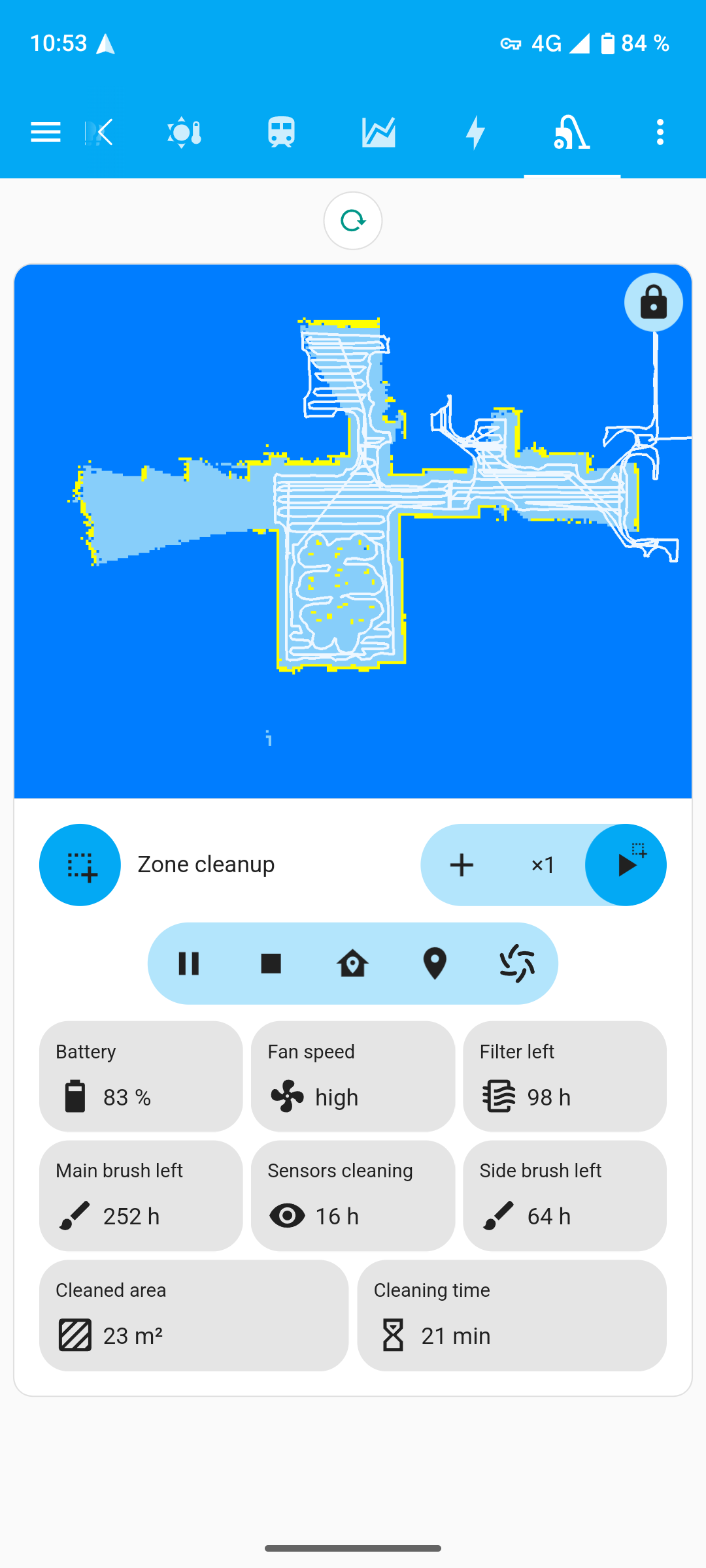
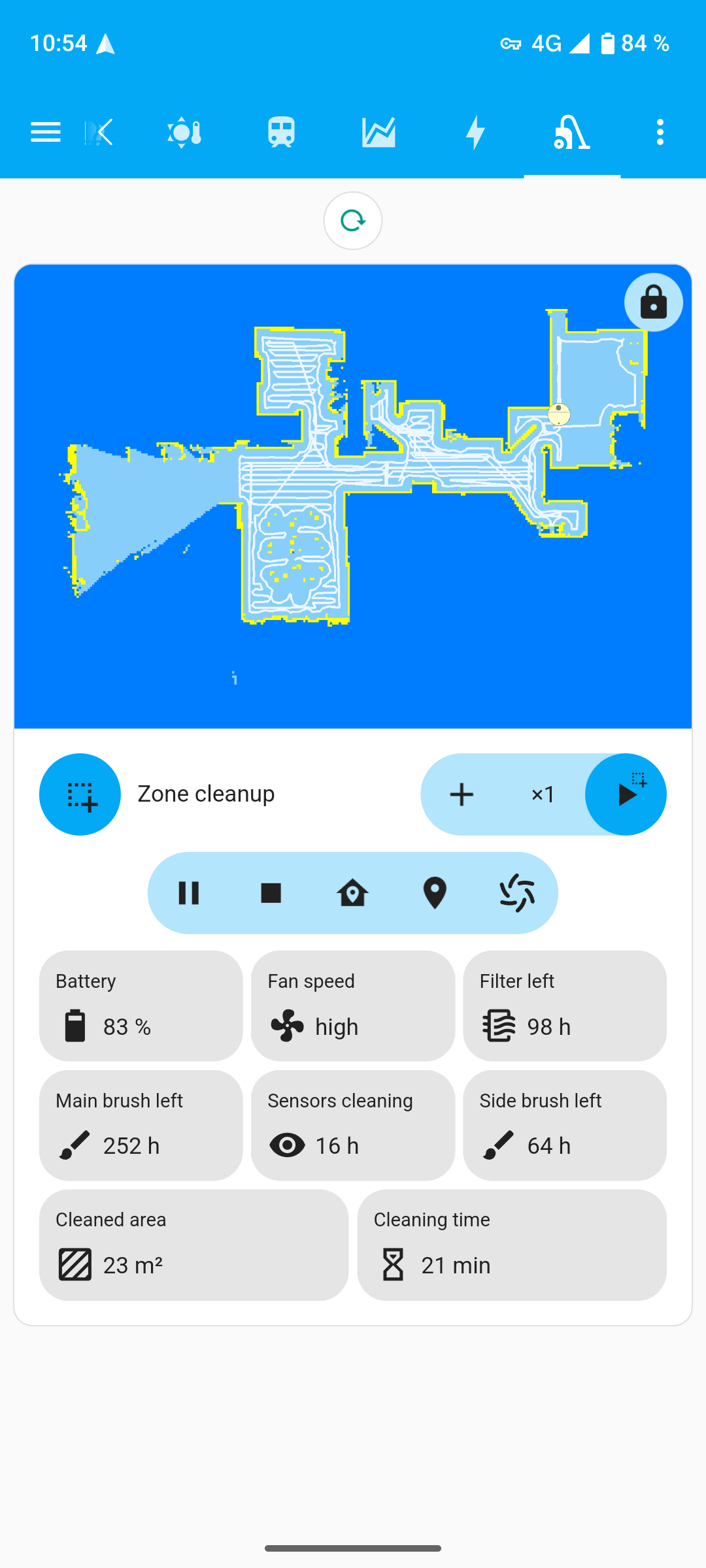
How do you guys manage this? It used to work with 2024.10 but it’s no longer possible as not compatible with recent HA versions.
Dear @hayvan96
I will add in the next release the possibility to save the floor name / data and save the trims for one or the other floor, this can be a possible solution to re-enable the reset trims, instead of reset trims the action will be change floor.
I did intend to do this since a while but I got stuck with a bigger issue that now is fixed.
2 Likes
@hayvan96
Unfortunately I will try to implement this hopefully on the 2025.9.0 the next should go out next week and I’m currently working on this and there are a couple of other things to fix there… possibly I will release some beta in the meanwhile.
Since a while ago, it seems the _camera entity does not seem to update for my two Valetudo vacuums, whereas the _map_data works fine (as displayed using valetudo-map-card). (It also works fine when using the robot webui.)
Does anyone have any idea on how to fault trace this? Looking at MQTT Explorer it at least seems to come in data in the MapData/map-data and /map-data-hass topics.
I’m not sure when it stopped working unfortunately, but I’ve not updated anything on the robots in quite a while, but am running the latest version of f. ex. HA and this integration…
I am using the “Disable vacuum camera update when docked” blueprint btw, could that somehow cause problems? It has been working fine previously, and I have now disabled the automation and have sent the camera.turn_on action now, without any improvement.
@RickDangerous I’m not sure what are we talking about here but I will do my best to address this. There are currently a couple of work in progress but I’m sure the _camera entity should still work for instance with the last stable version “MapData/map-data” is the topic used to “decopmpress” the json data that are then processed to return the PIL bites. I understand you disable the camera via blueprint and I will have a look at that. Turn off Turn on services of the camera anyhow should work too, so you can “write an automation” maybe… what vesion of the camera you are currently using althought?
Thanks for the reply. To be honest I’m not sure myself what happened, and now it seems to work fine again for unknown reasons (even though I had previously restarted both HA and the MQTT broker w/o resolving the issue).
So apologies for stealing some of your time. However if it happens again I’ll make sure to get some logs / whatever is needed for fault tracing.
(I’m using MQTT Vacuum Camera 2025.7.1 bt.w.).
Best regards,
RD
Works in progress and future releases announcement:
Since the 2025.7.1 release of this custom component we’ve been focused on a complete refactoring of both the library and the custom component to ensure stability and prevent potential issues for Home Assistant users. We know this has delayed new releases, but our priority is making sure the integration is safe, reliable, and easy to use for everyone — which is exactly why so many of you chose it in the first place. Would be really appreciated your kind help and understanding. The next release isn’t planned yet, there are serious refactoring to do. If you want to contribute, please consider joining our efforts.
**2025.x.0 - Refactoring and New Additions
- This release will be postponed till below is completed and tested.
- Changes
- Refactored the code to improve readability and maintainability.
- Remove file operation routines not required for logging export.
- Features / Improvements :
- Enable loading and saving of maps via services by fully integrating with MapLoader.
- Add options for Area and Floor management rooms renaming and trims settings stored.
- Option to resize the Robot → will be available…
- Braking Changes
- No more auto snapshot, as it is possible to manage those in actions/scrips from HA directly. This function cause overhead at each frame for this reason will be removed
1 Like
There is now available a new version of the camera 2025.10.1 this version is basically the same of the last 2025.10.0 but add a safeguard as per it was reported that some users are updating the vacuums Valetudo versions to the later one available and the camera fail to identify the vacuum Valetudo flavour… the issues on GitHub are still open but the fix warranty back compatibility with the older version of Valetudo and can be installed too. The next versions of the camera of course will also keep this patch. If you have any issue or request will always do my best to fix those as soon I can.
1 Like
What happen with 2025.11.0
- On 2025.10.0 and on we dropped support for the 32bits platforms, deign choose following HA standard this release maintain this line too.
- The Camera code was simplified, the obstacle view are living now in a separate class, it was tested in simulated environment (I bought the wrong L10 Ultra meanwhile), the images are now display again (sorry if you missed this on the 2025.10.0 but this is a huge refactoring process). A new constant OBSTACLE_SEARCH_RADIUS_MULTIPLIER is added in order to give you the possibility to feet the search parameters, default 65 pixels are used for the search from the pinned point, the value can be expand (tested 100 and the search is more accurate) but this means also you will need to wait a little longer for the search to complete.
- The Rand256 image processing had problems with too many warning and also some unexpected crash when no image’s this is solved on the valetudo_map_parser is bumped to 0.1.12 not only for this reason.
- We also added the floors base management to the library so in the next release finally we get the floors and map correlations the trims, that now are saved automatically at each docked (camera idle)
Hi, running the latest version of your great integration, I wonder if the mqtt camera reload action is still implemented. I’m asking because:
- when I trigger the camera reload (with a badge added to the dashboard), it works and the yaml goes like this
tap_action:
action: perform-action
perform_action: mqtt_vacuum_camera.reload
target: {}
but when I use the same action in an automation, with the same action, it throws an error saying action doesn’t exist (it’s listed in the droplist when choosing an action though). reset trims action works, but not reload, and combing the two is my workaround as the map doesn’t update when I change its location (different floor, or vacuum started manually and not from its dock).
I don’t understand why the same action can work when triggered by a badge but leads to an error when inserted in an automation.
Have you try this?
alias: New automation
description: "test reload from automation"
triggers:
  - trigger: state
    entity_id:
      - vacuum.valetudo_YOURVACUUM
    from:
      - returning
    to:
      - docked
conditions: []
actions:
  - action: mqtt_vacuum_camera.reload
    metadata: {}
    data: {}
mode: single
@hayvan96 I did test it and it worked without any problem from automations.
Hi, yes it works, but if I want to reset trims and reload camera, the second action throws that error.
actions:
  - sequence:
      - action: mqtt_vacuum_camera.reset_trims
        metadata: {}
        data: {}
      - action: mqtt_vacuum_camera.reload
        metadata: {}
        data: {}
If I invert the order, it’s always the second action which triggers an error saying it doesn’t exist.
But I’ve found a solution : I’ve introduced a 1sec delay between reset trim and reload, it seems to work!
1 Like
mmm… the reset trims are deprecated as service at the moment I’m changing this to floor management… by the way already in the next release probably there will be a “rest trims” kind of service and the reload of the camera would not be required anymore.
It has been a while since we released an update but now the 2026.2.0 is available supporting materials and carpets rendering and “mopping” state of the vacuums when provided (tested on an X40 that I recently bought). There is still a lot to do, there was a huge change also in the options menu, now you can navigate the menus and save the options changed only once from the main menu once you are “setup and ready” instead of reloading the camera several times… Hope you enjoy and soon… some nice enhancement will be too
2026.2.2: Important changes 
- The video source is now in go2rtc/ffmpeg (e.g. for HomeKit streaming). Camera map view context image is now image/jpeg and obstacles are context image/png. You can still adjust the transparency of the map elements as you wish.
- It is possible to configure the mop path size from the options “Image Settings” → “Basic Settings” colours and transparency can be set too.
- Introduce the Floor Management, select the active floor (were the vacuum is used) update the trims data for that floor and edit the trims of a particular map is now possible. It is not a braking change yet but this will replace the actual trims management. If no floors are configured in Home Assistant the camera use a floor_0 by default.
- The status text of the camera is now showing the docks operations like auto empty and mop cleaning / drying and expose the dock_state attribute in the camera one. This is available of course only vacuum with “smart” docks.
- It give also the possibility to set the obstacle view port. #418 if you do not need to custom this as it works then live those parameters as they are
Fixes:
- #411 The rendering time outs are logged now at debug level and raises a waning only when something really bad happen after 5 retry to retrieve the image. This change was actually important as some vacuum can take longer to init in MQTT.
As usual, thanks to all of you.. 
1 Like