Hello,
I suppose is joined in the home network correctly if you could configure it, can you confirm?
Hello,
I suppose is joined in the home network correctly if you could configure it, can you confirm?
Yes, I can see the IP address on my router’s DHCP table.
OK, it can be a lot of reasons.
Vimar is not giving any useful information about Homekit.
Let’s make sure that the gateway is working, can you see it or pair it with a Apple Device?
Make sure you disconnect after this test because you need the gateway to be “free” to be paired.
Do you have your zeroconf correctly set, meaning you did not change it?
double check the instructions in the home kit device page on the documentation.
Have you tried to uninstall the HomeKit device integration and install it again?
Have you tried to reload it?
Afterward if it does not shows up go to Settings>Device and services and see if you can manually add an entry in the HomeKit Device Integration.
In case it find something it might ask your code.
I had some problem on my network while IGMP Snooping was enabled, but I don’t believe this is the case, but just try as last resource.
Can you ping the Vimar gateway IP?
Just to make sure the following is the correct integration to use not the bridge:
HomeKit Device - Home Assistant
I think the gateway is somehow the problem.
I don’t have any Apple device that can be a HomeKit server (e.g. AppleTV, Homepod). So no way to test it that way.
I haven’t made any changes to zeroconfig.
Recently HA added a settings page for that, where all the local devices are listed, but the vimar gateway isn’t.
It’s not possible to manually add devices to the HomeKit Device integration, if HA cannot discover it. I don’t see a possibility to insert the IP nor the setup code.
And yes, I’m looking at the right integration.
Yes, I can ping it and IGMP snooping is disabled.
Thanks so far for the help.
Sorry for not being more helpful.
Have you had a look onto the log, there may be some hint there of what is going on.
It is quite strange your installation does not detect it.
If I was you I would do two test that are quite demanding.
In this way you can figure out which is the component not working fine.
SOLVED.
I finally found a solution.
After searching the Vimar website after every reference of HomeKit, I landed on a View app guide which describes how to connect the gateway to HomeKit.
Under chapter “Integration with third party systems” it’s mentioned:
Afterwards HA automatically discovered the gateway and I could pair it.
But in the end it was all for nothing in my case, since I only have actuators (14593).
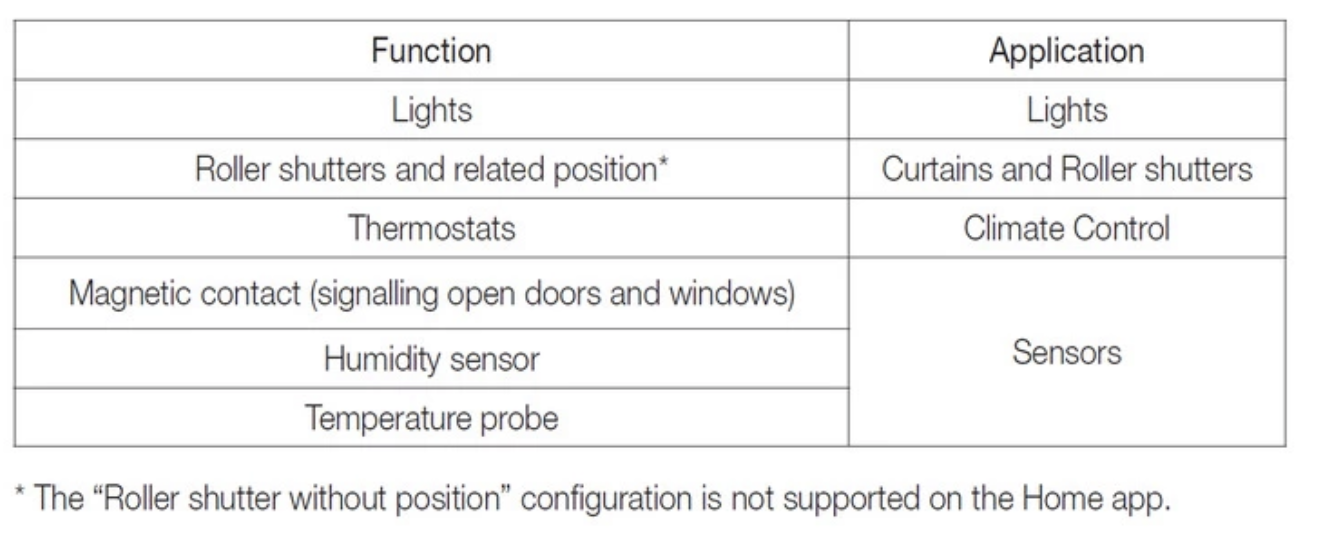
These are not supported in HomeKit.
In that guide it’s also described which components are supported:
I was interested in getting the power consumption information.
Seems like I will have to look into the Zigbee connection…
Anyway, thanks again!
Hello, sorry to add to an old topic.
I’m really new to Home Assistant and have recently set up a Docker instance to try it out and maybe switch completely or almost completely from Google Home. I have a lot of Vimar 14592.0 switches and some dimmerable ones (can’t remember the code at the moment) connected to the 14597 Gateway. Everything works perfectly in the Vimar View app and in Google Home once linked.
Unfortunately, like homie22, I can’t find the gateway in Home Assistant in the HomeKit devices, and unlike them, pressing the button on the gateway lights up the LED in yellow, but still no gateway in HA. All other devices from different brands I have in the house are being detected correctly, including ones not directly supported by HA, like Meross.
I do not have any Apple device to test if the HomeKit integration is working at the moment. If I create a HomeKitBridge in HA, it gets detected by the HomeKit Device integration, but that is as far as I could test.
I don’t like the idea of switching everything to Zigbee and reconfiguring everything. Does anyone have any advice or ideas on how I can get Home Assistant to connect to the Vimar Gateway?
Thanks in advance!
EDIT:
I’ve done some more digging and found out that is a much bigger problem with Zeroconf and mDNS, and whatever I’m trying it won’t leave the docker network. This can be a problem in the future, so I’ll try some alternative like a VM or put the OS on a raspberry.
Hello,
What is the issue with zeroconf and mDNS?
if the docker network is not fine then it won’t work.
I run everything in a docker and it works fine, so docker does not look to be an issue.
I suggest to fix the docker issues first and test again.
Hello,
thanks for the quick answer!
I omitted a lot of important information when I first wrote the post, as I didn’t think it was relevant to the problem, but after some digging, I found I was investigating the wrong cause.
I’m running almost all my home services and VMs on an R710 with TrueNAS Scale installed. The R710 is connected with its onboard switch to 3 separate VLANs:
After understanding that the issue was not in Home Assistant or the Vimar Gateway, I started trying to make the Docker use the newly configured NIC as its network interface in host mode. But the TrueNAS interface makes you only bind specific ports on the NIC, and obviously you can’t bind ports that HA uses, like 5353 for zeroconf, so I tried to transform the app into a custom one and add the host network manually. Still, HA only sees the Docker default network. The last thing I’ve tried is to add the network to the global Apps setting, but the app service ends up crashing exactly when updating the Home Assistant app.
Also, I’ve previously disabled mDNS on the TrueNAS network configuration, as it was listed as a common problem for HA to discover devices.
Now I’ve tried to install HAOS on a Raspberry Pi 4 and connected it on the IoT VLAN, and everything gets detected correctly, including the Vimar Gateway. Only a few errors on start-up, but I’ll try to figure them out after I find out how to make nginx on the default VLAN not 403 on HAOS UI, but this is off-topic.
In the end, as of now, the Raspberry solution is not perfect, and I’d much rather use the Docker app in TrueNAS for resource efficiency, but I was not using it for anything important, and it can be a pro tem solution.
Also, my issue is no longer related to the topic in any way; maybe I should open another one or find a more fitting one.
Anyway, thank you!
Sorry to answer to such an old post but I’m curious, how is your house wired?
The vimar switch can work as almost any type of relay or diverter switch (deviatore), it can be a monostable or bistable button, a monostable or bistable diverter… anything you can think of. So it’s weird that you would have to rewire your lights, maybe the electrician didn’t know you could change the settings?