Why can't HA ping ipv6 (sometimes)

I am just starting to use Matter, and set up ipv6 on my local network only with ULA addresses (and link local) as well as DHCP6. HA and my desktop and my network monitoring system are all on the same VLAN.

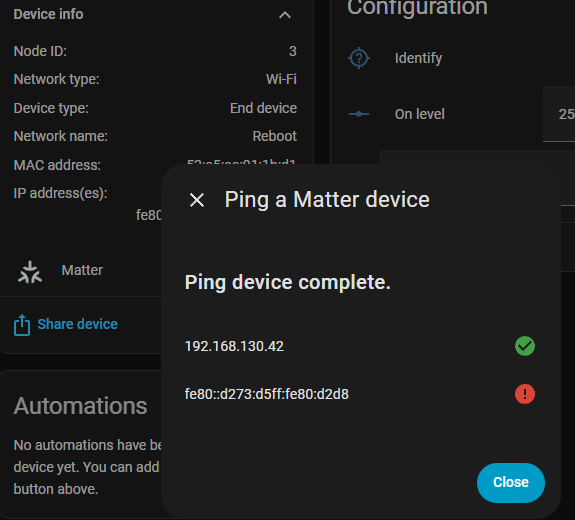
I have a matter device with link local address fe80::d273:d5ff:fe80:d2d8.

I have tried pinging it from my desktop and my NMS and it works fine.

When I try pinging from HA via the Matter setup screen, it fails sometimes, and works sometimes.

When I shell into HA it shows a link local address as well as DHCP6 assigned address in the ULA range.

Home Assistant Supervisor is running!
System information:
  IPv4 addresses for eth0:  192.168.130.254/24
  IPv6 addresses for eth0:  fd34:1727:2650:130::98e9/64, fe80::d327:3ecc:3840:87e1/64

  OS Version:               Home Assistant OS 16.2
  Home Assistant Core:      2025.9.4

I can ping these from my desktop and local NMS (which is linux and resides on the same HyperV server as my HA instance, uses the same NIC and same everything.

From the shell prompt however I cannot ping anything ipv6. This was immediately after the above display.

[core-ssh ~]$ ping -6 fe80::d327:3ecc:3840:87e1
PING fe80::d327:3ecc:3840:87e1 (fe80::d327:3ecc:3840:87e1): 56 data bytes
ping: sendto: Network unreachable
[core-ssh ~]$ ping -6 fe80::d327:3ecc:3840:87e1
PING fe80::d327:3ecc:3840:87e1 (fe80::d327:3ecc:3840:87e1): 56 data bytes
ping: sendto: Network unreachable

I’ve never seen the shell ping, but SOMETIMES the matter screen will ping. It does ping ipv4 always (both matter and shell). The sometimes is rare when it works.

Even though not pinging the matter device works (HA can control it) – though it takes a LONG time to start working after power cycle, but that may just be how it works.

HA is set up with static IPv6 addresses (and those are what is shown). And again – pinging TO it works fine.

I do not understand docker networking, but also I have not changed any of it.

What might I have set up incorrectly that this can happen? Notably that I can ping HA but HA can’t ping out?

Link locals are a little tricky. The IP stack doesn’t necessarily know which interface to chose when pinging a link local, so you would need to tell it, so in your case it should be: ping -6 fe80::d327:3ecc:3840:87e1 -I eth0

[core-ssh ~]$ ping -6 fe80::d327:3ecc:3840:87e1 -I eth0
PING fe80::d327:3ecc:3840:87e1 (fe80::d327:3ecc:3840:87e1): 56 data bytes
ping: sendto: Network unreachable

But shouldn’t the matter interface “ping” in HA choose the right interface?

I’m also not sure why I am not getting a ULA address for the device from my DHCP6 server – the handling of IPv6 by the device, or its setup, or something must not use DHCPV6, though the device pulled an IPv4 address from DHCP(4).

I am not even sure that the shell prompt I am reaching is the actual instance that is running.

[core-ssh ~]$ ip link
1: lo: <LOOPBACK,UP,LOWER_UP> mtu 65536 qdisc noqueue state UNKNOWN qlen 1000
    link/loopback 00:00:00:00:00:00 brd 00:00:00:00:00:00
2: eth0@if13: <BROADCAST,MULTICAST,UP,LOWER_UP,M-DOWN> mtu 1500 qdisc noqueue state UP
    link/ether e2:6d:2e:93:29:31 brd ff:ff:ff:ff:ff:ff

As I said, I don’t understand docker networks. The “eth0@if13” doesn’t work as an interface name. Maybe it’s just informative that it is an “if13” interface in the container?

Should this show an IPv6 address (I omitted l0)?

[core-ssh ~]$ ifconfig
eth0      Link encap:Ethernet  HWaddr E2:6D:2E:93:29:31
          inet addr:172.30.33.2  Bcast:172.30.33.255  Mask:255.255.254.0
          UP BROADCAST RUNNING MULTICAST  MTU:1500  Metric:1
          RX packets:448051 errors:0 dropped:0 overruns:0 frame:0
          TX packets:2662 errors:0 dropped:0 overruns:0 carrier:0
          collisions:0 txqueuelen:0
          RX bytes:130130912 (124.1 MiB)  TX bytes:2330649 (2.2 MiB)

It clearly doesn’t show my IPv4 address, so there’s some nat or other translation going on somewhere.

My failing memory managed to dredge up this command also, which looks right at least from the little I know, unless that “privacy” is relevant.

[core-ssh ~]$ ha network info
docker:
  address: 172.30.32.0/23
  dns: 172.30.32.3
  gateway: 172.30.32.1
  interface: hassio
host_internet: true
interfaces:
- connected: true
  enabled: true
  interface: eth0
  ipv4:
    address:
    - 192.168.130.254/24
    gateway: 192.168.130.1
    method: static
    nameservers:
    - 192.168.130.1
    ready: true
  ipv6:
    addr_gen_mode: default
    address:
    - fd34:1727:2650:130::98e9/64
    - fe80::d327:3ecc:3840:87e1/64
    gateway: fe80::3a05:25ff:fe31:39dc
    ip6_privacy: default
    method: static
    nameservers:
    - fd34:1727:2650:130::1
    ready: true
  llmnr: announce
  mac: 00:15:5D:58:08:05
  mdns: announce
  primary: true
  type: ethernet
  vlan: null
  wifi: null
supervisor_internet: true

Should I have to manually enable ipv6 for docker?

[core-ssh ~]$ ha docker  info
enable_ipv6: null
logging: journald
mtu: null
registries: {}
storage: overlay2
version: 28.3.3

I tested this on my system using the “Advanced SSH & Web Terminal” AddOn and it worked with the -I option and simply didn’t return anything without the -I flag. I think you are using the core SSH AddON, which I don’t use so can’t say whether its Docker container is setup for IPv6 networking or not.

My “Advanced SSH & Web Terminal” AddOn shows the same thing, so that CLI command is suspect.

Well, that’s interesting. First, it did appear necessary to enable ipv6 in docker. Apparently it is the default now, but back in the day was not for an HAOS add on.

But the old SSH still did not ping (but different error, not found, not a no-network issue). I just removed the addon I had, and installed that one and configured, and now I can ping out ipv6.

Sadly it has no impact on the matter integration, which still doesn’t work, leaving me more confused than ever.

âžś  ~ ping -6 fe80::d273:d5ff:fe80:d2d8

PING fe80::d273:d5ff:fe80:d2d8 (fe80::d273:d5ff:fe80:d2d8): 56 data bytes
64 bytes from fe80::d273:d5ff:fe80:d2d8: seq=0 ttl=255 time=2.432 ms
64 bytes from fe80::d273:d5ff:fe80:d2d8: seq=1 ttl=255 time=13.783 ms

So… it’s a matter integration issue? Maybe something about installing matter with ipv6 off in docker? I’m going to remove it completely and re-add theintegration and re-add the device…

Maybe… if I had to take a wild guess, it would be that the Matter Integration goes and gets these addresses from the Matter Server, and then its the Integration that does the pinging, and as mentioned above, the Integration may not know which interface to ping the link local from so picks the wrong one and gets the failure.

And indeed after removing the matter device, removing the matter integration, adding the integration back, and adding the device back (and earlier enabling IPv6 in docker)…

I can ping it from the HAOS shell, but not from the matter integration ping command.

You’d think the ping command there would have to be smart about HA’s structure. This is all an HA thing right? You mentioned matter server, but that comes in when you add the integration?

So it’s a home assistant bug?

Or could there be more ipv6 I need to repair? This is a VERY old HA configuration that gets upgraded every month.

Does your HA use multiple VLANs? If it does, then that maybe the issue.

No. It’s really very straightforward as best I can tell, it has one Nic (well virtual, it’s running in HyperV), not trunked, just VLAN 1 passed in untagged.

I used to run it on my own ubuntu, but some years ago (maybe 4-5) I backed up, loaded HAOS, restored, and have been running there ever since.

I’ve got a lot of devices and integrations, but to my knowledge nothing unusual.

OK, in that case, then yeah, those pings from the integration should work as there is really only one interface to ping link-locals from.

I’ll let this topic cook briefly see if anyone else has suggestions, then I guess try posting a bug. Though I’m not sure you can even do that any more if you are not one of the in-crowd at HA.

HA is pretty much designed to run on a flat network. Once you start any VLAN stuff you start to loose support and are more and more on your own.
Matter and IPv6 really don’t like VLAN either.
This is from the Senior Engineer at the OHF…
Enterprise Smart Home Syndrome

I’ll add this too if it helps anyone…

Sorry, I thought I was clear. It is a flat network. HA is on the default (1) untagged network, as are all these devices. I have VLAN’s for cameras that are not part of anything going on here. The HA instance doesn’t see any VLAN tags.

VLAN’s are not involved.

1 Like

This looks wrong… (Output from avhi-browse). Notice the IPv6 lines are showing ipv4 addresses. That would be a LIFX (vendor of the product) thing?

I watched for a while and didn’t see a real IPv6 address.

=   eth0 IPv4 C1A5BD5072DD7CC0-FEBC69F0C14B8989             _matter._tcp         local
   hostname = [D073D580D2D8.local]
   address = [192.168.130.101]
   port = [5540]
   txt = []
=   eth0 IPv4 1357C1CE9DFF2013-0000000000000001             _matter._tcp         local
   hostname = [D073D580D2D8.local]
   address = [192.168.130.101]
   port = [5540]
   txt = []
=   eth0 IPv6 C1A5BD5072DD7CC0-FEBC69F0C14B8989             _matter._tcp         local
   hostname = [D073D580D2D8.local]
   address = [192.168.130.101]
   port = [5540]
   txt = []
=   eth0 IPv6 1357C1CE9DFF2013-0000000000000001             _matter._tcp         local
   hostname = [D073D580D2D8.local]
   address = [192.168.130.101]
   port = [5540]
   txt = []

Try HA UI->Settings->Network->Network Discovery Zeroconf Browser and see what it’s _matter._tcp.local shows

Interesting. I didn’t know that existed. Thank you.

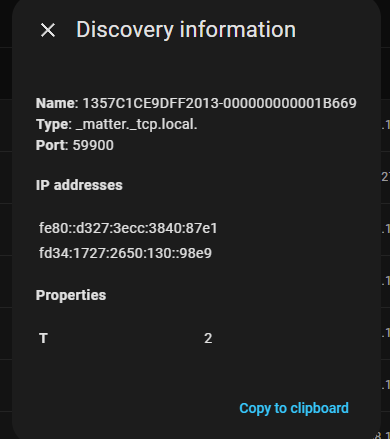
It looks better:

Those look like the right address but is also showing the odd duplication, as though each light has two names? Are the names different matter “things” like control vs status or some such?

But it seems to get ipv4 vs ipv6 right here. I wonder why the other browser showed it incorrectly?

It also shows Home Assistant itself advertising both the link local and DHCP6 assigned ULA. But no ULA for any device, they must not pull DHCP addresses, only link local.

But it would APPEAR that HA knows the right address. I wonder if it’s just a UI glitch that ping doesn’t work? Except it did work once - I saw it. And when it worked it showed a ULA. I’m not smart enough to imagine that - finished in a second or so and one IPv4 and 2 IPv6 addresses, but now it never does that.

Maybe I need to set up a sniffer and see if HA is actually using the link local address for control, that would at least prove it has IPv6 access to the device (I’m not quite sure why there’s IPv4 anyway for matter).

I just glanced through the Matter Integration code, and from what I can tell, the integration is using a websocket based API to ask the Matter Server to ping the node based on node-id.
So it seems that it is the Matter Server knows the addresses (and should know the interfaces) to use and is the one doing the actual pinging.
One thing to check is your Matter Server’s log. When it first boots up, it says what the “primary interface” is. Does yours say eth0?

This is likely due to the device thinking it is a member of two different Matter Fabrics, as it will send out an advertisement for each Fabric.

1 Like