Z-Wave woes - defective Zooz devices wreaking havoc

I have a fairly large home with an extended Z-Wave network, currently comprised of 130 nodes.

115 devices are made by Zooz, including the ZST39 controller.
12 are Kwikset Home Connect 620 .
3 are First Alert Z-Combo.

I have been experiencing various problems over the past year, which I related in many threads in these forums, including :

  1. numerous nodes randomly going dead, both Z-Wave and Z-Wave LR
  2. inability to include new Z-wave devices securely, including the First alert devices, some Zooz devices, and Hank smartplugs
  3. entire Z-wave network stalling during some new device inclusion, requiring the Z-Wave JS UI add-on to be manually restarted
  4. Sensors very frequently not reporting, especially battery-operated devices. In particular, locked/unlocked status from the Kwikset locks, and tilt from two Ecolink sensors that are no longer part of my network. I replaced these Ecolink tilt sensors with much better designed but proprietary Yolink tilt sensors earlier this week. At least the hub for it now runs locally, but new device inclusion still requires cloud, unlike Z-wave.
  5. major and random latency problems, for example with Z-wave remote control of smart switch relays taking many seconds, sometimes over 10 seconds, and sometimes simply getting lost.

When I switched from a regular LEDs to smart lightbulbs, I set the switches to smart bulb mode, and turned off the relays. Most of the switches are now scene controllers, to control properties of the Wifi bulb, such as on/off, and color temperature and effects. The same lag and lost signals were experienced when pressing the paddles on the switches.

A few weeks ago, I decided to nevertheless expand my network from about 70 nodes to the current 130. About 60 Zooz ZEN76 800LR switches were added.

I chose to try to debug the problems by factory resetting every single Z-Wave device, including the controller, and re-creating the entire network from scratch. This was a herculean effort, as it also required updating or newly creating over 100 device-based Home assistant automations, and all the device IDs changed as part of the network rebuild.

During my network expansion and rebuild, I chose to prioritize Z-Wave LR over Z-Wave.

I have 91 ZEN76 800LR switches, now all configured to use Z-Wave LR. An additional 3 ZEN76 700 series switches remain, which are on regular Z-Wave.

I ran into a few defective ZEN76 800LR switches during the expansion, that just failed to include into the network with various odd symptoms. I had bought some spares, and was able to use those and include them successfully.

The network was working fairly well being mostly LR. A few LR nodes would temporarily go dead, still, but usually would respond to a manual ping. They weren’t dropping off permanently. It was a short list of devices periodically doing this, less than 10.

I then proceeded to add back the non-LR nodes.

I made sure to put new CR2032 batteries in my five ZEN34 scene controllers, to avoid any problems related to low voltage.

I had trouble including Zooz ZSE18 securely. One ZSE18 included with S2, but the other only plaintext.

The 3 First alert Z-Combo could not be added with either SmartStart or manual inclusion. I tried brand new AA alkaline batteries, tested with a voltage tester, as well as rechargeable NiMH, charged in a smart charger, with capacity checked. I just could not add any of those Z-Combo.

I also replaced all 48 AA batteries in the 12 Kwikset locks with newly charged and tested Eneloops. All but one are regular Z-Wave, the other Z-Wave LR. All 12 included without problem.

I did not try to re-include the 3 Hank smartplugs, as they don’t support S2, and I was told to avoid S0 devices. In the past, I was able to include one Hank smartplug with S0, but the other two only worked with plain-text.

I tried to switch the few ZEN76 800LR nodes that were periodically going dead away from LR, and on to regular Z-Wave. After excluding them, updating the SmartStart entries, and re-including them, they would only re-include as plain-text. The secure inclusion would fail, and Z-Wave JS would start the inclusion all over again. It went on in a loop, using all the Z-Wave node IDs successively, failing, and on and on. I had to disable the SmartStart Z-wave entry, manually delete all the non-working Z-Wave nodes, and switch the SmartStart entry back to LR, in order to re-include the switches. Secure non-LR Z-Wave inclusion of the ZEN76 was quite simply impossible.

Eventually, I noticed a ZAC38 plug-in range extender dead node in Z-Wave JS UI. It would never respond to ping. I went to check the physical device. It had actually died. I unplugged it. Suddenly, my Z-Wave network started working much more reliably. I was able to easily add back all 3 Z-combo. I was able to securely re-include the ZSE18 that only worked as plain-text. One distant ZEN76 800LR node was successfully switched to non-LR Z-Wave securely, also.

Basically, the faulty ZAC38 range extender was wreaking havoc with the Z-Wave network. This has been nothing short of a nightmare to diagnose.

I still noticed a few nodes periodically going dead, notably a small set of LR nodes. I took a stab at trying to debug a few of them earlier tonight.

One was an ZEN76 800LR switch for my master bathroom fan, which was included in LR mode, but listed in Z-Wave JS UI as not having Z-Wave+, unlike the other 90 ZEN76 800LR. I manually excluded it, and re-included it with SmartStart, still in LR mode. It came back with Z-Wave+ enabled this time around. It’s too early to say if it’s going to drop off again. It’s in the same wall box as another identical model switch that is not dropping off.

Another misbehaving switch was a ZEN76 800LR switch in my dining room, which is used strictly as scene controller - not directly connected to a load. I factory reset it and tried to re-include it as LR with SmartStart. The inclusion completely hung the Z-Wave JS add-on. Every Z-Wave device stopped responding. The only way I could fix it was to restart the add-on. It showed a new LR node for the switch at that point, but that new node misbehaved too, dropping off. I tried this a few times, always with the same result - a dead Z-Wave network. I did not try to wait very long to see if would resolve itself after some timeout. I did wait more than one minute before restarting the add-on, though. I tried to reset and re-included another same model switch in the same wall box, and it worked just fine. I concluded one switch is faulty. I marked it as such in the SmartStart provisioning entry. I have left it excluded and factory reset.

As of this writing, all 130 nodes are showing green. I tried to ping many at random, and all responded, except the battery-powered ZEN34, HC620, and Z-combo, but that is as expected.

I now believe that most of the problems I have been experiencing with Z-Wave have been caused by a few faulty devices polluting the radio, and not by range issues with the very large property and thick building materials, as I previously thought.
Edit: I have the new ZWA-2 antenna on order, as I believe the larger design is still likely to be beneficial in my home. I don’t like the tabletop form factor, though. I would much prefer something wall mountable. I will find a flat spot for it when it arrives, still.

It has been extremely challenging to reach this conclusion. I don’t know if the network is going to remain stable, or for how long. Unfortunately, these electronic devices seem to be very sensitive, and many that are initially good fail over time.

I don’t know if there is anything that Z-Wave JS developers could do to try to detect these faulty devices, and point them out, to facilitate eliminating them, as I expect I have not seen my last Zooz device hardware failure, unfortunately, despite having a high-end Siemens FS140 whole-house surge protector on the main panel, as well as surge protectors on all 6 subpanels in the home, for all loads and solar generators.

I’m not seeing this rate of hardware failure with the hundreds of other electronic devices I own. Many are >10 years old. The failure rate with the Zooz devices stands out.

1 Like

I agree here, their reliability leaves something to be desire. I added Z Wave primarily for my door locks (2), and since then I have added some GE/Jasco Z Wave motion lights for my bedrooms. A vast majority of my home for light switches is Insteon backed with an ISY, and those have been absolutely rocks solid.

I have considered slowly replacing my Insteon with Zooz Z Wave stuff, but so far I have replaced my 800 LR twice from them, and they are both from times I lost power. (Both times they continue to work after rebooting them, but inclusion/exclusion and firmware updates stop working so it takes a while to figure it out). I just had to replace the 800 LR in the last months so I am looking at HA’s new Zwave controller to see if that improves things.

I am completely curious on who has 12 door locks in their house. Is this Prince William and Kate’s house? (Joke)

I bought two Jasco motion sensor Z-wave switches, and tried to have them installed in my garage as the same time as the Zooz. The electrician broke one of the tabs on the switch, and it could no longer be installed. I have to get it replaced. Unfortunately, my return window with Amazon has closed, so it needs to be a warranty replacement. But I used ZEN75 in my garage now, and those still work.

I never got into Insteon. I used to have X10. Those used to work OK in my older townhome. But once I moved to the current large home in 2010, they became flakier. I have found powerline communication to be very wanting. I replaced hundreds of halogens with CFLs in 2010. Then with LEDs once the CFLs started failing, and LEDs prices dropped to something reasonable, starting around 2015 - I have the install date written with a sharpie on each bulb. Earlier this year, I replaced all the regular LEDs with Philips Wiz LEDs. I have had a couple failures with those. I tried to use Powerline ethernet in the most, as my house lacks wiring. It was unreliable, and of course interferred with X10. I installed solar as well - 28 micro-inverters in 2010, that use powerline communications. And more later - now 70 micro-inverters. One Enphase Envoy-S solar gateway is in the garage. I have to put plug-in filters on nearby loads in the garage and office, or the gateway will not communicate with the micro-inverters. I use a bunch of ACT AF120 filters for this purpose. Those were designed for X10. But they serve their purpose in my use case with micro-inverters, too. My solar system could not reliably be monitored without them.

One of my Circlite fluorescent ceiling fixtures died yesterday. It was on a Zooz ZEN76 switch. I had turned off the subpanel that included that circuit during the day, and turned it back on. In the evening, I noticed that the light no longer turned on. The relay on the switch still clicks. I believe you are correct that bad things happen when the power is cut off.

I have had an ongoing problem with one Wiz Wifi lightbulb inside, near my front door. It kept dropping off Wifi. I could not control it using a scene controller as a result, as described above. I had to enable the relay on the Zooz switch, and use it as a dumb light. In this case it is a ZEN32 scene controller, so my blueprint doesn’t work with it. Anyway, yesterday, after remotely flipping the switch, trying desperately to get the the bulb to show up on Wifi, the bulb died. The fixture is very old and the glass is now very tight. I don’t think I will be able to open it without breaking the glass to replace the bulb. I broke the glass another identical fixture in a closet installing bulbs a month ago. I had it replaced at the same time the Zooz switches were installed. Unfortunately, I forgot about this old fixture in the entrance, sigh. Time to buy a new one at home depot tomorrow. I will choose one that can take more than one bulb, also.

How are the Jasco switches when it comes to scene control ? I really like the ability to do 10 separate commands on the Zooz, using multi-tap. 1 to 5 taps on top paddle, and 1 to 5 taps on the bottom paddle. I have created a blueprint that includes 7 common commands.
1x Top turn the corresponding light on
2x Top turns all the lights in the room on
3x Top turns the corresponding lights to party mode.
4x Top turns all the room lights to party mode.
5x Top turns all the room lights back to warm white (2700K)
1x Bottom turn the corresponding light off
2x Bottom turns all the lights in the room off

That leaves Bottom 3x, 4x and 5x custom commands for specialized per-room automations.

I think I will consolidate the on/off for lights and room lights to use toggle, which will save 2 commands out of the 10. That will make room for some more common commands. For example, sleep mode, to turn off all the lights and audio everywhere in the home. Maybe some more color temperature.

The Wiz bulbs also have an interesting “alarm” effect that where they go bright white and blink randomly. I could set all the smart lights in the home to alarm mode, both indoors and outdoors. And also turn on some audio for good measure, both indoors and outdoors. But that automation better not trigger accidentally, or my neighbors will hate me ! It probably needs to be a 5x tap automation, which are difficult to trigger, much less accidentally.

I have yet to successfully use the “hold” features on the Zooz switches, to do something like dimming, or setting audio volume. I believe the repeat rate on the switch is too slow, probably because of Z-wave bus speed limitations, sadly.

No, but it is a very large and unique home. Originally it was a 1966 home. The previous owners added on to it in 1998, and quadrupled the size, and added a lot of luxury features such as a hot tub, dry sauna, marble and hardwood floors throughout, high-end built-in kitchen appliances, 5 wallmount toilets (sigh, I hate those maintenance wise!), multiple indoor jaccuzi tubs, a shower area with 3 different showers, over 200 recessed lighting cans, 97 dimmer switches. The list goes on and on. They clearly spent a ton of money on all this luxury.

While the home is located in a very safe neighborhood, on a hill, with amazing views of the SF bay area, it is not central to job centers, and the school district is very bad. These factors put a ceiling on the home value, regardless of all the luxury features, and sheer size.

When the 2008 financial crisis hit, they were unable to sell, and got foreclosed.
We bought it for half of what their outstanding loans were, due to the second lender being wiped out. Despite the deal we got, it has been a handful to maintain and improve a home this size. The main ones we did have been mostly of the functional kind, like the 70 solar panels, 10-zone HVAC, 29 window coverings, 2 EV chargers, the move to more efficient CFLs and LEDs (currently 218 Wiz smart lights), replacing all the switches with vacancy sensors in 2010, and now the smart switches and smart bulbs most recently. So, this is why I have 611 devices in Home assistant currently, and 7278 entities - only half of which are enabled, to be fair.

I tried the Home assistant Android app on my brand new Equinox EV a couple days ago. It’s a work in progress, and only shows a few device categories. One is the lights. It takes a long time to scroll through 294 lights. Switches is another, and there are about as many. The one screen that’s usable on the car screen is actually the 12 locks. I hope some day I will be able to create a simple dashboard for the car with just the 2 garage door openers, using the Zooz ZEN16 relay, the HC620 lock for the interior garage door, and the light switch for the garage. Right now, the Home assistant app on the car is much more limited than on a phone or browser. I am certain it will improve over time. But I hope it doesn’t need to enumerate all the devices and entities every time, as it seems to be doing, and it’s constantly asking to “wait” or “quit” because it is taking so long to process, even when the car is parked in the garage and connected directly to the home Wifi.

To obviate the need for the app in the car on screen or phone, I have some Yolink motion sensors I need to setup and install for the lights. To trigger the garage opener and unlock the interior door lock at the same time, I will probably buy a battery powered Z-wave remote to keep in the car. Still not quite sure what to do about the alarm situation. I have not succeeded in getting Simplisafe to integrate with HA.

To answer only about the 12 door locks, one answer it because we haven’t installed the 13th lock yet :wink: Seriously though, a picture is probably easier. This is from the auto-entities card, so it’s not a particularly good order.
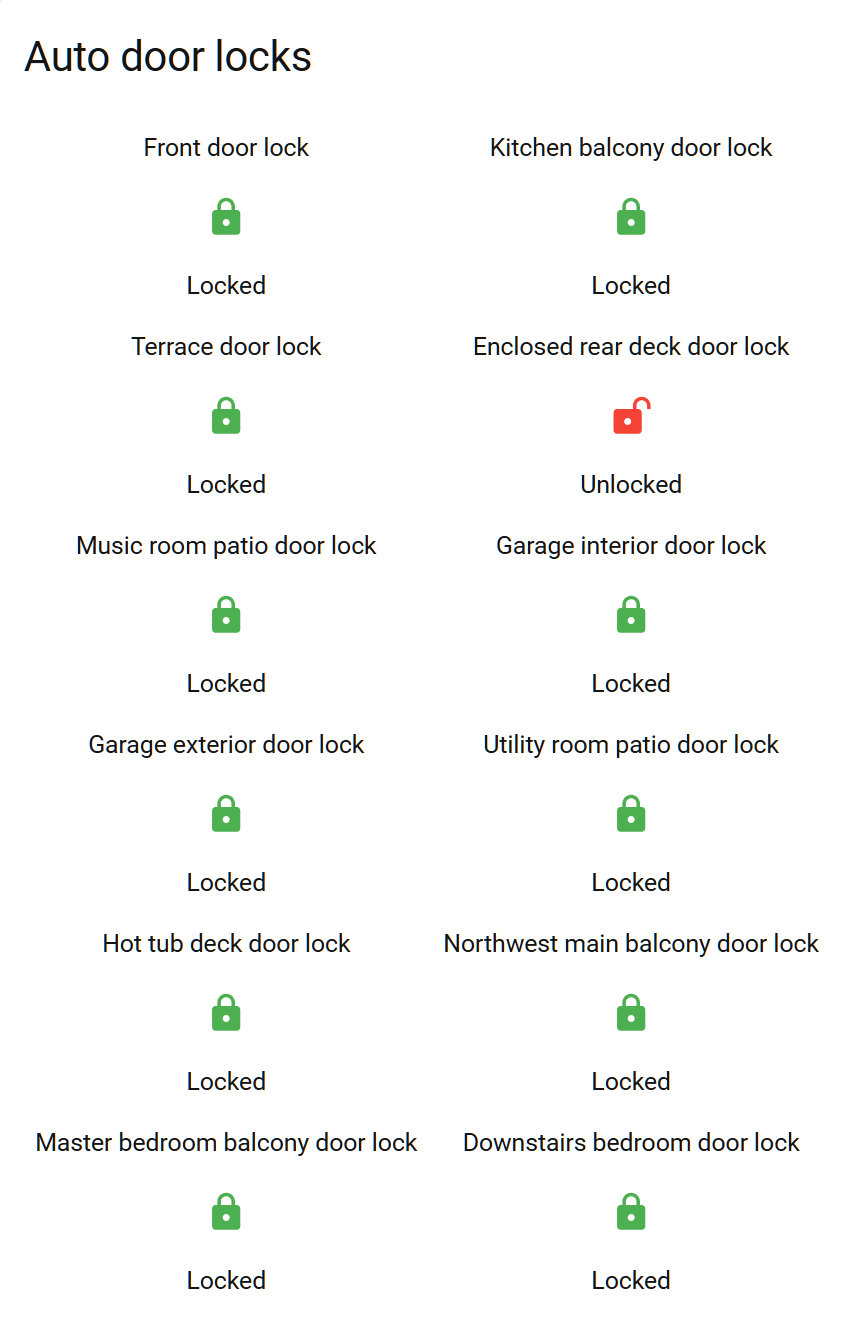
No idea why that rear deck door lock is unlocked. I need to write some automations to notify me when that happens.

I really struggle with naming devices as the house is so large. On a phone or car screen, they get truncated in those auto-entities cards. I haven’t found a way to put outlines also. This card is difficult for me to read as it’s not immediately visually obvious which lock each icon maps to - whether it pertains to the text above or below.

Thanks for all the information. Sounds like a very cool house. One my wife would love, and one I would potentially hate lol.

In regards to X10, the big thing I would say is there is some confusion on this (and this is my limited understanding as I read about it 7 or 8 years ago when I started my HA journey). X10 as I recall is pure powerline which can be flaky. Insteon combines powerline and something around 900Mhz so it provides redundancy. In addition, it uses unique On/Off commands instead of toggle, therefore when you want to turn a light off it sends it via powerline and “wireless.” The unique command part is cool as if it send an “off” command and say powerline arrives first, then when wireless arrives it says I want you ‘off’ are you already off. The “wireless” side will use hops as well, like Z wave, to get to where it needs to go. I have a few Z wave items (14) overall, and my system still struggles with dropping devices.

One note, I use the ISY as a hub instead of the Insteon hub which I have found super reliable. (It does have Z wave in it, but I use a Zooz 800 LR as my hub, and use the built in to the ISY as a repeater to extend my coverage)

Thanks. I did not know Insteon had a wireless fallover, much less a point to point one like Z-wave.

X10 is pure powerline, indeed. It uses discrete on/off commands. It does not support toggle, per my recollection. Wikipedia confirms this :

X10 had some really cool devices. One of my favorites was something called an IR543, which takes an infrared signal from a remote control, and then sends a corresponding powerline signal. I used it for years - decades, actually - to turn lights on and off in my TV/home theater room in my previous and current home, which was very much needed since I have been using a projector as my main TV since 2003. It was especially cool, because no separate automation computer was needed to manage the lights - only the remote control, IR receiver, and the appliance modules. Or X10 wall switches.

Then, the powerline started becoming too polluted and unreliable, unfortunately. I had to install filters in some wall boxes to get things to work even within one room. And forget about signal traveling to other rooms.

Nowadays, the way I got the lights to work is much more complex, and they entirely depend on home assistant to function, as they are all different technology.

The IR543 has been replaced with an ESPHome AtHom AR-01. It receives IR signals from my IR remote. Home assistant talks to it over Wifi. Until recently, I had the Zooz switches with regular LEDs, so HA would respond by sending Z-wave commands to switch the relay back and forth. The physical switches could still be used, even if HA was down. However, once I switched to smart bulbs, using the relay was no longer an option. I had to disable the relay in the Zooz switches, and they are now only scene controllers. If HA goes down, my lights no longer operate. If my Wifi network goes down, same thing. But at least things still work if the ISP goes down - Z-wave continues to work, and the Wiz smartbulbs do, too, with local Wifi. This is way more brittle than I would like. I don’t see a way to solve it without having some hardware tie-in, such as smartbulbs with Z-wave on them, and Z-wave associations between the switches and bulbs. Even if that existed, basic Z-wave only supports 256 nodes max, and my switch + bulb count exceeds that by a lot. Z-wave LR allows more nodes, but associations don’t work with LR. Associations wouldn’t work when you have >30 bulbs to control in one room, though, even if the node count wasn’t exceeded. So, I have to accept that the system is more fragile now than all the old tech.

My 130 node Z-wave network seems to be working OK since my post last night, at least, other than for the 2 dead lightbulbs . At least, I did not notice any non-working switches. I thought all 130 Z-wave nodes were up. But I when I just looked at ZUI, 7 of them were marked “red”, which means dead. I was able to manually ping all of them, though, and they all responded quickly. I am not sure what to make of it.

Just throwing my Zooz issues into the mix here. I’ve have two Zooz Zen22 dimmers installed (HUSBZB) for nearly five years that, up until this past year, were rock solid. Seemingly every another day, one or both dimmers randomly become unavailble. I’ve re-interviewed, reset, rebuilt routes, etc., all to no avail. Usually only the toggling the air gap switch (temporarily) solves the problem.

I could be way off, but I feel like all these problems started when last year I updated the Zooz firmware for the first time since purchasing the switches.

I have nothing else to add, unfortunately… just glad to see it appears to be a Zooz problem, not something to do with my setup.

I’m not sure if your ZEN22 issue is related or not. However, if you think your problem is due to a firmware regression, you may be able to roll back to the previous version, if you can obtain the old files from Zooz.

I have used Insteon in four houses and ZWave, mostly Zooz, in one. The Insteon installations were mostly trouble free, older hardware had issues, and I find Home Assistant with Insteon much more reliable than ZWave. Or at least the Zooz ZWave devices. An advantage to Insteon is that all of the links are stored locally in the devices.

2 Likes

Thanks. I used to use X10, back when I had a smaller home and far fewer electronics. It became impractical due to pollution on the powerline. A large number of filters was required to make things work. I only used it in a single room, my home theater, due to some unique devices like the IR543. I ripped out X10 about 3 years ago. The IR543 was replaced with an AtHom AR-01.

I never got into Insteon due to the high price. Even today, it looks like Insteon switches cost about twice what the Zooz do. This may be a case of getting what you pay for.

I’m still experiencing a few random dead nodes even with the ZWA-2. These are Zooz ZEN76 800LR configured in LR mode. Manual ping always works with those nodes. The biggest problem is latency. I haven’t measured the exact time, but when I turn on the lights from the bottom of my stairs, I can walk 2 to 5 steps before my Wiz Wifi lights turn on, in response to an HA automation. And I’m not climbing stairs fast, just normal pace. Subsequent switch presses of the same Zooz switch have much less latency. This is a switch located just 10ft away from the ZWA-2, though they are separated by a wall. I really can’t explain the latency issue, but it is very bothersome. I have had contractors at my home for the last month redoing my floors, and they end up pressing the switches repeatedly because the lights don’t turn on right away. I have automations for 2x, 3x, 4x and 5x presses, both on the top and bottom paddles, that have been triggered unintentionally by them due to this. These automations change the light colors and intensity.

I know that the problem is not Wifi latency. I can control the Wifi lights from the HA app, and the response is instant. smokeping shows media latency around 90ms for those bulbs. More typical is 5ms. It never exceeds 250ms. The lag I’m experiencing with the Z-wave switch presses is often in the order of several seconds.

Have you monitored the z-wave logs? You should be able to see the time when Home Assistant told the light to turn on and the controller sends the command to the switch, and then see the response(s) from the switch and if there were any errors. And if there’s other traffic on the network. The first step would be to see where the latency is really happening.

What information do I specifically need to monitor in the logs ?

Also, in my setup, almost all my Zooz switches are used as scene controllers, ie. with the relay disabled both locally and remotely. Thus, my HA/ZUI is not expected to send any commands to the switches - it is the other way around. The ZEN76 switches send status to ZUI upon pressing the paddles, and HA in turn sends commands to my Wiz bulbs to turn them on or off - or change other bulb properties.

I’m wondering if the latency is not Z-wave related, but perhaps something scheduler or priority related with the ZUI running in a separate container. I don’t have any visibility into it, as this is an HAOS installation. This might partly explain the latency on the first switch press, and lack thereof on subsequent switch presses soon after.

FYI, I am running HAOS on a VMWare workstation Pro VM under Win11. I tried to set the priority of vmware-vmx.exe to “realtime”, but that did not fix the latency.

Since my host has a removable SATA drive bay, I made a backup of my HAOS install, flashed HAOS bare metal on a spare SSD, and restored a backup onto it. Unfortunately, the multi-second latency with the Z-wave switch showed up right away. So, the issue is not related to the hypervisor. I put my Win11 boot SSD back in, and my HAOS is back on VMWare.

Unrelated issues I ran into when briefly testing bare metal :

  1. my host uses a dual-port Intel X550-T2 10GBASE-T NIC. I had one port assigned to the Win11 host, and the other port assigned to the HAOS VM. Each NIC has a different local DNS name assigned. When I booted HAOS bare metal, HAOS chose the “wrong” NIC - the one I had previously assigned to Win11. This caused the local DNS name I use on the browser side to restore the backup to be different . Not sure what I would have had to do to switch NIC port on the HAOS side. Probably easiest to physically switch the Ethernet cable. The host also has a 1 Gbe NIC, but that NIC was disabled in the BIOS, and is also not wired.

  2. The “restore backup” screen just sat there in Firefox, seemingly forever. I waited a good 10 minutes. This is a powerful host with 16 cores and 32GB of RAM, so I knew that was excessive. I then manually opened another browser tab using https://homeassistant.local:8123, and found out that it was already running. I think there might be an issue with the restore process. Maybe it is related to the fact that my install was using SSL/TLS. Not sure if this is a known issue with restore.