ZHA Bindings Manager - visual manager for ZHA Zigbee direct bindings (graph/table view + drag-and-drop bind/unbind)

Updated for v0.24.0

ZHA Bindings Manager

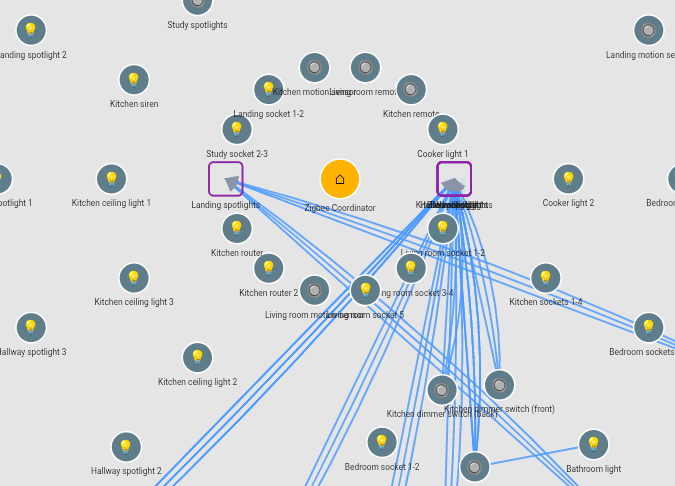
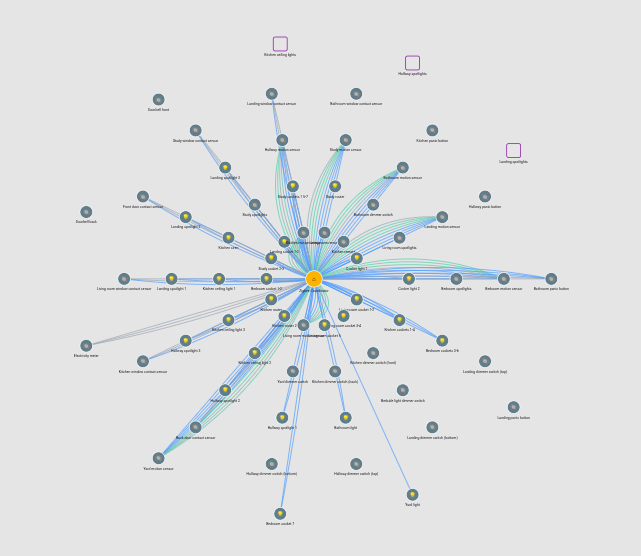
ZHA Bindings Manager is a Lovelace card for visualising, diagnosing and managing direct Zigbee bindings in ZHA.

It started because I wanted to understand what was really happening inside my own Zigbee network - including devices that continued controlling each other without Home Assistant being involved.

The card can help answer questions such as:

  • What does this switch directly control?
  • What controls this light?
  • Has re-pairing left an old or duplicate binding behind?
  • Which endpoint on a multi-gang device is involved?
  • Is a binding structurally valid?
  • Does the target device firmware actually support the command being sent?

Main features

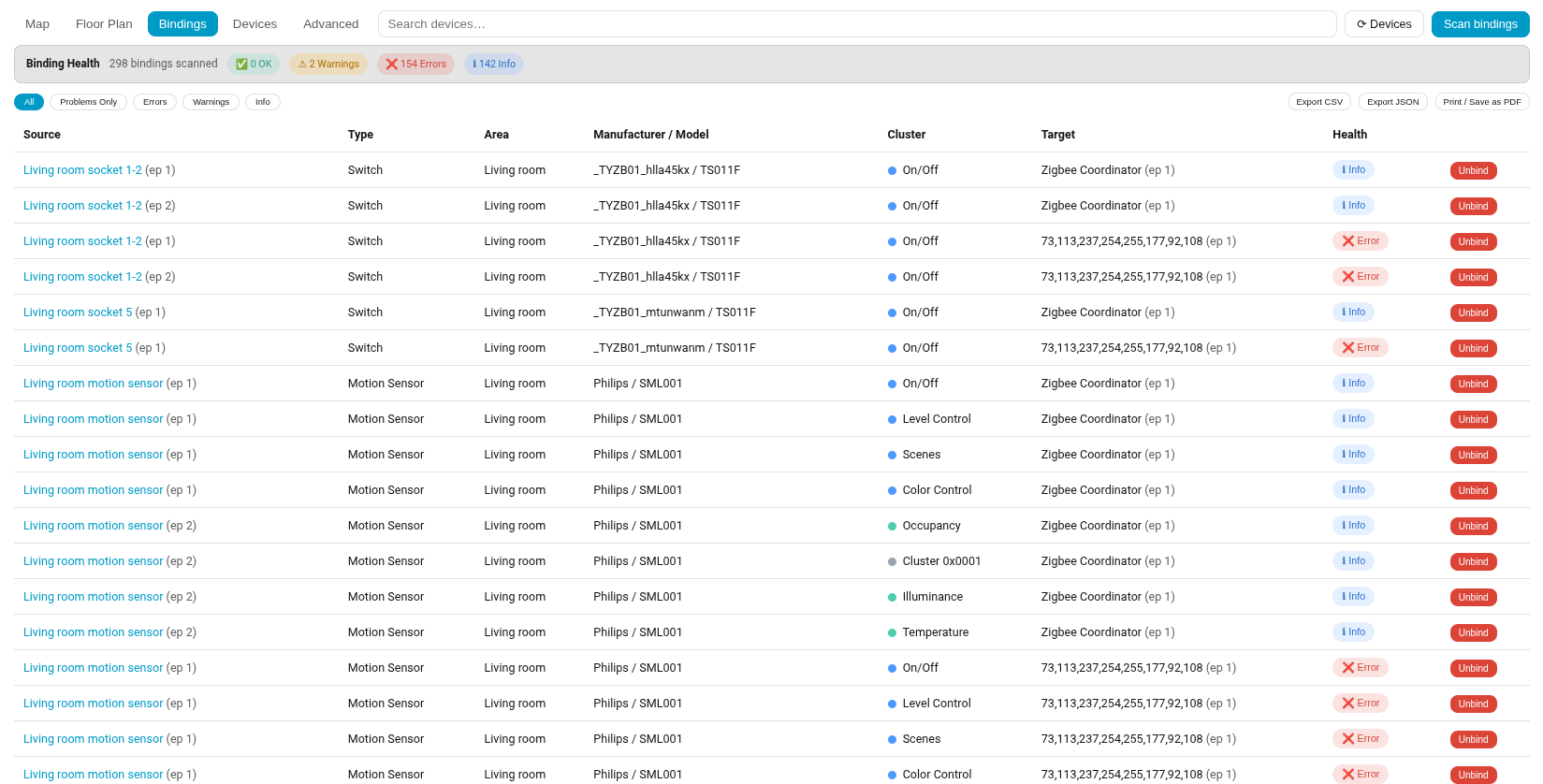
  • Interactive binding map, table and optional floor-plan view
  • Device and endpoint-level inspection
  • Binding Health checks for missing devices, endpoints, groups and duplicates
  • Create and remove direct or group bindings
  • Individual device rescans
  • Live supported-command discovery
  • Firmware and quirk information
  • Community Zigbee Capability Explorer

One real example from my own network was an outside light that kept turning on from the wrong switch. Home Assistant was not triggering it - an old direct Zigbee binding was. The map made the cause immediately visible.

Zigbee Capability Explorer

The card now also includes a community-built capability database based on scans from real devices and firmware versions.

It can:

  • compare your own devices with community observations;
  • show confirmed commands and attributes;
  • highlight firmware-dependent differences;
  • compare firmware versions;
  • search by manufacturer, model, cluster, command or attribute;
  • show the evidence and confidence behind each result.

This part of the project only becomes genuinely useful if the community participates.

A single scan is useful, but repeated scans increase confidence. Different firmware versions reveal changes, and broader participation improves coverage across manufacturers and models.

No result means nobody has yet contributed suitable evidence. It does not mean the device lacks the capability.

The dataset currently contains around 37 community submissions, which is a promising start, but still early.

Contributing a scan

Nothing is uploaded automatically.

After running a supported-command scan, the card can prepare a GitHub issue containing the technical capability results.

It excludes personal Home Assistant information such as:

  • IEEE addresses;
  • entity IDs;
  • areas;
  • device names;
  • binding data.

You can review everything before submitting it.

Repeated scans of common devices are just as useful as unusual ones, because they strengthen the evidence behind existing results.

Installation

Requirements

  • Home Assistant using ZHA
  • zha_toolkit
  • Home Assistant Core 2023.7 or newer

Install ZHA Bindings Manager through HACS under the Dashboard category.

Basic card configuration:

type: custom:zha-binding-map-card

GitHub repository, full documentation, screenshots and installation instructions:

Feedback

Testing, ideas, bug reports and capability submissions are very welcome.

Please use GitHub Issues where possible so technical reports and diagnostic information do not get lost:

The project is open source under the MIT Licence.

3 Likes

Experimented briefly using Philips Hue lights and remotes.

So far I haven’t been able to make the drag and drop work with individual lights (“unknown error”). With groups, on the other hand, it works immediately, so my interim solution is to create a group containing a single light.

This creates a problem on the map, which piles new groups on top of one another. So far I haven’t been able to separate them and had to use the advanced tab.

Great idea though, and already useful.

Hi RedKing,

Many thanks for the test and feedback. I found a binding bug and fixed it + have also made a few additional enhancements.
I published a new version: GitHub - hsolgaard/zha-bindings-manager: Visual manager for Zigbee direct bindings in Home Assistant's ZHA integration - graph/table overview plus drag-and-drop bind/unbind. · GitHub

I would be genuinely interested in your feedback and more info on any issues you may find.

Thank you!

2 Likes

OK. So…

Testing with the HA Android app, Firefox and Chrome (all on a Chromebook) and Firefox and Chrome on a Linux laptop.

Updated to version 0.9.0 (latest available on HACS).

On the browsers I am now seeing no bindings at all on the Map or on the Bindings tab, although if you query particular devices in the Advanced tab the bindings are there (they are also working on the actual devices - all set up yesterday using your card). In the HA app, the bindings appear as expected.

When I click on “Scan Bindings” they still don’t appear in the browsers and I get the following in the log:

This error originated from a custom integration.

Logger: custom_components.zha_toolkit
Source: custom_components/zha_toolkit/__init__.py:817
Integration: ZHA đź§° Toolkit (documentation, issues)
First occurred: 09:09:11 (28 occurrences)
Last logged: 09:27:55

Exception '' for service call with data '{'zha_toolkit_version': 'v1.2.1', 'zigpy_version': '2.0.0', 'zigpy_rf_version': '0.49.2', 'ieee_org': 00:12:4b:00:29:11:b1:c5, 'ieee': '00:12:4b:00:29:11:b1:c5', 'command': 'binds_get', 'command_data': None, 'start_time': '2026-07-12T09:23:58.012132+00:00', 'errors': ['TimeoutError()'], 'params': {'dir': 0, 'tries': 1, 'expect_reply': True, 'args': [], 'kwargs': {}, 'read_before_write': True, 'read_after_write': True}, 'replies': [], 'success': False}'
Exception '' for service call with data '{'zha_toolkit_version': 'v1.2.1', 'zigpy_version': '2.0.0', 'zigpy_rf_version': '0.49.2', 'ieee_org': 00:17:88:01:0b:9f:a4:27, 'ieee': '00:17:88:01:0b:9f:a4:27', 'command': 'binds_get', 'command_data': None, 'start_time': '2026-07-12T09:24:42.462547+00:00', 'errors': ['TimeoutError()'], 'params': {'dir': 0, 'tries': 1, 'expect_reply': True, 'args': [], 'kwargs': {}, 'read_before_write': True, 'read_after_write': True}, 'replies': [[<Status.SUCCESS: 0>, 5, 0, [Binding(SrcAddress=00:17:88:01:0b:9f:a4:27, SrcEndpoint=1, ClusterId=1, DstAddress=MultiAddress(addrmode=3, ieee=6c:5c:b1:ff:fe:ed:71:49, endpoint=1)), Binding(SrcAddress=00:17:88:01:0b:9f:a4:27, SrcEndpoint=1, ClusterId=64512, DstAddress=MultiAddress(addrmode=3, ieee=6c:5c:b1:ff:fe:ed:71:49, endpoint=1)), Binding(SrcAddress=00:17:88:01:0b:9f:a4:27, SrcEndpoint=1, ClusterId=8, DstAddress=MultiAddress(addrmode=3, ieee=6c:5c:b1:ff:fe:ed:71:49, endpoint=1))]]], 'success': False}'
Exception '' for service call with data '{'zha_toolkit_version': 'v1.2.1', 'zigpy_version': '2.0.0', 'zigpy_rf_version': '0.49.2', 'ieee_org': 00:17:88:01:08:03:0b:25, 'ieee': '00:17:88:01:08:03:0b:25', 'command': 'binds_get', 'command_data': None, 'start_time': '2026-07-12T09:25:42.466677+00:00', 'errors': ['TimeoutError()'], 'params': {'dir': 0, 'tries': 1, 'expect_reply': True, 'args': [], 'kwargs': {}, 'read_before_write': True, 'read_after_write': True}, 'replies': [], 'success': False}'
Exception '' for service call with data '{'zha_toolkit_version': 'v1.2.1', 'zigpy_version': '2.0.0', 'zigpy_rf_version': '0.49.2', 'ieee_org': 00:17:88:01:08:02:80:04, 'ieee': '00:17:88:01:08:02:80:04', 'command': 'binds_get', 'command_data': None, 'start_time': '2026-07-12T09:26:26.905816+00:00', 'errors': ['TimeoutError()'], 'params': {'dir': 0, 'tries': 1, 'expect_reply': True, 'args': [], 'kwargs': {}, 'read_before_write': True, 'read_after_write': True}, 'replies': [], 'success': False}'
Exception '' for service call with data '{'zha_toolkit_version': 'v1.2.1', 'zigpy_version': '2.0.0', 'zigpy_rf_version': '0.49.2', 'ieee_org': 00:17:88:01:08:96:2a:44, 'ieee': '00:17:88:01:08:96:2a:44', 'command': 'binds_get', 'command_data': None, 'start_time': '2026-07-12T09:27:11.249181+00:00', 'errors': ['TimeoutError()'], 'params': {'dir': 0, 'tries': 1, 'expect_reply': True, 'args': [], 'kwargs': {}, 'read_before_write': True, 'read_after_write': True}, 'replies': [], 'success': False}'

Are these because the end devices are sleeping? I have about 30 of them.

As far as the Map goes, The browsers all show groups nicely separated.

But the HA Android app shows groups piled on top of one another.

1 Like

Just as a counter-point, it’s working fine for me in Firefox.

1 Like

Hi RedKing,

Thanks for the feedback. Your device’s binding table is bigger than what fits in one
response, so zha_toolkit has to fetch it in “pages.” The first page came
back fine (that’s the binding data visible in your log), but the request
for the next page timed out - and the card was treating that timeout as a
total failure, throwing away the perfectly good first page along with it.
That’s why you saw zero bindings even though they genuinely existed and
worked.

v0.9.1 is up on GitHub/HACS now and fixes this (fingers crossed!!): the card keeps
whatever valid bindings a page did return, even if a later page times out,
and marks that device as a “partial read” (an Info badge in Binding
Health) so you know there may be more bindings on it than are currently
shown.

What I would appreciate you to check: please update to v0.9.1 and run “Scan bindings” again in a browser.

  1. Do bindings now show up for the devices that previously errored with TimeoutError (even if marked “partial”)?
  2. If any device still shows nothing at all, could you open the browser’s developer console (F12 → Console tab), look for a line starting with [ZHA Bindings Manager] binds_get reported failure, click to expand it, and screenshot or copy what’s inside response.replies? I’ve built the parsing for this against zha_toolkit and zigpy’s actual source code, but there’s one detail (exactly how Home Assistant converts that internal Zigbee data to JSON for the browser) I can’t verify without seeing a real example - that console output would let me confirm it or fix it fast if it’s not quite right.

This is separate from the groups-piling-up issue in the Android app, which is still open - no update on that yet, we can come back to it once this one’s confirmed.

Thanks again for the excellent bug report.

OK, so to begin with, the overlaid icons on the map when using a Chromebook is a “feature” of running the HA app in ChromeOS. You can run most Play Store apps on a Chromebook, but not all of them behave as expected. The display is fine on Android devices. Probably not a priority unless you get lots of complaints (unlikely).

First part of your request:

  • Running Chrome browser on a Linux laptop
  • Home Assistant 2026.7.2
  • ZHA Toolkit 1.2.1

1 Update Bindings Map card to 0.9.1

2 Restart Home Assistant and wait for all the end devices to become available

3 Open the dashboard with the Binding Map card on it. All devices are present, clearly displayed, no bindings. Message “Bindings never scanned yet”. The Bindings tab says “No bindings loaded yet”. The Devices tab shows all devices have been discovered, all marked as having 0 bindings.

  1. Click the Scan Bindings button. The scan (64 devices) takes 12 minutes to complete.
  • The map still shows no bindings.
  • Every entry in the bindings list is marked “Error. Target device no longer exists”. No mention of “partial”.
  • In the Devices tab every device is now marked as having 0-16 bindings. These are presumably with the co-ordinator - the seven end devices on which I have set up bindings (Philips Hue dimmer switches) are shown as having none - presumably they were sleeping during the scan.
  • There are two errors in the log, both repeated 15 times:
Logger: homeassistant.components.websocket_api.http.connection
Source: components/websocket_api/commands.py:281
Integration: Home Assistant WebSocket API (documentation, issues)
First occurred: 15:35:58 (15 occurrences)
Last logged: 15:47:34

[139895793773888] Unexpected exception
Traceback (most recent call last):
  File "/usr/local/lib/python3.14/site-packages/bellows/zigbee/application.py", line 1095, in send_packet
    send_status, _ = await future
                     ^^^^^^^^^^^^
asyncio.exceptions.CancelledError

The above exception was the direct cause of the following exception:

Traceback (most recent call last):
  File "/usr/src/homeassistant/homeassistant/components/websocket_api/commands.py", line 281, in handle_call_service
    response = await hass.services.async_call(
               ^^^^^^^^^^^^^^^^^^^^^^^^^^^^^^^
    ...<7 lines>...
    )
    ^
  File "/usr/src/homeassistant/homeassistant/core.py", line 2900, in async_call
    response_data = await coro
                    ^^^^^^^^^^
  File "/usr/src/homeassistant/homeassistant/core.py", line 2943, in _execute_service
    return await target(service_call)
           ^^^^^^^^^^^^^^^^^^^^^^^^^^
  File "/config/custom_components/zha_toolkit/__init__.py", line 825, in toolkit_service
    raise handler_exception
  File "/config/custom_components/zha_toolkit/__init__.py", line 777, in toolkit_service
    handler_result = await handler(
                     ^^^^^^^^^^^^^^
    ...<8 lines>...
    )
    ^
  File "/config/custom_components/zha_toolkit/__init__.py", line 912, in command_handler_default
    return await default.default(
           ^^^^^^^^^^^^^^^^^^^^^^
        app, listener, ieee, cmd, data, service, params, event_data
        ^^^^^^^^^^^^^^^^^^^^^^^^^^^^^^^^^^^^^^^^^^^^^^^^^^^^^^^^^^^
    )
    ^
  File "/config/custom_components/zha_toolkit/default.py", line 51, in default
    await handler(app, listener, ieee, cmd, data, service, params, event_data)
  File "/config/custom_components/zha_toolkit/binds.py", line 618, in binds_get
    reply = await u.retry_wrapper(
            ^^^^^^^^^^^^^^^^^^^^^^
        zdo.request, ZDOCmd.Mgmt_Bind_req, idx, tries=tries
        ^^^^^^^^^^^^^^^^^^^^^^^^^^^^^^^^^^^^^^^^^^^^^^^^^^^
    )
    ^
  File "/config/custom_components/zha_toolkit/utils.py", line 1175, in retry_wrapper
    return await retry(
           ^^^^^^^^^^^^
    ...<4 lines>...
    )
    ^
  File "/config/custom_components/zha_toolkit/utils.py", line 1155, in retry
    return await func()
           ^^^^^^^^^^^^
  File "/usr/local/lib/python3.14/site-packages/zigpy/zdo/__init__.py", line 68, in request
    return await self._device.request(
           ^^^^^^^^^^^^^^^^^^^^^^^^^^^
    ...<13 lines>...
    )
    ^
  File "/usr/local/lib/python3.14/site-packages/zigpy/device.py", line 704, in request
    await send_request(attempt=attempt)
  File "/usr/local/lib/python3.14/site-packages/zigpy/application.py", line 1136, in request
    await self.send_packet(
    ...<14 lines>...
    )
  File "/usr/local/lib/python3.14/site-packages/bellows/zigbee/application.py", line 1090, in send_packet
    async with asyncio_timeout(
               ~~~~~~~~~~~~~~~^
        MESSAGE_SEND_TIMEOUT_MAINS
        ^^^^^^^^^^^^^^^^^^^^^^^^^^
        if not packet.extended_timeout
        ^^^^^^^^^^^^^^^^^^^^^^^^^^^^^^
        else MESSAGE_SEND_TIMEOUT_BATTERY
        ^^^^^^^^^^^^^^^^^^^^^^^^^^^^^^^^^
    ):
    ^
  File "/usr/local/lib/python3.14/asyncio/timeouts.py", line 115, in __aexit__
    raise TimeoutError from exc_val
TimeoutError

and…

This error originated from a custom integration.

Logger: custom_components.zha_toolkit
Source: custom_components/zha_toolkit/__init__.py:817
Integration: ZHA đź§° Toolkit (documentation, issues)
First occurred: 15:35:58 (15 occurrences)
Last logged: 15:47:34

Exception '' for service call with data '{'zha_toolkit_version': 'v1.2.1', 'zigpy_version': '2.0.0', 'zigpy_rf_version': '0.49.2', 'ieee_org': 00:17:88:01:0b:9f:a4:27, 'ieee': '00:17:88:01:0b:9f:a4:27', 'command': 'binds_get', 'command_data': None, 'start_time': '2026-07-14T14:43:15.298916+00:00', 'errors': ['TimeoutError()'], 'params': {'dir': 0, 'tries': 1, 'expect_reply': True, 'args': [], 'kwargs': {}, 'read_before_write': True, 'read_after_write': True}, 'replies': [], 'success': False}'
Exception '' for service call with data '{'zha_toolkit_version': 'v1.2.1', 'zigpy_version': '2.0.0', 'zigpy_rf_version': '0.49.2', 'ieee_org': 00:17:88:01:08:03:0b:25, 'ieee': '00:17:88:01:08:03:0b:25', 'command': 'binds_get', 'command_data': None, 'start_time': '2026-07-14T14:43:59.637823+00:00', 'errors': ['TimeoutError()'], 'params': {'dir': 0, 'tries': 1, 'expect_reply': True, 'args': [], 'kwargs': {}, 'read_before_write': True, 'read_after_write': True}, 'replies': [], 'success': False}'
Exception '' for service call with data '{'zha_toolkit_version': 'v1.2.1', 'zigpy_version': '2.0.0', 'zigpy_rf_version': '0.49.2', 'ieee_org': 00:17:88:01:08:96:2a:44, 'ieee': '00:17:88:01:08:96:2a:44', 'command': 'binds_get', 'command_data': None, 'start_time': '2026-07-14T14:45:18.021809+00:00', 'errors': ['TimeoutError()'], 'params': {'dir': 0, 'tries': 1, 'expect_reply': True, 'args': [], 'kwargs': {}, 'read_before_write': True, 'read_after_write': True}, 'replies': [], 'success': False}'
Exception '' for service call with data '{'zha_toolkit_version': 'v1.2.1', 'zigpy_version': '2.0.0', 'zigpy_rf_version': '0.49.2', 'ieee_org': 00:15:bc:00:39:00:2e:f2, 'ieee': '00:15:bc:00:39:00:2e:f2', 'command': 'binds_get', 'command_data': None, 'start_time': '2026-07-14T14:46:06.041684+00:00', 'errors': ['TimeoutError()'], 'params': {'dir': 0, 'tries': 1, 'expect_reply': True, 'args': [], 'kwargs': {}, 'read_before_write': True, 'read_after_write': True}, 'replies': [], 'success': False}'
Exception '' for service call with data '{'zha_toolkit_version': 'v1.2.1', 'zigpy_version': '2.0.0', 'zigpy_rf_version': '0.49.2', 'ieee_org': 00:15:bc:00:39:00:3e:15, 'ieee': '00:15:bc:00:39:00:3e:15', 'command': 'binds_get', 'command_data': None, 'start_time': '2026-07-14T14:46:50.385382+00:00', 'errors': ['TimeoutError()'], 'params': {'dir': 0, 'tries': 1, 'expect_reply': True, 'args': [], 'kwargs': {}, 'read_before_write': True, 'read_after_write': True}, 'replies': [], 'success': False}'

I’ll have a look at the developer console this evening.

Edit: After about half an hour (while I was posting this, in fact), the co-ordinator bindings appear on the map and on the Bindings tab.

Another Edit: Just realised that the “Hide coordinator bindings” checkbox affects the bindings page as well… :roll_eyes:

1 Like

Hi RedKing,

Thanks for the detailed report - turned out there was a real bug in it. Your scan showed every coordinator binding as “target device no longer exists” because a target device’s IEEE address was being parsed incorrectly (confirmed against a real captured response from another network). That’s fixed in v0.9.4, along with two related issues found while testing the fix: some genuinely fine bindings were showing false “duplicate binding” warnings, and Home Assistant was popping its own generic error toast on top of the card’s own “did not respond” reporting for sleepy/offline devices - both resolved. The scan-complete summary also now stays on screen until you dismiss it, rather than disappearing after a few seconds.

Could you update to v0.9.4 and rescan when you get a chance? Your Hue switches timing out is expected (likely asleep during the scan, not a bug), but the coordinator bindings and the false duplicates/toast noise should all be resolved now.

Also planned for a future release: better handling of battery-powered devices during a scan - detecting them up front, prompting you to wake a device before scanning it, and an easier way to rescan just one device (with more retries) rather than re-running the whole network. Not in yet, but on the list given your network’s a good real-world test of exactly that.

Upgraded to 0.9.4.

No more toasts, but I’m still getting three devices giving false duplicates. These are all for the same type of multi-socket strip - they worked with ZHA out of the box, but there may be something odd about them.

So far I haven’t been able wake sleeping devices fast enough to get more than one picked up in the scan (there are eight of them), but I was able to scan them individually in the Advanced tab - a single click method would be great though. So I now have a complete bindings map.

I still have errors in the log:

Logger: homeassistant.components.websocket_api.http.connection
Source: components/websocket_api/commands.py:281
Integration: Home Assistant WebSocket API (documentation, issues)
First occurred: 15:43:22 (15 occurrences)
Last logged: 15:55:06

[139701370982528] Unexpected exception
Traceback (most recent call last):
  File "/usr/local/lib/python3.14/site-packages/bellows/zigbee/application.py", line 1095, in send_packet
    send_status, _ = await future
                     ^^^^^^^^^^^^
asyncio.exceptions.CancelledError

The above exception was the direct cause of the following exception:

Traceback (most recent call last):
  File "/usr/src/homeassistant/homeassistant/components/websocket_api/commands.py", line 281, in handle_call_service
    response = await hass.services.async_call(
               ^^^^^^^^^^^^^^^^^^^^^^^^^^^^^^^
    ...<7 lines>...
    )
    ^
  File "/usr/src/homeassistant/homeassistant/core.py", line 2900, in async_call
    response_data = await coro
                    ^^^^^^^^^^
  File "/usr/src/homeassistant/homeassistant/core.py", line 2943, in _execute_service
    return await target(service_call)
           ^^^^^^^^^^^^^^^^^^^^^^^^^^
  File "/config/custom_components/zha_toolkit/__init__.py", line 825, in toolkit_service
    raise handler_exception
  File "/config/custom_components/zha_toolkit/__init__.py", line 777, in toolkit_service
    handler_result = await handler(
                     ^^^^^^^^^^^^^^
    ...<8 lines>...
    )
    ^
  File "/config/custom_components/zha_toolkit/__init__.py", line 912, in command_handler_default
    return await default.default(
           ^^^^^^^^^^^^^^^^^^^^^^
        app, listener, ieee, cmd, data, service, params, event_data
        ^^^^^^^^^^^^^^^^^^^^^^^^^^^^^^^^^^^^^^^^^^^^^^^^^^^^^^^^^^^
    )
    ^
  File "/config/custom_components/zha_toolkit/default.py", line 51, in default
    await handler(app, listener, ieee, cmd, data, service, params, event_data)
  File "/config/custom_components/zha_toolkit/binds.py", line 618, in binds_get
    reply = await u.retry_wrapper(
            ^^^^^^^^^^^^^^^^^^^^^^
        zdo.request, ZDOCmd.Mgmt_Bind_req, idx, tries=tries
        ^^^^^^^^^^^^^^^^^^^^^^^^^^^^^^^^^^^^^^^^^^^^^^^^^^^
    )
    ^
  File "/config/custom_components/zha_toolkit/utils.py", line 1175, in retry_wrapper
    return await retry(
           ^^^^^^^^^^^^
    ...<4 lines>...
    )
    ^
  File "/config/custom_components/zha_toolkit/utils.py", line 1155, in retry
    return await func()
           ^^^^^^^^^^^^
  File "/usr/local/lib/python3.14/site-packages/zigpy/zdo/__init__.py", line 68, in request
    return await self._device.request(
           ^^^^^^^^^^^^^^^^^^^^^^^^^^^
    ...<13 lines>...
    )
    ^
  File "/usr/local/lib/python3.14/site-packages/zigpy/device.py", line 704, in request
    await send_request(attempt=attempt)
  File "/usr/local/lib/python3.14/site-packages/zigpy/application.py", line 1136, in request
    await self.send_packet(
    ...<14 lines>...
    )
  File "/usr/local/lib/python3.14/site-packages/bellows/zigbee/application.py", line 1090, in send_packet
    async with asyncio_timeout(
               ~~~~~~~~~~~~~~~^
        MESSAGE_SEND_TIMEOUT_MAINS
        ^^^^^^^^^^^^^^^^^^^^^^^^^^
        if not packet.extended_timeout
        ^^^^^^^^^^^^^^^^^^^^^^^^^^^^^^
        else MESSAGE_SEND_TIMEOUT_BATTERY
        ^^^^^^^^^^^^^^^^^^^^^^^^^^^^^^^^^
    ):
    ^
  File "/usr/local/lib/python3.14/asyncio/timeouts.py", line 115, in __aexit__
    raise TimeoutError from exc_val
TimeoutError

and…

This error originated from a custom integration.

Logger: custom_components.zha_toolkit
Source: custom_components/zha_toolkit/__init__.py:817
Integration: ZHA đź§° Toolkit (documentation, issues)
First occurred: 15:43:22 (15 occurrences)
Last logged: 15:55:06

Exception '' for service call with data '{'zha_toolkit_version': 'v1.2.1', 'zigpy_version': '2.0.0', 'zigpy_rf_version': '0.49.2', 'ieee_org': 00:17:88:01:0b:9f:a4:27, 'ieee': '00:17:88:01:0b:9f:a4:27', 'command': 'binds_get', 'command_data': None, 'start_time': '2026-07-15T14:50:33.654670+00:00', 'errors': ['TimeoutError()'], 'params': {'dir': 0, 'tries': 1, 'expect_reply': True, 'args': [], 'kwargs': {}, 'read_before_write': True, 'read_after_write': True}, 'replies': [], 'success': False}'
Exception '' for service call with data '{'zha_toolkit_version': 'v1.2.1', 'zigpy_version': '2.0.0', 'zigpy_rf_version': '0.49.2', 'ieee_org': 00:17:88:01:08:03:0b:25, 'ieee': '00:17:88:01:08:03:0b:25', 'command': 'binds_get', 'command_data': None, 'start_time': '2026-07-15T14:51:17.992872+00:00', 'errors': ['TimeoutError()'], 'params': {'dir': 0, 'tries': 1, 'expect_reply': True, 'args': [], 'kwargs': {}, 'read_before_write': True, 'read_after_write': True}, 'replies': [], 'success': False}'
Exception '' for service call with data '{'zha_toolkit_version': 'v1.2.1', 'zigpy_version': '2.0.0', 'zigpy_rf_version': '0.49.2', 'ieee_org': 00:17:88:01:08:02:80:04, 'ieee': '00:17:88:01:08:02:80:04', 'command': 'binds_get', 'command_data': None, 'start_time': '2026-07-15T14:52:02.362516+00:00', 'errors': ['TimeoutError()'], 'params': {'dir': 0, 'tries': 1, 'expect_reply': True, 'args': [], 'kwargs': {}, 'read_before_write': True, 'read_after_write': True}, 'replies': [], 'success': False}'
Exception '' for service call with data '{'zha_toolkit_version': 'v1.2.1', 'zigpy_version': '2.0.0', 'zigpy_rf_version': '0.49.2', 'ieee_org': 00:17:88:01:08:96:2a:44, 'ieee': '00:17:88:01:08:96:2a:44', 'command': 'binds_get', 'command_data': None, 'start_time': '2026-07-15T14:52:46.704190+00:00', 'errors': ['TimeoutError()'], 'params': {'dir': 0, 'tries': 1, 'expect_reply': True, 'args': [], 'kwargs': {}, 'read_before_write': True, 'read_after_write': True}, 'replies': [], 'success': False}'
Exception '' for service call with data '{'zha_toolkit_version': 'v1.2.1', 'zigpy_version': '2.0.0', 'zigpy_rf_version': '0.49.2', 'ieee_org': 00:15:bc:00:39:00:3e:15, 'ieee': '00:15:bc:00:39:00:3e:15', 'command': 'binds_get', 'command_data': None, 'start_time': '2026-07-15T14:54:22.588581+00:00', 'errors': ['TimeoutError()'], 'params': {'dir': 0, 'tries': 1, 'expect_reply': True, 'args': [], 'kwargs': {}, 'read_before_write': True, 'read_after_write': True}, 'replies': [], 'success': False}'

One general point: is a dashboard card the right place for this? I now have binding maps in four browsers on two different machines, and they’re all different. The bindings are the same, but the maps are at different stages of completion. Is there a case for some sort of backend integration so that the frontend dashboard card is consistent?

1 Like

Hi RedKing,

Good news first. Your “single click to rescan one device” ask is already built: v0.10.1 adds a Rescan button directly in the Devices tab for every device, so you can wake one of your eight sleepy devices and retry just that one instead of needing the full network scan to happen to catch it awake.

It also adds a configurable retry count for that button specifically (a small settings icon next to “Scan bindings”). A single retry attempt against a device that doesn’t respond takes about 45 seconds, confirmed by timing it directly. So with the default of 2 retries, you’ve got roughly 90 seconds from clicking the button to wake the device and have it respond, and so on. This only affects the individual rescan button. Your full network scan is untouched and won’t get any slower. After you’ve rescanned a device a few times, its row also starts showing its own typical response time, so you’ll get a more precise sense of how much time that specific device actually needs. I’m testing whether I could run scans across multiple devices in parallel, but this requires a bit more testing.

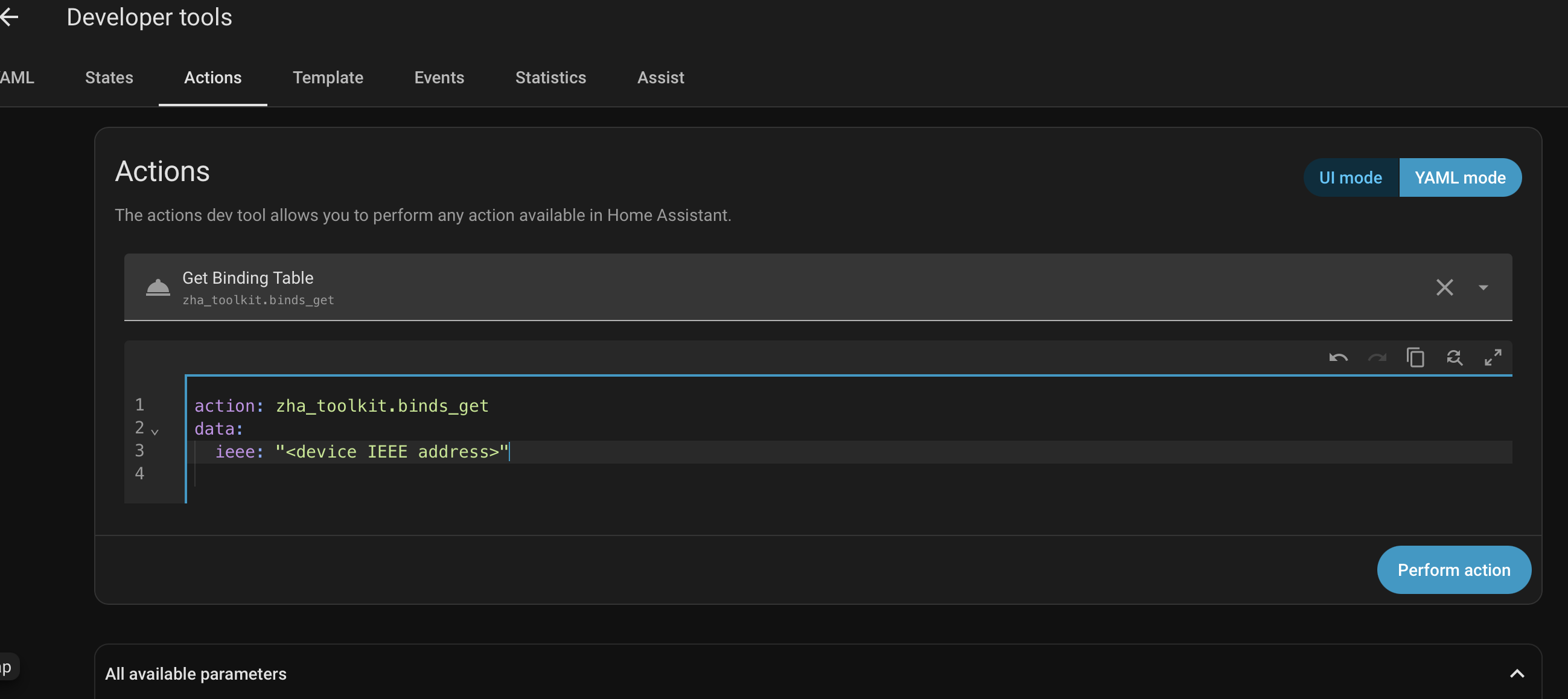
On the false duplicates on your multi-socket strips: this looks different from the duplicate bug we fixed in 0.9.3, and I’d rather not guess at it. Could you tell me the make and model of that strip? It’d also help a lot to see the raw data behind one of the false duplicates. If you go to Developer Tools, then Actions, switch to YAML mode, and paste this in (swapping in the IEEE address of one of the three affected devices, found on its device page):

action: zha_toolkit.binds_get
data:
  ieee: "<device IEEE address>"

If there’s a “Response data” option, enable it before running it. Then paste whatever comes back here, the full thing if possible. That’ll show the actual source endpoint, target, and cluster values behind the false duplicate, so I can see what’s really going on rather than assume it’s the same issue as before.

On the multi-browser consistency question: fair point! The card’s intended use case is a single person managing their own network, so the frontend-only, per-browser design is a reasonable fit for that. You scan, you see your own results, no backend component to install or version alongside HA itself. Where it breaks down, as you’ve found, is exactly your setup: the same person checking the same network from multiple browsers and devices, where each one ends up with its own independent view. That’s a real limitation of the current design. I’m genuinely open to a future version that persists scan data in Home Assistant itself rather than per browser, so every view of the dashboard stays consistent. Not promising a timeline, but it’s a legitimate architectural question and on the list to think through properly rather than bolt on quickly. Feel free to log an issue on GitHub :slight_smile:

Thanks again for the thorough testing.

Sorry about the delayed reply…

Upgraded to 0.15.0.

Amazon seem to sell the socket strips under several brand names, so “generic Chinese” is my best guess. The ZHA device info is:

TS011F
by _TZ3000_cfnprab5 

The response to zha_toolkit.binds_get is:

zha_toolkit_version: v1.2.1
zigpy_version: 2.0.0
zigpy_rf_version: 0.49.2
ieee_org:
  - 226
  - 207
  - 239
  - 63
  - 43
  - 56
  - 193
  - 164
ieee: a4:c1:38:2b:3f:ef:cf:e2
command: binds_get
command_data: null
start_time: "2026-07-19T23:57:12.793386+00:00"
errors: []
params:
  dir: 0
  tries: 1
  expect_reply: true
  args: []
  kwargs: {}
  read_before_write: true
  read_after_write: true
replies:
  - - 0
    - 5
    - 0
    - - SrcAddress:
          - 226
          - 207
          - 239
          - 63
          - 43
          - 56
          - 193
          - 164
        SrcEndpoint: 1
        ClusterId: 6
        DstAddress:
          addrmode: 3
          nwk: null
          ieee:
            - 73
            - 113
            - 237
            - 254
            - 255
            - 177
            - 92
            - 108
          endpoint: 1
      - SrcAddress:
          - 226
          - 207
          - 239
          - 63
          - 43
          - 56
          - 193
          - 164
        SrcEndpoint: 2
        ClusterId: 6
        DstAddress:
          addrmode: 3
          nwk: null
          ieee:
            - 2
            - 3
            - 73
            - 113
            - 237
            - 254
            - 255
            - 177
          endpoint: 1
  - - 0
    - 5
    - 2
    - - SrcAddress:
          - 226
          - 207
          - 239
          - 63
          - 43
          - 56
          - 193
          - 164
        SrcEndpoint: 3
        ClusterId: 6
        DstAddress:
          addrmode: 3
          nwk: null
          ieee:
            - 73
            - 113
            - 237
            - 254
            - 255
            - 177
            - 92
            - 108
          endpoint: 1
      - SrcAddress:
          - 226
          - 207
          - 239
          - 63
          - 43
          - 56
          - 193
          - 164
        SrcEndpoint: 4
        ClusterId: 6
        DstAddress:
          addrmode: 3
          nwk: null
          ieee:
            - 4
            - 3
            - 73
            - 113
            - 237
            - 254
            - 255
            - 177
          endpoint: 1
  - - 0
    - 5
    - 4
    - - SrcAddress:
          - 226
          - 207
          - 239
          - 63
          - 43
          - 56
          - 193
          - 164
        SrcEndpoint: 5
        ClusterId: 6
        DstAddress:
          addrmode: 3
          nwk: null
          ieee:
            - 73
            - 113
            - 237
            - 254
            - 255
            - 177
            - 92
            - 108
          endpoint: 1
success: true
result:
  "0":
    src: a4:c1:38:2b:3f:ef:cf:e2
    src_ep: 1
    cluster_id: "0x0006"
    dst:
      addrmode: 3
      dst_ieee: 6c:5c:b1:ff:fe:ed:71:49
      dst_ep: 1
  "1":
    src: a4:c1:38:2b:3f:ef:cf:e2
    src_ep: 2
    cluster_id: "0x0006"
    dst:
      addrmode: 3
      dst_ieee: b1:ff:fe:ed:71:49:03:02
      dst_ep: 1
  "2":
    src: a4:c1:38:2b:3f:ef:cf:e2
    src_ep: 3
    cluster_id: "0x0006"
    dst:
      addrmode: 3
      dst_ieee: 6c:5c:b1:ff:fe:ed:71:49
      dst_ep: 1
  "3":
    src: a4:c1:38:2b:3f:ef:cf:e2
    src_ep: 4
    cluster_id: "0x0006"
    dst:
      addrmode: 3
      dst_ieee: b1:ff:fe:ed:71:49:03:04
      dst_ep: 1
  "4":
    src: a4:c1:38:2b:3f:ef:cf:e2
    src_ep: 5
    cluster_id: "0x0006"
    dst:
      addrmode: 3
      dst_ieee: 6c:5c:b1:ff:fe:ed:71:49
      dst_ep: 1

Updated to 0.18.0.

Still getting errors:

And in the log:

This error originated from a custom integration.

Logger: custom_components.zha_toolkit
Source: custom_components/zha_toolkit/__init__.py:817
Integration: ZHA đź§° Toolkit (documentation, issues)
First occurred: 10:04:42 (16 occurrences)
Last logged: 10:08:25

Exception '' for service call with data '{'zha_toolkit_version': 'v1.2.1', 'zigpy_version': '2.0.0', 'zigpy_rf_version': '0.49.2', 'ieee_org': 00:17:88:01:0b:9f:a4:27, 'ieee': '00:17:88:01:0b:9f:a4:27', 'command': 'binds_get', 'command_data': None, 'start_time': '2026-07-20T10:06:56.485467+00:00', 'errors': ['TimeoutError()'], 'params': {'dir': 0, 'tries': 1, 'expect_reply': True, 'args': [], 'kwargs': {}, 'read_before_write': True, 'read_after_write': True}, 'replies': [], 'success': False}'
Exception '' for service call with data '{'zha_toolkit_version': 'v1.2.1', 'zigpy_version': '2.0.0', 'zigpy_rf_version': '0.49.2', 'ieee_org': 00:12:4b:00:29:11:b1:c5, 'ieee': '00:12:4b:00:29:11:b1:c5', 'command': 'binds_get', 'command_data': None, 'start_time': '2026-07-20T10:06:56.498994+00:00', 'errors': ['TimeoutError()'], 'params': {'dir': 0, 'tries': 1, 'expect_reply': True, 'args': [], 'kwargs': {}, 'read_before_write': True, 'read_after_write': True}, 'replies': [], 'success': False}'
Exception '' for service call with data '{'zha_toolkit_version': 'v1.2.1', 'zigpy_version': '2.0.0', 'zigpy_rf_version': '0.49.2', 'ieee_org': 00:17:88:01:08:02:80:04, 'ieee': '00:17:88:01:08:02:80:04', 'command': 'binds_get', 'command_data': None, 'start_time': '2026-07-20T10:06:56.511966+00:00', 'errors': ['TimeoutError()'], 'params': {'dir': 0, 'tries': 1, 'expect_reply': True, 'args': [], 'kwargs': {}, 'read_before_write': True, 'read_after_write': True}, 'replies': [], 'success': False}'
Exception '' for service call with data '{'zha_toolkit_version': 'v1.2.1', 'zigpy_version': '2.0.0', 'zigpy_rf_version': '0.49.2', 'ieee_org': 00:15:bc:00:39:00:2e:f2, 'ieee': '00:15:bc:00:39:00:2e:f2', 'command': 'binds_get', 'command_data': None, 'start_time': '2026-07-20T10:07:41.188965+00:00', 'errors': ['TimeoutError()'], 'params': {'dir': 0, 'tries': 1, 'expect_reply': True, 'args': [], 'kwargs': {}, 'read_before_write': True, 'read_after_write': True}, 'replies': [], 'success': False}'
Exception '' for service call with data '{'zha_toolkit_version': 'v1.2.1', 'zigpy_version': '2.0.0', 'zigpy_rf_version': '0.49.2', 'ieee_org': 00:15:bc:00:39:00:3e:15, 'ieee': '00:15:bc:00:39:00:3e:15', 'command': 'binds_get', 'command_data': None, 'start_time': '2026-07-20T10:07:41.212412+00:00', 'errors': ['TimeoutError()'], 'params': {'dir': 0, 'tries': 1, 'expect_reply': True, 'args': [], 'kwargs': {}, 'read_before_write': True, 'read_after_write': True}, 'replies': [], 'success': False}'

I notice that the ieee numbers in the errors are not the actual device ieee numbers - which is why there are no errors when I use Device Tools. Don’t know where these are coming from. If I enter one of them in Device Tools I get “No entities found for …”

Thanks for digging up the raw binds_get output.

Short version: this isn’t a bug in the bindings manager card. Running the raw byte arrays you posted through the same decode logic the card uses lines up exactly with zha_toolkit’s own result output - including the two bindings on endpoints 2 and 4 that resolve to an address that isn’t a real device. That corruption is already present in what zha_toolkit hands back, before the card ever touches it, so there’s nothing on my end to fix here that will resolve it.

The pattern itself: endpoints 1, 3, and 5 all decode correctly to the same real target device, which is expected for a 5-gang strip like this. Endpoints 2 and 4 - always the second binding entry returned in a given response page - decode to a garbled address. The corruption is very consistent, which points to either the device’s own firmware sending a malformed second record, or a parsing quirk further upstream in zigpy. Either way, it’s a zigpy/zha-toolkit (or possibly TS011F firmware) question rather than something addressable in the card.

If you want to chase it further, a couple of things would help narrow it down: running binds_get a couple more times to see if the corrupted bytes (IEEE numbers) are identical each time (points to something deterministic vs. transient), and if you’re comfortable with it, turning on debug logging for zigpy to see whether the bad bytes are already there before any parsing happens. That’d be useful evidence if you end up filing something with the zigpy or zha-toolkit projects directly - they’re better placed to take it from there than I am.

Appreciate you taking the time to pull the raw data.

I think I’ll be able to live with it - just a couple of errors when I do a scan. Thanks for looking into it.

The card’s looking better and better - a really useful tool.

1 Like