### The problem
The zigbee part of my system has a Sonoff Zigbee 3 dongle (Te…xas Instruments). I have 20 zigbee devices attached that include products from sengled (mainly power plugs), Third Realty (plower plugs) heiman (smoke detectors) and a couple of others.
Everything has been working fine for many months
Yesterday an HA upgrade from 2024.1.3 to 2024.1.5 and when it came back, all 10 of the Third Reality plugs were offline. All other zigbee devices are fine. I restored back to 2024-1-3 but they stayed offline - which is how they remain. I have tried numerous restarts (HA and OS) and reloaded the integration multiple times. I can see them in the topology diagram, and in the devices and entities lists - all 3rd Reality devices marked as offline or unavailable.
I am currently a 7 hour flight away from my home and am not returning for 3 months, so I am cautious about doing anything dramatic here.
Any suggestions on how to bring these back?
### What version of Home Assistant Core has the issue?
core-2024.1.5
### What was the last working version of Home Assistant Core?
core-2024.1.3 ??
### What type of installation are you running?
Home Assistant OS
### Integration causing the issue
Zigbee
### Link to integration documentation on our website
https://www.home-assistant.io/integrations/zha/
### Diagnostics information
_No response_
### Example YAML snippet
_No response_
### Anything in the logs that might be useful for us?
```txt
Here is an extract from my log (debug turned on). Not sure if this is useful or not.
2024-01-26 09:39:03.118 DEBUG (MainThread) [zigpy_znp.zigbee.application] Request failed (Unsuccessful request status code: <Status.APS_NO_ACK: 183>), retry attempt 5 of 5 (RouteDiscovery|LastGoodRoute|IEEEAddress)
2024-01-26 09:39:03.568 DEBUG (MainThread) [zigpy.application] Previously delayed request is now running, delayed by 1805.71s
2024-01-26 09:39:03.570 DEBUG (MainThread) [zigpy.application] Previously delayed request is now running, delayed by 1805.70s
2024-01-26 09:39:03.571 DEBUG (MainThread) [zigpy.application] Previously delayed request is now running, delayed by 1805.52s
2024-01-26 09:39:03.574 DEBUG (MainThread) [zigpy_znp.api] Sending request: AF.DataRequestExt.Req(DstAddrModeAddress=AddrModeAddress(mode=<AddrMode.NWK: 2>, address=0xB81F), DstEndpoint=1, DstPanId=0x0000, SrcEndpoint=1, ClusterId=1794, TSN=15, Options=<TransmitOptions.ACK_REQUEST|SUPPRESS_ROUTE_DISC_NETWORK: 48>, Radius=0, Data=b'\x18\x0F\x0B\x0A\x00')
2024-01-26 09:39:03.578 DEBUG (MainThread) [zigpy.application] Previously delayed request is now running, delayed by 1805.01s
2024-01-26 09:39:03.579 DEBUG (MainThread) [zigpy.application] Previously delayed request is now running, delayed by 1805.00s
2024-01-26 09:39:03.579 DEBUG (MainThread) [zigpy.application] Previously delayed request is now running, delayed by 1804.99s
2024-01-26 09:39:03.580 DEBUG (MainThread) [zigpy.application] Previously delayed request is now running, delayed by 1804.86s
2024-01-26 09:39:03.582 DEBUG (MainThread) [zigpy.application] Previously delayed request is now running, delayed by 1804.84s
2024-01-26 09:39:03.583 DEBUG (MainThread) [zigpy.application] Previously delayed request is now running, delayed by 1804.50s
2024-01-26 09:39:03.598 DEBUG (MainThread) [zigpy_znp.api] Received command: AF.DataRequestExt.Rsp(Status=<Status.SUCCESS: 0>)
2024-01-26 09:39:03.602 DEBUG (MainThread) [zigpy_znp.api] Sending request: AF.DataRequestExt.Req(DstAddrModeAddress=AddrModeAddress(mode=<AddrMode.NWK: 2>, address=0x04A9), DstEndpoint=1, DstPanId=0x0000, SrcEndpoint=1, ClusterId=1794, TSN=64, Options=<TransmitOptions.ACK_REQUEST|SUPPRESS_ROUTE_DISC_NETWORK: 48>, Radius=0, Data=b'\x18\x40\x0B\x0A\x00')
2024-01-26 09:39:03.619 DEBUG (MainThread) [zigpy_znp.api] Received command: AF.DataRequestExt.Rsp(Status=<Status.SUCCESS: 0>)
2024-01-26 09:39:03.621 DEBUG (MainThread) [zigpy_znp.api] Sending request: AF.DataRequestExt.Req(DstAddrModeAddress=AddrModeAddress(mode=<AddrMode.NWK: 2>, address=0x00B3), DstEndpoint=1, DstPanId=0x0000, SrcEndpoint=1, ClusterId=1794, TSN=114, Options=<TransmitOptions.ACK_REQUEST|SUPPRESS_ROUTE_DISC_NETWORK: 48>, Radius=0, Data=b'\x18\x72\x0B\x0A\x00')
2024-01-26 09:39:03.622 DEBUG (MainThread) [zigpy.application] Previously delayed request is now running, delayed by 1789.60s
2024-01-26 09:39:03.637 DEBUG (MainThread) [zigpy_znp.api] Received command: AF.DataRequestExt.Rsp(Status=<Status.SUCCESS: 0>)
2024-01-26 09:39:03.639 DEBUG (MainThread) [zigpy_znp.api] Sending request: AF.DataRequestExt.Req(DstAddrModeAddress=AddrModeAddress(mode=<AddrMode.NWK: 2>, address=0xB81F), DstEndpoint=1, DstPanId=0x0000, SrcEndpoint=1, ClusterId=1794, TSN=13, Options=<TransmitOptions.ACK_REQUEST|SUPPRESS_ROUTE_DISC_NETWORK: 48>, Radius=0, Data=b'\x18\x0D\x0B\x0A\x00')
2024-01-26 09:39:03.655 DEBUG (MainThread) [zigpy_znp.api] Received command: AF.DataRequestExt.Rsp(Status=<Status.SUCCESS: 0>)
2024-01-26 09:39:03.656 DEBUG (MainThread) [zigpy_znp.api] Sending request: AF.DataRequestExt.Req(DstAddrModeAddress=AddrModeAddress(mode=<AddrMode.NWK: 2>, address=0xB81F), DstEndpoint=1, DstPanId=0x0000, SrcEndpoint=1, ClusterId=1794, TSN=14, Options=<TransmitOptions.ACK_REQUEST|SUPPRESS_ROUTE_DISC_NETWORK: 48>, Radius=0, Data=b'\x18\x0E\x0B\x0A\x00')
2024-01-26 09:39:03.672 DEBUG (MainThread) [zigpy_znp.api] Received command: AF.DataRequestExt.Rsp(Status=<Status.SUCCESS: 0>)
2024-01-26 09:39:03.674 DEBUG (MainThread) [zigpy_znp.api] Sending request: AF.DataRequestExt.Req(DstAddrModeAddress=AddrModeAddress(mode=<AddrMode.NWK: 2>, address=0x04A9), DstEndpoint=1, DstPanId=0x0000, SrcEndpoint=1, ClusterId=1794, TSN=63, Options=<TransmitOptions.ACK_REQUEST|SUPPRESS_ROUTE_DISC_NETWORK: 48>, Radius=0, Data=b'\x18\x3F\x0B\x0A\x00')
2024-01-26 09:39:03.691 DEBUG (MainThread) [zigpy_znp.api] Received command: AF.DataRequestExt.Rsp(Status=<Status.SUCCESS: 0>)
2024-01-26 09:39:03.692 DEBUG (MainThread) [zigpy_znp.api] Sending request: AF.DataRequestExt.Req(DstAddrModeAddress=AddrModeAddress(mode=<AddrMode.NWK: 2>, address=0x00B3), DstEndpoint=1, DstPanId=0x0000, SrcEndpoint=1, ClusterId=1794, TSN=115, Options=<TransmitOptions.ACK_REQUEST|SUPPRESS_ROUTE_DISC_NETWORK: 48>, Radius=0, Data=b'\x18\x73\x0B\x0A\x00')
2024-01-26 09:39:03.706 DEBUG (MainThread) [homeassistant.components.zha.core.device] [0x42FC](3RSP02028BZ): last_seen is 117543.44511342049 seconds ago and ping attempts have been exhausted, marking the device unavailable
2024-01-26 09:39:03.706 DEBUG (MainThread) [homeassistant.components.zha.core.device] [0x42FC](3RSP02028BZ): Update device availability - device available: False - new availability: False - changed: False
2024-01-26 09:39:03.709 DEBUG (MainThread) [zigpy_znp.api] Received command: AF.DataRequestExt.Rsp(Status=<Status.SUCCESS: 0>)
2024-01-26 09:39:03.710 DEBUG (MainThread) [zigpy_znp.api] Sending request: AF.DataRequestExt.Req(DstAddrModeAddress=AddrModeAddress(mode=<AddrMode.NWK: 2>, address=0xB81F), DstEndpoint=1, DstPanId=0x0000, SrcEndpoint=1, ClusterId=1794, TSN=15, Options=<TransmitOptions.ACK_REQUEST|SUPPRESS_ROUTE_DISC_NETWORK: 48>, Radius=0, Data=b'\x18\x0F\x0B\x0A\x00')
2024-01-26 09:39:03.735 DEBUG (MainThread) [zigpy_znp.api] Received command: AF.DataRequestExt.Rsp(Status=<Status.SUCCESS: 0>)
2024-01-26 09:39:03.737 DEBUG (MainThread) [zigpy_znp.api] Sending request: AF.DataRequestExt.Req(DstAddrModeAddress=AddrModeAddress(mode=<AddrMode.NWK: 2>, address=0x04A9), DstEndpoint=1, DstPanId=0x0000, SrcEndpoint=1, ClusterId=1794, TSN=64, Options=<TransmitOptions.ACK_REQUEST|SUPPRESS_ROUTE_DISC_NETWORK: 48>, Radius=0, Data=b'\x18\x40\x0B\x0A\x00')
2024-01-26 09:39:03.754 DEBUG (MainThread) [zigpy_znp.api] Received command: AF.DataRequestExt.Rsp(Status=<Status.SUCCESS: 0>)
2024-01-26 09:39:03.755 DEBUG (MainThread) [zigpy_znp.api] Sending request: AF.DataRequestExt.Req(DstAddrModeAddress=AddrModeAddress(mode=<AddrMode.NWK: 2>, address=0x04A9), DstEndpoint=1, DstPanId=0x0000, SrcEndpoint=1, ClusterId=1794, TSN=66, Options=<TransmitOptions.ACK_REQUEST|SUPPRESS_ROUTE_DISC_NETWORK: 48>, Radius=0, Data=b'\x18\x42\x0B\x0A\x00')
2024-01-26 09:39:03.772 DEBUG (MainThread) [zigpy_znp.api] Received command: AF.DataRequestExt.Rsp(Status=<Status.SUCCESS: 0>)
2024-01-26 09:39:03.789 DEBUG (MainThread) [zigpy_znp.api] Received command: AF.DataConfirm.Callback(Status=<Status.APS_NO_ACK: 183>, Endpoint=1, TSN=63)
2024-01-26 09:39:03.791 DEBUG (MainThread) [zigpy_znp.zigbee.application] Request failed (Unsuccessful request status code: <Status.APS_NO_ACK: 183>), retry attempt 5 of 5 (RouteDiscovery|LastGoodRoute|IEEEAddress)
2024-01-26 09:39:04.265 DEBUG (MainThread) [zigpy_znp.api] Received command: AF.DataConfirm.Callback(Status=<Status.APS_NO_ACK: 183>, Endpoint=1, TSN=63)
2024-01-26 09:39:04.268 DEBUG (MainThread) [zigpy_znp.zigbee.application] Request failed (Unsuccessful request status code: <Status.APS_NO_ACK: 183>), retry attempt 1 of 5 (NONE)
2024-01-26 09:39:04.293 DEBUG (MainThread) [zigpy.application] Previously delayed request is now running, delayed by 1790.25s
2024-01-26 09:39:04.295 DEBUG (MainThread) [zigpy_znp.api] Sending request: AF.DataRequestExt.Req(DstAddrModeAddress=AddrModeAddress(mode=<AddrMode.NWK: 2>, address=0x04A9), DstEndpoint=1, DstPanId=0x0000, SrcEndpoint=1, ClusterId=1794, TSN=66, Options=<TransmitOptions.ACK_REQUEST|SUPPRESS_ROUTE_DISC_NETWORK: 48>, Radius=0, Data=b'\x18\x42\x0B\x0A\x00')
2024-01-26 09:39:04.312 DEBUG (MainThread) [zigpy_znp.api] Received command: AF.DataRequestExt.Rsp(Status=<Status.SUCCESS: 0>)
2024-01-26 09:39:04.390 DEBUG (MainThread) [zigpy_znp.api] Received command: AF.DataConfirm.Callback(Status=<Status.APS_NO_ACK: 183>, Endpoint=1, TSN=114)
2024-01-26 09:39:04.393 DEBUG (MainThread) [zigpy_znp.zigbee.application] Request failed (Unsuccessful request status code: <Status.APS_NO_ACK: 183>), retry attempt 1 of 5 (NONE)
2024-01-26 09:39:04.399 DEBUG (MainThread) [homeassistant.components.zha.entity] sensor.plug_michelle_computer_active_power: skipping polling for updated state, available: False, allow polled requests: True
2024-01-26 09:39:04.590 DEBUG (MainThread) [homeassistant.components.zha.entity] sensor.plug_kitchen_charging_shelves_active_power: skipping polling for updated state, available: False, allow polled requests: True
2024-01-26 09:39:05.772 DEBUG (MainThread) [zigpy_znp.api] Sending request: AF.DataRequestExt.Req(DstAddrModeAddress=AddrModeAddress(mode=<AddrMode.NWK: 2>, address=0x04A9), DstEndpoint=1, DstPanId=0x0000, SrcEndpoint=1, ClusterId=1794, TSN=63, Options=<TransmitOptions.ACK_REQUEST|SUPPRESS_ROUTE_DISC_NETWORK: 48>, Radius=0, Data=b'\x18\x3F\x0B\x0A\x00')
2024-01-26 09:39:05.797 DEBUG (MainThread) [zigpy_znp.api] Received command: AF.DataRequestExt.Rsp(Status=<Status.SUCCESS: 0>)
2024-01-26 09:39:05.895 DEBUG (MainThread) [zigpy_znp.api] Sending request: AF.DataRequestExt.Req(DstAddrModeAddress=AddrModeAddress(mode=<AddrMode.NWK: 2>, address=0x00B3), DstEndpoint=1, DstPanId=0x0000, SrcEndpoint=1, ClusterId=1794, TSN=114, Options=<TransmitOptions.ACK_REQUEST|SUPPRESS_ROUTE_DISC_NETWORK: 48>, Radius=0, Data=b'\x18\x72\x0B\x0A\x00')
2024-01-26 09:39:05.912 DEBUG (MainThread) [zigpy_znp.api] Received command: AF.DataRequestExt.Rsp(Status=<Status.SUCCESS: 0>)
2024-01-26 09:39:06.310 DEBUG (MainThread) [zigpy_znp.api] Received command: AF.DataConfirm.Callback(Status=<Status.APS_NO_ACK: 183>, Endpoint=1, TSN=14)
2024-01-26 09:39:06.314 DEBUG (MainThread) [zigpy_znp.api] Sending request: ZDO.ExtRouteDisc.Req(Dst=0xB81F, Options=<RouteDiscoveryOptions.UNICAST: 0>, Radius=30)
2024-01-26 09:39:06.321 DEBUG (MainThread) [zigpy_znp.api] Received command: ZDO.ExtRouteDisc.Rsp(Status=<Status.NWK_TABLE_FULL: 199>)
2024-01-26 09:39:06.385 DEBUG (MainThread) [zigpy_znp.api] Received command: AF.DataConfirm.Callback(Status=<Status.APS_NO_ACK: 183>, Endpoint=1, TSN=15)
2024-01-26 09:39:06.394 DEBUG (MainThread) [zigpy_znp.api] Received command: AF.DataConfirm.Callback(Status=<Status.APS_NO_ACK: 183>, Endpoint=1, TSN=14)
2024-01-26 09:39:07.171 DEBUG (MainThread) [zigpy_znp.api] Received command: AF.DataConfirm.Callback(Status=<Status.APS_NO_ACK: 183>, Endpoint=1, TSN=15)
2024-01-26 09:39:07.172 DEBUG (MainThread) [zigpy_znp.api] Received command: AF.DataConfirm.Callback(Status=<Status.APS_NO_ACK: 183>, Endpoint=1, TSN=64)
2024-01-26 09:39:07.174 DEBUG (MainThread) [zigpy_znp.zigbee.application] Request failed (Unsuccessful request status code: <Status.APS_NO_ACK: 183>), retry attempt 1 of 5 (NONE)
2024-01-26 09:39:07.175 DEBUG (MainThread) [zigpy_znp.zigbee.application] Request failed (Unsuccessful request status code: <Status.APS_NO_ACK: 183>), retry attempt 1 of 5 (NONE)
2024-01-26 09:39:07.195 DEBUG (MainThread) [zigpy_znp.api] Received command: AF.DataConfirm.Callback(Status=<Status.APS_NO_ACK: 183>, Endpoint=1, TSN=13)
2024-01-26 09:39:07.196 DEBUG (MainThread) [zigpy_znp.api] Received command: AF.DataConfirm.Callback(Status=<Status.APS_NO_ACK: 183>, Endpoint=1, TSN=14)
2024-01-26 09:39:07.198 DEBUG (MainThread) [zigpy_znp.zigbee.application] Request failed (Unsuccessful request status code: <Status.APS_NO_ACK: 183>), retry attempt 1 of 5 (NONE)
2024-01-26 09:39:07.198 DEBUG (MainThread) [zigpy_znp.zigbee.application] Request failed (Unsuccessful request status code: <Status.APS_NO_ACK: 183>), retry attempt 1 of 5 (NONE)
2024-01-26 09:39:07.205 DEBUG (MainThread) [zigpy_znp.api] Received command: AF.DataConfirm.Callback(Status=<Status.APS_NO_ACK: 183>, Endpoint=1, TSN=63)
2024-01-26 09:39:07.209 DEBUG (MainThread) [zigpy_znp.zigbee.application] Request failed (Unsuccessful request status code: <Status.APS_NO_ACK: 183>), retry attempt 1 of 5 (NONE)
2024-01-26 09:39:07.239 DEBUG (MainThread) [zigpy_znp.api] Received command: AF.DataConfirm.Callback(Status=<Status.APS_NO_ACK: 183>, Endpoint=1, TSN=64)
2024-01-26 09:39:07.241 DEBUG (MainThread) [zigpy_znp.zigbee.application] Request failed (Unsuccessful request status code: <Status.APS_NO_ACK: 183>), retry attempt 1 of 5 (NONE)
2024-01-26 09:39:07.244 DEBUG (MainThread) [zigpy_znp.api] Received command: AF.DataConfirm.Callback(Status=<Status.APS_NO_ACK: 183>, Endpoint=1, TSN=66)
2024-01-26 09:39:07.248 DEBUG (MainThread) [zigpy_znp.zigbee.application] Request failed (Unsuccessful request status code: <Status.APS_NO_ACK: 183>), retry attempt 1 of 5 (NONE)
2024-01-26 09:39:07.624 DEBUG (MainThread) [zigpy_znp.zigbee.application] Request failed (Unsuccessful request status code: <Status.APS_NO_ACK: 183>), retry attempt 3 of 5 (RouteDiscovery|LastGoodRoute)
2024-01-26 09:39:07.625 DEBUG (MainThread) [zigpy_znp.zigbee.application] Request failed (Unsuccessful request status code: <Status.APS_NO_ACK: 183>), retry attempt 3 of 5 (RouteDiscovery|LastGoodRoute)
2024-01-26 09:39:07.625 DEBUG (MainThread) [zigpy_znp.zigbee.application] Request failed (Unsuccessful request status code: <Status.APS_NO_ACK: 183>), retry attempt 3 of 5 (RouteDiscovery|LastGoodRoute)
2024-01-26 09:39:07.675 DEBUG (MainThread) [zigpy_znp.api] Received command: AF.DataConfirm.Callback(Status=<Status.APS_NO_ACK: 183>, Endpoint=1, TSN=115)
2024-01-26 09:39:07.676 DEBUG (MainThread) [zigpy_znp.api] Received command: AF.DataConfirm.Callback(Status=<Status.APS_NO_ACK: 183>, Endpoint=1, TSN=114)
2024-01-26 09:39:07.677 DEBUG (MainThread) [zigpy_znp.api] Received command: AF.DataConfirm.Callback(Status=<Status.APS_NO_ACK: 183>, Endpoint=1, TSN=15)
2024-01-26 09:39:07.683 DEBUG (MainThread) [zigpy_znp.zigbee.application] Request failed (Unsuccessful request status code: <Status.APS_NO_ACK: 183>), retry attempt 1 of 5 (NONE)
2024-01-26 09:39:07.684 DEBUG (MainThread) [zigpy_znp.zigbee.application] Request failed (Unsuccessful request status code: <Status.APS_NO_ACK: 183>), retry attempt 1 of 5 (NONE)
2024-01-26 09:39:07.684 DEBUG (MainThread) [zigpy_znp.zigbee.application] Request failed (Unsuccessful request status code: <Status.APS_NO_ACK: 183>), retry attempt 1 of 5 (NONE)
2024-01-26 09:39:07.741 DEBUG (MainThread) [homeassistant.components.zha.core.device] [0x5A21](3RSP02028BZ): last_seen is 117539.0850007534 seconds ago and ping attempts have been exhausted, marking the device unavailable
2024-01-26 09:39:07.742 DEBUG (MainThread) [homeassistant.components.zha.core.device] [0x5A21](3RSP02028BZ): Update device availability - device available: False - new availability: False - changed: False
2024-01-26 09:39:07.761 DEBUG (MainThread) [zigpy_znp.api] Received command: AF.DataConfirm.Callback(Status=<Status.APS_NO_ACK: 183>, Endpoint=1, TSN=66)
2024-01-26 09:39:07.764 DEBUG (MainThread) [zigpy_znp.zigbee.application] Request failed (Unsuccessful request status code: <Status.APS_NO_ACK: 183>), retry attempt 1 of 5 (NONE)
2024-01-26 09:39:08.129 DEBUG (MainThread) [zigpy_znp.api] Sending request: AF.DataRequestExt.Req(DstAddrModeAddress=AddrModeAddress(mode=<AddrMode.NWK: 2>, address=0xB81F), DstEndpoint=1, DstPanId=0x0000, SrcEndpoint=1, ClusterId=1794, TSN=14, Options=<TransmitOptions.ACK_REQUEST|SUPPRESS_ROUTE_DISC_NETWORK: 48>, Radius=0, Data=b'\x18\x0E\x0B\x0A\x00')
2024-01-26 09:39:08.146 DEBUG (MainThread) [zigpy_znp.api] Received command: AF.DataRequestExt.Rsp(Status=<Status.SUCCESS: 0>)
2024-01-26 09:39:08.148 DEBUG (MainThread) [zigpy_znp.api] Sending request: AF.DataRequestExt.Req(DstAddrModeAddress=AddrModeAddress(mode=<AddrMode.NWK: 2>, address=0xB81F), DstEndpoint=1, DstPanId=0x0000, SrcEndpoint=1, ClusterId=1794, TSN=15, Options=<TransmitOptions.ACK_REQUEST|SUPPRESS_ROUTE_DISC_NETWORK: 48>, Radius=0, Data=b'\x18\x0F\x0B\x0A\x00')
2024-01-26 09:39:08.161 DEBUG (MainThread) [zigpy_znp.api] Received command: AF.DataRequestExt.Rsp(Status=<Status.SUCCESS: 0>)
2024-01-26 09:39:08.164 DEBUG (MainThread) [zigpy_znp.api] Sending request: AF.DataRequestExt.Req(DstAddrModeAddress=AddrModeAddress(mode=<AddrMode.NWK: 2>, address=0xB81F), DstEndpoint=1, DstPanId=0x0000, SrcEndpoint=1, ClusterId=1794, TSN=14, Options=<TransmitOptions.ACK_REQUEST|SUPPRESS_ROUTE_DISC_NETWORK: 48>, Radius=0, Data=b'\x18\x0E\x0B\x0A\x00')
2024-01-26 09:39:08.183 DEBUG (MainThread) [zigpy_znp.api] Received command: AF.DataRequestExt.Rsp(Status=<Status.SUCCESS: 0>)
2024-01-26 09:39:08.679 DEBUG (MainThread) [zigpy_znp.api] Sending request: AF.DataRequestExt.Req(DstAddrModeAddress=AddrModeAddress(mode=<AddrMode.NWK: 2>, address=0xB81F), DstEndpoint=1, DstPanId=0x0000, SrcEndpoint=1, ClusterId=1794, TSN=15, Options=<TransmitOptions.ACK_REQUEST|SUPPRESS_ROUTE_DISC_NETWORK: 48>, Radius=0, Data=b'\x18\x0F\x0B\x0A\x00')
2024-01-26 09:39:08.695 DEBUG (MainThread) [zigpy_znp.api] Received command: AF.DataRequestExt.Rsp(Status=<Status.SUCCESS: 0>)
2024-01-26 09:39:08.696 DEBUG (MainThread) [zigpy_znp.api] Sending request: AF.DataRequestExt.Req(DstAddrModeAddress=AddrModeAddress(mode=<AddrMode.NWK: 2>, address=0x04A9), DstEndpoint=1, DstPanId=0x0000, SrcEndpoint=1, ClusterId=1794, TSN=64, Options=<TransmitOptions.ACK_REQUEST|SUPPRESS_ROUTE_DISC_NETWORK: 48>, Radius=0, Data=b'\x18\x40\x0B\x0A\x00')
2024-01-26 09:39:08.713 DEBUG (MainThread) [zigpy_znp.api] Received command: AF.DataRequestExt.Rsp(Status=<Status.SUCCESS: 0>)
2024-01-26 09:39:08.714 DEBUG (MainThread) [zigpy_znp.api] Sending request: AF.DataRequestExt.Req(DstAddrModeAddress=AddrModeAddress(mode=<AddrMode.NWK: 2>, address=0xB81F), DstEndpoint=1, DstPanId=0x0000, SrcEndpoint=1, ClusterId=1794, TSN=13, Options=<TransmitOptions.ACK_REQUEST|SUPPRESS_ROUTE_DISC_NETWORK: 48>, Radius=0, Data=b'\x18\x0D\x0B\x0A\x00')
2024-01-26 09:39:08.730 DEBUG (MainThread) [zigpy_znp.api] Received command: AF.DataRequestExt.Rsp(Status=<Status.SUCCESS: 0>)
2024-01-26 09:39:08.733 DEBUG (MainThread) [zigpy_znp.api] Sending request: AF.DataRequestExt.Req(DstAddrModeAddress=AddrModeAddress(mode=<AddrMode.NWK: 2>, address=0xB81F), DstEndpoint=1, DstPanId=0x0000, SrcEndpoint=1, ClusterId=1794, TSN=14, Options=<TransmitOptions.ACK_REQUEST|SUPPRESS_ROUTE_DISC_NETWORK: 48>, Radius=0, Data=b'\x18\x0E\x0B\x0A\x00')
2024-01-26 09:39:08.749 DEBUG (MainThread) [zigpy_znp.api] Received command: AF.DataRequestExt.Rsp(Status=<Status.SUCCESS: 0>)
2024-01-26 09:39:08.753 DEBUG (MainThread) [zigpy_znp.api] Sending request: AF.DataRequestExt.Req(DstAddrModeAddress=AddrModeAddress(mode=<AddrMode.NWK: 2>, address=0x04A9), DstEndpoint=1, DstPanId=0x0000, SrcEndpoint=1, ClusterId=1794, TSN=63, Options=<TransmitOptions.ACK_REQUEST|SUPPRESS_ROUTE_DISC_NETWORK: 48>, Radius=0, Data=b'\x18\x3F\x0B\x0A\x00')
2024-01-26 09:39:08.770 DEBUG (MainThread) [zigpy_znp.api] Received command: AF.DataRequestExt.Rsp(Status=<Status.SUCCESS: 0>)
2024-01-26 09:39:08.772 DEBUG (MainThread) [zigpy_znp.api] Sending request: AF.DataRequestExt.Req(DstAddrModeAddress=AddrModeAddress(mode=<AddrMode.NWK: 2>, address=0x04A9), DstEndpoint=1, DstPanId=0x0000, SrcEndpoint=1, ClusterId=1794, TSN=64, Options=<TransmitOptions.ACK_REQUEST|SUPPRESS_ROUTE_DISC_NETWORK: 48>, Radius=0, Data=b'\x18\x40\x0B\x0A\x00')
2024-01-26 09:39:08.788 DEBUG (MainThread) [zigpy_znp.api] Received command: AF.DataRequestExt.Rsp(Status=<Status.SUCCESS: 0>)
2024-01-26 09:39:08.790 DEBUG (MainThread) [zigpy_znp.api] Sending request: AF.DataRequestExt.Req(DstAddrModeAddress=AddrModeAddress(mode=<AddrMode.NWK: 2>, address=0x04A9), DstEndpoint=1, DstPanId=0x0000, SrcEndpoint=1, ClusterId=1794, TSN=66, Options=<TransmitOptions.ACK_REQUEST|SUPPRESS_ROUTE_DISC_NETWORK: 48>, Radius=0, Data=b'\x18\x42\x0B\x0A\x00')
2024-01-26 09:39:08.806 DEBUG (MainThread) [zigpy_znp.api] Received command: AF.DataRequestExt.Rsp(Status=<Status.SUCCESS: 0>)
2024-01-26 09:39:09.137 WARNING (SyncWorker_1) [custom_components.worlds_air_quality_index.sensor] aqi value from json waqi api was undefined ('-' value)
2024-01-26 09:39:09.185 DEBUG (MainThread) [zigpy_znp.api] Sending request: AF.DataRequestExt.Req(DstAddrModeAddress=AddrModeAddress(mode=<AddrMode.NWK: 2>, address=0x00B3), DstEndpoint=1, DstPanId=0x0000, SrcEndpoint=1, ClusterId=1794, TSN=115, Options=<TransmitOptions.ACK_REQUEST|SUPPRESS_ROUTE_DISC_NETWORK: 48>, Radius=0, Data=b'\x18\x73\x0B\x0A\x00')
2024-01-26 09:39:09.202 DEBUG (MainThread) [zigpy_znp.api] Received command: AF.DataRequestExt.Rsp(Status=<Status.SUCCESS: 0>)
2024-01-26 09:39:09.203 DEBUG (MainThread) [zigpy_znp.api] Sending request: AF.DataRequestExt.Req(DstAddrModeAddress=AddrModeAddress(mode=<AddrMode.NWK: 2>, address=0x00B3), DstEndpoint=1, DstPanId=0x0000, SrcEndpoint=1, ClusterId=1794, TSN=114, Options=<TransmitOptions.ACK_REQUEST|SUPPRESS_ROUTE_DISC_NETWORK: 48>, Radius=0, Data=b'\x18\x72\x0B\x0A\x00')
2024-01-26 09:39:09.207 DEBUG (MainThread) [zigpy_znp.api] Received command: AF.DataConfirm.Callback(Status=<Status.APS_NO_ACK: 183>, Endpoint=1, TSN=63)
2024-01-26 09:39:09.213 DEBUG (MainThread) [zigpy_znp.zigbee.application] Request failed (Unsuccessful request status code: <Status.APS_NO_ACK: 183>), retry attempt 2 of 5 (LastGoodRoute)
2024-01-26 09:39:09.220 DEBUG (MainThread) [zigpy_znp.api] Received command: AF.DataRequestExt.Rsp(Status=<Status.SUCCESS: 0>)
2024-01-26 09:39:09.223 DEBUG (MainThread) [zigpy_znp.api] Sending request: AF.DataRequestExt.Req(DstAddrModeAddress=AddrModeAddress(mode=<AddrMode.NWK: 2>, address=0xB81F), DstEndpoint=1, DstPanId=0x0000, SrcEndpoint=1, ClusterId=1794, TSN=15, Options=<TransmitOptions.ACK_REQUEST|SUPPRESS_ROUTE_DISC_NETWORK: 48>, Radius=0, Data=b'\x18\x0F\x0B\x0A\x00')
2024-01-26 09:39:09.242 DEBUG (MainThread) [zigpy_znp.api] Received command: AF.DataRequestExt.Rsp(Status=<Status.SUCCESS: 0>)
2024-01-26 09:39:09.266 DEBUG (MainThread) [zigpy_znp.api] Sending request: AF.DataRequestExt.Req(DstAddrModeAddress=AddrModeAddress(mode=<AddrMode.NWK: 2>, address=0x04A9), DstEndpoint=1, DstPanId=0x0000, SrcEndpoint=1, ClusterId=1794, TSN=66, Options=<TransmitOptions.ACK_REQUEST|SUPPRESS_ROUTE_DISC_NETWORK: 48>, Radius=0, Data=b'\x18\x42\x0B\x0A\x00')
2024-01-26 09:39:09.298 DEBUG (MainThread) [zigpy_znp.api] Received command: AF.DataRequestExt.Rsp(Status=<Status.SUCCESS: 0>)
2024-01-26 09:39:09.385 DEBUG (MainThread) [zigpy_znp.api] Received command: AF.DataConfirm.Callback(Status=<Status.APS_NO_ACK: 183>, Endpoint=1, TSN=114)
2024-01-26 09:39:09.389 DEBUG (MainThread) [zigpy_znp.zigbee.application] Request failed (Unsuccessful request status code: <Status.APS_NO_ACK: 183>), retry attempt 2 of 5 (LastGoodRoute)
2024-01-26 09:39:09.717 DEBUG (MainThread) [zigpy_znp.api] Sending request: AF.DataRequestSrcRtg.Req(DstAddr=0x04A9, DstEndpoint=1, SrcEndpoint=1, ClusterId=1794, TSN=63, Options=<TransmitOptions.ACK_REQUEST|SUPPRESS_ROUTE_DISC_NETWORK: 48>, Radius=0, SourceRoute=[], Data=b'\x18\x3F\x0B\x0A\x00')
2024-01-26 09:39:09.741 DEBUG (MainThread) [zigpy_znp.api] Received command: AF.DataRequestSrcRtg.Rsp(Status=<Status.SUCCESS: 0>)
2024-01-26 09:39:09.892 DEBUG (MainThread) [zigpy_znp.api] Sending request: AF.DataRequestSrcRtg.Req(DstAddr=0x00B3, DstEndpoint=1, SrcEndpoint=1, ClusterId=1794, TSN=114, Options=<TransmitOptions.ACK_REQUEST|SUPPRESS_ROUTE_DISC_NETWORK: 48>, Radius=0, SourceRoute=[], Data=b'\x18\x72\x0B\x0A\x00')
2024-01-26 09:39:09.906 DEBUG (MainThread) [zigpy_znp.api] Received command: AF.DataRequestSrcRtg.Rsp(Status=<Status.SUCCESS: 0>)
2024-01-26 09:39:11.710 DEBUG (MainThread) [homeassistant.components.zha.core.device] [0xF1BC](3RSP02028BZ): last_seen is 117556.50859379768 seconds ago and ping attempts have been exhausted, marking the device unavailable
2024-01-26 09:39:11.711 DEBUG (MainThread) [homeassistant.components.zha.core.device] [0xF1BC](3RSP02028BZ): Update device availability - device available: False - new availability: False - changed: False
2024-01-26 09:39:11.813 DEBUG (MainThread) [zigpy_znp.api] Received command: AF.DataConfirm.Callback(Status=<Status.APS_NO_ACK: 183>, Endpoint=1, TSN=14)
2024-01-26 09:39:11.815 DEBUG (MainThread) [zigpy_znp.zigbee.application] Request failed (Unsuccessful request status code: <Status.APS_NO_ACK: 183>), retry attempt 4 of 5 (RouteDiscovery|LastGoodRoute|IEEEAddress)
2024-01-26 09:39:11.823 DEBUG (MainThread) [zigpy_znp.api] Received command: AF.DataConfirm.Callback(Status=<Status.APS_NO_ACK: 183>, Endpoint=1, TSN=15)
2024-01-26 09:39:11.824 DEBUG (MainThread) [zigpy_znp.api] Received command: AF.DataConfirm.Callback(Status=<Status.APS_NO_ACK: 183>, Endpoint=1, TSN=14)
2024-01-26 09:39:11.825 DEBUG (MainThread) [zigpy_znp.zigbee.application] Request failed (Unsuccessful request status code: <Status.APS_NO_ACK: 183>), retry attempt 4 of 5 (RouteDiscovery|LastGoodRoute|IEEEAddress)
2024-01-26 09:39:11.826 DEBUG (MainThread) [zigpy_znp.zigbee.application] Request failed (Unsuccessful request status code: <Status.APS_NO_ACK: 183>), retry attempt 4 of 5 (RouteDiscovery|LastGoodRoute|IEEEAddress)
2024-01-26 09:39:12.318 DEBUG (MainThread) [zigpy_znp.api] Sending request: AF.DataRequestExt.Req(DstAddrModeAddress=AddrModeAddress(mode=<AddrMode.IEEE: 3>, address=b0:ce:18:14:03:6b:e3:d5), DstEndpoint=1, DstPanId=0x0000, SrcEndpoint=1, ClusterId=1794, TSN=14, Options=<TransmitOptions.ACK_REQUEST|SUPPRESS_ROUTE_DISC_NETWORK: 48>, Radius=0, Data=b'\x18\x0E\x0B\x0A\x00')
2024-01-26 09:39:12.336 DEBUG (MainThread) [zigpy_znp.api] Received command: AF.DataRequestExt.Rsp(Status=<Status.SUCCESS: 0>)
2024-01-26 09:39:12.338 DEBUG (MainThread) [zigpy_znp.api] Sending request: AF.DataRequestExt.Req(DstAddrModeAddress=AddrModeAddress(mode=<AddrMode.IEEE: 3>, address=b0:ce:18:14:03:6b:e3:d5), DstEndpoint=1, DstPanId=0x0000, SrcEndpoint=1, ClusterId=1794, TSN=15, Options=<TransmitOptions.ACK_REQUEST|SUPPRESS_ROUTE_DISC_NETWORK: 48>, Radius=0, Data=b'\x18\x0F\x0B\x0A\x00')
2024-01-26 09:39:12.355 DEBUG (MainThread) [zigpy_znp.api] Received command: AF.DataRequestExt.Rsp(Status=<Status.SUCCESS: 0>)
2024-01-26 09:39:12.356 DEBUG (MainThread) [zigpy_znp.api] Sending request: AF.DataRequestExt.Req(DstAddrModeAddress=AddrModeAddress(mode=<AddrMode.IEEE: 3>, address=b0:ce:18:14:03:6b:e3:d5), DstEndpoint=1, DstPanId=0x0000, SrcEndpoint=1, ClusterId=1794, TSN=14, Options=<TransmitOptions.ACK_REQUEST|SUPPRESS_ROUTE_DISC_NETWORK: 48>, Radius=0, Data=b'\x18\x0E\x0B\x0A\x00')
2024-01-26 09:39:12.367 DEBUG (MainThread) [zigpy_znp.api] Received command: AF.DataRequestExt.Rsp(Status=<Status.SUCCESS: 0>)
2024-01-26 09:39:12.388 DEBUG (MainThread) [zigpy_znp.api] Received command: AF.DataConfirm.Callback(Status=<Status.APS_NO_ACK: 183>, Endpoint=1, TSN=15)
2024-01-26 09:39:12.389 DEBUG (MainThread) [zigpy_znp.api] Received command: AF.DataConfirm.Callback(Status=<Status.APS_NO_ACK: 183>, Endpoint=1, TSN=64)
2024-01-26 09:39:12.392 DEBUG (MainThread) [zigpy_znp.zigbee.application] Request failed (Unsuccessful request status code: <Status.APS_NO_ACK: 183>), retry attempt 2 of 5 (LastGoodRoute)
2024-01-26 09:39:12.392 DEBUG (MainThread) [zigpy_znp.zigbee.application] Request failed (Unsuccessful request status code: <Status.APS_NO_ACK: 183>), retry attempt 2 of 5 (LastGoodRoute)
2024-01-26 09:39:12.407 DEBUG (MainThread) [zigpy_znp.api] Received command: AF.DataConfirm.Callback(Status=<Status.APS_NO_ACK: 183>, Endpoint=1, TSN=13)
2024-01-26 09:39:12.409 DEBUG (MainThread) [zigpy_znp.zigbee.application] Request failed (Unsuccessful request status code: <Status.APS_NO_ACK: 183>), retry attempt 2 of 5 (LastGoodRoute)
2024-01-26 09:39:12.458 DEBUG (MainThread) [zigpy_znp.api] Received command: AF.DataConfirm.Callback(Status=<Status.APS_NO_ACK: 183>, Endpoint=1, TSN=14)
2024-01-26 09:39:12.463 DEBUG (MainThread) [zigpy_znp.zigbee.application] Request failed (Unsuccessful request status code: <Status.APS_NO_ACK: 183>), retry attempt 2 of 5 (LastGoodRoute)
2024-01-26 09:39:12.674 DEBUG (MainThread) [zigpy_znp.api] Received command: AF.DataConfirm.Callback(Status=<Status.APS_NO_ACK: 183>, Endpoint=1, TSN=63)
2024-01-26 09:39:12.675 DEBUG (MainThread) [zigpy_znp.api] Received command: AF.DataConfirm.Callback(Status=<Status.APS_NO_ACK: 183>, Endpoint=1, TSN=64)
2024-01-26 09:39:12.676 DEBUG (MainThread) [zigpy_znp.api] Received command: AF.DataConfirm.Callback(Status=<Status.APS_NO_ACK: 183>, Endpoint=1, TSN=66)
2024-01-26 09:39:12.680 DEBUG (MainThread) [zigpy_znp.zigbee.application] Request failed (Unsuccessful request status code: <Status.APS_NO_ACK: 183>), retry attempt 2 of 5 (LastGoodRoute)
2024-01-26 09:39:12.681 DEBUG (MainThread) [zigpy_znp.zigbee.application] Request failed (Unsuccessful request status code: <Status.APS_NO_ACK: 183>), retry attempt 2 of 5 (LastGoodRoute)
2024-01-26 09:39:12.681 DEBUG (MainThread) [zigpy_znp.zigbee.application] Request failed (Unsuccessful request status code: <Status.APS_NO_ACK: 183>), retry attempt 2 of 5 (LastGoodRoute)
2024-01-26 09:39:12.896 DEBUG (MainThread) [zigpy_znp.api] Sending request: AF.DataRequestSrcRtg.Req(DstAddr=0xB81F, DstEndpoint=1, SrcEndpoint=1, ClusterId=1794, TSN=15, Options=<TransmitOptions.ACK_REQUEST|SUPPRESS_ROUTE_DISC_NETWORK: 48>, Radius=0, SourceRoute=[], Data=b'\x18\x0F\x0B\x0A\x00')
2024-01-26 09:39:12.999 DEBUG (MainThread) [zigpy_znp.api] Received command: AF.DataConfirm.Callback(Status=<Status.APS_NO_ACK: 183>, Endpoint=1, TSN=115)
2024-01-26 09:39:13.000 DEBUG (MainThread) [zigpy_znp.api] Received command: AF.DataConfirm.Callback(Status=<Status.APS_NO_ACK: 183>, Endpoint=1, TSN=114)
2024-01-26 09:39:13.001 DEBUG (MainThread) [zigpy_znp.api] Received command: AF.DataConfirm.Callback(Status=<Status.APS_NO_ACK: 183>, Endpoint=1, TSN=15)
2024-01-26 09:39:13.002 DEBUG (MainThread) [zigpy_znp.api] Received command: AF.DataConfirm.Callback(Status=<Status.APS_NO_ACK: 183>, Endpoint=1, TSN=66)
```
### Additional information
_No response_


 . A golden rule for Zigbee is ‘Make one and only one change, then let the mesh network adapt for a period of time. Evaluate the results. Then either revert or move forward next single change.’ This is so hard to obey, however my experiences have taught me that not following is recipe for eventual failure and frustration.
 is that this firmware on these plugs retained routes to devices that I had removed and seemed to never purge them. My little evidence was that I could run the Zigbee2MQTT network ‘map’, in ‘data’ output mode (requires newer versions of Zigbee2MQTT) and see these routes to ‘gone’ devices still in the 3rd reality plugs.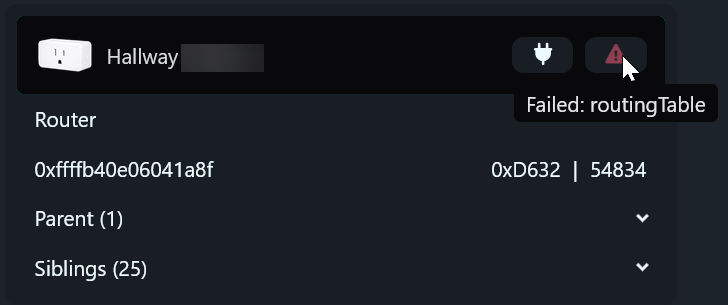
 .
. (outlet firmware ID: 1.9.29, 20250210)
 . Then moved to the next plug, two ‘sixers’ of
  sloshed and feeling ‘whatever’…
