1hr14m to complete the update this time. Definitely not a hardware issue.

1 Like
No release notes section for 2025.7.3? Ah, already answered a few posts above mine.
Hm… this release killed my HA… interesting though: all was working, even sound was working (i’ve got sound notifications on my speakers) except GUI - no dashboards were loaded - constant loading circle. I’ve had to use my nightly backup to restore to working condition. Second time update went fine… go and figure…
and, raw editor no-scroll is still not corrected. i’ll report that to github. It’s extremely annoying.
With or without backup enabled?
Regarding time to update
Assuming (which I know it does) log.fault is created on the restart it took 3 minutes to update on a Pi5 with 8GB of RAM.

Last log entry on restart (log.1 - final write before a restart) :
2025-07-22 11:45:35.347 ERROR (MainThread) [homeassistant.components.automation.low_level_alert]
First log entry on restart (.log - first entry) :
2025-07-22 11:48:38.833 WARNING (SyncWorker_0) [homeassistant.loader]
I always backup before updating. The restart is not my problem. Restarting takes about 30seconds on my machine. I have SMB into the directories where the backups are generated and to the config folder. The backup time was the start time I use because my backups also do not take long. I have a server running nvme’s @gen4 speeds so everything is usually lightening quick…except random Core updates.
Never had an issue with a core update taking very long - only when I install the first beta of the month do I run a full backup and that only adds a few minutes to it.
So - if you are always backing up then the issue is either with the backup procedure and not the core update itself OR an internet issue dragging the image down from Github,.
I would like to have that privilege to only backup on the new month. I have a database file that is constantly churning (currently sitting at 6gb) and the data is critical. I used to do backups similar to what you’re doing but there was one time, all it takes is one time, where I didn’t recover from an update. Lost a lot of data and this is still with nightly backups.
I do a nightly backup. For any .x version I simply use the command line to roll back so my data is kept intact.
Unless there is a database schema change (and with that I mean a field dropped or truncated, or an index redefined - not something a .x release should contain) the command line is the quickest and safest way to roll back.
I was looking for that “command line” commands today when my HA crashed… at the end i restored image from proxmox. But, would you mind sharing the CLI procedure?
ha core update --version x.y.z
Oh…sorry, i missunderstood…i know this one… i thought that he means restore from backup…that is what i was looking for (from cli).
Has anyone been using the native amazon integration instead of the HACS version. how doe sit compare?
If you search on the forum there are a few comparison threads already on this that’ll prob give you a good overview…
edit: for example How does the new `Alexa Device` integration differ from the existing `Alexa Media Player` integration
I couldn’t find it on GH so I created an issue for it:
1 Like
You’re looking in Core instead of Frontend. Issue was raised here YAML editor fails to focus search result when searching · Issue #25437 · home-assistant/frontend · GitHub
1 Like
d’oh didn’t realize the front end has its own repo, thanks
1 Like
Can confirm this is fixed in 2025.7.3.
3 Likes
i have updated and now i have multiple integrations not working. the problem appears to be because for some reason HA cannot reach the internet. I can ssh into in but i cannot ping anything other than the ips in my local network.
there is this weird nameserver in /etc/resolv.conf
nameserver 172.30.32.3
if I replace that with 1.1.1.1 then i can ping google from ha, but it still doesn’t work.
To make matters worse, i try to restore from backup and that doesn’t work either:
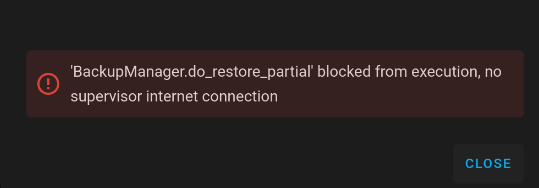
So what can I do to get my system back?
What install type are you running?