2026.8: Approachable by design

For everyone experiencing increased CPU usage after updating to Home Assistant 2026.8.x and using the Generic Camera integration, try this:

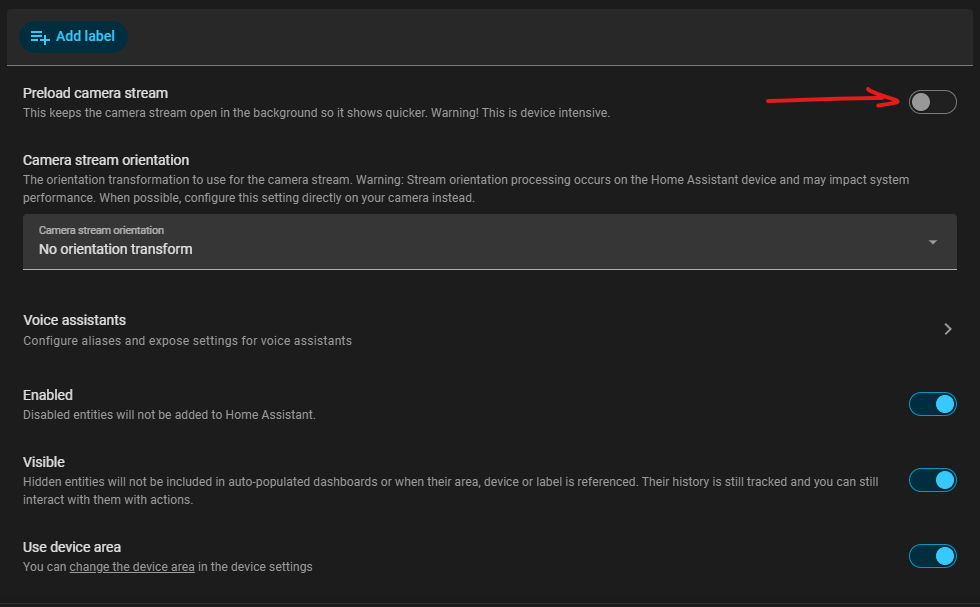
Disable “Preload camera stream” on all your Generic Camera entities and check whether the CPU usage returns to normal.

In my case, this solved the problem. CPU usage goes back to normal when “Preload camera stream” is disabled.

This does not happen with 2026.7.4, so it may be related to a bug introduced in the 2026.8.x releases.

If you are experiencing this issue, it is worth testing before troubleshooting anything else.

4 Likes

I gave this another try and it turned out that one of my 6 Unifi cameras had the preload active, not sure what difference it makes because with my use pattern I have never noticed a difference.

This fixed my CPU instantly and now I have even lower CPU compared to before August 11th when I updated to 2026.8.

Thank you for mentioning this and giving me a reason to have a look at it again :slight_smile:

Put the following in your configuration.yaml, restart, and you will have Developer Tools on your side-bar again:

panel_custom:
  - name: Developer Tools
    sidebar_title: Developer Tools
    sidebar_icon: mdi:application-cog-outline
    js_url: /api/hassio/app/entrypoint.js
    url_path: developer-tools/yaml
    embed_iframe: true
    require_admin: true
    config:
      ingress: core_configurator

This solution came from, I think, the blog discussion of June or July’s update that moved Developer Tools off the sidebar. I thank the solution’s author

2 Likes

.8.3 did not have any effect on the pre-load/CPU issue. Still spikes the CPU

1 Like

Updated to 2026.8.2 this afternoon, I now regret it.
The system took a huge amount of time to go back up and even then I had the waiting spinner when opening every page.

At some point I was able to see that all automations were lost along with all devices (supposedly due to the breaking change I forgot about when updating); I could also see Mosquitto broker errors in the logs the only time I was able to display it:

Logger: homeassistant.config_entries
Source: config_entries.py:796
First occurred: 17:06:45 (4 occurrences)
Last logged: 17:08:04

Setup of config entry 'Mosquitto broker' for mqtt integration cancelled
Setup of config entry 'Home' for met integration cancelled
Setup of config entry 'Décodeur TV UHD' for dlna_dmr integration cancelled
Setup of config entry '' for hacs integration cancelled
Traceback (most recent call last):
  File "/usr/src/homeassistant/homeassistant/config_entries.py", line 796, in __async_setup_with_context
    result = await component.async_setup_entry(hass, self)
             ^^^^^^^^^^^^^^^^^^^^^^^^^^^^^^^^^^^^^^^^^^^^^
  File "/usr/src/homeassistant/homeassistant/components/mqtt/__init__.py", line 595, in async_setup_entry
    await integration.async_get_platforms(platforms_used)
  File "/usr/src/homeassistant/homeassistant/loader.py", line 1193, in async_get_platforms
    import_future.result()
    ~~~~~~~~~~~~~~~~~~~~^^
  File "/usr/src/homeassistant/homeassistant/loader.py", line 1193, in async_get_platforms
    import_future.result()
    ~~~~~~~~~~~~~~~~~~~~^^
  File "/usr/src/homeassistant/homeassistant/loader.py", line 1193, in async_get_platforms
    import_future.result()
    ~~~~~~~~~~~~~~~~~~~~^^
  [Previous line repeated 5 more times]
  File "/usr/src/homeassistant/homeassistant/loader.py", line 1162, in async_get_platforms
    await self.hass.async_add_import_executor_job(
        self._load_platforms, platform_names
    )
asyncio.exceptions.CancelledError: Global task timeout: Bootstrap stage 2 timeout

No repair available in the repair page.

However, the Backup page was unavailable as many others, so I tried to reboot.

Now it won’t even start: the IP address is reachable but I always get a ERR_CONNECTION_REFUSED error when trying to load the UI.

It seems that every time I update/upgrade, something goes wrong and I need to start from scratch again. And of course I haven’t locally backed up the backup…

Honestly I’m disappointed and tired of HA.

By the way, it is running on a RPi 5.

Edit: somehow after trying to download the backup files from the SD Card on my computer and then booting the RPi for lack of a better option, the system reverted to a backup from 6 days ago… some data lost but nevermind.
So now I have to understand what needs to be done before updating when it comes to entity IDs.
11 posts were split to a new topic: Having trouble migrating stmp to new notification actions

So far I haven’t found anything in regards to this. Any suggestions?

Nothing needs to be done with your entity IDs before updating. Your log shows that Home Assistant timed out during startup, but it does not show what caused the delay. The missing devices and automations were most likely a result of Home Assistant not finishing startup, not changed entity IDs. A complete startup log would be needed to identify the actual cause.

I tried to revert using ha core update --version 2026.7.3 to test something and that failed due to this:

homeassistant.exceptions.UnsupportedStorageVersionError: Storage file http has version 2 which is newer than the max supported version 1;

I assume I can just stop 2026.8, replace the http file and revert to 2026.7. Are there other incompatible changes to be aware of? Update: well, yeah…

Storage file core.device_registry was created by a newer version of Home Assistant (storage version 3 > 1); activating recovery mode

Was this deprecated for a while? I mean, why not leave version 1 as it was and add a new key (leave “data” in place) so that either version could read it?

The two versions of the http files:
{
  "version": 1,
  "minor_version": 1,
  "key": "http",
  "data": {
    "use_x_frame_options": true,
    "login_attempts_threshold": -1,
    "ip_ban_enabled": true,
    "server_port": 8123,
    "cors_allowed_origins": [
      "https://cast.home-assistant.io"
    ],
    "ssl_profile": "modern"
  }
}
{
  "version": 2,
  "minor_version": 2,
  "key": "http",
  "data": {
    "stable": {
      "use_x_frame_options": true,
      "ssl_profile": "modern",
      "server_port": 8123,
      "cors_allowed_origins": [
        "https://cast.home-assistant.io"
      ],
      "ip_ban_enabled": true,
      "login_attempts_threshold": -1,
      "created_at": "2026-08-17T14:00:45.786041+00:00",
      "error": null,
      "error_message": null
    },
    "pending": null,
    "yaml_migration_done": true
  }
}

Yes it’s stated, You have to edit All Automations
Since decades, long before HA, a certain feature was implemented in various text editors( 2 decades ago, or more)
Search & Replace … not to confuse with , Search & You’ll find

actually the “basic” File-editor-App in HA, got this feature, recently thou, but it’s there !
So if you only have GUI-Automations, it’s 1 file
If you have Yaml-Folder-files, use i.e. N++

Search & Replace?

A plain literal find/replace (notify.gmail_notificationssmtp.send_message) can handle the action rename fine, but it won’t add the required target: entity_id: block — and without that, smtp.send_message doesn’t know which recipient to send to and the call will fail at runtime. That’s the part that makes pure search/replace risky here.

That’s just another “string” which also can be “added/appended/replaced”, but yes i would verify each before save&close ( with another “find” )

Well, this certainly isn’t making things easier. Without some sort of automated merge or fix for this, it is going to be many hours for me to get things fixed and tested. Not Impressed…

Someone please tell me why this had to be deprecated?

@Mariusthvdb

I just tried upgrading again from 2026.4.4 to 2026.8.3 and am getting the exact same failure on my automation related to Zigbee / ZHA. I’ve posted a rather detailed topic on the forum here that I’m hoping you guys can take a look at and perhaps point me in a direction toward a resolution. The only change is the update, so something must have changed in ZHA, HA, or … something.

I would appreciate any help anyone can provide. This automation has run for years unaltered, but I first noticed it failed when upgrading from 2026.4.4 to 2026.7.4. I rolled back and it has worked fine, until today, with the upgrade to 2026.8.3.

Yes , 4 month of update/releases, in OS, Supervisor,/(python)/ Core & Frontend ( Sorry to say )
And As our “updates” don’t comes in " full package releases " ( backwards compatible ) , it is a " struggle/puzzle " to keep up ( if one don’t spend hours every month, on this )

1 Like

Update to each version after your current until you hit the issue, then read the release notes/breaking changes for it.

You need to use the command line to update per release/sub version.

2 Likes

Yeah, but still … “Additional” Integrations/Apps (Native/Custom) makes it even harder, with their " Dependencies " :laughing:

Why the personal tag?

A post was merged into an existing topic: Having trouble migrating stmp to new notification actions

You offered help on my original post here.