ebusctl write -c bai PrEnergySumHc1 0
For every entity you want to reset.
ebusctl write -c bai PrEnergySumHc1 0
For every entity you want to reset.
As I said, ebusctl is not installed on HA
Okay, thanks for your reply. Does it mean that the add-on is checking for newer version in general, but not only for the HA add-on version? If so, it´s a bit confusing… let´s wait and hope that the add-on will be updated as well.
Thanks
yes, exactly.
You could try from developer tool send
service: mqtt.publish
data:
qos: “1”
retain: true
topic: ebusd/bai/PrEnergySumHc1/set
payload: 0
It is yaml but probably possible to do it from UI. Check also if parameter has r/w set in .csv file.
For those interested, it may be useful to someone.
Done!
and fixed some things on the way there such as automatic updates as soon as a new ebusd version is out via github automations.
ebusctl is installed in the ebusd docker container.
see using ebusctl interactive shell in the docs on how to access, and use it.
update: just added a terminal ingress, so you can just run
root@2ad9b828-ebusd:/# ebusctl info
version: ebusd 26.1.26.1
device: /dev/serial/by-id/usb-ESERA-Automation_eBus_Coupler_12001_AL6DCGZY-if00-port0, serial
signal: acquired
symbol rate: 75
max symbol rate: 144
min arbitration micros: 0
max arbitration micros: 87
min symbol latency: 4
max symbol latency: 7
scan: finished
reconnects: 0
masters: 4
messages: 704
conditional: 0
poll: 251
update: 29
address 03: master #11
address 08: slave #11, scanned "MF=Vaillant;ID=HMU00;SW=0605;HW=5103", loaded "vaillant/08.hmu.csv"
address 10: master #2
address 15: slave #2, scanned "MF=Vaillant;ID=70000;SW=0614;HW=6903", loaded "vaillant/15.700.csv"
address 31: master #8, ebusd
address 36: slave #8, ebusd
address 71: master #9
address 76: slave #9, scanned "MF=Vaillant;ID=VWZIO;SW=0605;HW=5103", loaded "vaillant/76.vwzio.csv"
in the “show user interface” on the info tab of the app
ebusd 26.1 Addon App just got released. It doesn’t support --enablehex and --enabledefine command line arguments, so make sure to read the logs and adjust accordingly if it doesn’t start after updating. Other things may have changed as well.
After removal of the two above which I needed to debug some entities, the App comes up fine and seems to be working at first glance.
PSA: ebusd 26.1 is missing the ebusctl binary, which makes it almost useless for new installs where you need to discover entities! I filed a bug at [26.1] ebusctl missing from docker container · Issue #198 · LukasGrebe/ha-addons · GitHub
Also, /config is not mapped into the container, which broke a lot of entities … time to look into a roll back. (I filed a bug about this as well).
Fixed this already. sorry for the confusion. to prevend futher confusion i extend the version number for app versions. so 26.1 from ebusd and 26.1.1 for the .1 version of this app running ebusd26.1
Also, /config is not mapped into the container, which broke a lot of entities … time to look into a roll back. (I filed a bug about this as well).
this is an unfortunate sideeffect of moving to addon_config. i cant have both in the addon config and addon_config. but see the docs on a simply copy and paste to the correct folder.
Thanks for the update. I had mistakenly set the App to auto update, so it’s my fault to a degree. Unfortunately after restoring 25.1 from backup some things are still broken. I’ll revisit tonight.
ok. let me know (though github preferebly).
My current state is captured in [26.1.6] new errors with convig files that worked fine with 25.1 · Issue #211 · LukasGrebe/ha-addons · GitHub
I guess the completely differnet behavior of ebus 26.1 is not something you can influence, but I feel completely stumped. resolved by adding back the --scanconfig option.
@afiwube and again, thank you for packaging ebusd for easy installation on HAOS. Without that I would probably have had even more hurdles to overcome. Everything seems to be running just right again.
EDIT: This morning, a number of entities suddenly turned “Unavailable” even though I can see them with ebusctl and with MQTT integraton MQTT queries and MQTTExplorer. I can’t really tell why. Some of them came back when querying, others do not.
Update: with the dropped command line options, I also lost write mode, which replaced some of the option type entities to sensors. But not all. For posterity, here is my current configuration with ebusd-26.1.6, which seems to have helped rebuilding my dashboard.
commandline_options:
  - "--enablehex"
  - "--enabledefine"
  - "--configpath=/config/configuration/en"
  - "--loglevel=info"
  - "--scanconfig"
  - "--accesslevel=*"
  - "--mqttvar=filter-direction=r|u|^w"
network_device: enh:192.168.xx.yy.:9999
I think that should be all (-:
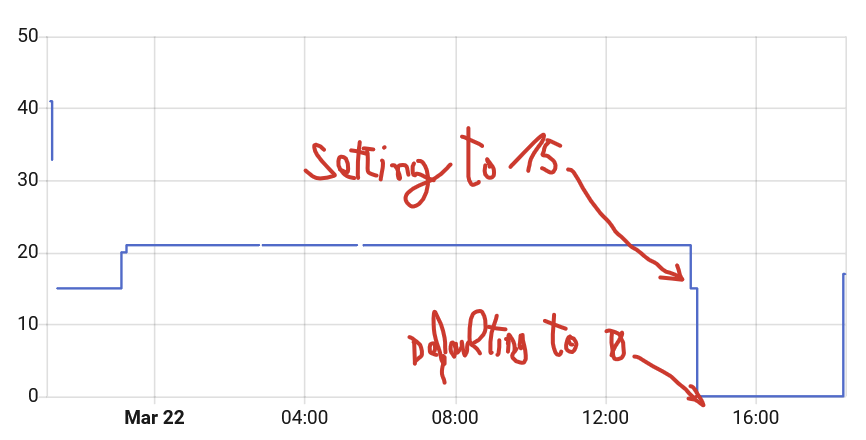
I am struggling with an Ariston Genus One boiler.
I have automatized all heating but when heating require only heating small part of the house the power of the boiler needs to be reduced because otherwise the returning water from radiators will be too hot and boiler will immediately stop heating and start recirculating.
I can adjust the boiler power from boiler menu,
2.3.1 Maximum heating power
2.3.4 Maximum percentage heating power
which resolves the problem. Right now I set up HA to alert me when too many recirculations are triggered and I reduce the boiler power from the menu but I can’t keep doing so all the time. I want to control this parameter from HA.
I could not identify the 2.3.1 parameter in ebus.
I did find the 2.3.4 parameter which I can read with below config in the ebusd csv file:
r,genusone,heat_max_power_pct,Heating Bolier Max Power PCT,,3c,2000,6329,,s,IGN:1,,,,,s,UCH,,pct,,,,,,,,,,,,,,,,,,,,,,,,,,,,,,
I tried to write a new value so that ia can change the heating power from HA using the following lines but none of them, could sucsessfully change the value in the boiler:
w,genusone,heat_max_power_pct,Heating Boiler Max Power PCT,,fe,2020,6329,,s,UCH,,pct
w,genusone,heat_max_power_pct,Heating Bolier Max Power PCT,,fe,2020,6329,,s,UCH,,,pct
w,genusone,heat_max_power_pct,Heating Bolier Max Power PCT(Write),,3c,2020,6329,,s,UCH,,,pct
w,genusone,heat_max_power_pct,Heating Boiler Max Power PCT (Write),,3c,2020,6329,,s,IGN:1,,,,,s,UCH,,pct
w,genusone,heat_max_power_pct,Heating Boiler Max Power PCT (Write),,3c,2020,6329,,s,IGN:1,,,,,s,UCH,*,pct,,,,,,,,,,,,,,,,,,,,,,,,,,,,,,**
I hope with help from the community we can make the 2.3.4 and 2.3.1 parameters read/writable as they are very important for making proper automations with ebusd.
I can try and test on my boiler If you have any suggestions because I am out of ideas.
EDIT: the 2020 PBSB is correct, you may need to change the writing parameter as master “m” instead of slave “s”
Try this:
w,genusone,heat_max_power_pct,Heating Bolier Max Power PCT,,3c,2020,6329,,m,UCH,,,
and/or this
w,genusone,heat_max_adj_power_pct,Heating Bolier Max Adjustable Power PCT,,3c,2020,6629,,m,UCH,,,
Beware that the internal flash memory of the boiler PCB is not meant to be written continuously, in normal circumstances you set the thing once and then leave it almost untouched for months.
If you write many times a day to change some setting you may, in the long run, damage your PCB flash module needing to change the entire PCB.
Thank you. I have tried the following:
r,genusone,heat_max_power_pct,Heating Bolier Max Power PCT,,3c,2000,6329,,s,IGN:1,,,,,s,UCH,,pct,,,,,,,,,,,,,,,,,,,,,,,,,,,,,,
w,genusone,heat_max_power_pct,Heating Bolier Max Power PCT(Write),,3c,2020,6329,,m,UCH,,,pct
and
w,genusone,heat_max_adj_power_pct,Heating Bolier Max Adjustable Power PCT,,3c,2020,6629,,m,UCH,,,
But if I set from HA the numeric value, let’s say to 15 and then go to the boiler menu, the values are 0 on the boiler. Same happens for both parameters. Somehow the values are not sent correctly and the boiler defaults them to 0.
Regarding the frequent parameter change in boiler. Isn’t the Sensys or AristonNet ebus thermostat doing the same thing? The original Thermostat is continually adjusting the parameters based on outside temperature, inside temp, returning water temp, outgoing water temperature, day, night scheduler, leaving/returning home, scheduler and so on.
OK I got it fixed, the problem didn’t lay on the format of the writing line, it was the datatype, you need to change UCH to UIN, it matters because UCH is a single byte datatype while UIN is 2 bytes. While reading a percentage it doesn’t matter but when you try to write you’re missing a piece.
these are the correct lines, you may want to change also the others, I’ll fix my repo asap…
r,genusone,heat_max_power_pct,Heating Bolier Max Power PCT,,3c,2000,6329,ign,s,IGN:1,,,,,s,UIN,,pct
w,genusone,heat_max_power_pct,Heating Bolier Max Power PCT,,3c,2020,6329,,m,UIN,,,
AFAIK if you use weather compensation the boiler built in logic did not change the MAX power settings, the boiler change the LWT setpoint which is probably stored in RAM so no flash burning. The internal logic then adapt the CURRENT power setting to align the LWT to the setpoint.
You are hijacking the MAX power setting to do a similar thing “capping” the boiler power by other means.
I suggest you to buy an external probe (and an internal bus enabled thermostat) to accomplish your goals, you’ll spens 100/150€ once but you’ll get a more robust systems…
a { text-decoration: none; color: #464feb; } tr th, tr td { border: 1px solid #e6e6e6; } tr th { background-color: #f5f5f5; }
Hi,
I am still at a very early stage with ebusd. The adapter is connected to the heating system and is active. Data is also being received, as I can see this in the log.
a { text-decoration: none; color: #464feb; } tr th, tr td { border: 1px solid #e6e6e6; } tr th { background-color: #f5f5f5; }
I suspect that my configuration on the Home Assistant (HA) side is not set up correctly. Unfortunately, I can’t find any further information on this when using micro ebusd.
Does anyone here have a tip for me?
[14:07:19] INFO: eBUSd addon version 26.1.6
[14:07:19] INFO: ebusd --foreground --updatecheck=off --mqtthost=core-mosquitto --mqttport=1883 --mqttuser=<redacted> --mqttpass=<redacted> --mqttjson --mqttint=/config/mqtt-hassio.cfg --device=ens:192.168.10.217:9999 --configpath=https://ebus.github.io/next --scanconfig --latency=10000 --pollinterval=5 --mqttvar=filter-direction=r|u|w --mqttvar=filter-name= --scanretries=5
2026-03-26 14:07:19.951 [device error] transport closed
2026-03-26 14:07:19.951 [bus error] unable to open 192.168.10.217:9999: ERR: generic I/O error
2026-03-26 14:07:19.954 [main notice] ebusd 26.1.26.1 started with broadcast scan on device: 192.168.10.217:9999, TCP, enhanced
2026-03-26 14:07:20.184 [bus notice] bus started with own address 31/36
2026-03-26 14:07:20.184 [bus notice] device invalid
2026-03-26 14:07:20.268 [mqtt notice] connection established
2026-03-26 14:07:25.192 [device error] transport closed
2026-03-26 14:07:25.192 [bus error] unable to open 192.168.10.217:9999: ERR: generic I/O error
2026-03-26 14:07:25.193 [bus notice] device invalid
2026-03-26 14:07:30.203 [device error] transport closed
2026-03-26 14:07:30.203 [bus error] unable to open 192.168.10.217:9999: ERR: generic I/O error
2026-03-26 14:07:30.203 [bus notice] device invalid
2026-03-26 14:07:35.206 [device error] transport closed
2026-03-26 14:07:35.206 [bus error] unable to open 192.168.10.217:9999: ERR: generic I/O error
2026-03-26 14:07:35.206 [bus notice] device invalid
2026-03-26 14:07:40.211 [device error] transport closed
2026-03-26 14:07:40.211 [bus error] unable to open 192.168.10.217:9999: ERR: generic I/O error
2026-03-26 14:07:40.211 [bus notice] device invalid
2026-03-26 14:07:45.218 [device error] transport closed
2026-03-26 14:07:45.218 [bus error] unable to open 192.168.10.217:9999: ERR: generic I/O error
2026-03-26 14:07:45.218 [bus notice] device invalid
2026-03-26 14:07:50.222 [device error] transport closed
2026-03-26 14:07:50.222 [bus error] unable to open 192.168.10.217:9999: ERR: generic I/O error
2026-03-26 14:07:50.222 [bus notice] device invalid
2026-03-26 14:07:55.226 [device error] transport closed
2026-03-26 14:07:55.226 [bus error] unable to open 192.168.10.217:9999: ERR: generic I/O error