Hi,
I have been hacking away at ApexCharts for some time and my latest project is to create a weather dashboard which looks as closed as possible to my weather app. This may be a fools errand, but actually delivering this has become secondary to tinkering around.
I have created something pretty close to what I want, but there are a few things that I am unable to sort, hence my post.
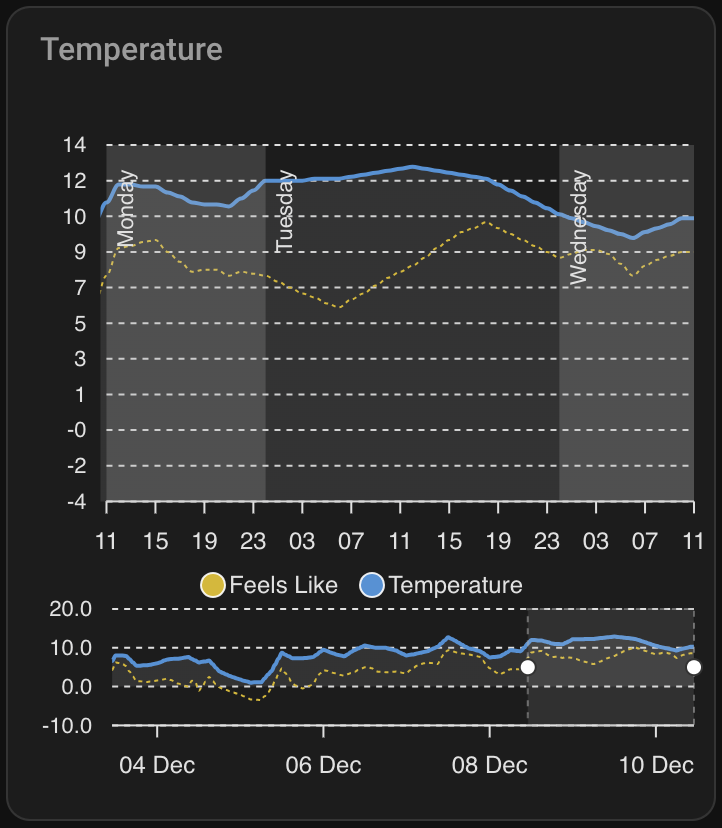
I am creating an hourly view that allows me to toggle between charts for temperature, precipitation, wind etc. In my app, I can see two days and I am able to scroll the chart with my finger to see up to 10 days out.
In Apexcharts, I have achieved something similar by defining a brush which is working well and gives me what I want. However, when the chart is initially rendered, the selection on the brush is rightmost, which results in the default view being 5 days in the future. Ideally, I would like the default selection to be left aligned, which sill provide the forecast for now up to the next 2 days. I have included a screenshot that shows this.
Reading through the documentation, it seems that this is possible and would be configured using apex_config under chart and selection as shown below:
apex_config:
  chart:
    id: temperature
    height: 100%
  selection:
    enabled: true
    xaxis:
      min: EVAL:new Date().setMinutes(00,0,0)
      max: >-
        EVAL:new Date(new Date().setDate(new Date().getDate() +
        2)).setMinutes(00,0,0)
Sadly, this does not work as expected and I have spent a lot of time researching and hacking and have not managed to find a solution, hence my post here. One thing I did try is to put the relevant apex_config for this under brush, as follows:
brush:
  selection_span: 2d
  apex_config:
    selection:
      enabled: true
      xaxis:
        min: EVAL:new Date().setMinutes(00,0,0)
        max: >-
          EVAL:new Date(new Date().setDate(new Date().getDate() +
          2)).setMinutes(00,0,0)
Right now I am circling the drain on this and any help would be much appreciated.
For completeness, here is the full card config:
type: custom:apexcharts-card
experimental:
  color_threshold: true
  brush: true
apex_config:
  plotOptions:
    area:
      fillTo: end
  chart:
    id: temperature
    height: 100%
  selection:
    enabled: true
    xaxis:
      min: EVAL:new Date().setMinutes(00,0,0)
      max: >-
        EVAL:new Date(new Date().setDate(new Date().getDate() +
        2)).setMinutes(00,0,0)
  grid:
    show: true
    xaxis:
      lines:
        show: false
  xaxis:
    type: datetime
    tickAmount: 12
    labels:
      format: HH
  annotations:
    xaxis:
      - x: >-
          EVAL:new Date(new Date().setDate(new Date().getDate() +
          1)).setHours(00,0,0)
        x2: >-
          EVAL:new Date(new Date().setDate(new Date().getDate() +
          2)).setHours(00,0,0)
        borderColor: "#0000"
        opacity: 0.2
        label:
          text: Tomorrow
          orientation: vertical
          textAnchor: middle
          offsetX: 18
          offsetY: 0
          borderWidth: 0
          style:
            background: "#0000"
      - x: >-
          EVAL:new Date(new Date().setDate(new Date().getDate() +
          2)).setHours(00,0,0)
        x2: >-
          EVAL:new Date(new Date().setDate(new Date().getDate() +
          3)).setHours(00,0,0)
        borderColor: "#0000"
        opacity: 0
        label:
          text: >-
            EVAL:["Sunday", "Monday", "Tuesday", "Wednesday", "Thursday",
            "Friday", "Saturday"][new Date(new Date(new Date().setDate(new
            Date().getDate() + 2)).setHours(00,0,0)).getDay()]
          orientation: vertical
          textAnchor: middle
          offsetX: 18
          offsetY: 0
          borderWidth: 0
          style:
            background: "#0000"
      - x: >-
          EVAL:new Date(new Date().setDate(new Date().getDate() +
          3)).setHours(00,0,0)
        x2: >-
          EVAL:new Date(new Date().setDate(new Date().getDate() +
          4)).setHours(00,0,0)
        borderColor: "#0000"
        opacity: 0.2
        label:
          text: >-
            EVAL:["Sunday", "Monday", "Tuesday", "Wednesday", "Thursday",
            "Friday", "Saturday"][new Date(new Date(new Date().setDate(new
            Date().getDate() + 3)).setHours(00,0,0)).getDay()]
          orientation: vertical
          textAnchor: middle
          offsetX: 18
          offsetY: 0
          borderWidth: 0
          style:
            background: "#0000"
      - x: >-
          EVAL:new Date(new Date().setDate(new Date().getDate() +
          4)).setHours(00,0,0)
        x2: >-
          EVAL:new Date(new Date().setDate(new Date().getDate() +
          5)).setHours(00,0,0)
        borderColor: "#0000"
        opacity: 0
        label:
          text: >-
            EVAL:["Sunday", "Monday", "Tuesday", "Wednesday", "Thursday",
            "Friday", "Saturday"][new Date(new Date(new Date().setDate(new
            Date().getDate() + 4)).setHours(00,0,0)).getDay()]
          orientation: vertical
          textAnchor: middle
          offsetX: 18
          offsetY: 0
          borderWidth: 0
          style:
            background: "#0000"
      - x: >-
          EVAL:new Date(new Date().setDate(new Date().getDate() +
          5)).setHours(00,0,0)
        x2: >-
          EVAL:new Date(new Date().setDate(new Date().getDate() +
          6)).setHours(00,0,0)
        borderColor: "#0000"
        opacity: 0.2
        label:
          text: >-
            EVAL:["Sunday", "Monday", "Tuesday", "Wednesday", "Thursday",
            "Friday", "Saturday"][new Date(new Date(new Date().setDate(new
            Date().getDate() + 5)).setHours(00,0,0)).getDay()]
          orientation: vertical
          textAnchor: middle
          offsetX: 18
          offsetY: 0
          borderWidth: 0
          style:
            background: "#0000"
      - x: >-
          EVAL:new Date(new Date().setDate(new Date().getDate() +
          6)).setHours(00,0,0)
        x2: >-
          EVAL:new Date(new Date().setDate(new Date().getDate() +
          7)).setHours(00,0,0)
        borderColor: "#0000"
        opacity: 0
        label:
          text: >-
            EVAL:["Sunday", "Monday", "Tuesday", "Wednesday", "Thursday",
            "Friday", "Saturday"][new Date(new Date(new Date().setDate(new
            Date().getDate() + 6)).setHours(00,0,0)).getDay()]
          orientation: vertical
          textAnchor: middle
          offsetX: 18
          offsetY: 0
          borderWidth: 0
          style:
            background: "#0000"
      - x: >-
          EVAL:new Date(new Date().setDate(new Date().getDate() +
          7)).setHours(00,0,0)
        x2: >-
          EVAL:new Date(new Date().setDate(new Date().getDate() +
          8)).setHours(00,0,0)
        borderColor: "#0000"
        opacity: 0.2
        label:
          text: >-
            EVAL:["Sunday", "Monday", "Tuesday", "Wednesday", "Thursday",
            "Friday", "Saturday"][new Date(new Date(new Date().setDate(new
            Date().getDate() + 7)).setHours(00,0,0)).getDay()]
          orientation: vertical
          textAnchor: middle
          offsetX: 18
          offsetY: 0
          borderWidth: 0
          style:
            background: "#0000"
graph_span: 7d
span:
  start: hour
brush:
  selection_span: 2d
header:
  show: true
  title: Temperature (Working)
  show_states: false
  colorize_states: true
yaxis:
  - id: temperature
    decimals: 0
    align_to: 2
    apex_config:
      tickAmount: 10
series:
  - entity: weather.pirateweather
    name: Feels Like
    data_generator: >
      const serviceData = {
        "type": "hourly"
      };

      const target = {
        "entity_id": "weather.pirateweather"
      };

      const hourlyForecast = await hass.callService("weather", "get_forecasts",
      serviceData, target, true, true);

      return
      hourlyForecast.response["weather.pirateweather"].forecast.map((forecast,
      index) => {
        return [new Date(forecast.datetime).getTime(), forecast.apparent_temperature];
      });
    unit: °C
    color: "#D8B800"
    yaxis_id: temperature
    stroke_width: 1
    stroke_dash: 2
    show:
      in_chart: true
      in_brush: true
      legend_value: false
  - entity: weather.pirateweather
    name: Temperature
    data_generator: >
      const serviceData = {
        "type": "hourly"
      };

      const target = {
        "entity_id": "weather.pirateweather"
      };

      const hourlyForecast = await hass.callService("weather", "get_forecasts",
      serviceData, target, true, true);

      return
      hourlyForecast.response["weather.pirateweather"].forecast.map((forecast,
      index) => {
        return [new Date(forecast.datetime).getTime(), forecast.temperature];
      });
    unit: °C
    color: "#4990D8"
    opacity: 0.5
    yaxis_id: temperature
    type: area
    stroke_width: 2
    fill_raw: last
    show:
      in_chart: true
      in_brush: true
      legend_value: false
    color_threshold:
      - value: 0
        color: "#8D8E90"
        opacity: 0.2