[App] huABus - Huawei Solar Modbus to MQTT (SUN2/3/5/000 → MQTT → Home Assistant + Auto Discovery)

[Add On] huABus - Huawei Solar Modbus to MQTT (Inverter → MQTT → Home Assistant)

This Home Assistant add-on reads data from a Huawei inverters via Modbus TCP and publishes it to MQTT with full MQTT Discovery support.

Key Features

  • Direct Modbus TCP connection to Huawei SUN2000
  • JSON MQTT payload on a single topic (e.g. huawei-solar)
  • Automatic Home Assistant MQTT Discovery for 68 entities
  • Integrated automatic total_increasing Filter to secure sensor entities for long term statistics
  • PV power (per string), grid import/export, battery SOC and power, energy totals
  • 3‑phase grid voltages and frequency
  • Alarm & diagnostic entities, optimizer monitoring, battery limits
  • Online/offline status via dedicated status topic and availability

Latest Release: v1.7.4 (February 2026)

What’s New

  • :heavy_plus_sign: 7 New Registers: Alarm bitfields (3), optimizer monitoring (2), battery limits (2)
  • :bar_chart: Total: 68 entities (56 numeric + 11 text sensors + 1 status)
  • :bug: Bug Fix: Resolved update issues (reinstallation fixes HA caching problems)

Installation

  1. Add repository: https://github.com/arboeh/huABus
  2. Install the Huawei Solar MQTT Bridge add-on
  3. Configure inverter IP and MQTT settings
  4. Start the add-on

Troubleshooting

Update issues? Uninstall add-on → remove repo → restart HA → reinstall → reconfigure

“Failed storage” messages? Normal without battery. Set log level to INFO to hide.

Links

:package: GitHub | :memo: Changelog | :bug: Issues

1 Like

Hi, thx for the addon. Since my Huawei Solar Integration makes a lot of trouble atm, I’m looking for an alternative.
Before installing the addon, I have two Sun2000 Inverter in a cascade. Modbus IDs are 1 and 16. Is it possible to configure 2 Slaves in this addon?

Thanks you.

This isn’t on my to-do list and could become complex.

Currently, version 1.3.4 is running very stably for me – the Modbus proxy is completely unnecessary thanks to the use of MQTT – and I’ve opened the issue and feature request section on GitHub: GitHub - arboeh/homeassistant-huawei-solar-addon: Home Assistant Add-on for Huawei Solar Inverter Modbus to MQTT

Hi @arboeh,

I found your add-on while trying to figure out a way that my Huawei inverter starts to speak home assistant.
I like the idea to do it via MQTT (I have a separate MQTT instance running) etc.

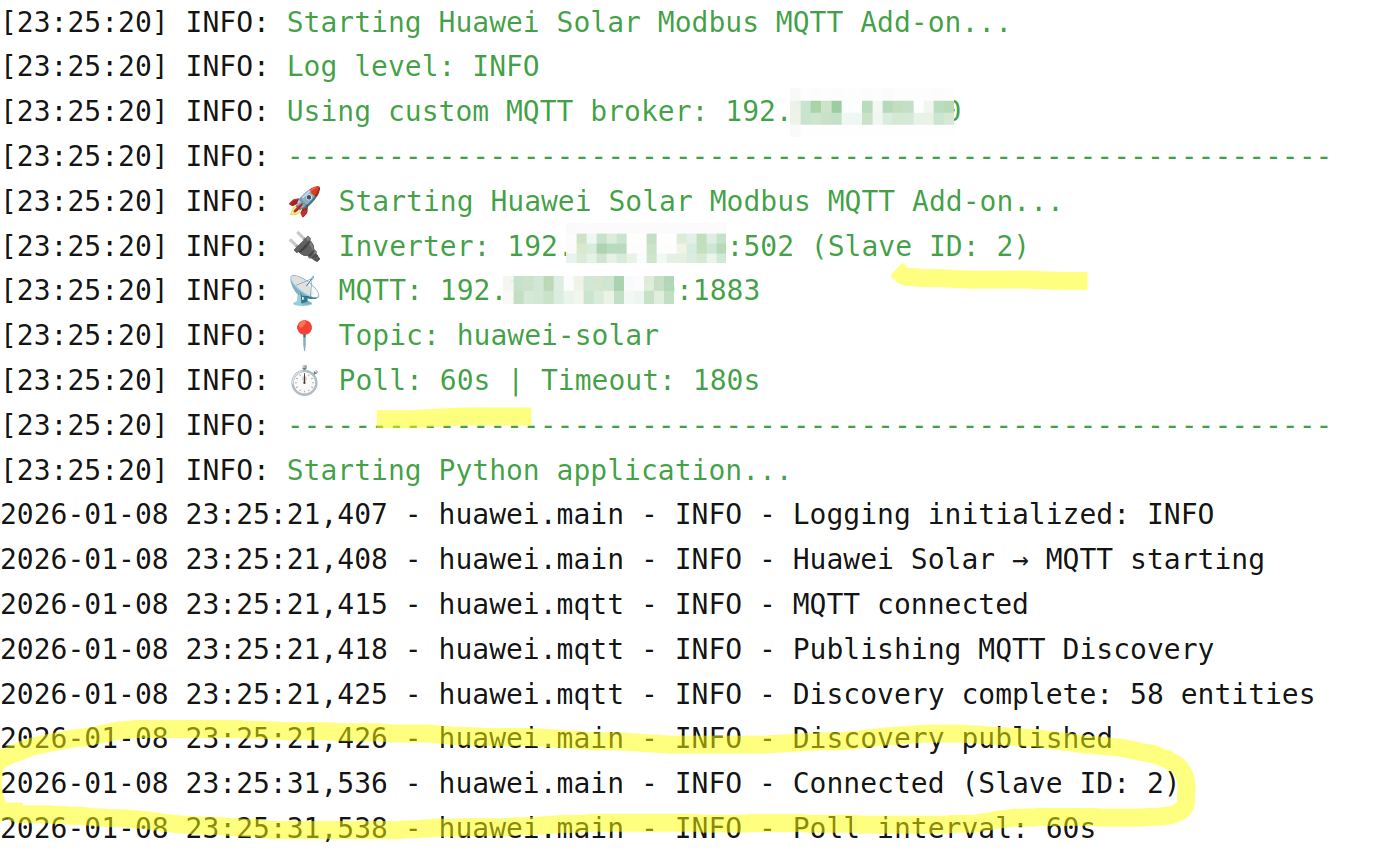
I tried to set up, but it runs into timeouts (v1.4.2)

But nevertheless, although I am not sure, it connects to MQTT just fine (and the 50+ entities become available in HA) :+1:.
And it also connects to the inverter (via the dongle) fine, but only initially and does not produce any data at all.

Instead, it runs into a timeout right away. At least it is what it seems to me.

But I might got it wrong here. Or what does it mean,

2026-01-08 23:25:31,536 - huawei.main - INFO - Connected (Slave ID: 2)

But five seconds, the following happens each time:

> 2026-01-08 23:25:36,545 - huawei_solar.huawei_solar - ERROR - Timeout while waiting for connection. Reconnecting
> Traceback (most recent call last):
>   File "/usr/lib/python3.12/asyncio/tasks.py", line 520, in wait_for
>     return await fut
>            ^^^^^^^^^
>   File "/usr/lib/python3.12/asyncio/locks.py", line 212, in wait
>     await fut
> asyncio.exceptions.CancelledError
> The above exception was the direct cause of the following exception:
> Traceback (most recent call last):
>   File "/usr/lib/python3.12/site-packages/huawei_solar/huawei_solar.py", line 150, in _communication_lock
>     await asyncio.wait_for(
>   File "/usr/lib/python3.12/asyncio/tasks.py", line 519, in wait_for
>     async with timeouts.timeout(timeout):
>                ^^^^^^^^^^^^^^^^^^^^^^^^^
>   File "/usr/lib/python3.12/asyncio/timeouts.py", line 115, in __aexit__
>     raise TimeoutError from exc_val
> TimeoutError
> 2026-01-08 23:25:41,563 - huawei_solar.huawei_solar - ERROR - Timeout while waiting for connection. Reconnecting
> Traceback (most recent call last):
>   File "/usr/lib/python3.12/asyncio/tasks.py", line 520, in wait_for
>     return await fut
>            ^^^^^^^^^
>   File "/usr/lib/python3.12/asyncio/locks.py", line 212, in wait
>     await fut
> asyncio.exceptions.CancelledError
> The above exception was the direct cause of the following exception:
> Traceback (most recent call last):
>   File "/usr/lib/python3.12/site-packages/huawei_solar/huawei_solar.py", line 150, in _communication_lock
>     await asyncio.wait_for(
>   File "/usr/lib/python3.12/asyncio/tasks.py", line 519, in wait_for
>     async with timeouts.timeout(timeout):
>                ^^^^^^^^^^^^^^^^^^^^^^^^^
>   File "/usr/lib/python3.12/asyncio/timeouts.py", line 115, in __aexit__
>     raise TimeoutError from exc_val
> TimeoutError
> 2026-01-08 23:25:46,566 - huawei_solar.huawei_solar - ERROR - Timeout while waiting for connection. Reconnecting
> Traceback (most recent call last):
>   File "/usr/lib/python3.12/asyncio/tasks.py", line 520, in wait_for
>     return await fut
>            ^^^^^^^^^
>   File "/usr/lib/python3.12/asyncio/locks.py", line 212, in wait
>     await fut
> asyncio.exceptions.CancelledError
> The above exception was the direct cause of the following exception:
> Traceback (most recent call last):
>   File "/usr/lib/python3.12/site-packages/huawei_solar/huawei_solar.py", line 150, in _communication_lock
>     await asyncio.wait_for(
>   File "/usr/lib/python3.12/asyncio/tasks.py", line 519, in wait_for
>     async with timeouts.timeout(timeout):
>                ^^^^^^^^^^^^^^^^^^^^^^^^^
>   File "/usr/lib/python3.12/asyncio/timeouts.py", line 115, in __aexit__
>     raise TimeoutError from exc_val
> TimeoutError
> 2026-01-08 23:25:51,571 - huawei_solar.huawei_solar - ERROR - Timeout while waiting for connection. Reconnecting
> Traceback (most recent call last):
>   File "/usr/lib/python3.12/asyncio/tasks.py", line 520, in wait_for
>     return await fut
>            ^^^^^^^^^
>   File "/usr/lib/python3.12/asyncio/locks.py", line 212, in wait
>     await fut
> asyncio.exceptions.CancelledError
> The above exception was the direct cause of the following exception:
> Traceback (most recent call last):
>   File "/usr/lib/python3.12/site-packages/huawei_solar/huawei_solar.py", line 150, in _communication_lock
>     await asyncio.wait_for(
>   File "/usr/lib/python3.12/asyncio/tasks.py", line 519, in wait_for
>     async with timeouts.timeout(timeout):
>                ^^^^^^^^^^^^^^^^^^^^^^^^^
>   File "/usr/lib/python3.12/asyncio/timeouts.py", line 115, in __aexit__
>     raise TimeoutError from exc_val
> TimeoutError

Any idea? Any suggestion?
It runs on the laetest HA OS.

Firmware etc.:
Dongle V200R022C10SPC312
Inverter (20KTL-M2) V100R001C00SPC173
HA OS 2026.1

Thanks,
HANT

PS. Other solutions seem to suffer the same fate.

Hi @HANT,

This looks like a connection lock timeout issue – the initial Modbus connection works, but the register reads take too long and hit the timeout.

First: Which add-on version are you using? Version info will be added to the logs soon. Also, did you already try with log level DEBUG?

Quick things to try:

  1. Change Slave ID (most likely fix)
    Your Slave ID: 2 is unusual. Please try 1 (standard), 0, or 16.

  2. Check network connection

    • Is the inverter on stable LAN or via SDongle/Wi-Fi?
    • Test: ping <INVERTER_IP> and check latency/packet loss.
  3. Enable DEBUG logging

    log_level: DEBUG
    

    Then please post the full log so it is possible to see which register is timing out.

Questions:

  • What inverter model (e.g. SUN2000-…)?
  • Direct LAN or via SDongle/WLAN?
  • Is FusionSolar Cloud enabled (can interfere with Modbus)?

There is now also an Issue and Feature Request section in the GitHub repository for this add-on, so feel free to open an issue there with your config and logs.

This is exactly the impression I got so far, too.

I did all those things to be honest.

I tried different slave IDs. I did go with ID 2 b/c with a different integration I got a more meaningful error message which also helped with the conclusion you came up with (init ok, reading register is not).

String inverter: 20KLT, no bat, no inverter cascade

LAN cable hooked up to the dongle
No observed connection issue on that part

Yes, it is (although I do the admin of the inverter locally as an installer as I do not have installer right in the FusionSolar cloud yet).

I will look at it.

Thanks,
HANT

PS. I am running HA OS 2026.1 now but it was the same with the latest 2025 version.

I also attempted a dfferent intgeration with first the same result but It seem that a beta of it does a better job with the current HA OS and the Huawei inverter:

Please take a look here:

Maybe it points into the right direction?

Thanks,
HANT

You’re so lucky… I’ll also be switching from HA Supervised to HA OS in the next few days. You can be sure that if I experience the same problem, I’ll find and fix it. If only for my own benefit :slight_smile:

1 Like

@arboeh maybe there is not much to do, if you move to HA OS.
I wonder why, but it seem to work right now:

Possibly an inverter thing, as it now started to produce a small AC current.
Not sure if it makes a real difference.

While I am happy now, I added a feature request to your repository.
I would love to see the insulation resistance (MΩ) being reported as well.

I think it makes sense to have when you see it degrading hard over time, it indicates some problem w/ the DC wiring incoming. Or it helps if the PV production declines to narrow down the issue.

I am affected a little by such an issue, I think.

Great stuff!

Thanks,
HANT

Perhaps… You know that Huawei only accepts ONE Modbus connection, and you have to remove/disable the Huawei integration because it’s also connected to the inverter.

With this add-on, you only need one connection… No Modbus proxy or anything like that.

That’s why I developed this add-on… Just one connection – MQTT handles the rest, and other integrations or add-ons can retrieve the values ​​from the broker.

The insulation resistance shouldn’t be a problem. I think I just need to add one more register, that’s all.

I am well aware of that and kept my different attempts separate to the best of my knowledge. No ModBus Proxy used at all at the moment.

When I run your add-on it kills the other integration lifeline right away (and vice versa, I suppose). I colud observe it when, accidentally, the other one was still polling data :wink: .

That’s what I thought. :+1:

Does the add-on pull data according to the values enabled in HA?
Do fewer values here reduce the stress of the Huawei hardware and helps with the reliability at all?

Thanks,
HANT

Yes, less registers → less stress and polling interval is what you define in configuration.
And “your” value is there already. It’s disabled per default.

Thanks, I thought I checked it. Nevertheless I found it alright

If you have moved your HA installation to HA OS.
What are your plans with the add-on? Will it stay an add-on?
Or might it move to a becoming an integration?

BTW so far, it worked for me. I only the modbus cycle time jumping all over the place, But I guess that’s on Huawei.
I might try move to a Modbus friendly firmware for the SDongle in the next fews days, if possible at all.

Dongle V200R022C10SPC312 → downgrade to → V200R022C10SPC126

That one seems to run more stable with enabled Modbus TCP.

Thanks!
HANT

312 is a bad Dongle Version, go back to 126 or atleast the 210’er version.
Dont use R25 Versions, you cant go back anymoder to R22 Versions.
Thomas

I just tried it today… It works perfect with modbus_proxy.
I wished that I could add the second inverter so I see the DC solar Data
incl. the temperatur.
I read about a second AddOn installation under a different name, how do I do this under HA ??

Thomas

You could try to fork the repo and install it again with the fork url.
Supporting two inverters is not currently on my list.

Hello, it will remain an add-on.

I saw this advice before, and I am always surprised to see the Modbus function degrading w/ newer version. How so?

Currently, 312 is installed and according to the log a modbus request consumes 5 to 15sec most of the time. It fluctuates quite a bit.
The add-on handles it quite well tough.
Nevertheless, if I come around, I will try to downgrade.

Thanks,
HANT

Hey there! I might be missing something. Is this add-on a direct alternative to the well established integration by wlcrs?

Why did you decide to develop your own? What’s different or better about yours?