Okay, I’ll take a look. I swear I’ll find it and fix it. 
1 Like
Looking at this
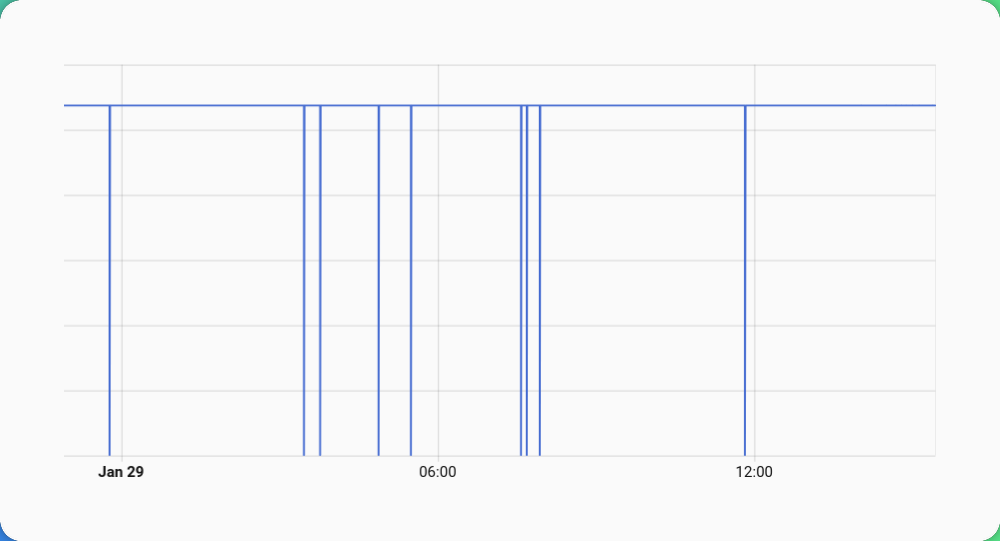
I would think that the currently the fix is not much of postive effect.
I had the suspicion that the issue might related to the fact that these come from the smart meter (DTSU666-H) but I have not seen these drops e.g. in the total energy consumed from the grid in HA.
Also, the inverter statistic does not show such drops at all:
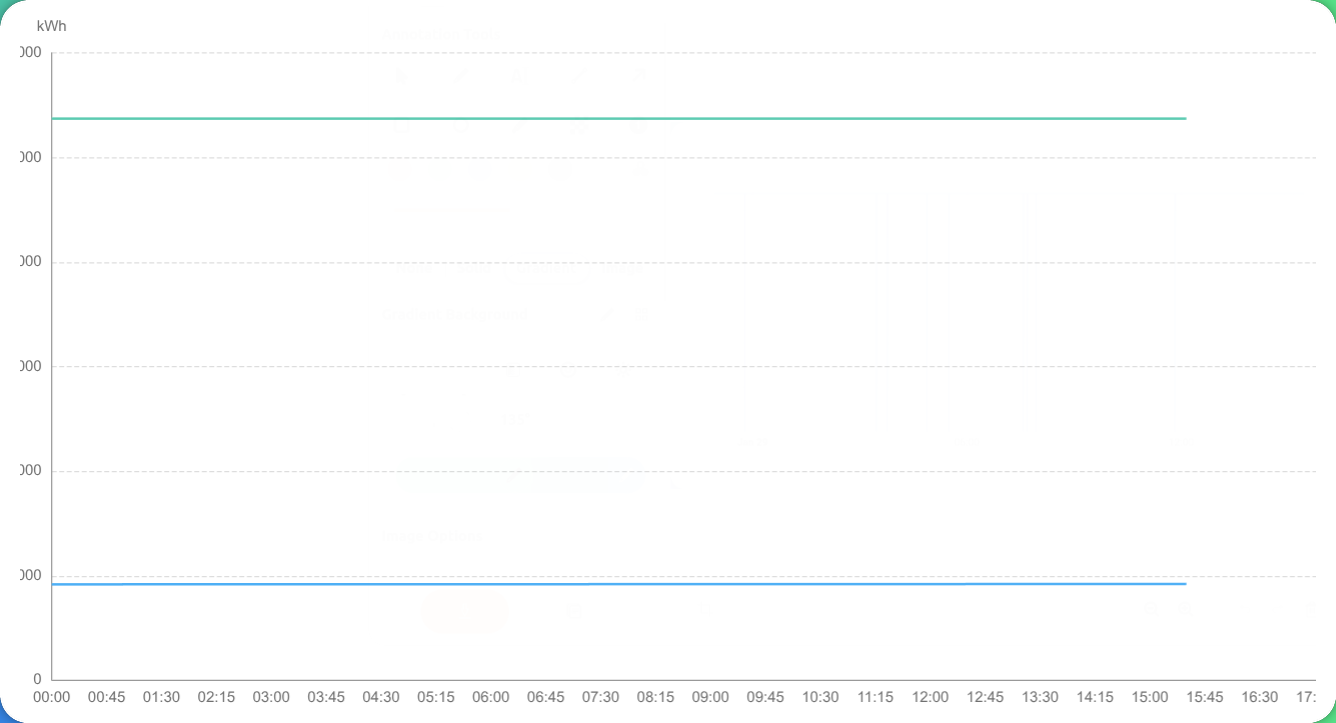
But one should remember that the time resolution in the Huawei portal is something around 5 minutes so a drop to ZERO between two values will be not recognizable in the graph I think.
So checking it might not be useful at all.
Thanks,
HANT
 Release 1.6.2 - Filter Improvements & Warmup Period
What’s New
 Warmup Period
- First 3 cycles after startup now treated as “learning phase”
- Prevents false filtering when starting with unknown state
- Visual indicators in logs:
🔥 Warmup active→✅ Warmup complete
 Enhanced Test Coverage
- Added test suite with comprehensive regression tests:
- Connection reset scenarios (inverter restart, network interruptions)
- Zero-drop edge cases that could cause incorrect Utility Meter readings
- Filter timing validation (ensures filtering happens before MQTT publish)
- Warmup behavior verification (suspicious zero detection and recovery)
- End-to-end workflow validation with realistic mock data
- All tests validate the fix for Issue #7 (false counter resets)
 Improved Code Quality
- Refactored warmup variable naming for better maintainability
- Fixed type hints for full mypy compliance
- Enhanced logging with warmup progress indicators
Upgrade Notes
- Warmup is automatic - no configuration needed
- Existing configurations remain unchanged
- Filter behavior more stable during startup and recovery scenarios
Technical Details
- Internal refactoring: clearer separation of warmup counter vs. target
- Test suite expanded to 43 tests (including 3 HANT regression tests)
Full Changelog: CHANGELOG.md
1 Like
I have already updated to 1.6.2.
I’ll keep an eye on it.
Thanks,
HANT
I just checked and I am still out of luck as drops keep on occurring.
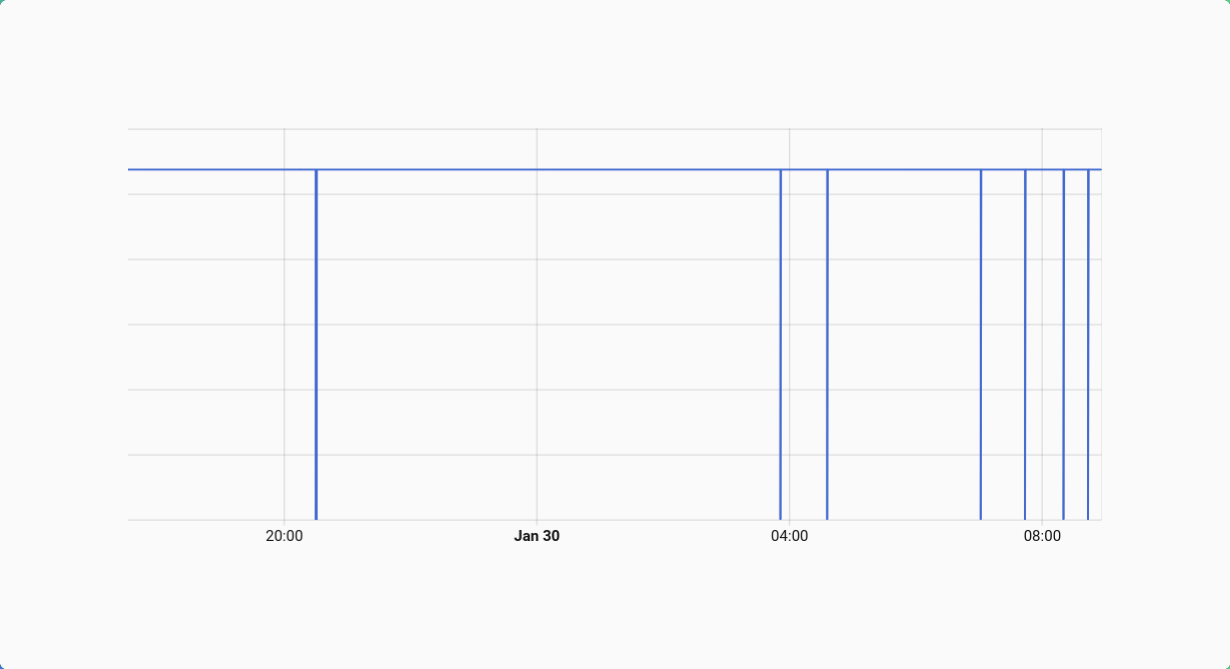
But this time I caught something in the log.
2026-01-30 08:56:26,537 - huawei.main - DEBUG - Failed accumulated_yield_energy
2026-01-30 08:57:06,628 - huawei.main - DEBUG - Failed grid_exported_energy
2026-01-30 08:57:06,629 - huawei_solar.huawei_solar - INFO - Waiting for connection
2026-01-30 08:57:18,731 - huawei.main - INFO - 📖 Essential read: **332.7s** (49/57)
2026-01-30 08:57:18,732 - huawei.transform - DEBUG - Transforming 49 registers
I noticed failed reads of that specific value (but no filtering action?).
And a very long (looking at the time stamps) and failing reads:
2026-01-30 08:52:26,035 - pymodbus.logging - ERROR - No response received after 3 retries, continue with next request
2026-01-30 08:52:26,036 - huawei.main - DEBUG - Failed active_power
2026-01-30 08:53:06,124 - pymodbus.logging - ERROR - No response received after 3 retries, continue with next request
2026-01-30 08:53:06,124 - huawei.main - DEBUG - Failed input_power
2026-01-30 08:53:46,211 - pymodbus.logging - ERROR - No response received after 3 retries, continue with next request
2026-01-30 08:53:46,212 - huawei.main - DEBUG - Failed power_meter_active_power
2026-01-30 08:54:26,295 - pymodbus.logging - ERROR - No response received after 3 retries, continue with next request
2026-01-30 08:54:26,295 - huawei.main - DEBUG - Failed storage_charge_discharge_power
2026-01-30 08:55:06,381 - pymodbus.logging - ERROR - No response received after 3 retries, continue with next request
2026-01-30 08:55:06,381 - huawei.main - DEBUG - Failed storage_state_of_capacity
2026-01-30 08:55:46,464 - pymodbus.logging - ERROR - No response received after 3 retries, continue with next request
2026-01-30 08:55:46,464 - huawei.main - DEBUG - Failed daily_yield_energy
2026-01-30 08:56:26,536 - pymodbus.logging - ERROR - No response received after 3 retries, continue with next request
2026-01-30 08:56:26,537 - huawei.main - DEBUG - Failed accumulated_yield_energy
2026-01-30 08:57:06,628 - huawei.main - DEBUG - Failed grid_exported_energy
2026-01-30 08:57:06,629 - huawei_solar.huawei_solar - INFO - Waiting for connection
The dongle has frequent hiccups?
Nevertheless, I would expect the filtering solving this or am I mistaken?
But maybe the culprit is the following:
2026-01-30 08:57:18,733 - huawei.transform - DEBUG - Transform complete: 55 values (0.001s)
2026-01-30 08:57:18,733 - huawei.filter - DEBUG - ✅ Accepted energy_grid_accumulated: 925.90 → 925.90
2026-01-30 08:57:18,734 - huawei.filter - DEBUG - ✅ Accepted battery_charge_total: 0.00 → 0.00
2026-01-30 08:57:18,734 - huawei.filter - DEBUG - ✅ Accepted battery_discharge_total: 0.00 → 0.00
2026-01-30 08:57:18,734 - huawei.mqtt - DEBUG - Publishing: Solar=0W, Grid=0W, Battery=0W
2026-01-30 08:57:18,735 - huawei.mqtt - DEBUG - Data published: 55 keys
Or the lack thereof. The value is not filtered, nor is it transferred at all. Only 55 keys are published. Might the no show lead to the ZERO drops?
Thanks,
HANT
I think I could extract the log (debug log level) for the whole cycle. It might be useful to get the full picture.
Full cycle log #1182
2026-01-30 08:51:45,993 - huawei.main - DEBUG - Cycle #1182
2026-01-30 08:51:45,993 - huawei.main - DEBUG - Starting cycle

2026-01-30 08:51:45,993 - huawei.main - DEBUG - Reading 57 essential registers

2026-01-30 08:52:26,035 - pymodbus.logging - ERROR - No response received after 3 retries, continue with next request

2026-01-30 08:52:26,036 - huawei.main - DEBUG - Failed active_power

2026-01-30 08:53:06,124 - pymodbus.logging - ERROR - No response received after 3 retries, continue with next request

2026-01-30 08:53:06,124 - huawei.main - DEBUG - Failed input_power

2026-01-30 08:53:46,211 - pymodbus.logging - ERROR - No response received after 3 retries, continue with next request

2026-01-30 08:53:46,212 - huawei.main - DEBUG - Failed power_meter_active_power

2026-01-30 08:54:26,295 - pymodbus.logging - ERROR - No response received after 3 retries, continue with next request

2026-01-30 08:54:26,295 - huawei.main - DEBUG - Failed storage_charge_discharge_power

2026-01-30 08:55:06,381 - pymodbus.logging - ERROR - No response received after 3 retries, continue with next request

2026-01-30 08:55:06,381 - huawei.main - DEBUG - Failed storage_state_of_capacity

2026-01-30 08:55:46,464 - pymodbus.logging - ERROR - No response received after 3 retries, continue with next request

2026-01-30 08:55:46,464 - huawei.main - DEBUG - Failed daily_yield_energy

2026-01-30 08:56:26,536 - pymodbus.logging - ERROR - No response received after 3 retries, continue with next request

2026-01-30 08:56:26,537 - huawei.main - DEBUG - Failed accumulated_yield_energy

2026-01-30 08:57:06,628 - huawei.main - DEBUG - Failed grid_exported_energy

2026-01-30 08:57:06,629 - huawei_solar.huawei_solar - INFO - Waiting for connection

2026-01-30 08:57:18,731 - huawei.main - INFO - 📖 Essential read: 332.7s (49/57)

2026-01-30 08:57:18,732 - huawei.transform - DEBUG - Transforming 49 registers

2026-01-30 08:57:18,732 - huawei.transform - WARNING - Critical 'power_active' missing, using 0

2026-01-30 08:57:18,732 - huawei.transform - WARNING - Critical 'power_input' missing, using 0

2026-01-30 08:57:18,733 - huawei.transform - WARNING - Critical 'meter_power_active' missing, using 0

2026-01-30 08:57:18,733 - huawei.transform - WARNING - Critical 'battery_power' missing, using 0

2026-01-30 08:57:18,733 - huawei.transform - WARNING - Critical 'battery_soc' missing, using 0

2026-01-30 08:57:18,733 - huawei.transform - DEBUG - Transform complete: 55 values (0.001s)

2026-01-30 08:57:18,733 - huawei.filter - DEBUG - ✅ Accepted energy_grid_accumulated: 925.90 → 925.90

2026-01-30 08:57:18,734 - huawei.filter - DEBUG - ✅ Accepted battery_charge_total: 0.00 → 0.00

2026-01-30 08:57:18,734 - huawei.filter - DEBUG - ✅ Accepted battery_discharge_total: 0.00 → 0.00

2026-01-30 08:57:18,734 - huawei.mqtt - DEBUG - Publishing: Solar=0W, Grid=0W, Battery=0W

2026-01-30 08:57:18,735 - huawei.mqtt - DEBUG - Data published: 55 keys

2026-01-30 08:57:18,736 - huawei.main - INFO - 📊 Published - PV: 0W | AC Out: 0W | Grid: 0W | Battery: 0W

2026-01-30 08:57:18,736 - huawei.main - DEBUG - Cycle: 332.7s (Modbus: 332.7s, Transform: 0.002s, Filter: 0.001s, MQTT: 0.00s)

2026-01-30 08:57:18,736 - huawei.main - WARNING - Cycle 332.7s > 80% poll_interval (30s)

2026-01-30 08:57:18,739 - huawei.mqtt - DEBUG - Status: 'online' → huawei-solar/status

2026-01-30 08:57:18,739 - huawei.main - DEBUG - Heartbeat OK: 0.0s since last success

2026-01-30 08:50:27,464 - huawei.main - DEBUG - Cycle #1180
Thanks for the detailed logs! 
Root cause identified:
When a Modbus register read times out (like grid_exported_energy in your log), the key is completely missing from the MQTT payload. The filter can’t protect a key that doesn’t exist, so Home Assistant receives an incomplete payload and interprets the missing sensor as 0 → causing the Utility Meter jump.
Fix planned for 1.6.3:
The filter will be enhanced to:
- Detect missing
total_increasingkeys (not just invalid values) - Insert last valid value for missing keys
- Prevent incomplete MQTT payloads from reaching Home Assistant
This will properly handle your scenario where 8 registers timeout (49/57 successful reads).
I’ll release 1.6.3 with this fix soon. Thanks for the excellent debugging! 
Thanks for the upcoming fix,
2026-01-30 08:56:26,537 - huawei.main - DEBUG - Failed accumulated_yield_energy
2026-01-30 08:57:06,628 - huawei.main - DEBUG - Failed grid_exported_energy
The thing is two parameter/register (grid_exported_energy and accumulated_yield_energy) fail to be read but only one is omitted (grid_exported_energy) from the processing and therefore also from filtering as such while accumulated_yield_energy remains uneffected.
At least that is the case for me. That parameter does not show the ZERO drops.
See below:
2026-01-30 08:57:18,733 - huawei.transform - DEBUG - Transform complete: 55 values (0.001s)
2026-01-30 08:57:18,733 - huawei.filter - DEBUG - ✅ Accepted energy_grid_accumulated: 925.90 → 925.90
2026-01-30 08:57:18,734 - huawei.filter - DEBUG - ✅ Accepted battery_charge_total: 0.00 → 0.00
2026-01-30 08:57:18,734 - huawei.filter - DEBUG - ✅ Accepted battery_discharge_total: 0.00 → 0.00
2026-01-30 08:57:18,734 - huawei.mqtt - DEBUG - Publishing: Solar=0W, Grid=0W, Battery=0W
2026-01-30 08:57:18,735 - huawei.mqtt - DEBUG - Data published: 55 keys
So grid_exported_energy was just the unklucky one?
But it happen to be the one I take special interest in.
Also, see here on github.
Thanks,
HANT
huABus v1.7.0 Released - Simplified Filter Logic
TL;DR: Filter is now simpler, more predictable, and easier to maintain. No configuration needed!
What’s New
Simplified TotalIncreasingFilter
The energy counter filter has been dramatically simplified:
 Removed warmup period - No more 60-second learning phase
- First value is immediately accepted as baseline
- No startup delay
- Removed tolerance configuration - No more confusing thresholds
- ALL counter drops are now filtered (previously allowed up to 5%)
HUAWEI_FILTER_TOLERANCEenvironment variable no longer needed
 Result: More strict but predictable filtering
- 60% less code (~300 → ~120 lines)
- Easier to understand and maintain
- All protection features retained
What’s Still Protected
- Negative values filtered
- Zero-drops filtered (e.g., 9799.5 → 0)
- Counter decreases filtered
- Missing keys handled gracefully
- First value always accepted
 Migration Guide
Do I need to change my config?
No! The filter works out of the box. Your existing configuration continues to work.
What changes in behavior?
Before (v1.6.x):
text
10000 → 9510 kWh  # 4.9% drop → ACCEPTED ✅
10000 → 9490 kWh  # 5.1% drop → FILTERED ❌
Now (v1.7.0):
text
10000 → 9999 kWh  # ANY drop → FILTERED ❌
10000 → 9510 kWh  # ANY drop → FILTERED ❌
Should I upgrade?
Yes, if: You have a stable Modbus connection
 Monitor after upgrade, if: You experience frequent connection issues
What to watch after upgrade:
Check your logs for filter summaries:
INFO - 🔍 Filter summary (last 20 cycles): 0 values filtered - all data valid ✓
If you see frequent filtering (every cycle):
- Consider increasing
poll_intervalfrom 30s to 60s - Check Modbus connection stability
- Review network latency to inverter
Additional Improvements
- Pre-commit hooks with ruff linter/formatter
- Test suite reduced from 72 to 48 tests (-33%)
- Better logging - Filter stats show exactly which values were filtered
 Full Details
See CHANGELOG.md for complete technical details and breaking changes.
 Feedback Welcome!
Please report any issues or feedback on GitHub Issues.
Happy monitoring! 

Thanks for the update!
I had it quickly installed [1.7.0] and observed the following almost right away.
With each restart of the add-on a ZERO drops seem to occur now:
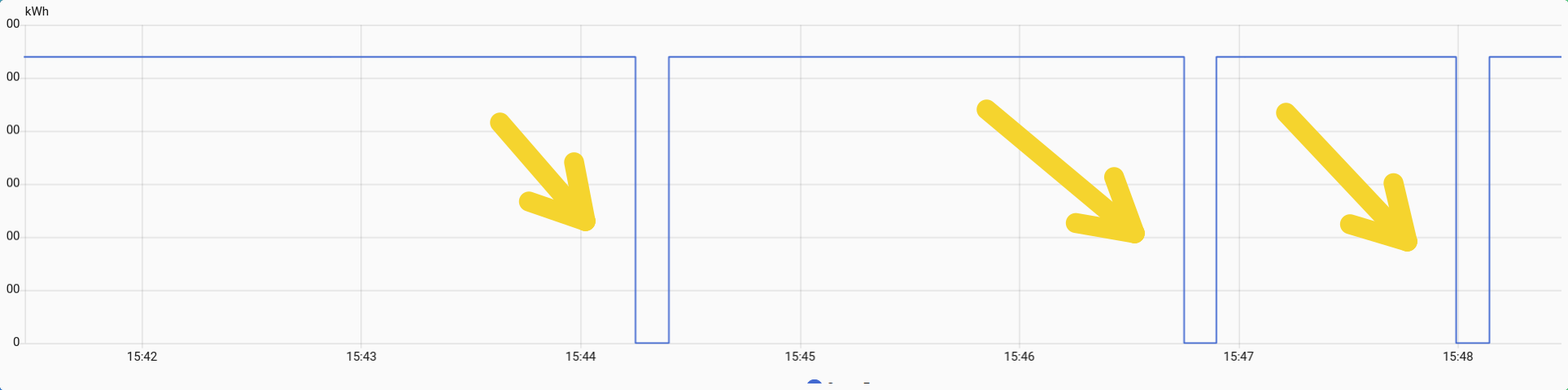
The log does not mention it so far:
[15:48:03] INFO:  🔌 Inverter: 192.168.XXX.XXX:502 (Slave ID: 2)
[15:48:03] INFO:  📡 MQTT: 192.168.XXX.XXX:XXXX (custom)
[15:48:03] INFO:  🔐 Auth: enabled (custom)
[15:48:03] INFO:  📍 Topic: huawei-solar
[15:48:03] INFO:  ⏱️  Poll: 25s | Timeout: 180s
[15:48:03] INFO:  📊 Registers: 58 essential
[15:48:03] INFO: --------------------------------------------------------
[15:48:03] INFO: >> System Info:
[15:48:03] INFO:    - Python: 3.12.12
[15:48:06] INFO:    - huawei-solar: 2.5.0
[15:48:06] INFO:    - pymodbus: 3.11.4
[15:48:06] INFO:    - paho-mqtt: 2.1.0
[15:48:06] INFO:    - Architecture: x86_64
[15:48:06] INFO: >> Starting Python application...
2026-01-31 15:48:06,997 - huawei.main - INFO - 📋 Logging initialized: DEBUG
2026-01-31 15:48:06,998 - huawei.main - DEBUG - 📋 External loggers: pymodbus=INFO, huawei_solar=INFO
2026-01-31 15:48:06,998 - huawei.main - INFO - 🚀 Huawei Solar → MQTT starting
2026-01-31 15:48:06,998 - huawei.main - DEBUG - Host=192.168.178.193:502, Slave=2, Topic=huawei-solar
2026-01-31 15:48:06,998 - huawei.mqtt - DEBUG - MQTT auth configured for mqttman1
2026-01-31 15:48:06,998 - huawei.mqtt - DEBUG - LWT set: huawei-solar/status
2026-01-31 15:48:06,999 - huawei.mqtt - DEBUG - Connecting MQTT to 192.168.178.20:1883
2026-01-31 15:48:07,007 - huawei.mqtt - INFO - 📡 MQTT connected
2026-01-31 15:48:07,407 - huawei.mqtt - DEBUG - MQTT connection stable
2026-01-31 15:48:08,409 - huawei.mqtt - DEBUG - Status: 'offline' → huawei-solar/status
2026-01-31 15:48:08,410 - huawei.mqtt - INFO - 🔍 Publishing MQTT Discovery
2026-01-31 15:48:08,470 - huawei.mqtt - DEBUG - Published 49 numeric sensors
2026-01-31 15:48:08,477 - huawei.mqtt - DEBUG - Published 8 text sensors
2026-01-31 15:48:08,478 - huawei.mqtt - INFO - ✅ Discovery complete: 58 entities
2026-01-31 15:48:08,479 - huawei.main - INFO - ✅ Discovery published
2026-01-31 15:48:08,581 - huawei.main - INFO - 🔌 Connected (Slave ID: 2)
2026-01-31 15:48:08,583 - huawei.mqtt - DEBUG - Status: 'online' → huawei-solar/status
2026-01-31 15:48:08,583 - huawei.main - INFO - ⏱️  Poll interval: 25s
2026-01-31 15:48:08,584 - huawei.main - DEBUG - Cycle #1
2026-01-31 15:48:08,584 - huawei.main - DEBUG - Starting cycle
2026-01-31 15:48:08,584 - huawei.main - DEBUG - Reading 57 essential registers
2026-01-31 15:48:08,585 - huawei_solar.huawei_solar - INFO - Waiting for connection
2026-01-31 15:48:18,942 - huawei.main - INFO - 📖 Essential read: 10.4s (57/57)
2026-01-31 15:48:18,942 - huawei.transform - DEBUG - Transforming 57 registers
2026-01-31 15:48:18,943 - huawei.transform - DEBUG - Transform complete: 58 values (0.000s)
2026-01-31 15:48:18,943 - huawei.filter - INFO - TotalIncreasingFilter initialized (simplified)
2026-01-31 15:48:18,943 - huawei.mqtt - DEBUG - Publishing: Solar=543W, Grid=363W, Battery=0W
2026-01-31 15:48:18,945 - huawei.mqtt - DEBUG - Data published: 58 keys
2026-01-31 15:48:18,946 - huawei.main - INFO - 📊 Published - PV: XXXW | AC Out: XXXW | Grid: XXXW | Battery: 0W
2026-01-31 15:48:18,946 - huawei.main - DEBUG - Cycle: 10.4s (Modbus: 10.4s, Transform: 0.001s, Filter: 0.000s, MQTT: 0.00s)
2026-01-31 15:48:18,948 - huawei.mqtt - DEBUG - Status: 'online' → huawei-solar/status
2026-01-31 15:48:18,948 - huawei.main - DEBUG - Heartbeat OK: 0.0s since last success
But I am not absolutely sure, if it as the very restart or even sometime before.
Do not know closely aligned the timestamps are.
Thanks,
HANT
 huABus v1.7.1 Released - Critical Restart Bugfix
Hi everyone! 
I’m excited to share huABus v1.7.1 - a critical bugfix release that addresses an issue I couldn’t reproduce myself, but was excellently documented by community member @HANT!
 What was fixed?
Zero-drops on addon restart (Issue reported by HANT)
The Problem:
When the addon restarted, energy counters briefly dropped to zero before recovering. This caused:
- Incorrect daily totals in Utility Meter helpers
- Visible drops in Grafana dashboards
- Energy statistics showing impossible jumps
Why it happened:
The total_increasing filter was initialized AFTER the first data publish, leaving a brief unprotected moment where zero values could reach Home Assistant.
The Fix:
Filter is now initialized BEFORE the first cycle in main(), ensuring all values are protected from the very first publish onwards.
Log order after fix:
[15:48:08] INFO: 🔌 Connected (Slave ID: 2)
[15:48:08] INFO: 🔍 TotalIncreasingFilter initialized ← NEW!
[15:48:08] INFO: ⏱️ Poll interval: 25s
[15:48:18] INFO: 📊 Published (protected from cycle 1) ✅
Special Thanks to HANT
I couldn’t reproduce this issue myself, but HANT provided:
- Detailed bug report with screenshots
- Complete log files showing the exact issue
- Clear description of the Home Assistant impact
- Patient testing and confirmation
This fix wouldn’t have been possible without your excellent debugging work!
huABus v1.7.2 Released - Enhanced Testing & Documentation
Happy to announce v1.7.2 of huABus (Huawei Solar Modbus to MQTT Bridge).
This release focuses on code quality and reliability with significantly improved test coverage. (And yes, it actually works this time!  )
)
What’s New
Testing & Quality
- 31 new comprehensive tests covering critical paths
- Code coverage increased from 77% to 86% (+9 percentage points)
- Filter logic now tested for edge cases (zero drops, missing keys, restart scenarios)
- All error handling paths covered (because apparently I needed them
 )
)
Documentation
- Enhanced translations (English/German) with practical examples
- Better guidance for beginners with concrete configuration tips
- Streamlined documentation structure
- Improved troubleshooting guides
 Test Coverage Breakdown
total_increasing_filter.py: 97% coveragemqtt_client.py: 97% coverageerror_tracker.py: 100% coveragetransform.py: 100% coveragemain.py: 73% (up from 52%)
 No Breaking Changes
This is a quality-focused release - no configuration changes needed. Your existing setup will continue to work seamlessly.
 Installation
If you’re already using huABus:
- Settings → Add-ons → huABus
- Check for updates (may take 5-15 minutes after release)
- Update & restart
New users:
- Add repository:
https://github.com/arboeh/huABus - Install “huABus | Huawei Solar Modbus to MQTT”
- Configure & enjoy!
Full Changelog: Comparing v1.7.1...v1.7.2 · arboeh/huABus · GitHub
GitHub: arboeh/huABus
Questions? Issues? Head over to GitHub Issues or ask here! 
1 Like
[Version : 1.7.1]
Well, well it seems to have solved the issue for me. No more ZERO drops during normal operation. But I did not have enough time yet to take a closer look.
There is something I want to look at but have not come around to that yet.
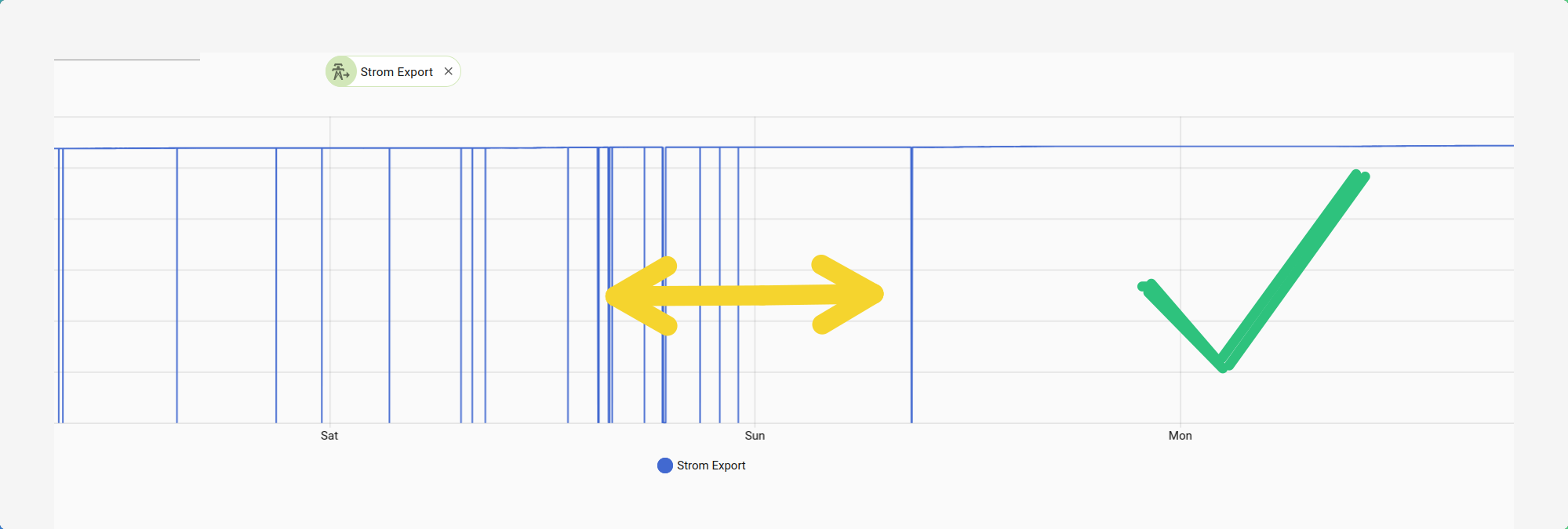
Somewhere in the middle of the arrows, the update happened. And as you see there hasn’t been the frequent drops I experienced before.
The derived daily energy counter also works as expected so far.
I wanted to give you just a quick update on how the things are going.
Thanks,
HANT
PS. 1.7.2 will be installed next [not yet available to me]
[Version 1.7.1 & Version 1.7.2]
Some peculiar happens when the addon stops (!). E.g. when an update is installed and HA gets rebooted .
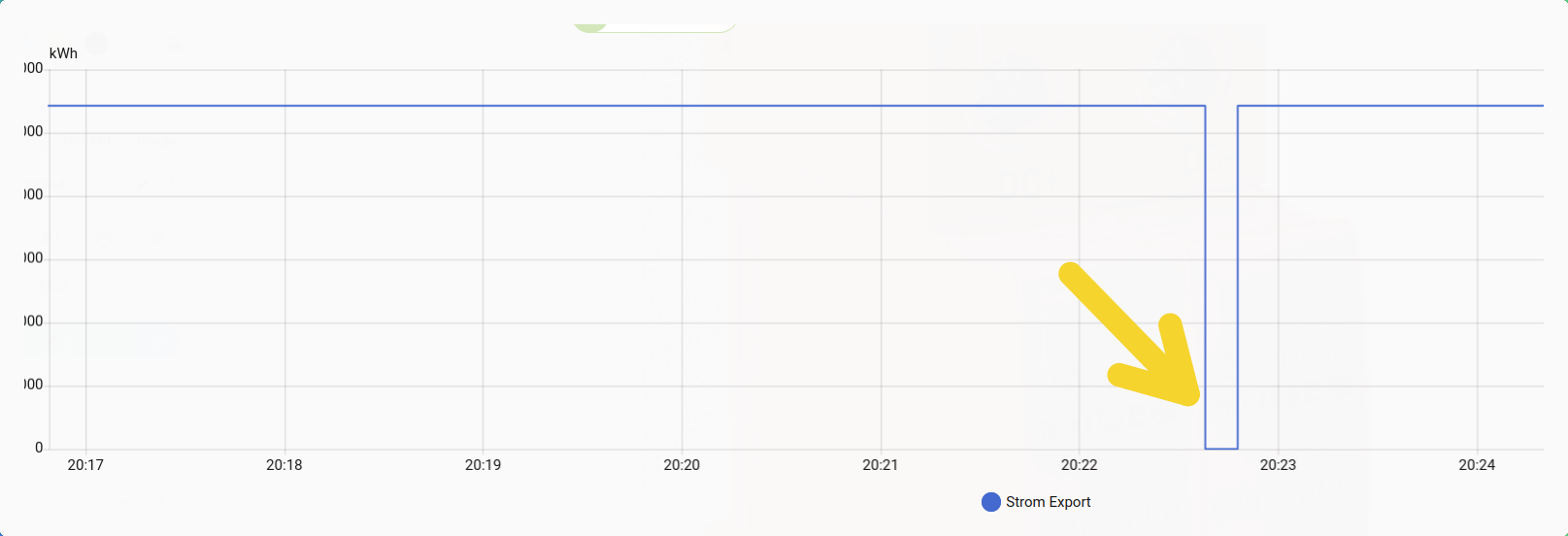
To me it seems it happens when the add-on stops.
But further analysis is needed. I also observed this in 1.7.1 as well.
But…
In this incident, the daily counter helper remain unaffected.
So not much of a consequence really.
HANT
Hey HANT!
Thanks for the detailed testing!
“The daily counter helper remain unaffected”
This is the key - working as designed!
The brief “blip” you see during restart is a cosmetic MQTT retained message effect, not a data problem:
- Addon stops → Last values remain in MQTT (retained)
- HA reconnects → Sees old retained messages briefly
- Addon starts → Publishes fresh values
- Result: Brief “jump” in history graph
Why it doesn’t affect Utility Meter:
Home Assistant’s state_class: total_increasing protects against backward jumps, so your daily counters stay correct!
Could we fix it?
Yes, but with trade-offs (sensors showing “unknown” after HA restart, or complex shutdown handlers). Since it’s purely cosmetic and counters work correctly, I’d keep it simple.
Bottom line: If your Utility Meters are happy, everything is working as intended!
Let me know if you see any actual counter issues - those would be real bugs to fix!
1 Like
[Version 1.7.2]
I am fine w/ the daily counter now working as expected. No probs here IMHO.
I thought that the glitch happens due to the way of how MQTT works, but was not sure. Especially w/ my setup as the MQTT resides outside of HA (but no problems so far).
But I am no expert on MQTT at all, so your explanation is very much appreciated.
One thing, I noticed overnight is that the backup of this add-on did fail last night.
I have automatic backup running. The failure is probable not caused by the add-on itself at all. A manual backup just worked fine now.
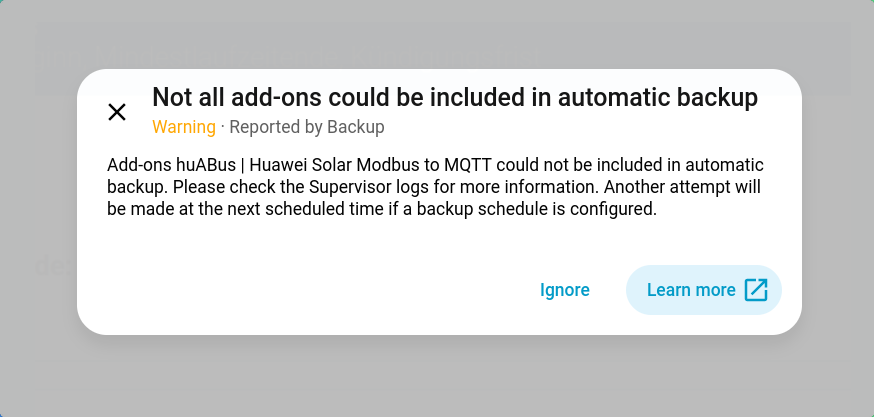
I’ll keep an eye on that.
Thanks,
HANT
huABus v1.7.3 Released - Python 3.13 Support & Dependency Updates
Hi everyone!
Version 1.7.3 of the Huawei Solar MQTT Bridge addon is now available!
What’s New:
- Python 3.13 support added to CI/CD pipeline
- Updated dependencies:
huawei-solar-lib0.5.1, Paho-MQTT 2.2.0, Pydantic 2.10.6 - Improved type hints and code quality
- Bug fixes and stability improvements
How to Update:
- Go to Settings → Add-ons → Add-on Store
- Click the ⋮ menu → Reload
- Find Huawei Solar MQTT Bridge → Update
Links:


As always, feedback and bug reports are welcome! 
1 Like
Hi there,
here are two things I have encountered with [1.7.2] and the update process until now for my set-up.
- The auto. backup has trouble backing up the add-on [version 1.7.2]:
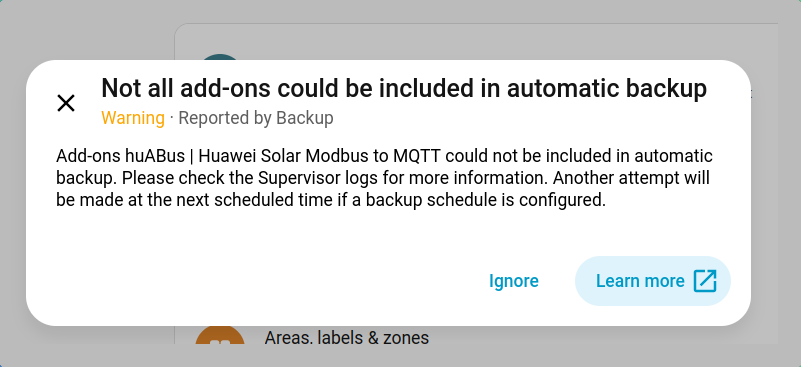
I had trouble w/ the back up of that add-on before [since 1.7.2]
- Update to 1.7.3 keeps failing
Ever since the update to 1.7.3 is made available in HA, it can not be updated using the normal procedure via GUI:
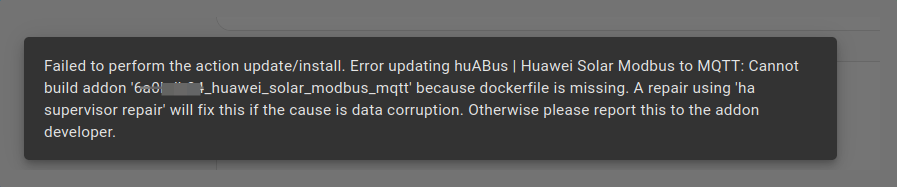
Thanks,
HANT
Hi @HANT,
Thank you for the detailed bug report with screenshots! I’ve investigated both issues and found the root cause.
Root Cause Analysis
Both issues are related to the AppArmor security profile I introduced in version 1.7.2:
Issue 1: Backup Warning Confirmed Bug
The AppArmor profile is blocking Home Assistant Supervisor from accessing the add-on’s data directory during backup creation. The profile was too restrictive and missing the necessary permissions for Supervisor’s backup mechanism.
Impact:
- Your add-on works perfectly fine
- Only automatic backups are affected
- Your configuration is still safe (stored in HA’s database)
Issue 2: Update to 1.7.3 Fails
The Docker build error "Cannot build addon because dockerfile is missing" is likely a side effect of the AppArmor issue combined with Supervisor cache corruption on your system.
Solution: Version 1.7.4 Coming
I’m currently preparing version 1.7.4 with a fixed AppArmor profile that:
- Adds explicit Supervisor backup support
- Allows
/run/supervisor.sockcommunication - Permits snapshot creation in
/data/.snapshot/** - Maintains security while enabling backups
Timeline: Release within 24-48 hours (after thorough testing)
 Recommendation for You
→ Stay on version 1.7.2 for now
Version 1.7.3 only contains documentation improvements (no functional changes), so there’s no urgency to update. Skip 1.7.3 entirely and wait for 1.7.4.
Update path:
Current: 1.7.2 ✅ Stable
Skip: 1.7.3 ⚠️ (backup issue)
Update to: 1.7.4 ✅ (coming soon)
 Temporary Workaround (if you need a backup NOW)
If you need to create a backup before 1.7.4 is released:
1. Settings → Add-ons → huABus → Stop
2. Settings → System → Backups → Create Backup
3. Settings → Add-ons → huABus → Start
Stopping the add-on allows Supervisor to snapshot the container without AppArmor interference. Your configuration and data will be included in the backup.
About the Update Failure
For the Docker build error, once 1.7.4 is released, try this refresh procedure:
1. Settings → Add-ons → ⋮ (three dots) → Reload
2. Hard refresh browser: Ctrl+Shift+R (Windows) / Cmd+Shift+R (Mac)
3. Wait 2 minutes for cache to clear
4. Update directly from 1.7.2 → 1.7.4
This should resolve any cached build states from the failed 1.7.3 update attempt.
 Communication
I’ll post here again once 1.7.4 is released and tested. In the meantime:
- Your setup is working fine on 1.7.2
- The backup warning can be safely ignored (or use the workaround above)
- No data loss or functionality issues
Sorry for the inconvenience! This is exactly the kind of feedback that helps improve the add-on.
I’ll keep you posted!
Cheers,
arboeh
Known Issues (Updated 2026-02-04)
Version 1.7.2 & 1.7.3: Backup Warning
Issue: Add-on shows warning during automatic backups
Cause: AppArmor profile missing Supervisor permissions
Status: Fixed in 1.7.4 (coming soon)
Workaround: Stop add-on before backup, then restart
Recommendation: Stay on 1.7.2 until 1.7.4 is released
1 Like