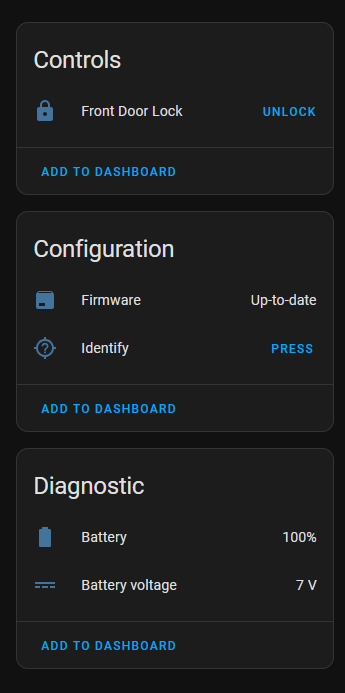
So I finally got delivery a few days ago and just this morning got around to installing my new U300 lock and wanted to post up what options it has in HA now that its setup with the current as of this reply firmware it has.
For full management you will still need the at the very least the Aqara app for user control and more specific settings it has as well as any calibration settings you may need to use and set.
It added no issue into HA via the matter code it has on it a soon as I used the set button and first set it up using the Aqara app. Will see how well this lock does for the long term with my setup.
I was also able to automate that when the night-latch is in an unlocked state that it unlocked the door and when locked it also self locks which i what I wanted.
I have one also. I use the unlock sensor for playing a custom welcome message based on who is entering, however I had to use a device tracker to know who entered since there is no access to the person who unlocked it since we use the fingerprint scanner. The one thing I wish it could do (that you can do in the Aqara app) is tell when the door is opened. I wound up using a ThirdReality Door sensor, but it would have been nice to be able to leverage the built in gyroscope. Still well worth the money. Prior I had a lockly lock that was way more expensive and way slower at unlocking the door.
I have the gyroscope calibrated in my setup via the app but I also already had the zigbee aqara door sensors setup to control when my front door light was turned on between sunset and sunrise and I have one setup on my nightlatch to have it act as a lock unlock state sensor for it so I get reminded when going to bed if I leave it unlocked (also have a conditional card show if its in an unlocked state with the state of the u300).
Its nice being able to unlock my main latch with a key then just tap with the fingerprint sensor for my bottom lock instead of fumbling for an extra key to unlock the door whilst still having it secure since I also have a crimsafe security door setup with a knock detection using a p2 sensor and a thirdreality vibration sensor for when people don’t use my shelly button I have as my doorbell button lol.
I have a dome camera setup outside my front door in the corner so I can get an image sent to my phone via notification on whom and at what time each action was taken, also turns on my rack monitor so I can see a live feed of it should I want to not open the door depending on who it is.
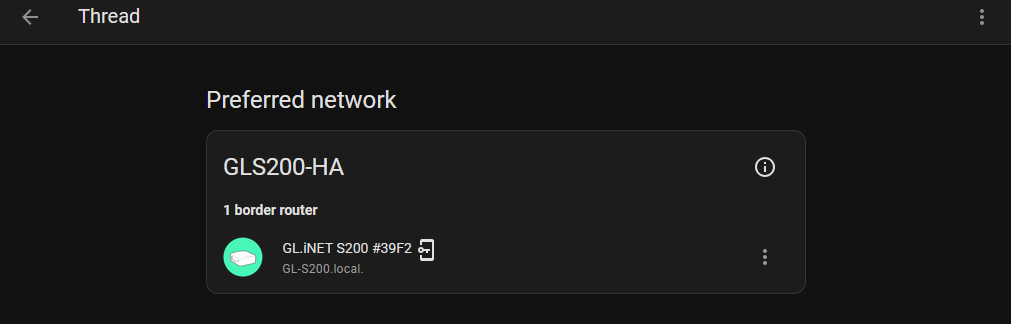
Side note I have had to setup an automation to power cycle my GL-S200 I am using as my thread border router as I think there is a general issue with it not seeing devices after a certain period of time so if say my p2 of lock is offline for 5min it reboots its via the zigbee plug as a work around (having the lock lets me validate this over the long term and if they release new firmware the TBR).
Would you mind sharing what your setup is? I’ve tried for weeks to get mine to play nice with Home Assistant and have had absolutely no luck…
I’m on the latest versions of pretty much everything and have the following devices that I’ve tried in what feels like every combination:
Home Assistant - Running HassOS on Proxmox
Matter Add-on Running
Aqara M3 Hub
Aqara U300 Smart Lock
2x Apple TV’s
Most of the time I’ve just disconnected the Apple TV’s to simplify setup. I’ve managed to get the M3 Hub into Home Assistant, but I can’t seem to ever get it to add the U300 Lock…
I would sincerly appreciate any help anyone can provide about how they got it to work! Or what I might be missing!!!
I have HA installed into a virtualbox instance that is running on my NUC. Skyconnect is used for zigbee (have a spare one since I bought it thinking my first one was dying due to issues with the usb hub I was using previous) then I have a GL-S200 setup for matter over thread based devices.
I don’t have any other hubs other than a switchbot hub 2 acting as my temp and humidity sensor for my bathroom and as matter hub for my switchbot bots when I need to use them.
As stated in the initial post I setup the lock via the Aqara app first then I pressed the set button to put it into paring mode and scanned the matter code using the companion app on the phone.
Connection wise I have also noted that since installing the lock in my setup my P2 sensor has not gone into an unkown state which confirms that you want at least 2 matter over thread devices to link back to the TBR to keep a stable connection even if they are listed as sleepy end devices.
I have 3 of these, only 2 installed the hole for the lock bit is slightly to small in the third door and haven’t worked out a way to make it bigger to be able to install it. I have a google hub as my border router but am trying to move away from google. Can you do more in HA with the locks if you have the Aqara hub.
I wish with the Aqara app the finger prints, tags etc that have access to a lock carried across or at least gave the option to carry across to other locks instead of having to add them all again to each one manually.
Think the main advantage of the hub from them for it is that you get more options for notifications when not home, but I have my own version of that by using my front door camera to show who unlocked it and when (since I have its setup for my doorbell notifications for both the button and via vibration sensor on my security door) if I add another person to it that is not me or use a temp code.
To make the latch longer there is a clip on it you press to extend it out to make it align better in the hole of the door.
I just got this U300 and a SLZB-MR4 radio but can’t seem to get things working. The SLZB has one radio set to Matter over Thread and is connected via USB to my Home Assistant server, though it says Thread is not connected.
In the Aqara app I can’t add the U300 because it says I don’t have a Matter hub setup… but then only gives me the option to add an Aqara one.
How did you get the U300 into the Aqara app using a non-Aqara hub?
You need to put the lock into matter pairing mode then scan the code on the side of it.
You don’t use the Aqara app to add share it to HA as it will only ask you to add their own gateway first to the mix.
On the internal side of the lock hit the pairing button and follow its instructions to do so, I had to also go through the onboard options to clear its matter pairing setup to get it working right (also something I had to do when I restored a backup of my HA instance).
For the Aqara app side its just connected via BT and Wifi.
Also from what I recall I setup the admin user first in the app to get it all working as that is needed for confirmation on the device itself.
You stated that thread is not connected so that might be why you are having issues.
Make sure that your thread setup is working between the co-ordinator and HA, also for matter make sure that any switches and networking gear don’t block mDNS.
give everything a reboot and it should work, I rem I had to reboot things once or twice as I was figuring things out with my s200 to get it all working as per my updates posted here:
I have disabled that auto restart automation mentioned since things have been stable (will need to update that thread post with that data later).
Make sure to clear its matter config even if you don’t have one setup for the lock via the steps for it then you can try get it connected via the qr on the side when you have it in pairing mode.
Sorry to sidetrack this thread a bit, but I have a UniFi network and looked into setting up IPv6. Apparently I need to enable it on the WAN side first, but according to my search, my ISP doesn’t support IPv6.
I enabled IPv6 anyway for both my WAN and LAN but the U300 still wont connect…