mapping values are not allowed here in “”, line 35, column 28: --tab-size-preference: 4; ^
Hello @Szybki946 !
I see that you have replied to the v1.0.5 release.
Have you tried using the dev branch of the repo ?
By the way, I don’t really see where this error could come from, so I would appreciate it if you could give me a little more context about this error.

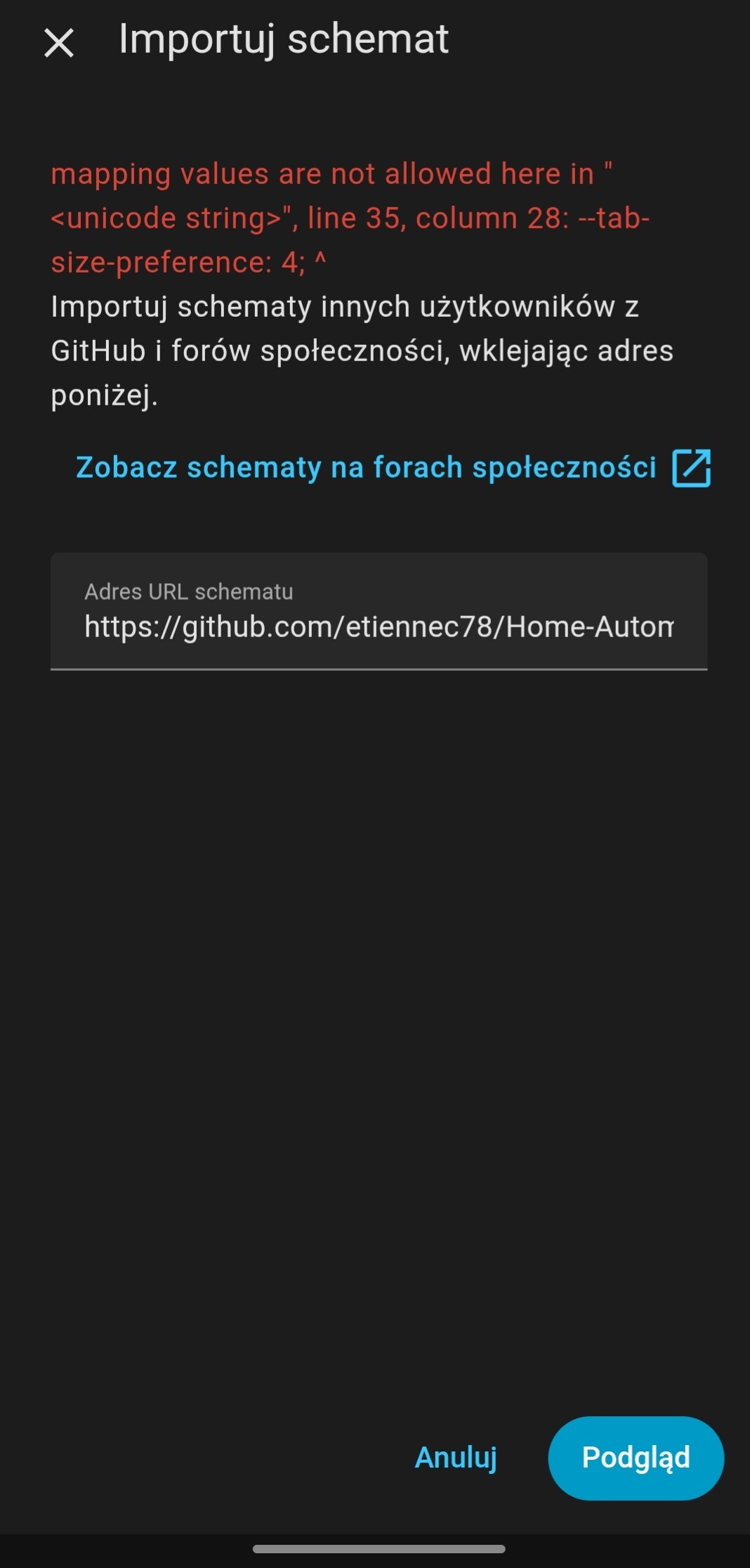
Thanks for these screenshots !
I can’t see the full file path you have pasted, but it seems that your link is wrong.
You are giving the folder where the blueprint is located, not the blueprint itself.
The correct links are:
- master:
https://github.com/etiennec78/Home-Automation/blob/179ca8b7f2071b150a874147bb13d1c150351222/Automatic%20Gate/automatic-gate.yaml - dev:
https://github.com/etiennec78/Home-Automation/blob/37c843de7f9026c01efd244d80f02802429cf1cd/Blueprints/Automatic-Gate/automatic-gate.yaml
hi @etiennec78
I have used 1.0.7 blueprint but had issues with itinerary canceled near gate, so I have switched to dev branch ver 2.0.0. as per your recommendations somewhere here in thread before.
I don’t know if it is right branch as this links above point to dev branch 1.1.0
With 2.0.0. opening gate on approach now works but closing on departure do not work
Nevertheless FYI I am getting with 2.0.0 following errors in HA:
Logger: annotatedyaml.constructors
Source: util/yaml/loader.py:65
First occurred: 12:07:00 AM (105 occurrences)
Last logged: 12:26:32 PM

* YAML file /config/blueprints/automation/etiennec78/automatic-gate.yaml contains duplicate key "timeout". Check lines 1287 and 2222
* YAML file /config/blueprints/automation/etiennec78/automatic-gate.yaml contains duplicate key "notification_icon". Check lines 1277 and 2354
* YAML file /config/blueprints/automation/etiennec78/automatic-gate.yaml contains duplicate key "timeout". Check lines 1287 and 2355
* YAML file /config/blueprints/automation/etiennec78/automatic-gate.yaml contains duplicate key "notification_icon". Check lines 1277 and 2518
* YAML file /config/blueprints/automation/etiennec78/automatic-gate.yaml contains duplicate key "timeout". Check lines 1287 and 2519
Also I am getting config error in notification on start of itinerary something like Text Helper is to short max is 255. (did not catch it on mobile )
Please advise and let me know if you need anything else.
Really want to use this automation as it the best thing fount for HA gate automatization. Keep the good work!
- Core2025.12.1
- Supervisor2025.12.2
- Operating System16.3
- Frontend20251203.1
Hello @semo12 and thanks for using my blueprint !
You’re right, v2.0.0 is the latest version, the v1.1.0 link you found is outdated.
I also noticed the warnings you gave me, but they are only superficial and won’t affect the blueprint.
And finally, the error you get about the itinerary sensor is because you have not changed the maximum length of the itinerary sensor.
You need to set it to 255.
Here is the link of the documentation
1 Like
By the way, the link of the dev branch above is also an old version.
I don’t know why, but the bot keeps editing my comments and removing the real link…
Here it is again (remove the space) : https://github.com /etiennec78/Home-Automation/blob/dev/Blueprints/Automatic-Gate/automatic-gate.yaml
1 Like
Yep, true. Later I have realized that .
Had to create new helper (old was not possible to edit for some reasons)
Thanks.
1 Like
@etiennec78 any chance to make door lock/unlock working without need of gate close? Or can we add sensor that detects if gate if closed or opened?
I have automatic gate closing after 120 s and no movement gate hardware closes without any extra steps. I also have binary_sensor that shows current gate state. Maybe it’s not a big deal to add that logic to door lock - if gate is open && person arrived home unlock doors, if person left && gate is closed (binary_sensor) lock doors.
Also any chance to edit first post with link to repo as this blueprint works really well when using latest version.
Hello @cpu
I justed tested the code for door locks, and noticed that I had made a change that broke the action call.
Could you try importing this branch please ? https://github.com/etiennec78/Home-Automation/blob/fe4f857e8363388bdfe8b8e198845e63afc5e01f/Blueprints/Automatic-Gate/automatic-gate.yaml
Also, I was planning on refining the door locks behavior, so I’ll keep you aware of when this will be ready.
And by the way, I’m happy to see that my blueprint works well for you, but I still have a looong to-do list of small features and fixes missing before the big release. (as you see the locks were broken, so this is not ready yet  )
)
Ok just imported, let me test over next few days, I’ need to be 100% sure it’s working before I’ll set this up for my wife  And yeah once I digged through topic I found it’s working perfectly - thanks for hard work, with some door lock tinkering it’ll be perfect automation.
Ok so the branch you provided works well except for the door lock / unlock feature; it might be related to my cover entity, but I’ve tried every combination and never had success with the door lock. Once you’ll get into rework of lock part let me know.
With latest dev tag I got such an error all the time:

I’ve set up GPS as per manual inside companion app and also added device tracker from unifi to get wifi tracking
Thanks for the report !
I already have a branch ready with a fix for your first issue.
And for the second one, could you please send me the attributes of your ‘Pixel’ device tracker please ?
Are you sure that it is provided by Wi-Fi and not GPS ?
I got those sorted - it was due to unifi misconfiguration and timeouts so that last part is sorted, once you’ll have anything to test I’m happy to be guinea pig.
1 Like
If you want to try out the lock fix, please import this branch: https://github.com/etiennec78/Home-Automation/tree/fix-locks-action
I’ll merge it once I can confirm that it works 100%

Sorry, I didn’t give you the whole path.
Here it is: https://github.com/etiennec78/Home-Automation/blob/95a664a5f65e6c2a8d7f21635d02286b62c24506/Blueprints/Automatic-Gate/automatic-gate.yaml
1 Like
Hello everyone 
I’m planning on releasing the v2.0.0 version next week (finally!)
I noticed that my documentation was not explaining how to set up GPS trackers on iOS.
For those who have an iPhone, how fast and accurate is the tracking from the companion app ? Are you using another service to retrieve your location ?
Thanks for your answers
The v2.0 is finally out !
