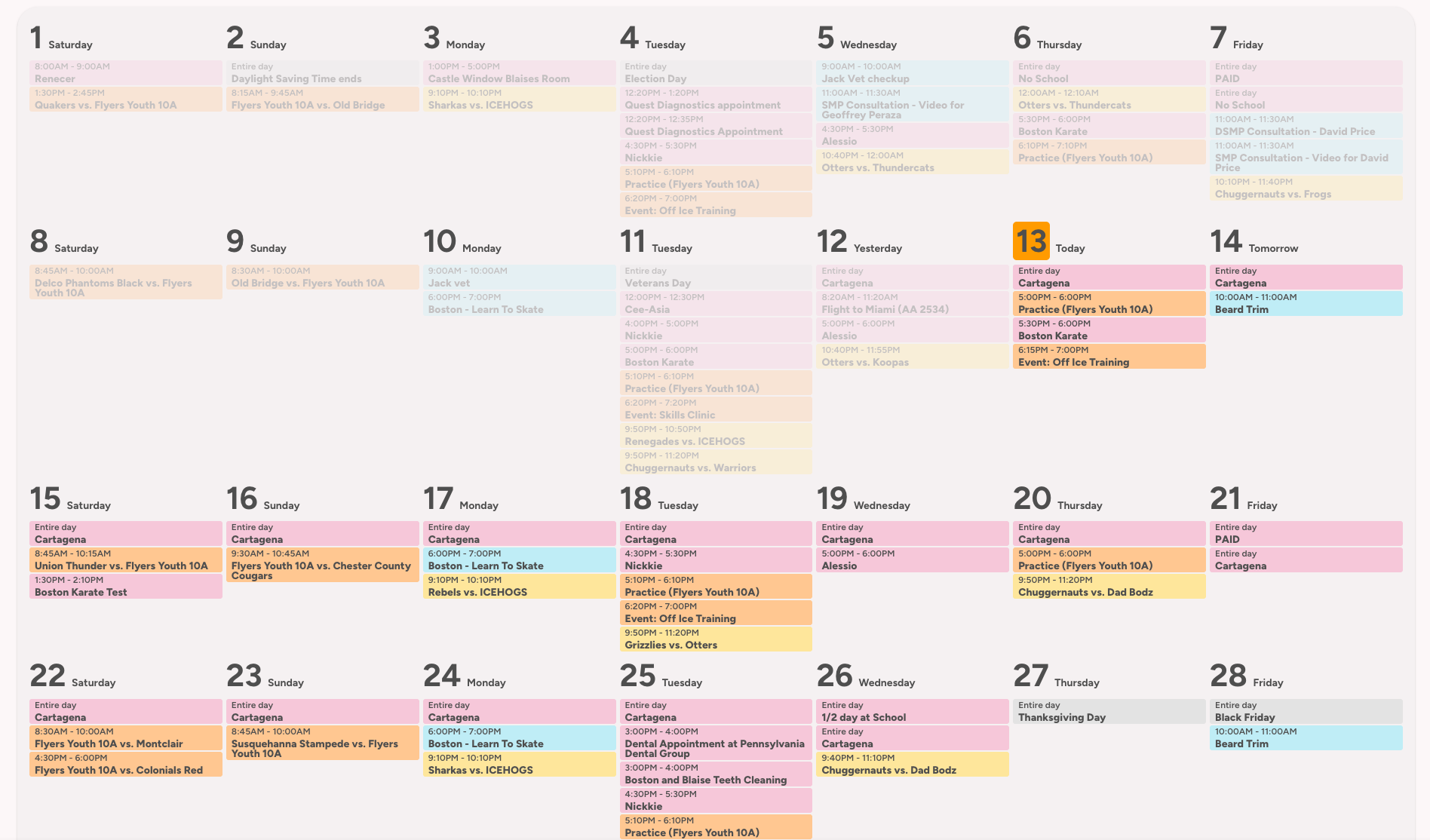
I think thats the StartingDay settings. Read the official docs on the calendar to see all available options.
startingDay:
today | tomorrow | yesterday | sunday | monday | tuesday | wednesday | thursday | friday | saturday | month
I think thats the StartingDay settings. Read the official docs on the calendar to see all available options.
startingDay:
today | tomorrow | yesterday | sunday | monday | tuesday | wednesday | thursday | friday | saturday | month
Can you share your yaml for that dashboard?
I see you have the today number highlighted, for some reason I can’t get this to work when the card is embedded into the config-template-card.
There is nothing in the official docs on how to setup to show the entire month, and have it display like a normal calendar. I have read through the docs completely and also had AI scan the docs just to make sure I didn’t miss anything about it.
it does say it in the docs.
Its the config startingDay, set that as startingDay: month.
I know it says that, but that doesn’t make it display like I am asking. So it doesn’t say in the docs how to achieve what I am trying to do. I am scrapping this idea since it seems it can’t be done, and reading the above past posts about this same request says it can’t be done. I am going to display this all in a different way. Thanks for your input though, I appreciate it.
I am having a small issue. I am trying to display 7 days across my large 25" tablet. Unfortunately it only will display 6 across, and the 7th day is below the 6 across. The 6 that are going across are also not displaying responsively, there is a very large gap on the right side. Is there a way to remove that large gap on the right so the days display responsively? Also can I some how force the 7th day to be inline with the first 6 that are displaying?
Thank you
Agree. Can you share the entire YAML?
@davidlop28 would you mind sharing your code for how you are displaying the date range, as well as how you are displaying the day name header between the date range/navigation and the calendar? Thanks in advance.
Then I am not sure what you’re asking.
You can view a full month with the
days: 31
startingDay: month
This will show an entire month, and not shift the current day.
I current have it on 28 days so it is exactly 4 rows and 7 columns.
I want the calendar to start on Sunday, like a typical wall calendar does in the US. With what you are suggesting the month starts on the starting day. So for the month of november, November 1st is on a saturday and the calendar for this month goes Saturday - Sunday each week, instead of Sunday - Saturday like a normal wall calendar would. Look at the attached image. I want the calendarto be shifted so it starts on a sunday, not saturday, Saturday Nov 1st should be put all the way to the right on the first row by itself and Nov 2nd should be first on the next row so it starts with a Sunday.
@lanceblaise I see what you mean now.
It’s somewhat possible but you need to adjust the settings every time  Would probably be easier to ask for feature update on github.
This is my take on this, still experimenting a lot;
Here is part of my calendar YAML that formats the month (next 31 days) but the starting day is always Sunday (first column). It also won’t show the past days and weeks and “resets” itself every Sunday.
And it was a request to change the month name so we can have an emoji…it was a feature of the hand written calendar that needed to continue 
days: 31
  startingDay: today
  startingDayOffset: 0
  timeFormat: h:mm a
  hour12: true
  hideWeekend: false
  noCardBackground: false
  compact: false
  weather:
    showCondition: true
    showTemperature: true
    showLowTemperature: false
    useTwiceDaily: false
    entity: weather.forecast_home
  locale: en-US
  showLocation: false
  hidePastEvents: true
  hideDaysWithoutEvents: false
  hideTodayWithoutEvents: false
  combineSimilarEvents: true
  showLegend: false
  legendToggle: false
  showNavigation: true
  texts:
    monday: Mon
    tuesday: Tue
    wednesday: Wed
    thursday: Thu
    friday: Fri
    saturday: Sat
    sunday: Sun
    yesterday: ""
    today: ""
    tomorrow: ""
    overmorrow: ""
    fullDay: ""
    noEvents: ""
  card_mod:
    style: |
      ha-card {
        font-family: 'Ovo';
        .container .navigation .data-year {
            position: static;
            right: 60px;
        }
        .event.past {
          opacity: .2;
          background-color: gray !important;
        }
        .container .data-week {
         display: none !important;
         }
        .time {
          color: #333333 !important;
          font-size: 0.8em !important;
        }
        .event {
          color: #333333 !important;
          line-height: 16px !important;
          background-color: var(--border-color) !important;
          border-radius: 10px !important;
          max-height: 100px !important;
          overflow: hidden !important;
          font-size: 1.1em !important;
        }
        .none {
          background-color: transparent !important;
        }
        .today .number {
          border-radius: 5px;
          background-color: #A3C4F3 !important;
          padding-left: 4px;
          padding-right: 4px;
        }
        .today {
          border: solid 2px #000000 !important;
        }
        .day .date .text {
          font-size: 1em !important;
          font-weight: bold !important;
        }
        .day .date .number {
          font-weight: bold !important;
          font-size: 3em !important;
        }
        .day {
          --background-color: red;
          border: solid 1px whitesmoke;
          display: flex !important;
          flex-direction: column !important;
          justify-content: flex-start !important;
          align-items: stretch !important;
          min-height: 15px !important;
          width: 100% !important;
          padding: 0 !important;
          overflow: hidden !important;
        }
        .day .event {
          white-space: normal !important;
          word-break: break-word !important;
        }
        .container {
          display: grid !important;
          grid-template-columns: repeat(7, 1fr) !important;
          grid-template-rows: auto !important;
          gap: 8px !important;
          padding: 0px !important;
        }

        .container .header,
        .container .legend {
          grid-column: 1 / -1 !important;   /* span full width */
          grid-row: 1 !important;
          justify-content: center !important;
        }

        .navigation {
          display: flex !important;
          flex-direction: row !important;
          align-items: center !important;
          margin-bottom: 0px !important;
          text-align: center !important;
        }

        .navigation .month {
          color: transparent !important;       /* hide original text */
          position: relative !important;
          white-space: nowrap !important;
          align-items: center !important;
        }

        .navigation .month::after {
          content: "November 🦃" !important;  /* new text */
          color: #000000 !important;           /* your desired color */
          position: absolute !important;
          white-space: nowrap !important;
          left: 0;
          top: 0;
          padding-right: 4px;
        }

        /* Reorder days so Sunday is first column */
        .day[data-weekday="1"] { grid-column: 2 !important; } /* Monday */
        .day[data-weekday="2"] { grid-column: 3 !important; } /* Tuesday */
        .day[data-weekday="3"] { grid-column: 4 !important; } /* Wednesday */
        .day[data-weekday="4"] { grid-column: 5 !important; } /* Thursday */
        .day[data-weekday="5"] { grid-column: 6 !important; } /* Friday */
        .day[data-weekday="6"] { grid-column: 7 !important; } /* Saturday */
        .day[data-weekday="7"] { grid-column: 1 !important; } /* Sunday */
        }
        .week.past-week {
          display: none !important;
        }
Hi friends, I was thinking about getting a skylight on Black Friday when I stumbled upon this thread. I also saw the DAKBOARD. I have some programming knowledge, but I got lost in this forum; maybe I don’t know how to use it. Can I use the project in my DIY calendar? Where is the link? What are you using it with? Raspberry Pi? I’m not familiar with this ‘Home Assistant’ community; do you have any beginner links?
I’m going to the USA next week; I was thinking of bringing back a touchscreen display and a Raspberry Pi.
Start with the Home Assistant installation wiki.
You’d need a server (rpi, small pc, anything really that can run the OS).
Then follow the steps in the first post.
or go here and buy a home assistant yellow or green hub.
Not yellow anymore, those are discontinued (still supported though).
Thank you. I did ask for a feature request. Right now I am stuck with modifying the code each month, which is obviously not ideal.
Hello, OP. I see that you mentioned in the initial post that everyone in the family got a “dedicated” Google Calendar. I’m curious what you meant by this, because I have been very heavily inspired by your post, so much so, that I shared the post with my wife to convince her to let me build a similar solution rather than buy a Skylight and she is onboard now. The question I have now is what did you mean by dedicated Google calendars? Did that mean brand new google calendars that you’d integrated to Home Assistant, assuming you were already using Google products for your email and calendar purposes? I ask because both my wife and I already use Google email and Google Calendar, so it would be ideal from a usability perspective to use the existing calendars, even if it might mean privacy to our HA deployment is compromised.
Could you please advise about that? I looked through the thread for any mentions of the term dedicated, but only saw the one mention in your original post.
You don’t have to use a dedicated Google calendar. Use your current calendar and ask your wife to share her calendar with you. Both your calendars will show up once you integrate it with HA.
Has anyone got this working really well? Ive got the google calendar authenticated and sure the display can be tinkered but im more talking about functionality. Create event? From what i can see edit and delete event cant be achieved. Pretty interested in setting this up.