Can someone please create a guide one how to get your gateway (both v1 and v2) secret that is working in 2026?
1 Like
I also need It please
Are you saying the instructions on the wiki do not work? What is the issue?
I connect to wiser Network wifi and i get 192.168.200.x and i open the browser with the ip 192.168.200.1 and It doesnt work
What about http://192.168.200.1/secret ?
Then you need to get the Hub connected back to the same network as Home Assistant and put its normal ip address and the secret into the integration config.
Hello, I’ve been using this wiser integration for a while now for controlling the boiler and the radiators thermostats, and it’s been great, the sheduling works very well.
However, one small issue is that for one of my radiators, probably not directly related to the integration, but maybe someone knows the answer.
When it’s time to turn everything on, for example if the target temperature is set to 20.0c, the boiler will start and the thermostat will open as expected. When the thermostat reaches 20.0c, the boiler will stop. So far so good, but when the temperature lowers to 19.9c, the boiler will turn on again, for a brief period (4-5 minutes) until the temperature reaches 20.0 again, and then stop. This process will repeat many times, and it’s a bit annoying because my boiler is a bit noisy when it starts.
I know the main problem is the temperature sensor is in the thermostat and therefore right next to the radiator, but is there something I can do to avoid this? A setting or trick, so for example make the boiler to stop only when temperature reaches 20.2c, and then don’t start again until temperature lowers to 19.8c
You could replace the Wiser TRV with a standard TRV. Having the boiler turn on for one radiator is terrible for efficiency and hence cost.
Well, there’s never a single radiator on, there 2 others (corridor and bathroom) that don’t have a TRV at all, so they heat when boiler is on.
The idea of the smart TRV at home is that we have a spare bedroom that is seldom used, and the lounge one that should be off during the day while I work in the bedroom/office.
would be usefull to know your boiler make and model
do you have a seperate pump to send water round system
sounds like it is going fast so heat cannot be radiated from rads
what is you boiler set at , try setting around 60’c and reducing this ,
Well, I’ll offer my experience…
As far as I know, there is no adjustment within the Wiser system for ‘hysteresis’, which is what I think you are looking for.
From your description, the main problem is not the temperature sensor, it is a noisy boiler?
But, I will relate my expereince of having a new boiler and later, adding the Wiser system into a 25 year old house. You may get some pointers from this:-
Prior to the Wiser system being added, I noticed the ( new ) boiler coming on every 10mins for a short period, to maintain a room temperature. The room temperature was set by a Honeywell programmable thermostat. It worked well, but I wanted ‘more control’, including possible ‘zone temperature control’ and assumed the 10minute cycling would change.
So I added a Wiser control.
I later found out, this 10 minute cycle is/was a standard arrangement when a gas fired boiler is used in a hot water central heating system. Introducing the Wiser system did not change it. But, Wiser does have a setting to select between gas fired, or oil fired boilers. If that is changed from the default ‘gas’ to ‘oil’, the cycle changes to a 20 minute period. So that could be your first change.
I did many experiments with pump flow rate and boiler water temperature and concluded, the water flow rate was best set to pump maximum speed and boiler temperature was best left at 70C.
If you don’t have a condensing boiler, you may even benefit from raising the temperature even higher. The idea there is, the higher radiator temperature raises the room temperature more quickly, causing the system to overshoot a little more. You should get your increased ‘hysteresis’ that way…
What I found does not work, is low flow rate, low temperature water, in a house with micro-bore piping, designed around 25 years ago for a typical 70C boiler temperature. The small bore pipes cannot remove the heat from the boiler fast enough with low flow and the radiators are not large enough to dissipate heat with low temperature water. A massive lose - lose situation, giving increased boiler cycling.
The only other thing I would add regarding zoning: People…
It’s impossible to control rooms (or even different areas of a house) at different tempertures with people walking in and out of rooms.
And people leaving room doors wide open!
Well x@#!$$%!
Hope that helps…
Helps indeed, thank you for your response. My boiler is a combi Vailant EcoTec plus 832. It is noisy when it starts only, it makes some loud click noises in rapid succession, and that’s why is annoying to have it start and stop all the time, specially when I’m trying to sleep or concentrate.
The heating water temperature is set to 65c, simply because I read in several places that it’s more economical no to set the water temperature too high, and wait a bit longer for the radiators temperature to reach the target.
I didn’t know this 10 minute cycle is a standard, that means it will happen even if I had no TRV in the radiators. So there’s not much I can do apart from trying to change to the oil setting as you mentioned.
My system boiler was kettling (making loud clicking noises) due to the pump not running early enough in the sequence of things. Of the 3 internal thermostats, the pump overrun stat was misbehaving, cutting power to the pump. Once replaced, the boiler ran quietly.
I try to get the secret key following the instructions
If you have another zigbee hub and use Zigbee2MQTT or ZHA, you could remove the TRV from Wiser and add it to your other zigbee network, and then create an Automation to call for heat as you require,
I have removed ALL my TRV’s from wiser (I have Room Thermostats in every room as well), I now simply use the TRV’s as temperature limiters, so if room is calling for heat, and other rooms are close to target temp, they are allowed to heat as long as they are below the room limit. This stops rooms calling for heat just after another room has just finished calling. It has reduced my GAS bill by a quarter last month.
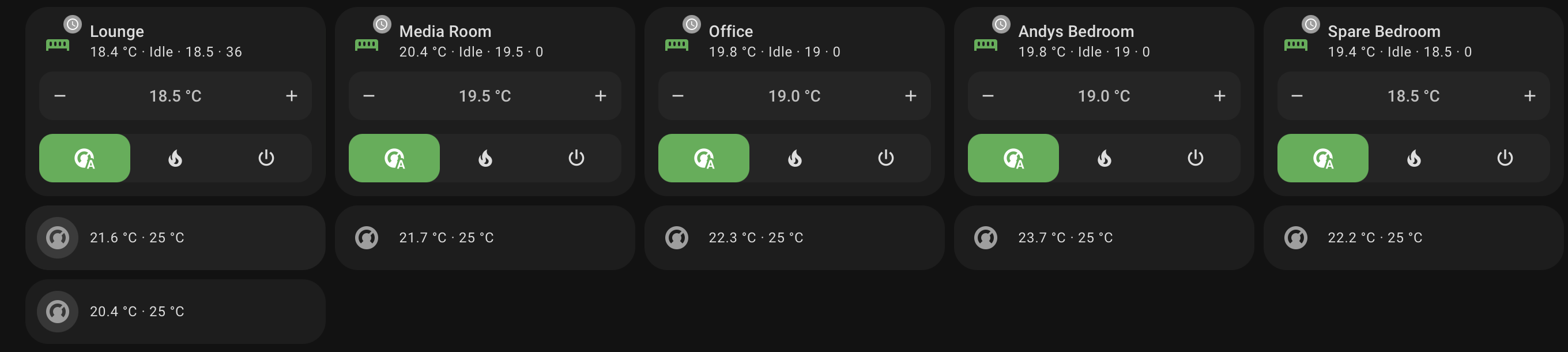
I tried using Passive Mode, but this closes the valve once target temperature is reached, and if the room temperature is below target temp, it calls for heat as well. So the way I’m doing it now is kind of like Passive Mode but NOT allowing Call for Heat until below minimum room temperature.
1 Like
I think I remember this being talked about before, but I can’t find where… I have a gen2 hub (on the latest 4.44.8 firmware) and am on the latest integration.
I keep getting duplicate hubs discovered - if my hub is WiserHeatxxxxxx, then I keep getting WiserHeatxxxxxx-2, WiserHeatxxxxxx-3 etc. discovered, more in the past few days. I just ignore them, and everything carries on working. What causes this?
UPDATE - I think I remember - is it having ipv6 enabled that causes it?
ANOTHER - OK, forget it, I finally found the issue that talked about this, yes it’s ipv6…
Gen 1 Hub API Drops
Let me start with a big shout-out to Wiser integration’s devs.  I have used it for 3 years and enjoy the control and visibility it provides via HA. Thank you for your hard work!
Question: How common is it for the 1st Gen Hub to choke on API calls?
I’m not talking about unstable wifi connectivity, which is mentioned regularly and I suffered from too. My hub’s wifi has been perfect since I moved it closer to an AP a year ago, thanks to comments on this forum.
Rather, I find the API becomes unresponsive from time to time, for both HA and the mobile app, before springing back to life some time later. The TRVs, RoomStats and heating schedules work fine in the interim, but it makes my Wiser automations unreliable.
According to ChatGPT, API drops are a common problem on 1st Gen but I was surprised how rarely it appears in this thread. This got me wondering: is ChatGPT is hallucinating, or did I search for the wrong terms, or is it a common problem that no-one mentions (e.g. because Gen 1 owners have come to accept it)?
Gen1 hub here.
I have noticed, it regularly has a red light or flashing red light on it, but it doesn’t seem to affect its control operation with TRV’s etc.
Maybe even, once a day in the morning?
I dont have any HA automations reliant on Wiser so I have never put much effort into trying to ‘resolve’ it. I have graphs showing trends in HA, but a bit of missing data is hardly noticeable in these cases. I’ve seen other people writing about changing Wifi frequences, moving the router etc, to try and resolve things, but TBH, I can’t be @R$**+ed with it.
So, yes. I guess I have come to accept it.
I think the red light (wifi/cloud disconnect) is not what @j112 is referring to (maybe wrong).
I get red light flashing occasionally but it doesn’t stop stuff working.
However there is the regular 30 secs delay because of the polling that the integrations does to to Hub. so is this the problem?
Hmmm. Your and @johnBoy’s reply have me questioning myself: maybe I am referring to this and I just don’t know it? I assumed my wifi is sorted as there are no longer drop-outs on my device graphs and my hub responds to ping, but the reality is I no longer see my physical hub so it could be flashing red without me knowing.
Let me pivot instead to the pain point…
We have two HA Wiser automations in our home. One sets Wiser to away mode when we leave and to home mode when we return. The second boosts a room’s set point when it’s occupied (or we have guests) and cancels the boost when the room is vacated and guest mode is off. The problem is the API commands fail ~10% of the time. For home/away, that means £5-10/day wasted when we’re away and no heating/HW after we arrive home. For boost, rooms are sometimes too cold and sometimes heated needlessly.
I’ve tried fixing with automation retry loops, but they tend to be brittle and demand maintenance, which is the antithesis of a smart home.
I guess my underlying question is how many Gen 1 hub users (i) send automation commands to their hub (vs just dashboarding its status), and (ii) see intermittent command failures, irrespective of whether those are due to API or wifi, and (iii) find the failures to be a material pain point?
1 Like
I have a gen1 hub and have pain points with it. I know it’s not a great indicator but the signal reported as always “Very good” with brief spots of “good” but I do miss commands. I had planned to add in the retry integration which is something I’ve had success with for my ZigBee bathroom fans/WiFi lights but haven’t gotten around to it yet.
It used to happen a lot less than it does now but my hub doesn’t like multiple commands sent at the same time so I have a script that spaces them out or it just rejects further commands. Even with this it still throws a wobbler every now and again.
Probably happens at least once or twice a week a complete lock out with a red light but it does recover itself after a few minutes. Whatever happens breaks passive mode as well so I’m going to be replacing that with another automation soon.
I don’t have room stats either so I use a template climate and another set of scripts to adjust the wiser set point when heat is needed so shouldn’t be too hard to work in my own type of passive mode / pre heat rooms near the set point.
1 Like