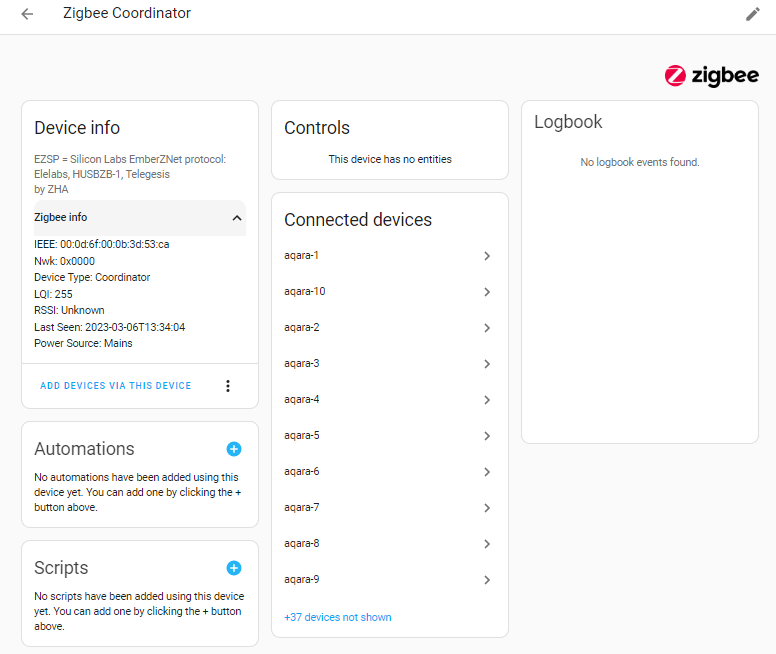
this is a strange one. As I mentioned in previous post, I removed the Sonoff USB dongle and migrated the radio to the Skyconnect, the Sonoff integration is still alive and kicking , looks like the Skyconnect is mascarating itself as Sonoff. Even the Sonoff is physically not connected, I was able to pair new Zigbee device , may be by Skyconnect ? As it is the only Zigbee coordinator I have plugged in
I am running Home Assistant Supervised on a Debian docker in an Intel NUC,
if USB pass-through is not working then the Zigbee devices should all be offline? but they are not
When I tried to upgrade the firmware of the Skyconnect, it did detected the ttyp port (only from memory, should have taken a screenshot, may be I should try again)
As regarding the extension usb cable, I use the same 3-meter good quality cable that I used with the Sonoff dongle, so it should not be an issue.
So it remains a mystery whether the Skyconnect is there and is working as it supposed to be
Is that not just what you named the ZHA integration instance yourself when you installed the ZHA integration the first time? Otherwise it sounds like a bug with the migration, or USB Discovery and ZHA use of it so suggest you report it as an issue to https://github.com/home-assistant/core/issues
Again, migration from deCONZ/Phoscon or Zigbee2MQTT is not seamless, as it will only migrate the Zigbee network, (that way you at least do not need to run around and re-pair/re-join all your devices), unfortunately, it does not migrate the entries in Home Assistant so still need to manually rename those devices and update all your automations and scripts that are using any of the old device names and entities.
There is currently no automatic migration path to migrate all settings, device names and entities from other Zigbee gateway software like deCONZ or Zigbee2MQTT to Home Assistant’s ZHA integration.
Anyone else having issues with Skyconnect, ZHA and the older version (SML001) of Hue Motion Sensor?
All of my older motion sensors go offline within 24 hours of resetting and re-pairing them. Never happened when using them with Hue Bridges, locations of sensors are unchanged.
After reset they work fine for a spell and then just quit. No issues during the pairing process.
I also have some newer Hue Motion sensors, the SML003. They do not have this issue.
Otherwise the Zigbee network is working fine, reacts quicker than a Hue Bridge -based one but the constantly offline motion sensors kinda make the whole thing unusable.
Perhaps a HW/SW issue either on the Skyconnect or ZHA? Sensor FW should be up to date.
Skyconnect connected to a RPI 4 with the provided extension cable. Approx 70-80 Zigbee devices total currently in this network, everything else except the SML001 are OK.
Also: My first post on this forum. Skimmed through this thread as well as used the search to find older posts and ended here regardless. Please feel free to point to a more appropriate location should one exist.
You should really start a new topic for that device issue as the root cause of your problem will probably not be specific to the Home Assistant SkyConnect dongle and regardless of any attempt at help with troubleshooting a specific device issue, it will get lost in a generic thread about the Home Assistant SkyConnect dongle as this is.
The only general advice can offer here is to recommend that you follow these two best practice guides:
Suggest that you instead first start by trying to follow all general best practices to optimize your setup, such as upgrading to the latest Zigbee Coordinator firmware, upgrading the firmware of all the devices that you have (including but not exclusively the devices that you are having problems with), upgrading the operating system and Zigbee software you that you using, making sure to use a long shielded USB extension cable to a USB 2.0 port (or via a powered USB 2.0 hub) and keeping the Zigbee Coordinator and problem devices away from USB 3.0 ports/cables/devices to avoid electromagnetic interference, changing Zigbee channel to one that does not overlap with your Wi-Fi, as well as adding more mains-powered Zigbee Router devices. Then lastly also re-pair the devices you have issues with at the location where they will be used.
Another general advice before troubleshooting further is to use “ZHA Toolkit” to do the OTA firmware upgrade of all your Philips Hue devices → https://github.com/mdeweerd/zha-toolkit
If still have issues then open a dedicated new topic thread for you device and setup, and there post device signature and diagnostic information + debug logs so people have deeper details to look at.
Updated to clarify questions regarding as Home Assistant posted video showing interference symptoms:
@agners since it was released have read/seen quite a few reports from many users saying they specifically have serious issues with electromagnetic interference symtoms with he Home Assistant SkyConnect dongle, even when using the original 0,5-meter long USB extension cable that ships with Home Assistant SkyConnect to a USB 2.0 port as recommended in order to get it away from the computer and pheriphials, so wonder if there should be any special concerns regarding those specific symptoms that are unique to the Home Assistant SkyConnect and the short extension cable it ships with that makes it extra sensitivity to electromagnetic interference compared to other Zigbee Coordinator adapters?
Can you confirm or refute that the USB extension cable that ships with Home Assistant SkyConnect is a properly shielded cable with adequate shielding to protect it from all electromagnetic interference if used in a USB 2.0 port (or a powered USB 2.0 hub) and place it as far away from the computer and other pheriphials/devices as the short USB extension cable that ships with it allow?
And have you tested if conductor shielding of the USB extension cable that it ships with is properly grounded to the plug connector on both sides?
Also, wondering why the EFR32MG21 SoC and other sensitive components such as the crystal oscillator chip and capacitors on the circuit board of the Home Assistant SkyConnect does not have a grounded metal shielding cage for electromagnetic shielding that would protect the EFR32MG21 SoC and all sensitive circuits, and design it so that the board only exposed the antenna?
To compare with the Silicon Labs EFR32MG21 based reference radio modules, the MGM210 series (MGM210P and MGM210L) does come with a grounded metal shielding cage for electromagnetic shielding that protect the EFR32MG21 SoC and all sensitive circuits, only exposing the antenna:
Then there is the question about the choice of using a circuit board PCB antenna instead of a ceramic chip antenna, as official MGM210 radio modules from Silicon Labs. Why not a ceramic chip antenna?
I understand there are many different pros and cons with ceramic chip antennas and circuit board PCB antennas, but I understand one major benefit with good ceramic chip antennas is that they are easier to tune perfectly, which indirectly makes them less sensitive to electromagnetic interference if implemented optimally, while I understand that a major downside is that ceramic chip antennas generally offer lower performance, however making them easier to tune can compensate for that.
PS: My personal feedback is that it should instead shipped with an even longer USB cable regardless.
Forgot to mention that another general advice before troubleshooting further is to use “ZHA Toolkit” to do OTA firmware upgrade of all your Philips Hue devices → https://github.com/mdeweerd/zha-toolkit
I posted a separate topic about this amongst other issues I’ve had with the SkyConnect:
Worst devices by far are the Hue motion sensors, however the Aqara open/close sensors are pretty bad too.
There are also a couple of different issues open on the Github page about it:
Has anyone had any experience of migrating to a ConBee II stick using ZHA? I’m thinking of going back to that until this gets sorted as I have a lot of automations that I rely on that are broken right now. Don’t really want to migrate all the way back to deconz / ConBee II…
Edit: Oops, this was supposed to be a reply to psysi’s post.
For reference, the Home Assistant SkyConnect documentation website and FAQ on the separate webpage where to find information on where to buy it does now contain some more information about interference:
“USB 3.0 ports (the ones with blue on the inside) are known to cause significant noise and radio interference to any 2.4Ghz wireless devices. This includes Zigbee and Thread. If you do not use the extension cable, it may not work at all, and if it does, it could be flaky at best with intermittent problems (issues with pairing, device dropouts, unreachable devices, timeout errors, etc).”
Issue with USB 3.0 interference for Zigbee was also mentioned in Home Assistant’s latest newsletter for Building the Open Home:
A lot of users build their smart home around a Raspberry Pi. It’s quite popular to expand the storage using an external hard drive connected to the Raspberry Pi via USB 3. What most users don’t know is that USB 3 causes enormous interference with any Zigbee device or stick that comes close, to a point that it no longer works.
Gabriela recently joined the Nabu Casa team as a technical documentation writer and has been focusing on documentation to help users avoid common pitfalls like these. She updated the documentation for the Home Assistant SkyConnect including this 30 second video that shows how bad the issue is:
However, I do however not think that those alone fully answer the follow-up questions asked above if the hardware design of the Home Assistant Skyconnect dongle without EMF cage + circuit board PCB antenna and the arguable short USB 2.0 extension cable that it ships with is more susceptible to electromagnetic interference than some of the other popular Zigbee Coordinator USB dongles and extension cables with perceivable better shielding. As in, do they have good enough shielding or not, and is the short length of the included USB extension cable really long enough? That is, the Home Assistant Skyconnect dongle circuits do not have an EMF metal cage for shielding the most sensitive components on the board, and the USB extension cable that it ships is both very short and relatively thin so it could be assumed that the cable does not have a lot of shielding compared to longer and ticker USB extension cables(?).
I do not have the same level of technical knowledge with most people of this forum
However, I want to share that I did not use the original extension cable that comes with Skyconnect but instead I use a 3M (10feet) cable I bought from Amazon.
So far, I do not seem to experience any interference issue. Also I am running HA from an Intel NUC, not from a Pi , not sure it makes any difference
Seems that I have similar situation. I migrated ZHA from Nortek HUSBZB-1 to SkyConnect without any problems. All devices discovered and working without problems, except Zigbee coordinator Device info still shows old stick info, very strange.
If you mean that text under Device info that starts with “EZSP = Silicon Labs …” then that is not strange at all as that does not dynamically reflect the name of the adapter that YOU are actually using but instead, just the current hardcoded example shows when selecting radio typpe the zha integration component inside the Home Assistant core (which should probably be updated and replaced with newer and more generic examples of commonly available adapters now as those examples are really outdated today):
I tried plugging in both my old Sonoff usb dongle and skyconnect at the same time and do a radio migration, see this YouTube video. During the migration, I removed the Sonoff , then point the new radio to the skyconnect port. It was successful , but … HA is still showing it is Sonoff.
So I simply removed the coordiator altogether, then re-install the coordiator integration , with only the Skyconnect plugged in. I used the backup file that HA stored during previous migration and then everything works…
The important thing is to make a manual backup of the network setting in case the migration process failed for any reason
I have two SkyConnects. One of them dedicated to ZHA. The other one I want to dedicate to Matter/Thread. How do I know which I need to adjust to support multiprotocol on the hardware page?
I have 100+ Zigbee devices. And I don’t want to screw up my main network (beta)testing Matter/Thread devices.
@Hedda : Yes, but on the hardware page I can’t see those id’s, would be a nice change. Maybe I could have unplugged one and see if my ZHA network was still availble. I ended up choosing the bottom one as I plugged that one in months later and was the correct one.