Hey, yes everything works, I am pulling some data from the Modbus 40 to home assistant via the core config. Unfortunately I still cannot figure out how to write to registers. That is why I want to use this dedicated integration but I cant get it to work. The recommendation was to ditch the modbus40 and get a lilygo. No return policy on that unfortunately 

Modbus is connected returns data in heat pump the connection is verified no errors.
Thanks for the help
Don’t you have mistake in adapter configuration? It should be:
serial:///dev/ttyACM0
Yes it is in fact a zero only when it is written as syntax it uses that type of font.
I mean that you wrote in original post as name of adapter ttyAMC0 and the correct name is ttyACM0.
Yes you were right, I have edited unfortunately this is not the case it still does not work.
Do you have something in logs, what could help us?
Nothing too specific, nothing else connected to that port I tried to a clean boot of HAOS on RPi and then tried with the official integartion nothing. Then I tested again with modbus.yaml it return data. So i got no clue about the error
Blockquote
Logger: homeassistant.components.nibe_heatpump
Source: components/nibe_heatpump/config_flow.py:192
integration: Nibe Heat Pump (documentation, issues)
First occurred: 8:51:38 PM (1 occurrences)
Last logged: 8:51:38 PM
Unexpected exception
Traceback (most recent call last):
File “/usr/local/lib/python3.13/site-packages/serialio/aio/base.py”, line 82, in wrapper
return await func(self, *args, **kwargs)
^^^^^^^^^^^^^^^^^^^^^^^^^^^^^^^^^
File “/usr/local/lib/python3.13/site-packages/serialio/aio/base.py”, line 449, in read
return await self._read(size=size)
^^^^^^^^^^^^^^^^^^^^^^^^^^^
File “/usr/local/lib/python3.13/site-packages/serialio/aio/posix.py”, line 286, in _read
raise serial.SerialException(
…<2 lines>…
)
serial.serialutil.SerialException: device reports readiness to read but returned no data (device disconnected or multiple access on port?)
During handling of the above exception, another exception occurred:
Traceback (most recent call last):
File “/usr/src/homeassistant/homeassistant/components/nibe_heatpump/config_flow.py”, line 192, in async_step_modbus
title, data = await validate_modbus_input(self.hass, user_input)
^^^^^^^^^^^^^^^^^^^^^^^^^^^^^^^^^^^^^^^^^^^^^^^^^^
File “/usr/src/homeassistant/homeassistant/components/nibe_heatpump/config_flow.py”, line 150, in validate_modbus_input
await connection.verify_connectivity()
File “/usr/local/lib/python3.13/site-packages/nibe/connection/modbus.py”, line 174, in verify_connectivity
await verify_connectivity_read_write_alarm(self, self._heatpump)
File “/usr/local/lib/python3.13/site-packages/nibe/connection/init.py”, line 96, in verify_connectivity_read_write_alarm
coil_data = await connection.read_coil(coil)
^^^^^^^^^^^^^^^^^^^^^^^^^^^^^^^^
File “/usr/local/lib/python3.13/site-packages/tenacity/asyncio/init.py”, line 189, in async_wrapped
return await copy(fn, *args, **kwargs)
^^^^^^^^^^^^^^^^^^^^^^^^^^^^^^^
File “/usr/local/lib/python3.13/site-packages/tenacity/asyncio/init.py”, line 111, in call
do = await self.iter(retry_state=retry_state)
^^^^^^^^^^^^^^^^^^^^^^^^^^^^^^^^^^^^^^^^
File “/usr/local/lib/python3.13/site-packages/tenacity/asyncio/init.py”, line 153, in iter
result = await action(retry_state)
^^^^^^^^^^^^^^^^^^^^^^^^^
File “/usr/local/lib/python3.13/site-packages/tenacity/_utils.py”, line 99, in inner
return call(*args, **kwargs)
File “/usr/local/lib/python3.13/site-packages/tenacity/init.py”, line 398, in
self._add_action_func(lambda rs: rs.outcome.result())
~~~~~~~~~~~~~~~~~^^
File “/usr/local/lib/python3.13/concurrent/futures/_base.py”, line 449, in result
return self.__get_result()
~~~~~~~~~~~~~~~~~^^
File “/usr/local/lib/python3.13/concurrent/futures/_base.py”, line 401, in __get_result
raise self._exception
File “/usr/local/lib/python3.13/site-packages/tenacity/asyncio/init.py”, line 114, in call
result = await fn(*args, **kwargs)
^^^^^^^^^^^^^^^^^^^^^^^^^
File “/usr/local/lib/python3.13/site-packages/nibe/connection/modbus.py”, line 92, in read_coil
result = await self._client.read_holding_registers(
^^^^^^^^^^^^^^^^^^^^^^^^^^^^^^^^^^^^^^^^^^
…<3 lines>…
)
^
File “/usr/local/lib/python3.13/site-packages/async_modbus/core.py”, line 181, in read_holding_registers
return await self._send_message(request)
^^^^^^^^^^^^^^^^^^^^^^^^^^^^^^^^^
File “/usr/local/lib/python3.13/site-packages/async_modbus/core.py”, line 142, in _send_message
return await self.protocol._async_send_message(
^^^^^^^^^^^^^^^^^^^^^^^^^^^^^^^^^^^^^^^^
request, self.stream, self.stream
^^^^^^^^^^^^^^^^^^^^^^^^^^^^^^^^^
)
^
File “/usr/local/lib/python3.13/site-packages/async_modbus/core.py”, line 68, in send_message_rtu
response_error_adu = await reader.readexactly(exception_adu_size)
^^^^^^^^^^^^^^^^^^^^^^^^^^^^^^^^^^^^^^^^^^^^
File “/usr/local/lib/python3.13/site-packages/serialio/aio/base.py”, line 67, in wrapper
return await coro
^^^^^^^^^^
File “/usr/local/lib/python3.13/site-packages/serialio/aio/base.py”, line 103, in wrapper
reply = await func(self, *args, **kwargs)
^^^^^^^^^^^^^^^^^^^^^^^^^^^^^^^^^
File “/usr/local/lib/python3.13/site-packages/serialio/aio/base.py”, line 88, in wrapper
return await func(self, *args, **kwargs)
^^^^^^^^^^^^^^^^^^^^^^^^^^^^^^^^^
File “/usr/local/lib/python3.13/site-packages/serialio/aio/base.py”, line 449, in read
return await self._read(size=size)
^^^^^^^^^^^^^^^^^^^^^^^^^^^
File “/usr/local/lib/python3.13/site-packages/serialio/aio/posix.py”, line 286, in _read
raise serial.SerialException(
…<2 lines>…
)
serial.serialutil.SerialException: device reports readiness to read but returned no data (device disconnected or multiple access on port?)
Sorry for delay in reply. I see “multiple access on port” error. Can you try to comment out you current MODBUS configuration in yaml?
Here is the modbus config, I have recently tried to reinstall homeassistnat, nothing else just the base and tried to add the integration. I get this error everytime with or without the modbus built in integration. You said you’ve got it worked with Modbus Via Waveshare RS485 to USB adapter but a difference heatpump version ? I tried to do it without the integration but I cant get the write register to work anyhow so I am trully lost. even Calling it from developer tools give me errors. Appriciate your assitance on this
- name: “Nibe_HeatPump”
type: serial
port: /dev/ttyACM0
baudrate: 9600
bytesize: 8
method: rtu
parity: N
stopbits: 1
delay: 10
message_wait_milliseconds: 500
timeout: 15
sensors:
- name: “EB100-EP14-BT3 Return temp”
unique_id: “Nibe_EB100_EP14_BT3_Return_temp_2”
slave: 1
address: 40012
input_type: holding
device_class: temperature
precision: 1
scale: 0.1
unit_of_measurement: “°C”
data_type: int16
scan_interval: 5
- name: “BT25 external supply temp”
unique_id: “Nibe_BT25_external_supply_temp_2”
slave: 1
address: 40071
input_type: holding
device_class: temperature
precision: 1
scale: 0.1
unit_of_measurement: “°C”
data_type: int16
scan_interval: 5
- name: “BT7 Hot Water top”
unique_id: “Nibe_BT7_Hot_Water_top_2”
slave: 1
address: 40013
input_type: holding
device_class: temperature
precision: 1
scale: 0.1
unit_of_measurement: “°C”
data_type: int16
scan_interval: 5
- name: “BT6 Hot Water load”
unique_id: “Nibe_BT6_Hot_Water_load_2”
slave: 1
address: 40014
input_type: holding
device_class: temperature
precision: 1
scale: 0.1
unit_of_measurement: “°C”
data_type: int16
scan_interval: 5
- name: “Heating Offset Climate System 1”
unique_id: “Climate_Offset_1”
slave: 1
address: 47011
input_type: holding
data_type: int16
scale: 1
precision: 0
state_class: measurement
- name: “Heating Offset Climate System 2”
unique_id: “Climate_Offset_2”
slave: 1
address: 47010
input_type: holding
precision: 1
scale: 1
data_type: int16
state_class: measurement
- name: “BT1 Outdoor temp”
unique_id: “Nibe_BT1_Outdoor_temp_2”
slave: 1
address: 40004
input_type: holding
device_class: temperature
precision: 1
scale: 0.1
unit_of_measurement: “°C”
data_type: int16
scan_interval: 5
switches:
- name: “More Hot Water”
unique_id: “More Hot Water”
slave: 1
address: 48132
write_type: holding
command_on: 3
command_off: 0
verify:
input_type: holding
address: 48132
state_on: 3
state_off: 0
That’s correct. I had this one and I was able to read/write values. I have VVM320 + F2120. Unfortunately I’m out of ideas now. The strange thing is that you are not able to write to MODBUS via developer tools. Don’t you forgot to lower address number by one? For example when you want read/write value on address 40071 you have to set in HA address 40070. But this will not help with the NIBE Integration.
Thanks for the help, it gives me hope that this works for you with a similiar setup. I also have the waveshare rs485to usb but maybe it is faulty I might try to replace it and you run this on a Rasberry pi too?. However it does it explain that I can read values with modbus.yaml but the device can’t be recognized by the integration.
Could you give me any pointers on how you made it work? Or setup rpi version possible homeassistan version any modbus setup you did? Or just straight out nibe integration serial connection and it was up and running?
I did nothing special. Wirring according to manual, but I assume that this part is OK for sure since it works via HA Modbus configuration. On software side was just about configuration during first start of integration and I got basic entities. After that I just had to enable desired entities.
I suppose that you have just one device od Modbus link between adapter nad MODBUS40. It should be OK, but if you would have more than that I would try to disconnect other devices.
Dear all, I am trying to connect a NIBE BA-SVM 10-200 unit to Home Assistant using this integration. I built a Nibe-GW interface based on the LilyGO T-CAN485, following the example from this GitHub repository.
Unfortunately, when I try to start the integration, I get the message:
“Error on read request from pump. Verify your Remote read port or Remote address.”
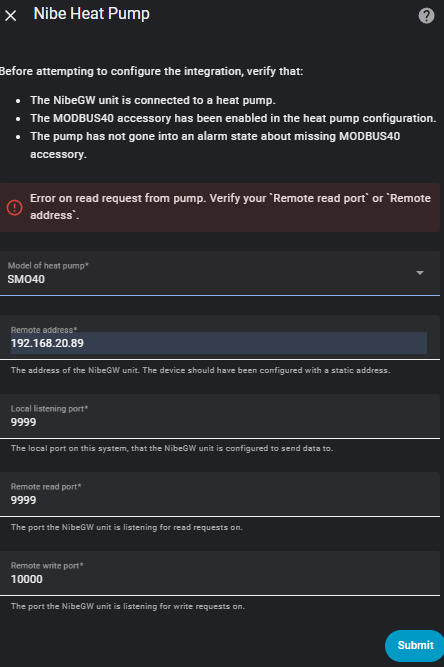
The IP address of the Nibe-GW is definitely 20.89, and the ESPHome configuration looks as follows:
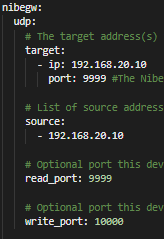
HA address is 192.168.20.10.
Has anyone here worked on this before? I would appreciate any advice.
I’ll just answer my own question in case it helps someone else later
The issue was related to the fact that I’m running HA as a container in Synology’s Docker, using bridge mode. I needed to add port mappings for 10000/9999 (which seems obvious in hindsight  ), but at first this wasn’t possible because Synology reserves those ports for findhostd.
After changing the default ports to values lower than 9996, everything started working properly.
You started it, I can’t figure it out either, can you help me how you did it?
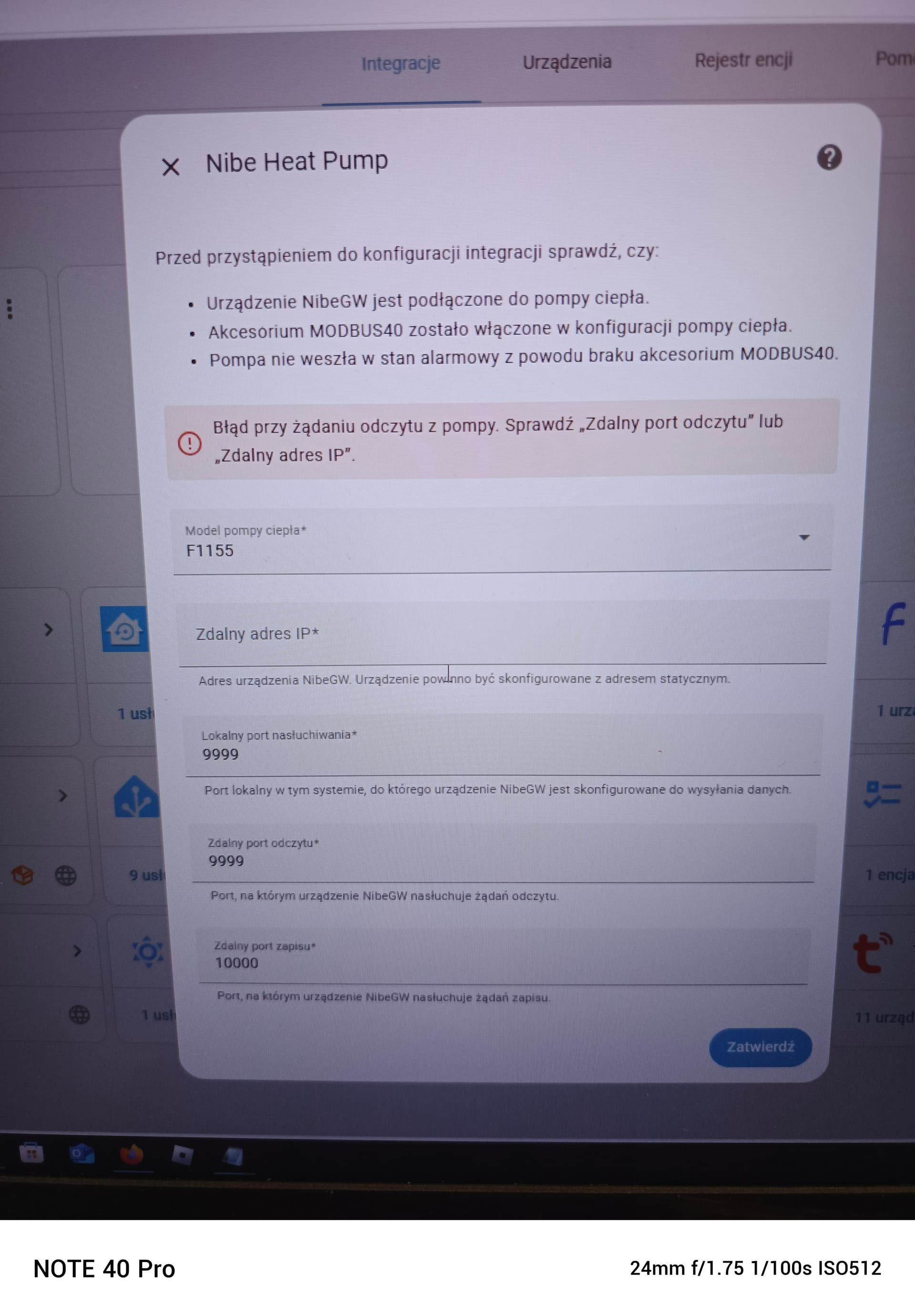
As I’ve mentioned, I use HA installation as docker container working in bridged mode on Synology NAS. Bridged means here HA works like in NAT network, i.e. no ports are visible outside the container. To make HA working I had to forward port 8123, and as long as it was the only opened port in a container, there was no possibility to make nibe-gw working, as it needs it own ports to communicate with Nibe integration.
I opened additional ports for HA container. As 9999 & 10000 were used by other Synology services, I changed ports in nibe-gw config to below:
nibegw:
udp:
target:
- ip: 192.168.20.10
port: 9994
source:
read_port: 9994
write_port: 9995
and then mapped 9994 → 9994/udp 9995 → 9995/udp to the container. Since then it works.
If you use Synlogy too, you can try that way. If not, give some more details of HA installation method.
Since this topic is on connecting a Nibe heatpump without a cloud, it might be worthwhile to know that Nibe has added a local REST API. See this topic: Nibe 4.4.7 Local Api
Integration method: Modbus
Model:S1155
Today I noticed that my Heat pump and all entities became unavailable in HA. I can see it is connected to the network and still has it’s reserved IP address, and I know it is connected to the Internet as I can access it through the Nibe App.
I tried removing ad re-adding the integration and pump and I get “unexpected error.” Very helpful. Have restarted HA, and the heat pump, and the router.
Has anybody else had this issue recently? There have been a lot of HA core updates recently and I think from memory that in the past an update has broken this integration.