ITead’s new “SONOFF Dongle Plus MG24" based on Silicon Labs EFR32MG24 radio microcontroller SoC has now been launched

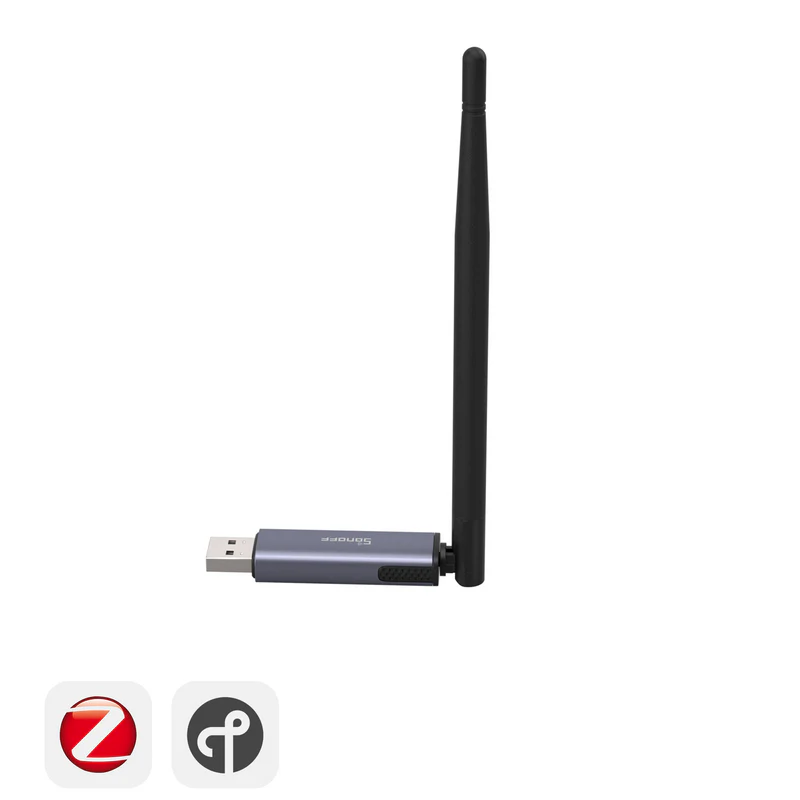
FYI, ITead just released a new “SONOFF Dongle Plus MG24”, a Zigbee Coordinator USB adapter (and optional Thread Border Router) based on the newer ERF32MG24 radio MCU from Silicon Labs, as an improved version of their previous “Sonoff ZBDongle-E” (based on EFR32MG21) which out-of-the-box is compatible with both Home Assistant’s built-in ZHA integration (Open Home Foundation’s officially supported Home Assistant native Zigbee gateway based on the zigpy project) as well as the just as popular third-party Zigbee2MQTT application. See:

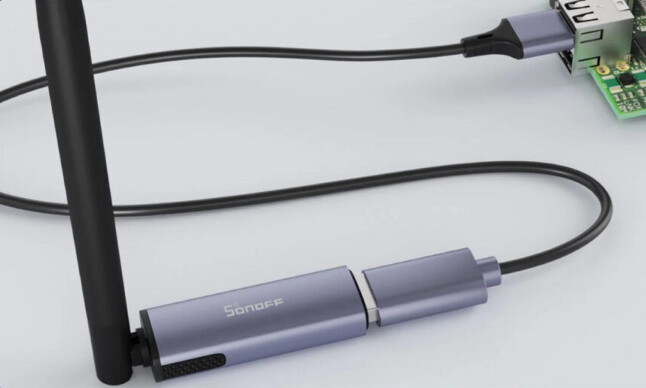
This model ships with a USB-extension-cable (which is really a must to use as explained below):
Being based on a faster Silabs EFR32MG24 chip (instead of the EFR32MG24 chip that the previous “Sonoff ZBDongle-E” was based on) means this new Zigbee Coordinator adapter has more resources (onboard CPU, memory and storage) so it will technically be able to handle a larger Zigbee network with more devices connected, and in theory aslo be a faster and a little more future proof, (though it should be noted that Silabs also have an even better latest-generation radio microcontroller available that is called EFR32MG26 which have even more memory and storage resources) and is what I personally would call “future-proof” (hence this public product request to Itead/Sonoff → [NEW HARDWARE REQUEST] Silicon Labs EFR32MG26 based Zigbee Coordinator USB adapter from ITead/Sonoff? · Issue #39 · itead/Sonoff_Zigbee_Dongle_Firmware · GitHub ).

While each model of newer chips from Silabs have improved RX Sensitivity (better dBm signal reception), the main valid technical arguments for wanting a new Zigbee Coordinator USB dongle radio adapter is perhaos the EFR32MG21 MCU which has less RAM and Flash Storage resoucres so is therefore limited to connecting around 200 connected Zigbee devices at most, and the EFR32MG24 MCU have twice the Flash Storage and three times as much RAM so should in theory be able to handle around 400 connected Zigbee devices. If that is the case then the even newer EFR32MG26 have more than 5-times the RAM and 30-times as much Flash Storage as the EFR32MG21 so any upcoming adapters based on the EFR32MG26 will in theory be able to handle at least 1000 connect Zigbee devices, (that said it should be a bigger leap for a user to upgrade from a EFR32MG21 directly to a EFR32MG26, but then again you can always reuse all of these dongles as best-in-class Zigbee repeaters by simpy flashing them with Zigbee Router firmware).

Anyway, this EFR32MG24 based “SONOFF Dongle Plus MG24” is still sold at such a very low price (this and previous USB radio dongle variants still look to be great value for the hardware you get at this low price) so I can assume ITead sell it at cost hoping to make money on attach rate sales, so if new to Zigbee then suggest you also check out all of the other Sonoff branded Zigbee devices as well (with exception of their own bridge/gateway products which I personally do not recommend when you can instead use Home Assistant’s native ZHA integration or Zigbee2MQTT and help the open-source community building those by reporting bugs or even assist with their development).

I personally use almost all of Sonoff battery-operated Zigbee devices and can recommend them however still suggest you do your own research and read articles by independent reviews for more information and practical tests. Also, I can personally recommend using their previous USB adapters flashed as Zigbee Routers to use as dedicated Zigbee repeaters.

TIPS!

  • If you are already using the Home Assistant’s ZHA integration with an older Zigbee Coordinator USB radio dongle then it is super easy to migrate to a newer Zigbee Coordinator USB radio dongle, just follow these steps in the ZHA integration documentation → https://www.home-assistant.io/integrations/zha#migrating-to-a-new-zigbee-coordinator-adapter-inside-zha
  • The fact that ITead now sell a “SONOFF Dongle Plus MG24”, an “Sonoff ZBDongle-E” variant and a “Sonoff ZBDongle-P” variants of similar looking adapters with practically the same functionallity can be a little confusing as they can all either can act as either a Zigbee Coordinator (by default) or a Zigbee Router device (if flashed with such firmware instead), or even a Thread Boarder Router (if flash alternative OpenThread/Spinel Radio Co-Processor (RCP) firmware to enable Thread network protocol for allowing Home Assistant to be used as a native Matter controller).
  • As more companies now sell similar adapters users will now have more options as different DIY home automation software applications offer might not be fully compatible with one or the other (Home Assistant’s ZHA integration and Zigbee2MQTT are today fully compatible with all so based in just the specification the older ones should in theory offer similar performance on paper while the newer MG24 model should be able to handle a larger amount of connected devices).
  • To avoid EMF/EMI/RMI interference it is strongly recommended use the included USB extension cable or even least buy a longer USB extension cable to get the Zigbee Coordinator / Thread Border Radio adapter a bit away from all sources of electricity and electomagnetic noise that will interfere with signal reception (which included the computer/appliace that runs Home Assistant). Again, it is higly recommended to follow all the general tips in the community guide about Zigbee network optimization: a how-to guide for avoiding radio frequency interference + adding Zigbee Router devices (repeaters/extenders) to get a stable Zigbee network mesh with best possible range and coverage by fully utilizing Zigbee mesh networking as all Zigbee Coordinator adapters is very sensitive to EMI/RFI interference (e.g. a noisy radio frequency environment will jam the signal and prevent it from receiving all Zigbee messages to it without errors). Connecting the dongle via a long “shielded” USB extension cable in a USB 2.0 port or USB 2.0 hub (and not a USB 3.0 port) to get it away from EMF sources will usually help a lot if experiencing connection or pairing symptoms/issues.
    • Another reason for using an USB extension cable is that the USB-plug design of ITead’s Sonoff USB dongle hardware adapters can be a little short and wide which makes it harder and sometimes impossible to plug it into some USB ports if the computer enclosure/chassis/casing is to thick around the USB-port as that will physically prevent the USB dongle from actually making a proper connection inside the USB port even if it looks like it is plugged in all the way that is possible.
      • Some people have even taken a Dremel to make these type of USB radio dongles fit without using a USB-extension cable, meaning that actually taken the bad decision to power-drill or other power-tool to physically modify the Home Assistant Blue chassi/enclosure to fix the issue of sunken USB-ports, see this picture what not to do (as instead you should use an USB-extension-cable):

Updating or changing the firmware type:

The SONOFF Dongle Plus MG24 USB adapter ships with EmberZnet Zigbee NCP (EZSP/Ember) firmware by default, but it can also be flashed with alternative firmware images to convert it for other functionality; including Zigbee Router (Zigbee repeater) and OpenThread RCP (Thread Border Router), or other custom firmware as explained in Sonoff user guide:

Note! The “SONOFF Dongle Plus MG24” adapter will use the CP2102(N) USB-to-UART bridge chip so if using Windows OS or Mac OS to flash the firmware or for virtualization then you first need to install CP210x USB to UART Bridge VCP Drivers from Silicon Labs:

Comparing “ZBDongle-P” vs. “ZBDongle-E” vs. SONOFF Dongle Plus MG24:

verses versus

Feature/Model ZBDongle-P ZBDongle-E SONOFF Dongle Plus MG24
Radio SoC/MCU chip Texas Instruments CC2652P Silicon Labs EFR32MG21 Silicon Labs EFR32MG24 (efr32mg24a420f1536im48)
Zigbee Stack (Serial Interface Protocol API/CLI) Z-Stack (ZNP) EmberZNet (EZSP/Ember) EmberZNet (EZSP/Ember)
Optional Zigbee Router firmware Yes (9dBm firmware available from Koenkk) Yes (20dBm firmware available from ITead) Yes (20dBm firmware available from ITead)
USB to UART/Serial Converter Chip CP2102 or CP2102N CH9102F or CP2102N CP2102N
USB EEPROM Product Description ID SONOFF Zigbee 3.0 USB Dongle Plus SONOFF Zigbee 3.0 USB Dongle Plus V2 (first need to run update script if from first hardware batch shipped) SONOFF Dongle Plus MG24
Home Assistant USB Auto Disovery Yes Yes (but way need to run update script if from first hardware batch shipped) Yes
Flow Control None by default (Hardware flow control optional with alternative firmware and flipped dip-switch) Software flow control Software flow control
RF Transmit Output Power 9dBm (firmware hardcoded), Max: 20dBm 20dBm (default) 20dBm (default)
Antenna External (rotatable and tiltable) External, removable and replacable (rotatable and tiltable) External, removable and replacable (rotatable and tiltable)
Enclosure/case Aluminum all-metal shell casing Aluminum all-metal shell casing Aluminum all-metal shell casing
Length 63mm 52mm ?
Packaging Retail-box with manual Retail-box with manual Retail-box with manual
Home Assistant ZHA integration Supported Supported Supported (firmware versions (7.4.x, 8.0.x, 8.1.x, or 8.2.x)
Zigbee2MQTT Supported Supported after update to a later compatible firmware version (7.4.x, 8.0.x, or 8.1.x) Supported (firmware versions (7.4.x, 8.0.x, or 8.1.x)

SONOFF Dongle Plus MG24 (and its EFR32MG24 Wireless SoC) detailed specifications:

  • Silicon Labs Wireless SoC: EFR32MG24 (SKU part: efr32mg24a420f1536im48)
    • Microcontroller CPU core: Arm Cortex-M33 MCU @ 78 MHz Core Frequency
    • Memory: 256 KB RAM (300% more RAM than the Sonoff ZBDongle-E)
    • Storage: 1536 KB Flash Storage (200% more Flash Storage the Sonoff ZBDongle-E)
    • Radios/Protocols: 802.15.4, Matter, OpenThread, Zigbee 3.0, BLE, Bluetooth Mesh, Proprietary 2.4 GHz, Multiprotocol (for the SoC, but it comes pre-flashed with EmberZNet Zigbee NCP firmware in order to be able to act as Zigbee Coordinator out-of-the-box)
  • Connectivity
    • Zigbee 3.0 with external 3dBi SMA antenna (upgradeable to 4.5dBi antenna)
    • RF Frequency: 2.4 GHz
    • Tx Power – Up to 20dBi + 3dBi from the antenna
      • Max Output Power Range (dBm) -20 to 19.5 from the SoC
    • RX Sensitivity -104.5 dBm (compared to -104.5 on the Sonoff ZBDongle-E with EFR32MG21)
  • Host interface: USB Type-A male port using CP2102(N) USB-to-serial bridge; 1-meter USB cable provided
  • Power Input: 5V/100mA via USB port
    • Stand-by power consumption: 40 mW (in standby)
  • Materials: Aluminum, ABS+PC enclosure
  • Dimensions: 18 mm × 10.5 mm × 214 mm ?
  • Weight: ?
  • Working Temperature Range: -10°C to 40°C
  • Working Humidity Range: 5% to 95%RH

WARNING! Don’t connect these using Serial-over-IP bridge and connect over WiFi or VPN:

Basically the serial protocol API for EmberZNet Zigbee coordinator application running on the Silicon Labs SoC/MCU does not deal well with unexpected loss of communication caused by network drops. The reason Ember remote bridges over serial-to-IP proxy server is not recommended is that clients using the EZSP serial protocol requires a robust connection between the EmberZNet Zigbee stack running on EFR32 MCU and the serial port of the Zigbee radio. With solutions such as ITEAD Sonoff ZBBridge or a Ser2Net serial proxy connection over a WiFi network it is expected to see NCP entered failed state. Requesting APP controller restart in the logs. This is a normal part of the operation and indicates there was a drop in communication which caused packet loss to occurred between the zigpy radio library and the Zigbee radio. The use of serial network proxies/bridges/servers over WiFi is therefore not recommended when wanting a stable Zigbee environment with Silicon Labs Ember based Zigbee radios. The developers of the ZHA and Zigbee2MQTT software has more information about this if needed and also issue warning that using a Zigbee Coordinator via a Serial-Proxy-Server is not recommended.

PS: Dislaimer; I do not have this myself and have not tested it or ordered it yet. I am just trying to spread the news as I believe that more competition in this space will lead to inovation and more importantly will grow the userbase and community that use and develop open-source Zigbee gateway software like Home Assistant’s built-in ZHA integration (Open Home Foundation’s officially supported Home Assistant native Zigbee gateway based on the zigpy project) and the popular third-party Zigbee2MQTT application.
6 Likes

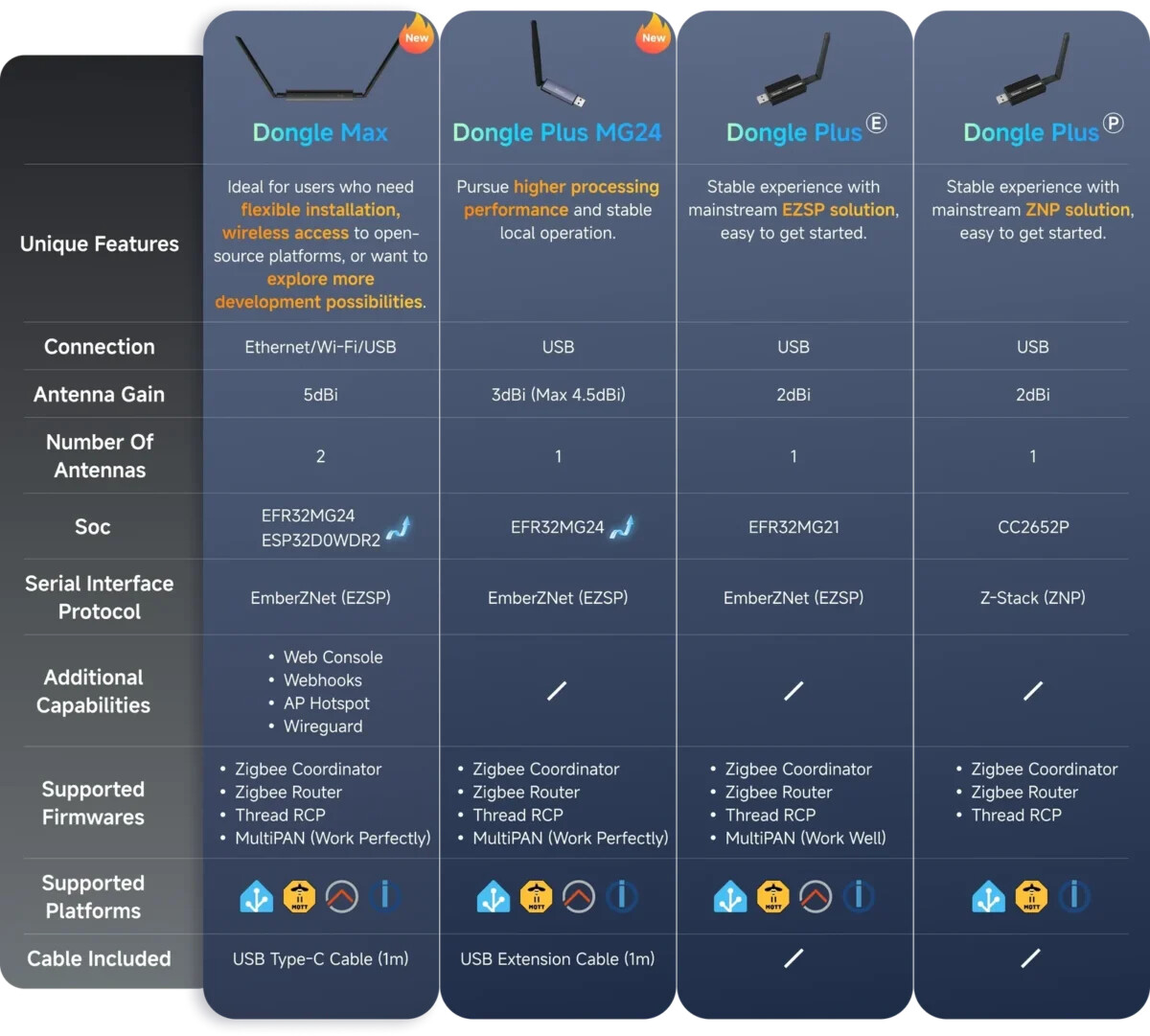
@Ash.xiao spotted now on the website that Sonoff/Itead offers “MultiPAN” (Multi-PAN) firmware for this new SONOFF Dongle Plus MG24 adapter, therefore I would like to point out that neither ZHA or Zigbee2MQTT developer recommended or support the use of Multi-PAN RCP (RCP Multi-PAN) firmware for a Zigbee Coordinator in a multiprotocol configuration on a single physical dongle, and as such I would suggest that Sonoff/Itead remove the mentioning of it as using a multiprotocol configuration with Zigbee and Thread network running at the same time on the same radio is very experimental even it technically works, or at least clearify that OpenThread Multi-PAN CPC (CPC Multi-PAN) firmware should only be used when will just using the dongle as a Thread Border Router. It is instead higly recommended to just buy two separate dongles and use one dedicated as Zigbee Coordinator adapter and the other one as a dedicated as Thread Border Router adapter. For reference read this discussion with arguments against using Multi-PAN for Zigbee:

Neither ZHA or Zigbee2MQTT officially support running multi-protocol (Zigbee and Thread at the same time)

Multiprotocol firmware is not supported. The recommended alternative to establish multiple networks is to use one adapter per protocol.

“Multiprotocol will remain an experimental feature and is not recommended for use.”

Thank you, @Hedda. Make corrections and add additional information to the Dongle-PMG24 comparison chart.

  • Radio SoC/MCU chip: Silicon Labs EFR32MG24(efr32mg24a420f1536im48)
  • USB to UART/Serial Converter Chip: CP2102N
  • USB EEPROM Product Description ID: SONOFF Dongle Plus MG24
1 Like

@Ash.xiao Can you tell us if the external antenna is replacable or no? And if the antenna it ships with is both rotatable and tiltable? Looking at the pictures it seems to only tiltable and not replacable, or?

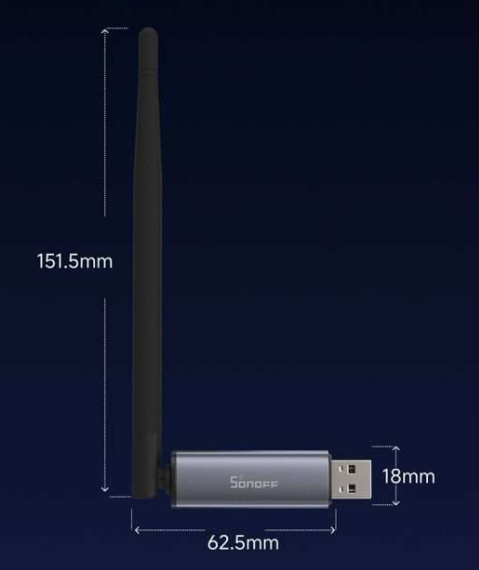
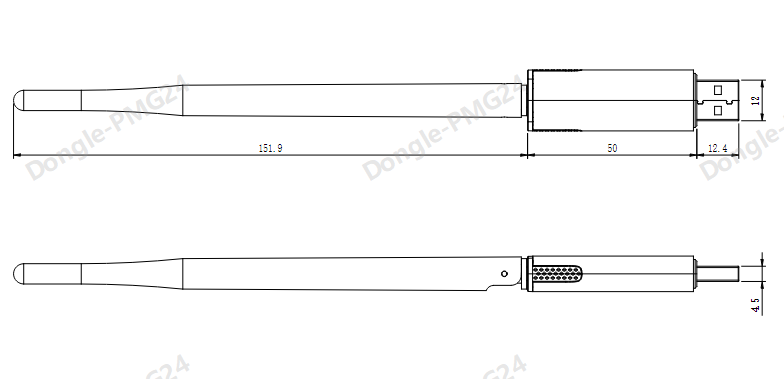
Also wondering about the measurements of the device, both the enclosure lenght and width, as well as the antenna lenght, do you have more detailed specifications?

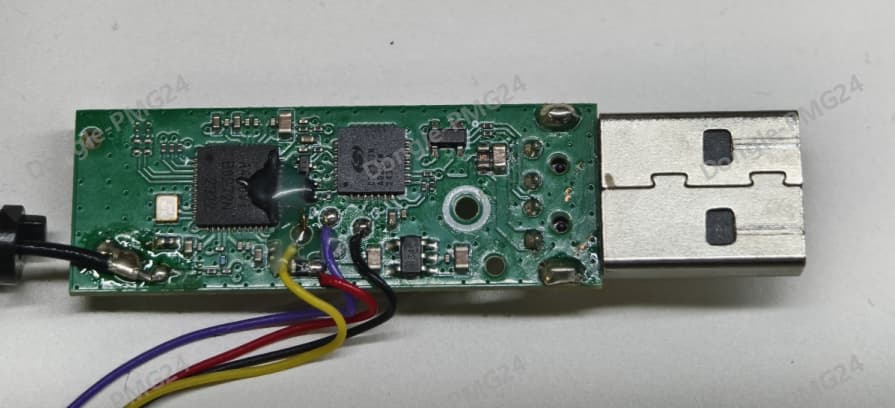
Could you perhaps even post some pictures of the circuit board inside without the enclosure? Both sides of the PCB?

@Ash.xiao Oh, I forgot to ask which exact EmberZNet firmware version does it ship with, and have you many similar or same configuration changes as Nabu Casa done for Home Assistant Connect ZBT-1 (SkyConnect) or do you use the default configuration from the EmberZNet SDK? And have Itead/Sonoff by the way started using their Silicon Labs firmware builder?

Or experimental forks like those from Nerivec, darkxst, or tube0013 which adds more changes?

Nabu Casa for exampel increase routing table size and source routing table size + more:

tube0013, Nerivec and darkxst increased other tables, buffers, + more for their MG24 adapters:

PS: Nerivec even has added support for building Zigbee Router firmware too, see example:

@Ash.xiao one last thing; if Itead makes a network-attatched Zigbee Coordinator dongle like is hinted at on the Sonoff website then you should really consider disabling WiFi on it by default in its firmware configuration and do not market the adapter as supporting Wi-Fi at all as using it is all but garanteed to lead to bad experience for many users sooner or later if they use it as a Zigbee Coordinator over WiFi. (And the same goes for VPN if you ever consider copying that bad concept from others). Please see warnings below and be warned. Those type of network Zigbee Coordinator adapters should really only ever use a wired Ethernet connection.

WARNING! Don’t connect these using Serial-over-IP bridge and connect over WiFi or VPN:

Basically the serial protocol API for EmberZNet Zigbee coordinator application running on the Silicon Labs SoC/MCU does not deal well with unexpected loss of communication caused by network drops. The reason Ember remote bridges over serial-to-IP proxy server is not recommended is that clients using the EZSP serial protocol requires a robust connection between the EmberZNet Zigbee stack running on EFR32 MCU and the serial port of the Zigbee radio. With solutions such as ITEAD Sonoff ZBBridge or a Ser2Net serial proxy connection over a WiFi network it is expected to see NCP entered failed state. Requesting APP controller restart in the logs. This is a normal part of the operation and indicates there was a drop in communication which caused packet loss to occurred between the zigpy radio library and the Zigbee radio. The use of serial network proxies/bridges/servers over WiFi is therefore not recommended when wanting a stable Zigbee environment with Silicon Labs Ember based Zigbee radios. The developers of the ZHA and Zigbee2MQTT software has more information about this if needed and also issue warning that using a Zigbee Coordinator via a Serial-Proxy-Server is not recommended.

Warning

Be aware that it is not recommended to use a Zigbee Coordinator via a Serial-Proxy-Server (also known as Serial-to-IP bridge or Ser2Net remote adapter) over a WiFi, WAN, or VPN connection.

Serial protocols used by Zigbee Coordinator do not have enough robustness, resilience, or fault-tolerance to handle packet loss and latency delays that can occur over unstable connections.

Zigbee Coordinator requires a stable local connection to its serial port interface with no drops in communication between it and the Zigbee gateway application running on the host computer.

Thus be warned that connecting to a network-attached remote Zigbee Coordinator over WiFi/WAN/VPN using Ser2Net or other Serial Proxy/Forwarding Tunnel is not supported for normal operation.

Caution

  • It is not recommended to run a coordinator via Serial-Proxy-Server (also called Serial-to-IP bridge or Ser2Net remote adapter) over:

    • Wi-Fi,
    • WAN, or
    • VPN
  • The coordinator requires a stable, local connection to its serial port interface without drops in communication with the Zigbee gateway application running on the host computer.

  • Serial protocols used by the coordinator do not have enough robustness, resilience, or fault tolerance to handle packet loss and latency delays that can occur over unstable connections.

Of course. The external antenna is not replaceable, but it can be tilted up to 90 degrees and rotated up to 180 degrees.

The following are the product dimension drawings and internal PCB layouts.

1 Like

The device comes pre-flashed with firmware version 7.4.5 Zigbee NCP (EmberZNet 7.4.5), with a baud rate of 115200.

The firmware was built using Silicon Labs’ official Simplicity Studio v5 (IDE). Its configuration remains largely consistent with previous ZBDongle-E firmware versions, with optimizations such as an increased receive buffer size.

For users who wish to build the firmware themselves, here is some additional information:

Crystal Frequency: 38.4 MHz
Pin Mapping:
TX = PC01
RX = PC02
1 Like

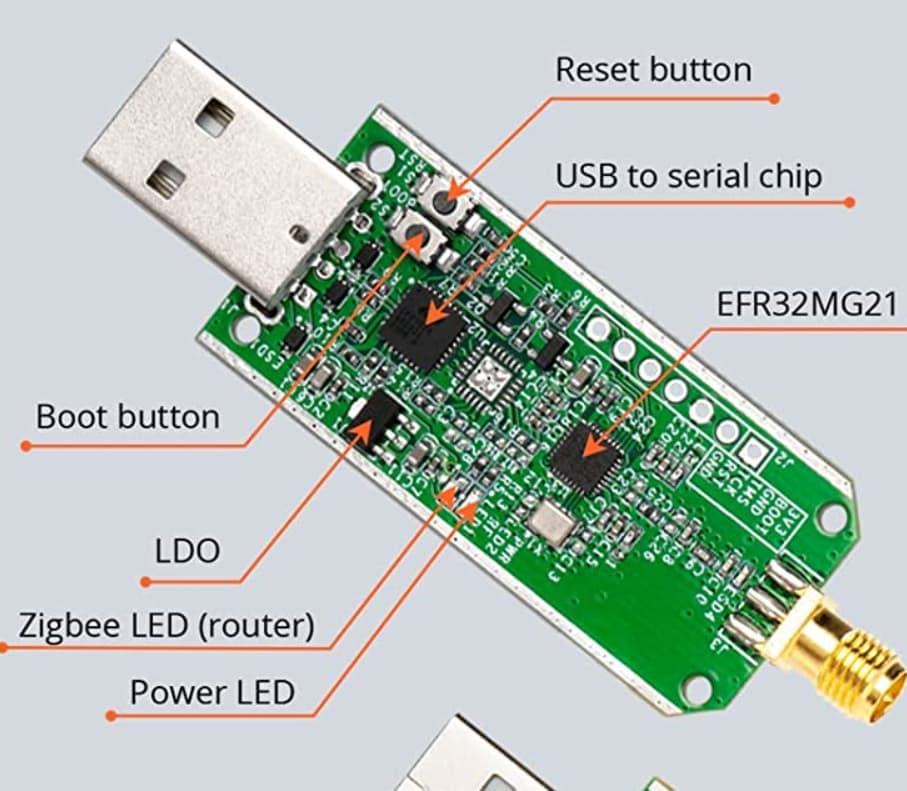
@Ash.xiao Only solder pads and no buttons on the PCB for Bootloader (“Boot button”) and resetting (“Reset button”) to make it possible to recover a bricked device in case the user flash wrong firmware or firmware writting gets corrupt? Will you document how to use the boot pad and/or reset pad for bootloader recovery?

Both the Sonoff ZBDongle-E and the Sonoff ZBDongle-P had “Boot” and “Reset” as buttons:

Under normal circumstances, as long as the bootloader is not damaged, users can flash back the official firmware using the SONOFF Dongle Flasher even if the wrong firmware was previously installed.

Due to its unique circuit design, the SONOFF Dongle can control the output of high and low levels from the serial chip via the USB port, allowing the device to enter bootloader mode — serving as an alternative to a physical button. This is also a key advantage of the SONOFF Dongle Flasher compared to other web flashers.

A practical example: the SONOFF Dongle Flasher can force a device running router firmware into bootloader mode, making it possible to reflash it with coordinator firmware. Compared to other web tools that require physically shorting pins or rely solely on software methods to enter the bootloader, this approach is significantly more reliable.

In cases where the bootloader is corrupted, even a physical button would be of no use. The only recourse is to solder wires to external pins and perform a wired flash using a tool such as a J-LINK.

@Ash.xiao Any change that ITead/Sonoff could try contributing a code patch for that feature/function to the universal-silabs-flasher project as well if it is not already supported there?

That universal-silabs-flasher is used as a dependecy in the official Silicon Labs Flasher Add-on for Home Assistant which ITead/Sonoff could then fork to make an addon for your Silabs adapters:

That is, release a forked “Sonoff Silicon Labs Flasher Add-on” available as a custom add-on.

Add-ons allow the user to extend HA functionality by installing additional applications as addons:

If I understand correctly ITead/Sonoff today only provide a closed-source Home Assistant add-on specifically made just for SONOFF iHost (and not an open-source platform independent one?)?

TubesZB and ZigStar are others that have forked it to release their own flasher addons for HA:

PS: ZigStar and TubesZB even have a own flashers based on it but for Texas Instruments adapters.

Hello everyone, I set up my stick two days ago and would like to give a quick report. It was delivered with firmware 7.4.5. I immediately updated it to the latest version, 7.5.0, using the Edge browser. The Sonoff Dongle Flasher in HA does not know this stick yet.

The stick was recognized immediately by Home Assistant, but Zigbee2Mqtt was stuck on the onboarding setup screen and did not save the configuration and has output a few errors in the log.
This is my first time using HA, and I spent the entire evening struggling with it.

In any case, the solution in the end was to reflash the same firmware again! After that, the Zigbee2Mqtt started immediately without any problems. My two smart plugs also connected directly and everything has been working fine so far.

I wanted to share my experience here in case anyone else is experiencing the same problem. It seems that a successful flash process is not always as successful.

1 Like

The development of the SONOFF Dongle Flasher was prompted precisely by the incompatibility issues with universal-silabs-flasher. Many users encountered problems when using the Web tool derived from universal-silabs-flasher to flash firmware. For example: Impossibile to flash on SonoZigbee 3.0 USB (Windows) · Issue #107 · darkxst/silabs-firmware-builder · GitHub

During the initial development of the SONOFF Dongle Flasher, we also evaluated whether it was possible to fix the issues based on universal-silabs-flasher. However, this project relies on multiple code repositories, and its code execution is relatively slow. Fixing the problems within it would likely be more challenging than developing a separate tool from scratch.

Additionally, limited development resources were another important factor.

Hello @Hedda , for your information.

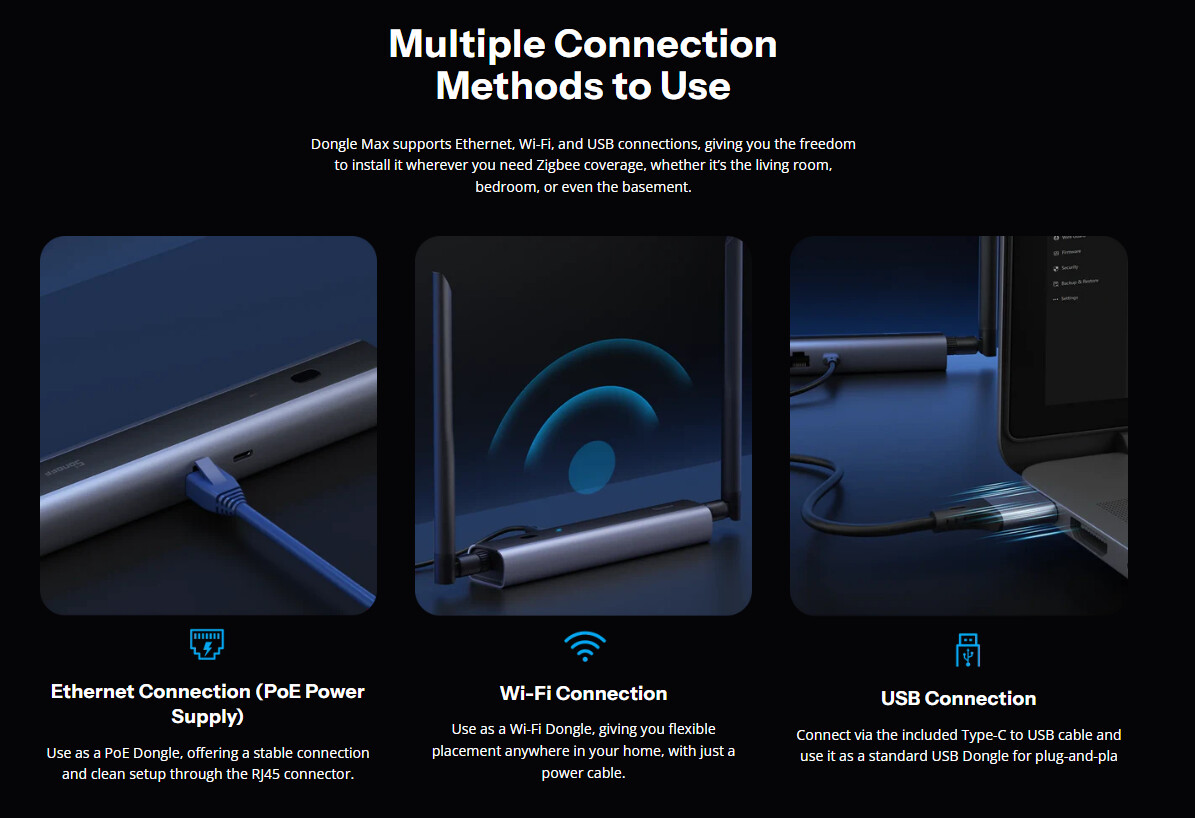
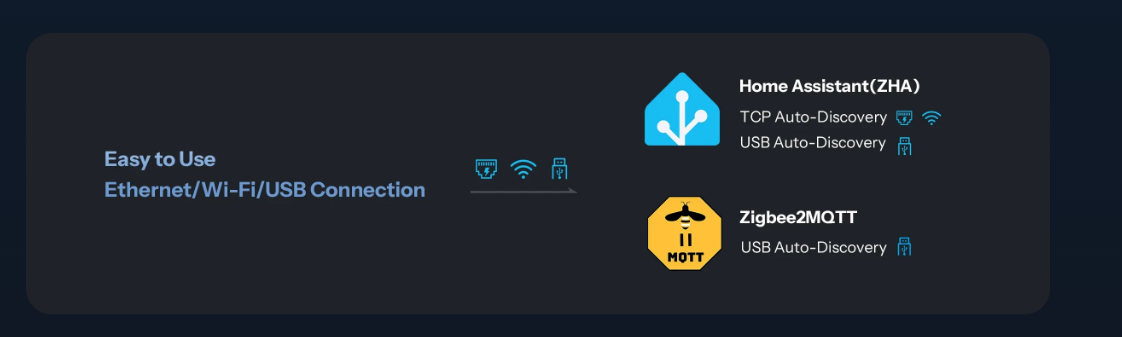
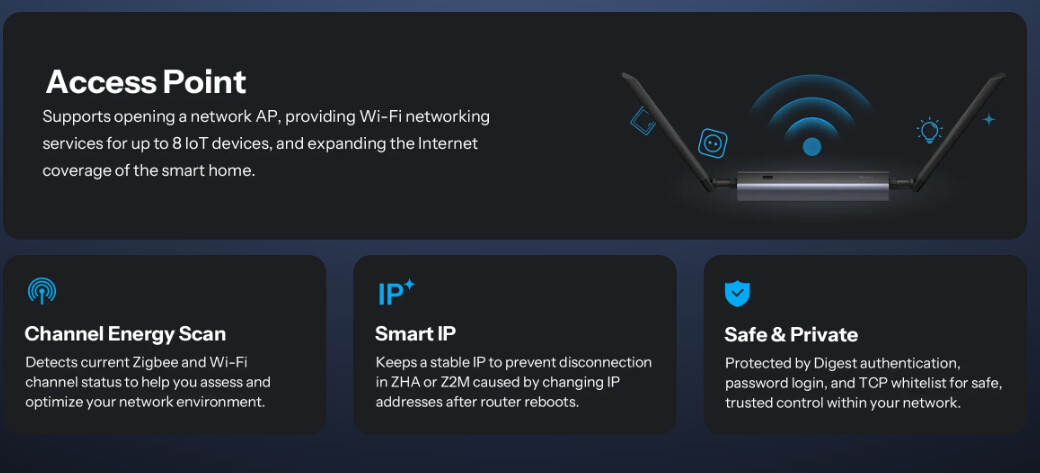
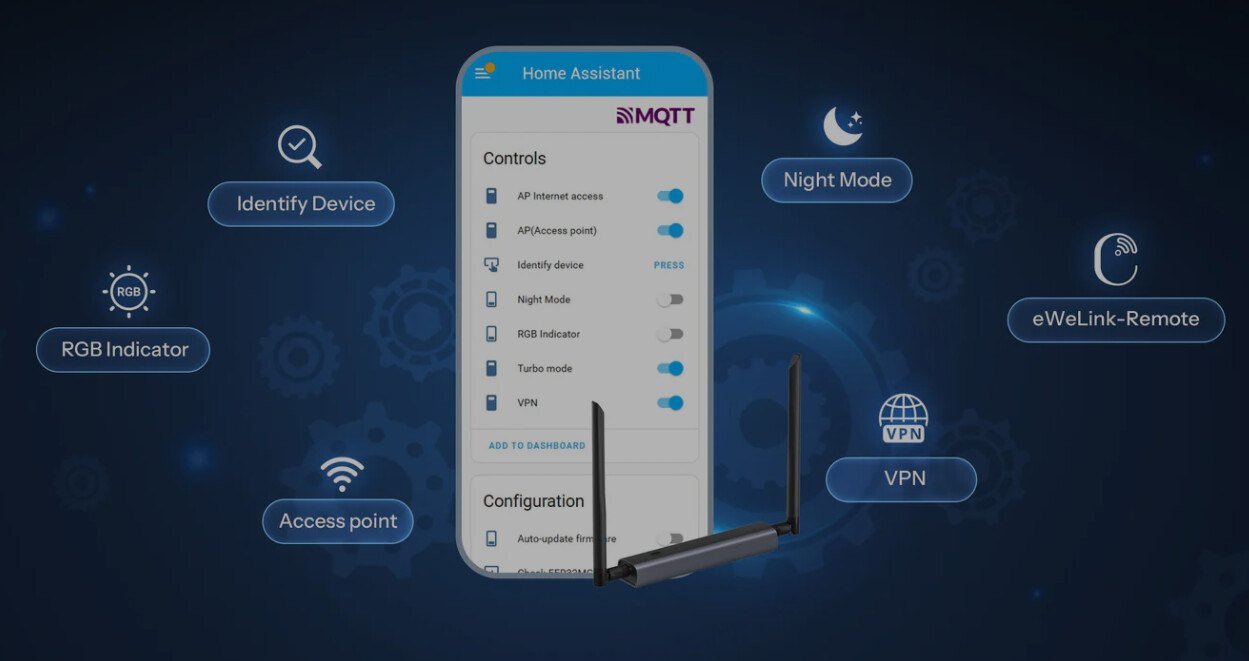
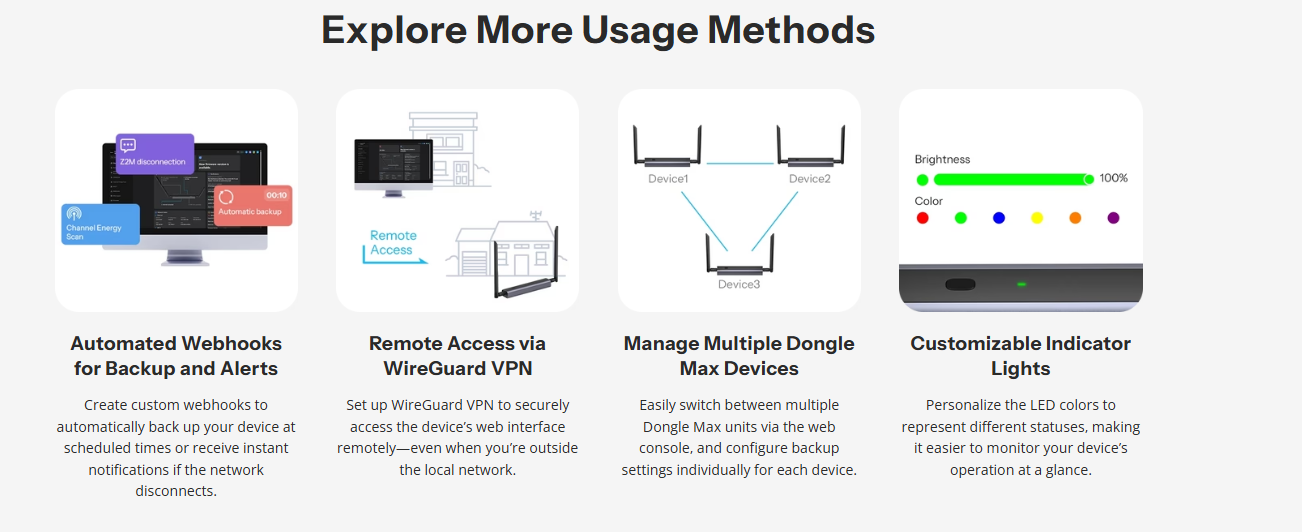
The SONOFF Dongle Max is now available.

SONOFF Dongle Max Zigbee/Thread PoE Dongle | Dongle-M

@Ash.xiao again I would really really really recommend that Sonoff disable both WiFi and VPN on it by default if and when using it as a Zigbee Coordinator adapter!

As far as I understand that the Thread protocol does not have this issues with packet drops or latency but users who use it as a Zigbee Coordinator will have problems, however not all the time, which makes troubleshooting even harder. This will also increase the support burden on application communities who will get more reports of people that have intermittent issues du to WiFi or VPN connection causing problems for them.

WiFi and VPN are as such very bad idea to offer for Zigbee Coordinator adapters and problems with it could risk ruin the reputation of not only Sonoff but also applications like ZHA and Zigbee2MQTT who users might blaime.

I would suggest that you make it very clear in both marketing (websites and user guides/manual, etc.) as well in the firmware configuration that using it as a Zigbee Coordinator adapter over Wi-Fi or VPN is not recommended. Personally I would not recommend an adapter to anyone unless it is made very clear that they should never ever use it as a Zigbee Coordinator adapter over WiFi or VPN.

Those using a Zigbee Coordinator adapter over a Wi-Fi or VPN connection are almost all but garanteed to have a bad experience and get issues sooner or later if they use it as a Zigbee Coordinator over WiFi and/or VPN.

Please see repeated warnings below and be warned. Using a Zigbee Coordinator adapters should really only ever use a wired Ethernet connection that is 100% stable and always online without latency or congestion.

WARNING! Don’t connect these using Serial-over-IP bridge and connect over WiFi or VPN:

Basically the serial protocol API for EmberZNet Zigbee coordinator application running on the Silicon Labs SoC/MCU does not deal well with unexpected loss of communication caused by network drops. The reason Ember remote bridges over serial-to-IP proxy server is not recommended is that clients using the EZSP serial protocol requires a robust connection between the EmberZNet Zigbee stack running on EFR32 MCU and the serial port of the Zigbee radio. With solutions such as ITEAD Sonoff ZBBridge or a Ser2Net serial proxy connection over a WiFi network it is expected to see NCP entered failed state. Requesting APP controller restart in the logs. This is a normal part of the operation and indicates there was a drop in communication which caused packet loss to occurred between the zigpy radio library and the Zigbee radio. The use of serial network proxies/bridges/servers over WiFi is therefore not recommended when wanting a stable Zigbee environment with Silicon Labs Ember based Zigbee radios. The developers of the ZHA and Zigbee2MQTT software has more information about this if needed and also issue warning that using a Zigbee Coordinator via a Serial-Proxy-Server is not recommended.

The documentation for Zigbee2MQTT and Home Assistant’s ZHA integration makes this very clear:

Warning

Be aware that it is not recommended to use a Zigbee Coordinator via a Serial-Proxy-Server (also known as Serial-to-IP bridge or Ser2Net remote adapter) over a WiFi, WAN, or VPN connection.

Serial protocols used by Zigbee Coordinator do not have enough robustness, resilience, or fault-tolerance to handle packet loss and latency delays that can occur over unstable connections.

Zigbee Coordinator requires a stable local connection to its serial port interface with no drops in communication between it and the Zigbee gateway application running on the host computer.

Thus be warned that connecting to a network-attached remote Zigbee Coordinator over WiFi/WAN/VPN using Ser2Net or other Serial Proxy/Forwarding Tunnel is not supported for normal operation.

Caution

  • It is not recommended to run a coordinator via Serial-Proxy-Server (also called Serial-to-IP bridge or Ser2Net remote adapter) over:
    • Wi-Fi,
    • WAN, or
    • VPN
  • The coordinator requires a stable, local connection to its serial port interface without drops in communication with the Zigbee gateway application running on the host computer.
  • Serial protocols used by the coordinator do not have enough robustness, resilience, or fault tolerance to handle packet loss and latency delays that can occur over unstable connections.
    [/quote]

Note! Multi-PAN /multi-protocol is also not recommended so should not be promited either! See:

PS: Regardless, I think it would have made a better product if it did not have WiFi or VPN at all.

Thank you for the kind reminder. I will add the warnings regarding Z2M and ZHA to the Dongle-M knowledge base.

The Wi-Fi feature (with hotspot capability) is an integral part of the device’s full functionality. It allows users to access the Dongle’s console via the AP hotspot and perform configuration tasks such as firmware updates, similar to most Shelly products.

But I am planning to develop a network diagnostics feature in the web console (dongle-m.local) to help users optimize their home network or choose a more suitable connection method based on the diagnostic feedback.

Hello Hedda, I have added the warnings for ZHA and Z2M as well as the recommendations for SONOFF to the product knowledge base. As for the display effect, it will be further optimized in subsequent updates.

Connecting to Home Assistant via ZHA | Dongle-M
Connecting to Zigbee2MQTT | Dongle-M

@Ash.xiao I do not think that is enough, and I do not think anyone else will think it is is enough either, all the marketing material on the Sonoff web pages for that product you really make it perfectly clean that using it as a Zigbee Coordinator over WiFi or VPN should not be used. In fact the opotite is true as they still more or less primarly promote the product as a Wi-Fi adapter for Zigbee, and the same goes for VPN.

That is, I am refering to the product pages so that people can get this information BEFORE they buy the product. No offence, but no one reads user guides before buying a product. You need to add a big fat disclaimer with an asterisk that make it clear that BEFORE buying that it is not meant to be used as a Zigbee Coordinator over WiFi or VPN and declare that doing so will not be supported by Zigbee Gateway implemenetaions and thus not recommended!

If they now look at the offical website it is easy to assume that Zigbee Coordinator over Wi-Fi or VPN is supported because it support both, so why should customers not think that the combination is not recommended?

Again, best would be for you to remove this feature in your software/firmware so it is not poissble for user to set it up as a Zigbee Coordinator over WiFi or VPN. That would mean less future complains and less strain on the developers Zigbee Gateway implemenetaions who will now have to deal with users with bad user experince because they thought that it was a good idea, (which is not strange when you are now promoting it like it is today).

Anything less is bad faith, dishonest, misleading, and fraudulent behavior, or a breach of contract to your buyers if they bought it thinking it fully supported based on the current markering.

This has now even been proven as reviewers do not know better and are now also in turn promoting it as a Zigbee Coordinator adapter for WiFi and VPN!!! → Google Search

Sorry but at it stands this marketing gets a big tumbs down and puts the Sonoff brand to shame. If you want to be proactive and repair the Sonoff reputation in advance then probably change the marketing, and better yet consider disable WiFi and VPN by default when Zigbee NCP mode is active. Regardless, I think it would have made a better product if it did not allow to have WiFi or VPN enabled when using it as a Zigbee Coordinator adapter.

FYI, this is otherwise seriously bad marketing, and could even be called false advertisement and is actually illegal in some countires that have stong consummer right protection laws (such as the EU and Scandinavia), as as Sonoff is selling directly to those countries you could be breaking the law by not declaring this limitation up front.

Today there is nothing on those webpages to indicate that Zigbee Coordinator over WiFi or VPN is a bad idea. Instead the webpages promote it and make it seem like it would be a good idea.

I highly recommend that you simply remove any mention of WiFi and VPN from all your pages!

  • SONOFF Dongle Max Zigbee/Thread PoE Dongle | Dongle-M

    • " 【Flexible Connectivity Options 】Supports Ethernet, Wi-Fi, and USB connections, giving you the freedom to deploy Dongle Max wherever it fits best. Even when your Dongle is far from the router, wireless access keeps it connected."

PS: I understand that Sonoff have seen that other manufacturers added WiFi and VPN so therefor maybe thought it be a good idea, but that does not mean that using it as a Zigbee Coordinator over WiFi and VPN is not a bad idea. If you want to make good use of the ESP32 chip then maybe see if could use use it Bluetooth Proxy (like ESPHome and Shelly does):

I wonder if anyone is able to get MG24 working on home assistant with both thread and Zigbee running at the same time?

While it is not hard getting Multi-Protocol working you need to today be aware that Multi-PAN has over the last few years been proven to not be stable which is why it is now classified as experimental or unsable and is not recommended nor officially supported for production. So instead just buy two adapters and use one dedicated for Zigbee and the othet dedicated for Thread. For a more extensive explaination read my replies here:

1 Like