I can see your entity has a device class battery. What state does it show?
Normally these binary_sensors will report low or OK or ON = low battery, OFF = battery OK. When your battery becomes ON or low it will be shown in the automation report. If you go into developer tools → states and search for your binary_sensor.driveway_battery you will see the state. If you click on it, it will then show you the current state. You can then change the state to on or low (lower case) and click Set State. Then trigger the automation again. You will then see it show up in your report.
Is it just me or does Custom Actions still get triggered even when there are no low batteries? I have mine set to send an email with the following message. How do I disable this action if there are no low batteries?
Could you please provide us your YAML of the automation? This YAML code are the settings you have selected in the automation so I can help. To do this go into your automation, top right 3 dots, Edit in YAML, copy all the code, come back to the forum and in your reply at the top tool bar click on “</>” and paste code in there.
It will trigger even though there are no batteries to report. What you need to do is within your custom end action you need to build a if , then action. So if there are batteries to report then send email if none then do nothing and skip.
Point 7 in this FAQ will show you how to do it, click here
If I have multiple actions, do they get executed sequentially? I’m trying to get an AI response into a variable and then use that in the notification,
Here’s the config I’m using:
alias: Low battery Notification
description: ""
use_blueprint:
  path: Blackshome/low-battery-notifications-and-actions.yaml
  input:
    include_time: time_disabled
    time: "10:45:00"
    weekday_options:
      - mon
      - tue
      - wed
      - thu
      - fri
    include_easy_notify: disabled_easy_notify
    custom_actions:
      - action: ai_task.generate_data
        metadata: {}
        data:
          instructions: >-
            You are Alfred Pennyworth (Michael Caine version, from the Nolan
            Batman trilogy). Give me a one-sentence notification for Master
            Grimshaw that there are batteries that need replacing. Be wise, a
            bit dry, and stay in character.
          task_name: Generate notification
        response_variable: alfred_response
      - action: assist_satellite.announce
        metadata: {}
        data:
          message: "{{ alfred_response.data }}"
          preannounce: true
    include_button: enable_button_trigger
    button_entity: input_button.check_low_battery
but in the logs I’m getting an error:
Logger: homeassistant.components.automation.low_battery_notification
Source: components/automation/__init__.py:724
integration: Automation (documentation, issues)
First occurred: 10:45:00 (3 occurrences)
Last logged: 10:59:42

Error rendering variables: UndefinedError: 'alfred_response' is undefined
So the message is undefined when the blueprint runs. I don’t use AI so that is my disclaimer if it not right but try this…
alias: Low battery Notification
description: ""
use_blueprint:
  path: Blackshome/low-battery-notifications-and-actions.yaml
  input:
    include_time: time_disabled
    time: "10:45:00"
    weekday_options:
      - mon
      - tue
      - wed
      - thu
      - fri
    include_easy_notify: disabled_easy_notify
    custom_actions:
      - action: ai_task.generate_data
        data:
          instructions: >
            You are Alfred Pennyworth (Michael Caine version, from the Nolan
            Batman trilogy). Give me a one-sentence notification for Master
            Grimshaw that there are batteries that need replacing. Be wise, a
            bit dry, and stay in character.
          task_name: Generate notification
        response_variable: alfred_response
      - variables:
          alfred_message: "{{ alfred_response.response.text | default('Batteries require attention, sir.') }}"
      - action: assist_satellite.announce
        data:
          message: "{{ alfred_message }}"
          preannounce: true
    include_button: enable_button_trigger
    button_entity: input_button.check_low_battery
Maybe I should of read the Home Assistant documentation first, click here. Again I don’t use AI so that is my disclaimer if it not right but try this…
      - action: ai_task.generate_data
        data:
          task_name: "Generate notification"
          instructions: >-
            You are Alfred Pennyworth (Michael Caine version, from the Nolan
            Batman trilogy). Give me a one-sentence notification for Master
            Grimshaw that there are batteries that need replacing. Be wise, a
            bit dry, and stay in character.
        response_variable: alfred_response
      - variables:
          alfred_message: >-
            {{ alfred_response.data if alfred_response is defined else
            'Batteries require attention, sir.' }}
      - action: assist_satellite.announce
        data:
          message: "{{ alfred_message }}"
          preannounce: true
Took me awhile to find this and learn how to use the “hidden” option. I think it would be helpful to add it to the FAQ or other documentation in that first post.
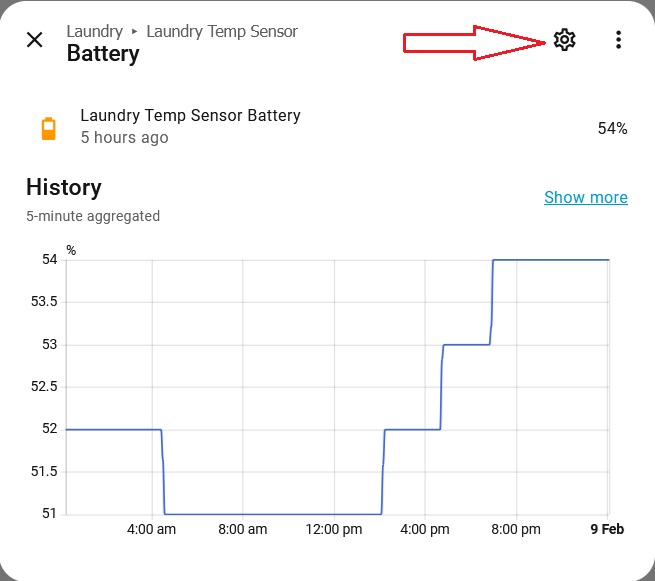
Go into settings / devices & services / click on the entities tab at the top and search for your batteries. Click on the entity you would like to hide and then select the cog wheel
This Blueprint is a real time saver! Nicely done! Curious if notify groups are under consideration? I know you’ve said you don’t use them previously, so it makes sense they aren’t in there My use case is like others have mentioned. I bounce around phones quite a bit so I don’t want to use a generic entity for my phone. Using a group makes it super easy to only have to make one change when I swap phones and everything keeps on working. Thanks for considering, thanks for the cool-ass tools you provide!
i get this error in the logs. not even a phone notification comes though
Logger: homeassistant.helpers.template
Source: helpers/template/init.py:1757
First occurred: 6:51:00 PM (6 occurrences)
Last logged: 7:10:00 PM
Template variable warning: ‘sensors_names_custom_group’ is undefined when rendering ‘You seem to have low batteries, here they are {{sensors_names_custom_group}}’
Template variable error: ‘response’ is undefined when rendering ‘{{ response1.response.speech.plain.speech}}’
Template variable warning: ‘sensors_names_custom_group’ is undefined when rendering 'You seem to have low batteries, here they are "{{sensors_names_custom_group}}
After completely DELETING the custom actions entirely and leaving only the phone notifications, the blueprint would run fine without issue. something is broke here. doesn’t matter if you use conversation.process, ai task, any form of it in the custom actions that pulls the sensor information breaks it. Yea i’ve been doing testing. the blueprint is not passing any sensor information to the custom actions at all if it uses any form of ai to process. I wonder if this is somehow a limitation in the blueprint structure itself. i have noticed this same issue in your calender blueprint aswell as i was forced to use normal tts.


 My use case is like others have mentioned. I bounce around phones quite a bit so I don’t want to use a generic entity for my phone. Using a group makes it super easy to only have to make one change when I swap phones and everything keeps on working. Thanks for considering, thanks for the cool-ass tools you provide!