Migration from ZWAVE JS to ZWAVE JS UI

Hi everyone,

I read a lot about ZWAVE and specifically about ZWAVE JS UI.
Because I sometimes struggle with ZWAVE I decided to migrate - which was not really easy.

One specific case was, that a mains powered switch just went dead from one day to the other. After switching to ZWAVE JS UI this switch was back to normal right away, which is pretty confusing.

So, this thread is for:

  1. Documentation for others
  2. Placing (my) questions about this topic.

So let’s start…

After removing the ZWAVE Integration (not just deactivating), I removed the ZWAVE JS Add-on as well.
Next step was to install the ZWAVE JS UI Add-on and activate it.
After that, I installed the ZWAVE JS Integration again.
IMPORTANT: choose user defined - NOT recommended installation - otherwise the Integration will automatically install the ZWAVE JS Add-on again (see also here: WTH does the ZWave Installation Auto Install that Add-on? - Month of “What the heck?!” - Home Assistant Community

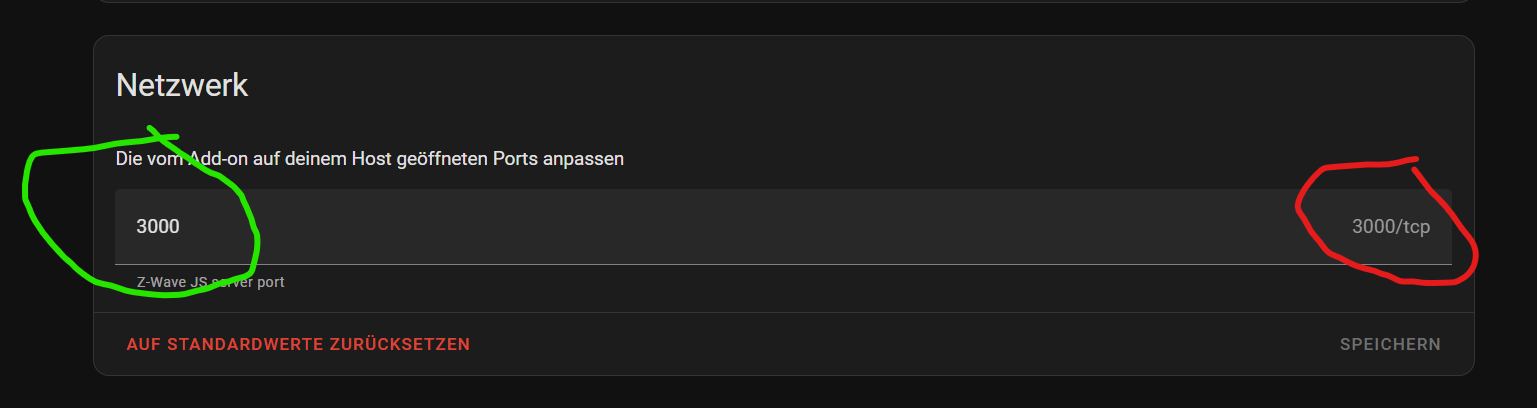
I had some problems to connect the Integration to the WS (of ZWAVE JS UI) on port 3000.
Even though the config of ZWAVE JS UI looked ok (see below in red) I needed to specify port 3000 anyway (green):

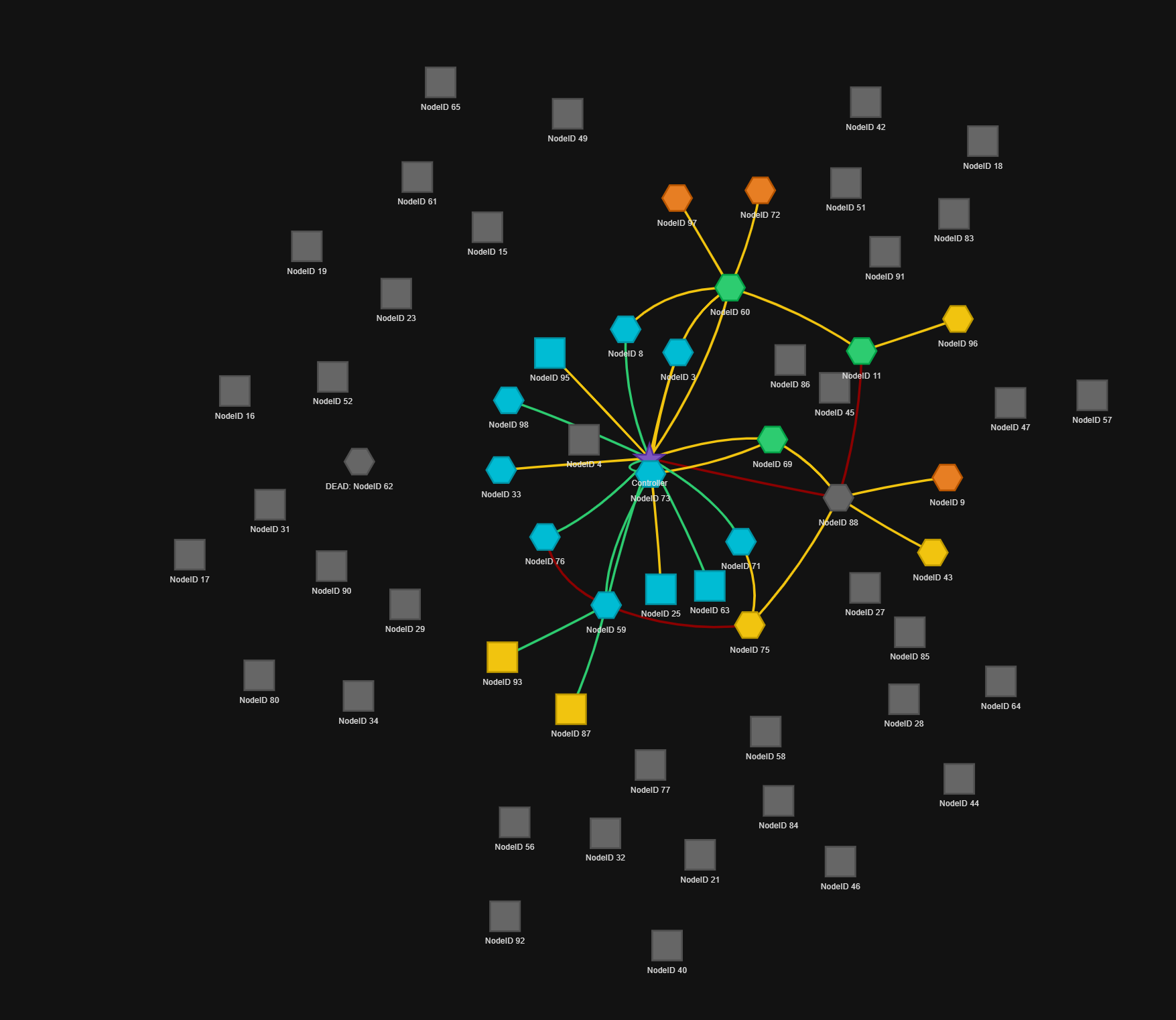
I really like the network view:

As mentioned above, I had a dead note, which went back to normal, but another one went dead (status: in re-interviewing process), which takes long considering it’s a mains powered one, too.

Now I come to my questions :slight_smile:

  1. I see a lot of Nodes sleeping and unknown - is this just a question of time for ZWAVE JS UI to re-interview all the nodes?
  2. Is it normal not to see the “Name” of the ZWAVE Device in the network view? Is there any option to put my own name / tag to them?

Any comments and answers are welcome and much sppreciated.

If you don’t backup and restore the driver cache all devices need to be reinterviewed. That’s why there is:

2 Likes

Great - thank you.
I will check it out and see what I can use.
Obviously I should have found it earlier, but did not while searching.

Anyway - thanks for sharing.

EDIT:
I still have some questions :slight_smile:
Even after interviewing my ring window sensor is still on Unknown manufacturer and I do not see the sensor (close / open) on the devices page (integration).

Is there anything I can do about this (beside removing and re-include)?

I am stuck and would greatly appreciate your help.

Node 49 is unknown and the logs during an interview looks like this:

2025-07-22 10:04:18.698 CNTRLR   [Node 049] Beginning interview - last completed stage: None
2025-07-22 10:04:18.698 CNTRLR   [Node 049] new node, doing a full interview...
2025-07-22 10:04:18.700 INFO Z-WAVE: [Node 049] Interview started
2025-07-22 10:04:18.704 CNTRLR » [Node 049] querying protocol info...
2025-07-22 10:04:18.726 CNTRLR « [Node 049] received response for protocol info:
                                 basic device class:    Routing End Node
                                 generic device class:  Notification Sensor
                                 specific device class: Notification Sensor
                                 node type:             End Node
                                 is always listening:   false
                                 is frequent listening: false
                                 can route messages:    true
                                 supports security:     false
                                 supports beaming:      true
                                 maximum data rate:     100000 kbps
                                 protocol version:      3
2025-07-22 10:04:18.733 CNTRLR   [Node 049] The node is asleep.
2025-07-22 10:04:18.735 INFO Z-WAVE: [Node 049] Is asleep
2025-07-22 10:04:18.745 INFO Z-WAVE: [Node 049] Interview stage PROTOCOLINFO completed
2025-07-22 10:04:18.749 CNTRLR   [Node 049] Interview stage completed: ProtocolInfo
2025-07-22 10:04:18.750 CNTRLR » [Node 049] querying node info...
2025-07-22 10:04:23.341 INFO APP: GET /health/zwave 301 2.566 ms - 162
2025-07-22 10:04:25.923 CNTRLR « [Node 049] Received updated node info
2025-07-22 10:04:25.925 CNTRLR   [Node 049] The node is now awake.
2025-07-22 10:04:25.940 INFO Z-WAVE: [Node 049] Is now awake
2025-07-22 10:04:25.945 INFO Z-WAVE: [Node 049] Node info (NIF) received
2025-07-22 10:04:27.331 INFO Z-WAVE: [Node 095] Metadata updated: 49-2-Air temperature
2025-07-22 10:04:27.333 INFO Z-WAVE: [Node 095] Value updated: 49-2-Air temperature 23.6 => 23.8
2025-07-22 10:04:28.111 CNTRLR « [Node 049] node info received
                                 supported CCs:
                                 · Z-Wave Plus Info
                                 · Security 2
                                 · Supervision
                                 · Transport Service
2025-07-22 10:04:28.116 CNTRLR « [Node 049] node info received
                                 supported CCs:
                                 · Z-Wave Plus Info
                                 · Security 2
                                 · Supervision
                                 · Transport Service
2025-07-22 10:04:28.118 INFO Z-WAVE: [Node 049] Interview stage NODEINFO completed
2025-07-22 10:04:28.122 CNTRLR   [Node 049] Interview stage completed: NodeInfo
2025-07-22 10:04:28.128 CNTRLR   [Node 049] Interviewing Z-Wave Plus Info...
2025-07-22 10:04:28.128 CNTRLR » [Node 049] querying Z-Wave+ information...
2025-07-22 10:04:28.217 INFO Z-WAVE: [Node 095] Metadata updated: 49-2-Air temperature
2025-07-22 10:04:28.226 INFO Z-WAVE: [Node 095] Value updated: 49-2-Air temperature 23.8 => 23.8
2025-07-22 10:04:28.353 CNTRLR « [Node 049] received response for Z-Wave+ information:
                                 Z-Wave+ version: 2
                                 role type:       SleepingReportingSlave
                                 node type:       Node
                                 installer icon:  0x0c07
                                 user icon:       0x0c07
2025-07-22 10:04:28.358 INFO Z-WAVE: [Node 049] Interview stage COMMANDCLASSES completed
2025-07-22 10:04:28.359 CNTRLR   [Node 049] Interview stage completed: CommandClasses
2025-07-22 10:04:28.360 INFO Z-WAVE: [Node 049] Interview stage OVERWRITECONFIG completed
2025-07-22 10:04:28.363 CNTRLR   [Node 049] Interview stage completed: OverwriteConfig
2025-07-22 10:04:28.366 INFO Z-WAVE: [Node 049] Interview stage COMPLETE completed
2025-07-22 10:04:28.373 CNTRLR   [Node 049] Interview completed
2025-07-22 10:04:28.375 CNTRLR   [Node 049] The node is ready to be used
2025-07-22 10:04:28.384 INFO Z-WAVE: [Node 049] Ready: Unknown manufacturer 0xXXXX - Unknown product 0xXXXX (0xXXXX)
2025-07-22 10:04:28.386 CNTRLR   Retrieving priority route to node 49...
2025-07-22 10:04:28.410 INFO Z-WAVE: [Node 049] Interview COMPLETED, all values are updated

Comparing this interview with a wokring one (known device) it seems that the manufacturer info request is skipped - but why?

2025-07-22 11:15:58.184 INFO Z-WAVE: [Node 011] Interview stage NODEINFO completed
2025-07-22 11:15:58.192 CNTRLR   [Node 011] Interview stage completed: NodeInfo
2025-07-22 11:15:58.200 CNTRLR   [Node 011] Interviewing Manufacturer Specific...
2025-07-22 11:15:58.201 CNTRLR » [Node 011] querying manufacturer information...
2025-07-22 11:15:58.621 INFO Z-WAVE: [Node 011] Metadata updated: 114-0-productId
2025-07-22 11:15:58.623 INFO Z-WAVE: [Node 011] Value added: 114-0-productId => 4097
2025-07-22 11:15:58.626 INFO Z-WAVE: [Node 011] Metadata updated: 114-0-productType
2025-07-22 11:15:58.629 INFO Z-WAVE: [Node 011] Value added: 114-0-productType => 1538
2025-07-22 11:15:58.632 INFO Z-WAVE: [Node 011] Metadata updated: 114-0-manufacturerId
2025-07-22 11:15:58.633 INFO Z-WAVE: [Node 011] Value added: 114-0-manufacturerId => 271
2025-07-22 11:15:58.636 CNTRLR « [Node 011] received response for manufacturer information:
                                   manufacturer: Nice Polska Sp. z o.o. (0x010f)
                                   product type: 0x0602
                                   product id:   0x1001
2025-07-22 11:15:58.643 CNTRLR   [Node 011] Interviewing Version...
2025-07-22 11:15:58.644 CNTRLR » [Node 011]   querying the CC version for Version...
2025-07-22 11:15:59.233 CNTRLR   [Node 011]   supports CC Version (0x86) in version 2
2025-07-22 11:15:59.235 CNTRLR » [Node 011] querying node versions...
2025-07-22 11:15:59.703 INFO Z-WAVE: [Node 011] Metadata updated: 134-0-hardwareVersion
2025-07-22 11:15:59.706 INFO Z-WAVE: [Node 011] Value added: 134-0-hardwareVersion => 2
2025-07-22 11:15:59.711 INFO Z-WAVE: [Node 011] Metadata updated: 134-0-firmwareVersions
2025-07-22 11:15:59.712 INFO Z-WAVE: [Node 011] Value added: 134-0-firmwareVersions => 3.2,3.2
2025-07-22 11:15:59.712 INFO Z-WAVE: [Node 011] Metadata updated: 134-0-protocolVersion
2025-07-22 11:15:59.713 INFO Z-WAVE: [Node 011] Value added: 134-0-protocolVersion => 4.5
2025-07-22 11:15:59.716 INFO Z-WAVE: [Node 011] Metadata updated: 134-0-libraryType
2025-07-22 11:15:59.717 INFO Z-WAVE: [Node 011] Value added: 134-0-libraryType => 3
2025-07-22 11:15:59.721 CNTRLR « [Node 011] received response for node versions:
                                   library type:      Enhanced Slave (0x03)
                                   protocol version:  4.5
                                   firmware versions: 3.2, 3.2
                                   hardware version:  2


  1. Why is the manufacturer not updated - even if the device is in the ZWAVE DB: Z-Wave JS Config DB Browser
  2. Do I need to update the DB locally? or is ZW JS UI checking the DB online?

Maybe these are dumb questions, but I am really stuck and could really need some help.

Just for the sake of completeness:
I went back to ZWAVE JS and started all over again with the guide mentioned above.
Now everything work almost perfect and I just need to re-include one node to make it work (I guess).
@freshcoast
Thanks for pointing me into the right direction.