You muss take mushroom chip conditional for the fan. And in the condition state_not: unavailable
type: custom:button-card
entity: light.pt_soggiorno_luce
name: Soggiorno
icon: phu:rooms-living
show_state: false
show_label: true
tap_action:
action: none
double_tap_action:
action: none
label: |
[[[
return "🌡️ <span style='font-weight: bold; color: white;'>" + Math.round(states['sensor.pt_soggiorno_sensori_temperature'].state) + "°C" + "   | 💧 " + Math.round(states['sensor.pt_soggiorno_sensori_humidity'].state) + "% </span>";
]]]
custom_fields:
btn:
card:
type: custom:mushroom-chips-card
chips:
- type: template
tap_action:
action: toggle
entity: light.pt_soggiorno_luce
icon_color: |
{% if is_state(entity, 'on') %}
orange
{% endif %}
icon: |
{% if is_state(entity, 'on') %}
mdi:lightbulb
{% else %}
mdi:lightbulb-outline
{% endif %}
- type: template
tap_action:
action: toggle
entity: binary_sensor.pt_soggiorno_finestra_sensore_contact
icon: |
{% if is_state(entity, 'on') %}
phu:double-window-open
{% else %}
phu:double-window-closed
{% endif %}
icon_color: |
{% if is_state(entity, 'on') %}
red
{% else %}
green
{% endif %}
- type: template
entity: binary_sensor.pt_soggiorno_presenza_sensore_presence_sensor
icon: mdi:motion-sensor
card_mod:
            style: >
              {% if
              is_state('binary_sensor.pt_soggiorno_presenza_sensore_presence_sensor','on')
              %}
                .content {
                  color: red;
                  animation: clip 2s linear infinite;
                }
                @keyframes clip {
                  50% { clip-path: polygon(0 0, 35% 0, 100% 100%, 0 100%); }
                }
              {% else %}

              {% endif %}
- type: template
entity: climate.pt_soggiorno_condizionatore
icon: mdi:air-conditioner
tap_action:
action: more-info
card_mod:
style: |
{% if is_state('climate.pt_soggiorno_condizionatore', 'on') %}
.content {
color: red;
animation: spin 1s linear infinite;
}
{% else %}
{% endif %}
card_mod:
style: |
ha-card {
margin-top: 18px;
margin-left: 4px;
height: 170px !important;
}
state:
- value: "off"
styles:
img_cell:
- background: "#8E7AB5"
- opacity: 0.3
- value: unavailable
styles:
img_cell:
- background: "#8E7AB5"
- opacity: 0.3
styles:
grid:
- grid-template-areas: "\"n btn\" \"l btn\" \"i btn\""
- grid-template-columns: 1fr min-content
- grid-template-rows: min-content min-content 1fr
img_cell:
- justify-content: start
- position: absolute
- width: 135px
- height: 135px
- left: 0
- bottom: 0
- margin: 0 0 -30px -30px
- background: orange
- border-radius: 200px
icon:
- width: 80px
- color: black
- opacity: ""
- margin-left: 32px;
- margin-top: "-5px;"
card:
- padding: 0px 0px 22px 22px
custom_fields:
btn:
- justify-content: end
- align-self: start
name:
- justify-self: start
- justify-content: start
- align-self: start
- font-size: 18px
- font-weight: 500
- margin-top: 10px;
- margin-left: "-10px;"
label:
- justify-self: start
- justify-content: start
- align-self: start
- font-size: 12px
- font-weight: 50
- margin-left: "-10px;"
columns: 2
The motion animation no longer works when the motion sensor is on.
Can someone kindly help me please?
Not the code I usually use/suggest, but your code works for binary_sensor.pt_soggiorno_presenza_sensore_presence_sensor
What card_mod version are you using? If v3.5, revert to v3.4.4
Hi @LiQuid_cOOled, How do you decide when to add the “$”, “.:”, and other delimiters in the card_mod style?
I’m trying to customize a badge icon and I don’t know where to start (too much information, and I haven’t been able to find a proper guide). I could also do something similar to what you’re discussing in this post, but with one (or more) mushroom slider cards (the idea would be to put the remaining timer inside the slider card and similar things).
Could you give me some guidance?
Thank you so much.
Here
1 Like
Fantastic and well laid out resource
Hi,
I’m trying to have a mushroom climate card in which the list of hvac_modes will be dependent on the state of a sensor. Specifically, I have sensor.vrf_state which may be e.g. “off”, “cool” or “heat”; when it’s in “cool” state, I do not want the heat button to appear, and so forth.
I tried different forms of conditional list, but none of them seems to work. Essentially, what I need is something like:
          hvac_modes: |
            {% if not is_state('sensor.vrf_state','heat') %}
            - cool
            {% endif %}
            {% if not is_state('sensor.vrf_state','cool') %}
            - heat
            {% endif %}
            - dry
            - off
But this, or any other forms I’ve tried, does not seem to affect the card, which appears to just ignore the hvac_modes section entirely if I start templating.
Is there any way to achieve what I’m after? Thanks for any pointer.
(Tried to play some card mod stuff here as well here, but didn’t get to an acceptable result)
where is the code you posted from?
It is just an example of code I tried with the climate card. Here’s the complete card for reference. Just to be clear, this does not work; it is what I hoped would work, and which I’m asking advice for. I’m seeking a conditional list of hvac_modes, in whatever way works… Thanks!
        - type: custom:mushroom-climate-card
          entity: climate.l1_002
          layout: horizontal
          fill_container: false
          show_temperature_control: true
          hvac_modes: |
            {% if not is_state('sensor.vrf_state','heat') %}
            - cool
            {% endif %}
            {% if not is_state('sensor.vrf_state','cool') %}
            - heat
            {% endif %}
            - dry
            - off
The HVAC card does not allow templating with the method you are trying .
Understood. Is there any other way in which I can achieve this functionality? To have hvac_modes be dependent on a condition?
No promises, but I am fairly certain (99%) I can tackle it with card_mod. Give me a day or so…
1 Like
Continuing the discussion from Mushroom Cards - Build a beautiful dashboard easily  (Part 1):
I’m trying to use any of your animations for mushroom-template-card but none of them work, even the simplest ones like the fan animation, I just copy and paste your code, I see the fan icon but it doesn’t spin.
at the same time I have a working animation for mushroom-chips-card
here’s a piece of code from card_mod:
mushroom-template-chip:nth-child(5)$: |
  :host {
    animation: spin 1s linear infinite;
  }
  @keyframes spin {
    0% {
      transform: rotate(0deg);
    }
    100% {
      transform: rotate(360deg);
    }
  }
Like this
type: custom:mushroom-template-card
primary: Spin
icon: mdi:fan
icon_color: teal
card_mod:
  style: |
      ha-state-icon {
        animation: spin 1s linear infinite;
      }
1 Like
like magic, it’s working!
How do plan on turning on the heat or cool if those mode buttons are hidden?
That’s the point - they are hidden conditionally. If the VRF unit is already cooling, the heat button will be hidden on the rest of the devices. The off button is always visible; once the last cooling device is turned off, all buttons show. And vice versa.
See the code I hoped would work. The state of the VRF variable is a reflection of the state of all the units - if one of them is cooling it is “cool”, if one of them is heating it is “heat”. Else it is “none” or “off”.
I’ll have to adjust the logic based off your explanation… You are asking for each button to react to the state of another device option selected, but the individual buttons are separate actions based on the current device mode in the cards original design.
type: custom:mushroom-climate-card
entity: climate.l1_002
hvac_modes:
  - cool
  - heat
  - "off"
fill_container: true
collapsible_controls: false
show_temperature_control: false
layout: horizontal
card_mod:
  style:
    mushroom-climate-hvac-modes-control$:
      mushroom-button:nth-child(1)$: |
        .button {
          {% if states(config.entity) != 'cool' %}
          display: none !important;
          {%else%}
            border: 1.5px solid white !important;
            background-color: darkorange !important;
            width: 85px !important;
            --icon-color: white !important;
           {% endif %}
             }
      mushroom-button:nth-child(2)$: |
        .button {
            {% if states(config.entity) != 'heat' %}
             display: none !important;
            {%else %}
              border: 1.5px solid white !important;
             background-color: blue !important;
              width: 85px !important;
              margin-left: -50px !important;
             --icon-color: white !important;
            {% endif %}
             }
This is a start you can work with… as a secondary note, your reply came across as a bit terse in my opinion.
Thank you so much for taking the time to assist!
So, with some minor tweaks we have progress, with mixed results. The good: The buttons do get removed per the logic - major progress! The not-so-good: the space “under” the missing button remains sensitive to clicking, so that if I touch / click on it, the undesired functionality does get triggered.
So for example, if the “cool” button gets removed because of this logic (since the VRF system is in “heat” mode), the space it took remains blank, and if I click it (say, by mistake), the system tries to activate “cool” nevertheless. What I need is the cool mode to get completely eradicated from the card…
So far I was not able to remove the clickable functionality.
Here is a shortened version of what currently works:
          card_mod:
            style:
              mushroom-climate-hvac-modes-control$:
                mushroom-button:nth-child(1)$: |
                  .button {
                     {% if states('sensor.vrf_state') == 'cool' %}
                       display: none !important;
                     {% endif %}
                   }
                mushroom-button:nth-child(2)$: |
                  .button {
                    {% if states('sensor.vrf_state') == 'heat' %}
                      display: none !important;
                    {% endif %}
Add pointer-events: none; to remove th clickable action.
If you want to shift the button’s position when the other button is hdden, position: relative !important; is needed to move the clickable action.
card_mod:
            style:
              mushroom-climate-hvac-modes-control$:
                mushroom-button:nth-child(1)$: |
                  .button {
                     {% if states('sensor.vrf_state') == 'cool' %}
                       display: none !important;
                       pointer-events: none;
                     {% endif %}
                   }
                mushroom-button:nth-child(2)$: |
                  .button {
                    {% if states('sensor.vrf_state') == 'heat' %}
                      display: none !important;
                      pointer-events: none;
                    {% endif %}
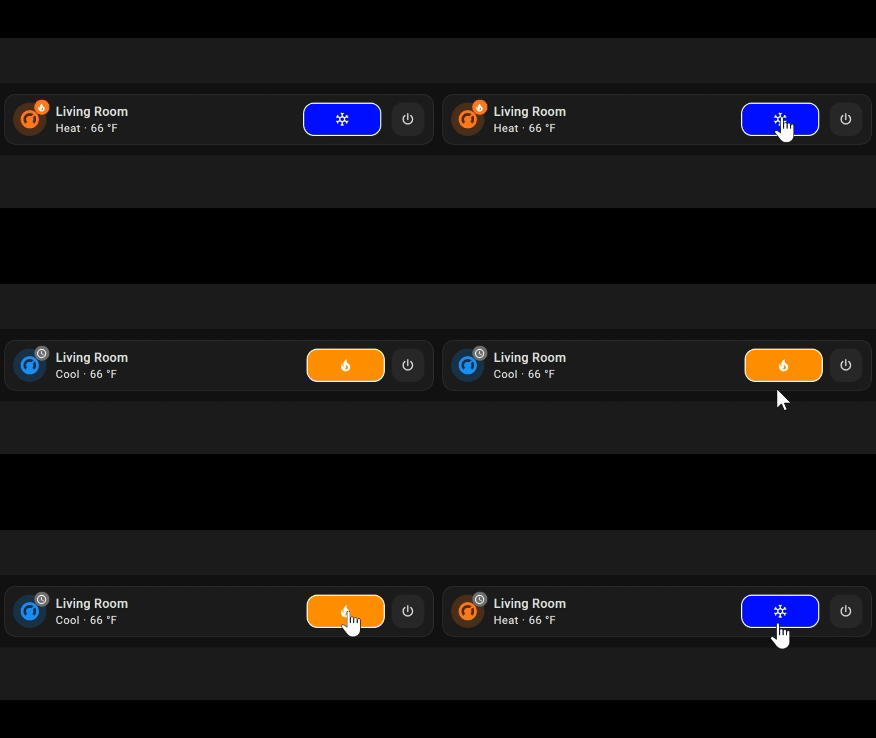
My code
type: custom:mushroom-climate-card
entity: climate.living_room
hvac_modes:
  - cool
  - heat
  - "off"
fill_container: true
collapsible_controls: false
show_temperature_control: false
layout: horizontal
card_mod:
  style:
    mushroom-climate-hvac-modes-control$:
      mushroom-button:nth-child(1)$: |
        .button {
          {% if states(config.entity) != 'cool' %}
            display: none !important;
            pointer-events: none;
          {%else%}
            border: 1.5px solid white !important;
            background-color: darkorange !important;
            width: 85px !important;
            --icon-color: white !important;
          {% endif %}
             }
      mushroom-button:nth-child(2)$: |
        .button {
            {% if states(config.entity) != 'heat' %}
              display: none !important;
              pointer-events: none;
            {%else %}
              border: 1.5px solid white !important;
              background-color: blue !important;
              width: 85px !important;
              margin-left: -50px !important;
             --icon-color: white !important;
            {% endif %}
             }
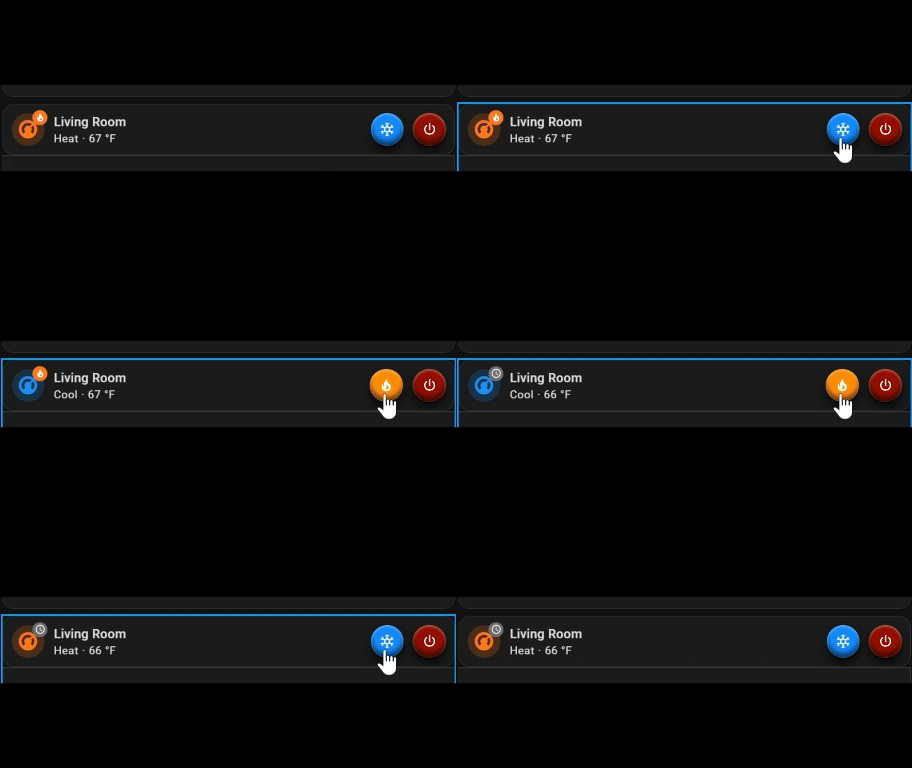
A robust version
type: custom:mushroom-climate-card
entity: climate.living_room
hvac_modes:
  - cool
  - heat
  - "off"
fill_container: true
collapsible_controls: false
show_temperature_control: false
layout: horizontal
card_mod:
  style:
    mushroom-climate-hvac-modes-control$:
      mushroom-button:nth-child(1)$: |
        .button {
          {% if states(config.entity) == 'off' %}
              background-color: darkorange !important;
              --icon-color: white !important;
              box-shadow: 0px 1px 0px 0px rgb(0,0,0),
              0px 7px 10px 0px rgb(10,10,10),
              inset 0px 1px 3px 0px rgba(250, 250, 250, .5),
              inset 0px -5px 5px 0px rgba(0, 0, 0, .6);
              border-radius: 50% !important;
          {% elif states(config.entity) == 'cool' %}
              background-color: darkorange !important;
              --icon-color: white !important;
              box-shadow: 0px 1px 0px 0px rgb(0,0,0),
              0px 7px 10px 0px rgb(10,10,10),
              inset 0px 1px 3px 0px rgba(250, 250, 250, .5),
              inset 0px -5px 5px 0px rgba(0, 0, 0, .6);
              border-radius: 50% !important;
              margin-left: 45px !important;
              position: relative !important;
          {%else%}
              display: none !important;
              pointer-events: none;
          {% endif %}
             }
      mushroom-button:nth-child(2)$: |
        .button {
          {% if states(config.entity) == 'off' %}
            background-color: dodgerblue !important;
              --icon-color: white !important;
              box-shadow: 0px 1px 0px 0px rgb(0,0,0),
              0px 7px 10px 0px rgb(10,10,10),
              inset 0px 1px 3px 0px rgba(250, 250, 250, .5),
              inset 0px -5px 5px 0px rgba(0, 0, 0, .6);
              border-radius: 50% !important;
          {% elif states(config.entity) == 'heat' %}
           background-color: dodgerblue !important;
              --icon-color: white !important;
              box-shadow: 0px 1px 0px 0px rgb(0,0,0),
              0px 7px 10px 0px rgb(10,10,10),
              inset 0px 1px 3px 0px rgba(250, 250, 250, .5),
              inset 0px -5px 5px 0px rgba(0, 0, 0, .6);
              border-radius: 50% !important;
              position: relative !important;
          {%else%}
              display: none !important;
              pointer-events: none;
          {% endif %}
             }
      mushroom-button:nth-child(3)$: |
        .button {
          {% if states(config.entity) == 'off' %}
              background-color: darkgreen !important;
              --icon-color: white !important;
              box-shadow: 0px 1px 0px 0px rgb(0,0,0),
              0px 7px 10px 0px rgb(10,10,10),
              inset 0px 1px 3px 0px rgba(250, 250, 250, .5),
              inset 0px -5px 5px 0px rgba(0, 0, 0, .6);
              border-radius: 50% !important;
          {%else%}
           background-color: darkred !important;
              --icon-color: white !important;
              box-shadow: 0px 1px 0px 0px rgb(0,0,0),
              0px 7px 10px 0px rgb(10,10,10),
              inset 0px 1px 3px 0px rgba(250, 250, 250, .5),
              inset 0px -5px 5px 0px rgba(0, 0, 0, .6);
              border-radius: 50% !important;
           {% endif %}

2 Likes