Mushroom Cards - Build a beautiful dashboard easily 🍄 (Part 2)

That was intended with the update. First point

  • Icons will only display a background when an action is assigned to them, making it clearer when they are interactive (2025.3: View those headers! - Home Assistant).
  • The default action is now more-info instead of toggle if you set an entity on the card.
  • The icon with have toggle as default tap action if the entity supports toggle.
2 Likes

it was my tinkering with template because ordinary card doesnt work and no options to change there.
I had all runing great for a year, and after one HA update, all my temps and voltages went to trash decimals

This doesn’t work for you?

type: custom:mushroom-chips-card
chips:
  - type: template
    entity: sensor.xxxx
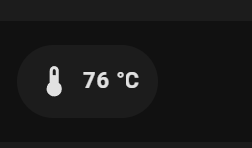
    content: "{{ states(entity) | round(0) }} °C"
    icon: mdi:thermometer
    tap_action:
      action: more-info

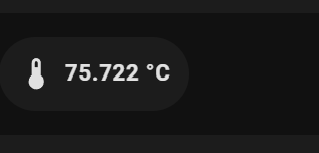
content: "{{ states(entity) | round(3) }} °C"

sorry to jump in here…
for the icon in my spinning buttons or menu-bar, I changed to mdi:turbine, because the rotation is much better :wink:

Sep-16-2025 13-27-14

No worries, always appreciate your input!

Sorry to keep coming back to this, but is there anyone that has managed to create a ring (like used for charging) around the icon in the new style? I can’t get this to work.
image

I’m not sure if this is what you’re looking for. It’s on a Tile card, but I expect it will work on the new Mushroom template card.

type: tile
icon: mdi:air-filter
entity: sensor.refridgerator_fresh_air_filter_remaining
tap_action:
  action: more-info
hold_action:
  action: none
double_tap_action:
  action: none
features_position: bottom
vertical: false
name: Fresh Filter
color: orange
icon_tap_action:
  action: more-info
card_mod:
  style:
    ha-tile-icon$: |
      .container {
        /* Radial progress bar */
        background: radial-gradient(var(--card-background-color) 60%, transparent calc(60% + 1px)), conic-gradient(var(--tile-color) {{ states(config.entity) }}% 0%, var(--card-background-color) 0% 100%);
      }
1 Like

Thanks my friend, this worked!

Did they drop ‘pulse’ ?

This repo mentions it being one of two built-in animations:
iMrLopez/mushroom_cards_animations: This repo includes animations shared in the Home Assistant community for the mushroom cards HACS integration

Hello! I am trying to configure two animations for one icon, depending if state is on or off (garage door opening and closing). I can get it to work for one state:
‘’’
mushroom-template-chip:nth-child(5)$: |
ha-state-icon {
animation:
{% if states(‘binary_sensor.garage_2bay_door_sensor_opening’) == ‘off’ -%}
doorclosed 3s steps(1);
chip-icon-size: 40px;
{% else %}
chip-icon-size: 40px;
{% endif %}
–chip-icon-size: 40px;
}
@keyframes
doorclosed {
75% { clip-path: inset(0 0 0 0); }
50% { clip-path: polygon(0 0, 100% 0, 100% 100%, 68% 100%, 69% 73%, 32% 73%, 31% 100%, 0 100%); }
25% { clip-path: polygon(0 0, 100% 0, 100% 100%, 68% 100%, 69% 61%, 32% 61%, 31% 100%, 0 100%); }
0% { clip-path: polygon(0 0, 100% 0, 100% 100%, 68% 100%, 69% 48%, 32% 48%, 31% 100%, 0 100%); }
}
‘’’

I’m not using Mushroom 5.x (yet), but, from what I’ve read, it is more Tile card than Mushroom card. Personally, I think it’s brilliant what’s being done; albeit, frustrating at first.

To answer your question: Yes, as best I can tell, there is no built in animation for “pulse” or “spin” in the Tile card, which is what the new Mushroom template card (Mushroom 5+) is based on.

I hope this helps.

1 Like

I’ve been struggling with this for a while and no AI could figure it out.

If I have this example chip with animation, how can I make it reusable for other views, to be added between other chips? It’s not nice having to add everything in multiple places, make sure to keep the animation nth child accurate and so on.

I tried with decluttering_card, I tried to add the animation under the chip, not under the whole card, but nothing worked…

type: custom:mushroom-chips-card
chips:
  - type: template
  # ....
  - type: template
    entity: input_boolean.dishwasher
    icon: mdi:dishwasher   
    icon_color: green
    tap_action:
      action: toggle
  - type: template
  # ....  
card_mod:
  style:
    mush-chip-height: 136px
    mushroom-template-chip:nth-child(2)$: |
      ha-state-icon {
        {{ 'animation: bounce 1.5s ease-in-out infinite, wash 1s ease-in-out infinite; 
        transform-origin: 50% 75%;' if is_state('input_boolean.dishwasher', 'on') }}
      }
      @keyframes bounce {
        0%, 20%, 50%, 80%, 100% {transform: translateY(0); } 
        40% { transform: translateY(-1.2px) rotate(5deg); } 
        60% { transform: translateY(-1.1px) rotate(-4deg); } 
      }
      @keyframes wash {
        50%  { clip-path: polygon(0 0, 0 100%, 35% 100%, 36% 74%, 31% 43%, 61% 40%, 71% 69%, 62% 78%, 36% 73%, 35% 100%, 100% 100%, 100% 0); }
      } 

I centralise some of my complex colours etc in configuration.yaml as template sensors. Then import that into my mushroom chip menu.

1 Like

Just discovered that you can also restore the icon background by simply specifying an action for the icon, even if it’s the default ‘more-info’ action. So adding:

icon_tap_action:
  action: more-info

restores the background, without having to use card_mod.

2 Likes

IF… you want an action on that card/icon. Apparently, you can also set the action to “null” and that will bring the “background” back but also invalidate the WebUI, so you have to work in YAML. I haven’t tested that, just reading stuff.

Your posted code is not a viable example. Start with something like this

type: custom:mushroom-chips-card
chips:
  - type: template
    entity: input_boolean.dishwasher
    icon_color: green
    tap_action:
      action: toggle
    icon: mdi:dishwasher
card_mod:
  style:
    mushroom-template-chip:nth-child(1)$: |
      ha-state-icon {
        animation: {{'bounce 1.5s ease-in-out infinite, wash 1s ease-in-out infinite' if is_state('linput_boolean.dishwasher, 'on') else 'none' }} 
        }
        @keyframes bounce {
        0%, 20%, 50%, 80%, 100% {transform: translateY(0); } 
        40% { transform: translateY(-1.2px) rotate(5deg); } 
        60% { transform: translateY(-1.1px) rotate(-4deg); } 
       }
       @keyframes wash {
        50%  { clip-path: polygon(0 0, 0 100%, 35% 100%, 36% 74%, 31% 43%, 61% 40%, 71% 69%, 62% 78%, 36% 73%, 35% 100%, 100% 100%, 100% 0); }
        } 

My example was meant to say that the specific dishwasher chip sits between other chips, and I want to extract it as a template somehow to be easily reused in other chips cards in other views. And I can’t seem to figure it out since the animation is defined to :nth-child on the whole card, not the individual chip

I fully understood, but your posted code was misleading. It is possibly the result of misguidence from your attempt to use AI to resolve the issue.

this code is quite old and formatted incorrectly

try --chip-icon-size:

What is the second animation?

Start with this

type: custom:mushroom-chips-card
chips:
  - type: template
    icon_color: red
    tap_action:
      action: toggle
    icon: mdi:garage
   
card_mod:
  style:
    mushroom-template-chip:nth-child(1)$: |
     ha-state-icon {
       animation: {{ 'doorclosed 3s infinite' if is_state('light.night_stand', 'off') else 'none'}};      
       }
        
      @keyframes
       doorclosed {
       75% { clip-path: inset(0 0 0 0); }
      50% { clip-path: polygon(0 0, 100% 0, 100% 100%, 68% 100%, 69% 73%, 32% 73%, 31% 100%, 0 100%); }
      25% { clip-path: polygon(0 0, 100% 0, 100% 100%, 68% 100%, 69% 61%, 32% 61%, 31% 100%, 0 100%); }
       0% { clip-path: polygon(0 0, 100% 0, 100% 100%, 68% 100%, 69% 48%, 32% 48%, 31% 100%, 0 100%); }
      }

Hi LiQuid

Is there a page where we can see CSS examples related to tile cards, like the ones Dimitri made? I’m having a really hard time adapting my current designs to tile cards. I think I might give up after a while.

And do you how this :

–shape-color: orange !important;

Little shape lifting code applied to the new template card ?