Hi, Anyone havin simular problem?
Seems like the connection gets lost easyli. I dont have any troubles with the rest of the devices over wifi. Vaillant connect is like 5m without any walls away from the router with wifi. HA is connected with the cable.
I rebooted HA and rebooted vaillant connect. But this does not seem to help.
Any suggestions?

Het lijkt erop dat ik de API van vaillant gewoon overbelast met teveel data opvragen. Hoewel ik momenteel echt volledig nieuw ben, begrijp ik er nog niet veel van.
“Seconds between updates (lowering risks ‘quota exceeded’ errors and temporary bans)*”
→ Deze staat std op 300s. en had ik verlaagd naar 5s, om meer samples te hebben. Maar daar lijkt het mis te lopen. Nu heb ik geen gaten in de data zitten nadat ik die terug op 300s heb gezet.
I was looking into this matter but some data doesnt match.
If i take a look at the temperature on the “Live Monitor” option on the console it shows one current flow temperature (50ºC for example), but if i take a look at HA or on the Vaillant APP it shows a completely different temperature (42ºC).
Is it a Vaillant restriction that doesnt update the parametrer?
Depends on your poll frequency, if the integration only updates every 600 seconds the values may deviate.
With ebus, I usually get updates within a minute. Sufficient for monitoring.
Ok, thanks.
But its not just the integration, is also de Vaillant APP. So i guess they just refresh the data each X minutes and not in realtime.
That is correct. If you try to increase the refresh rate, you get quota exceeded errors. The app will most likely need to adhere to the same limits.
1 Like
I’ve been having a problem with ‘out of quota’ with Vaillant recently. I’ve made a number of changes and would be interested in what settings others have got to work. I’ve upgraded to the latest version of myVAILLANT, however that has not helped. Below are my current settings, however my last fail which happened today the first 3600 was set to 1800. I’ve just changed it to 3600 to see if that helps.
I also noticed that in the Diagnostic section On/Off Cycles and Operation Time entities are Unavailable. Is this normal or a setting I’ve missed, I have a Vaillant Arotherm Plus 10.
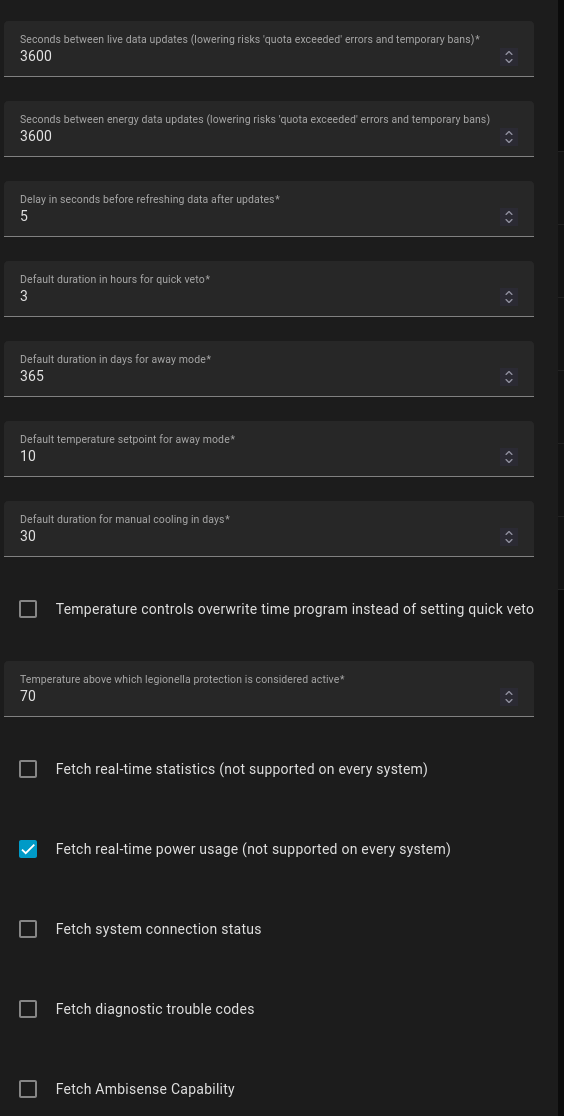
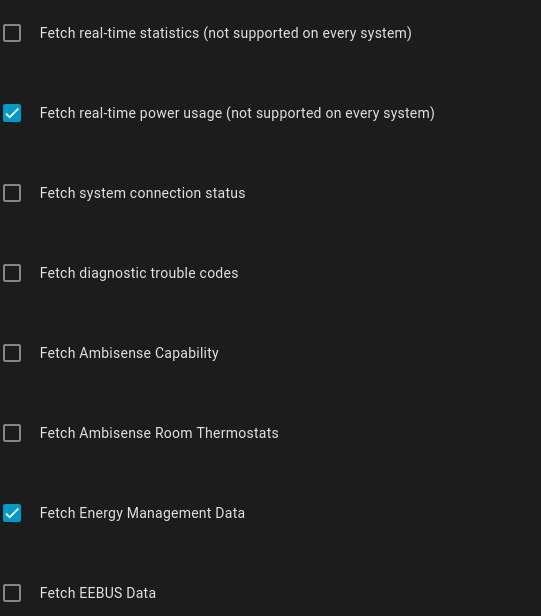
Thank you for any suggestions, this is quite a problem, which I realise is caused by Vaillant, not the integration, as I track energy consumed using the entities supplied via the integration.
It was mentioned elsewhere that 3h for the energy reporting and 10min for the live data may work.
Thank you,
I’ve made the following changes:
1: the first 3600 I’ve set to 600
2: I’ve ticked ‘Fetch real time statistics’
3: I’ve unticked ‘Fetch energy management statistics’
All seems to be working as I was hoping now. I was not sure which each does, however, looking at the following page seems to explain what I’m seeing: https://signalkraft.com/mypyllant-component/ . I’d missed it in a post by @pdd on 2/3/2023.
Furthermore that article suggests “Invite another user in the myVAILLANT app and use that one for the integration. This way at least queries from the mobile app run on a separate account” which might help with avoiding Out of Quota errors. I’ll do that this afternoon.
1 Like
To the latest statement… I doubt it nails the situation.
When HA suffers out of quota, the Vaillant app works properly, not loosing stats. It seems there is a difference in how they collect data, being independent to each other.
In my case I loose a day of data in HA, while Valllant app shows it up continuosly.
IME, if the quota hits the MyVaillant integration, it also hits the energy reporting in the app.
Interesting… not happened to me. Maybe different locations use different endpoints…
… and maybe different setups as well. This is all fishing in the dark, and it’s a small miracle that it works at all, the developer of the integration did a fantastic job.
1 Like
After a year using a Vaillant aroTHERM plus VWL 75/6 heat Pump combined with a Honeywell Evohome device (with thermostats) it is some kind of dissapointing to discover that it is in fact a dumb setup, no self learning whatsoever. Warming up the zones is depending on the outside temperature and cannot rely on just a dumb weekly schedule.
Playing around with the min temp and heating curve the system provides insufficient warmth, or the main zone is on the preferred temp but other zones remain cold because the main zone is dominant. Or, the zones are on temperature when it is no longer needed.
I am planning to create a (some kind of) smart system, based on a relais that switches on/off the HP, fully controlled by HA. This means that different devices will provide the current temperature to HA, EvoHome will provide the preferred temperature to HA, and HA will control a relais connected to the aroTherm for on/off mode, and also where needed the other settings of the HP. Evohome will be disconnected from the HP. All of this will be in multiple node-Red flows supported by a database that will measure and store the different temperature settings and outside temperature, and how long it takes to warm up a zone. Naturally with plenty of safeguards to prevent that the HP is on when not needed if a connection fails.
Does anyone already tried this before? Of does anyone alredy identifiess some pitfalls in this approach?
We have an underfloor heating controlled by smart valves / thermostats in every room. By controlling the valves I can control the temperature in each room in HA.
I also change the water tanks (300L) temperature based on solar forecast, more solar energy means I can store more energy in warm water. The underfloor heating also has a smaller (120 liter) buffer that can store excess energy. Excess solar energy is stored in hot water by changing and triggering the sg-ready configuration via HA. Vaillant can configure the legionella protection only statically based on a calendar. I control the legionella protection dynamically in HA, if there is enough excess energy I heat up the water, whenever that is. If this did not happen in the last week, I happens on the weekend to make sure it happens once a week.
I don’t know if my problem has already been discussed, but on my HA, only the power consumption part becomes unavailable after a while and comes back after days, or sometimes when I completely reboot the machine it’s on. Can you help me, please? maybe with a correct setup. i fagged all the option and set 1800 sec in the first slot and 3600 in the second one.
i have a Vaillant Arotherm 8kw
Yes, that’s one of Vaillants quota limits we all run into time and again. If you want reliable energy use metrics in HA, you’ll need to add a power meter and/or an ebus adapter.
i have the ebusd adapter but is a pity use only that having the Vaillant device…
Hi everyone,
I am having trouble integrating my HP energy consumption. I have a Vaillant HP that delivers energy entities via the myVAILLANT integration. However, it seems that certain energy entities are stale. I have attached a snip from the current power entity (in W) that seems to show live data, but the entity Energy Consumed (Wh) is flat.
Is this an issue with the integration or the sensor on the HP itself?
I have read somewhere that the Vaillant server is declining API calls. However, it seems not logic to me that in such a case the current power entity is getting data and the electrical energy is not.
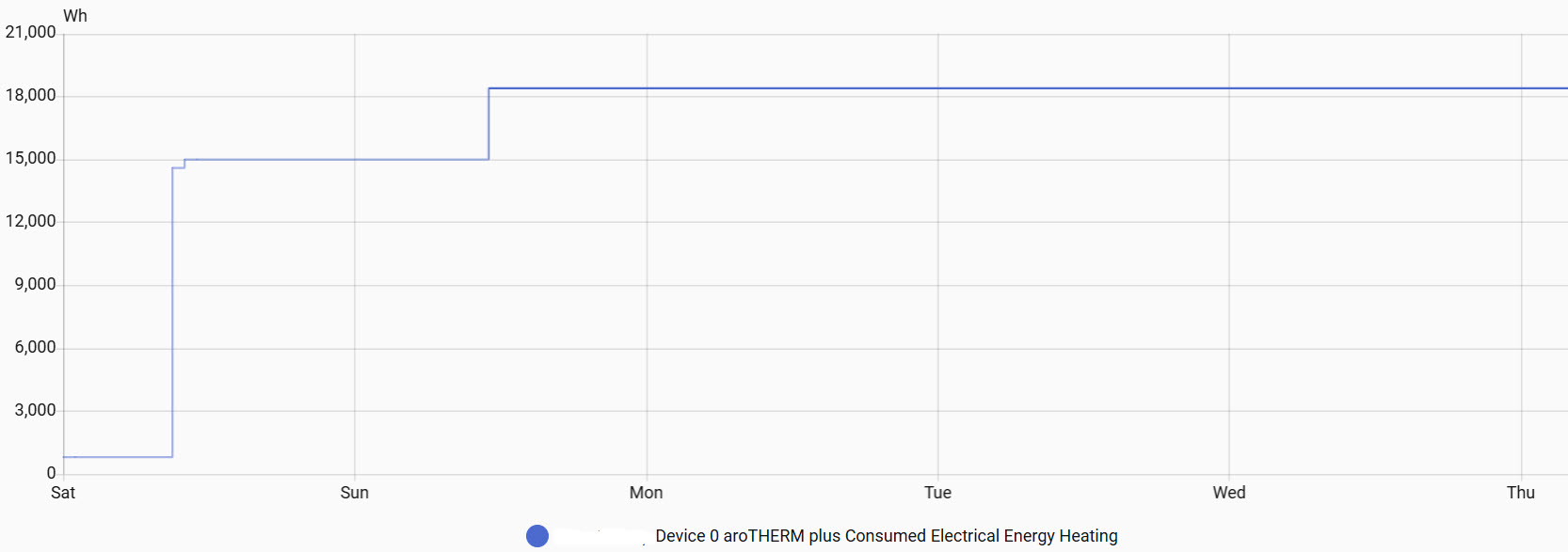
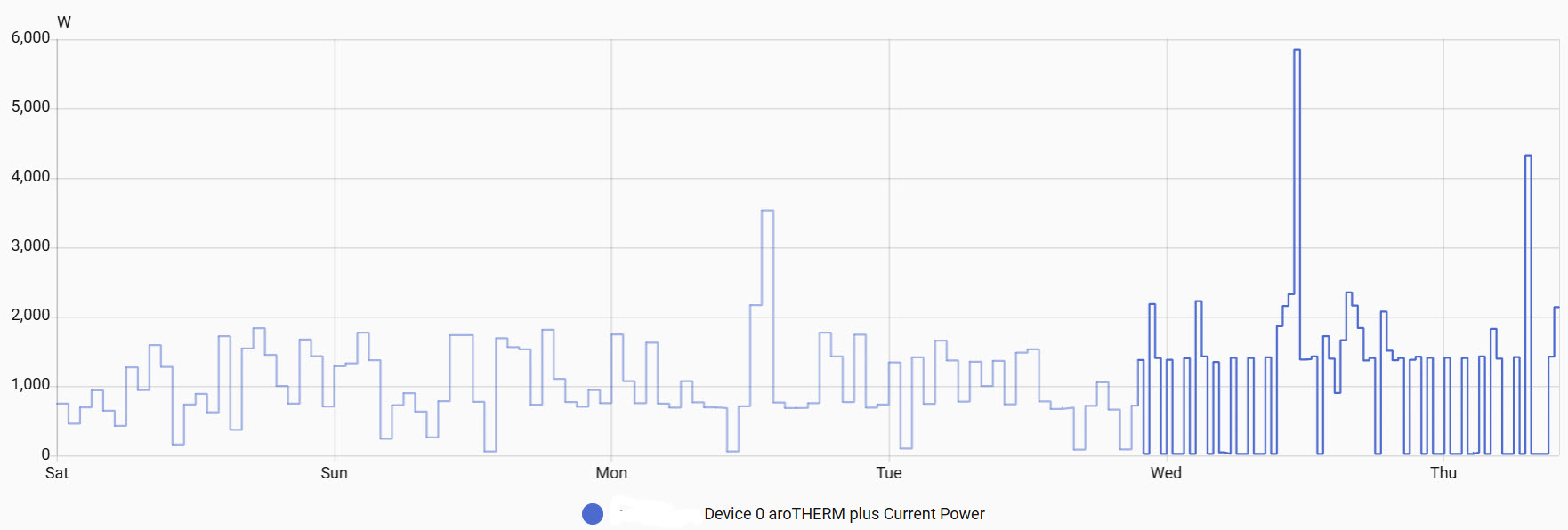
It’s not entirely logical, but different endpoints of the Vaillant API have different limits. There is nothing we can do about it other than trying to increase the poll intervals.