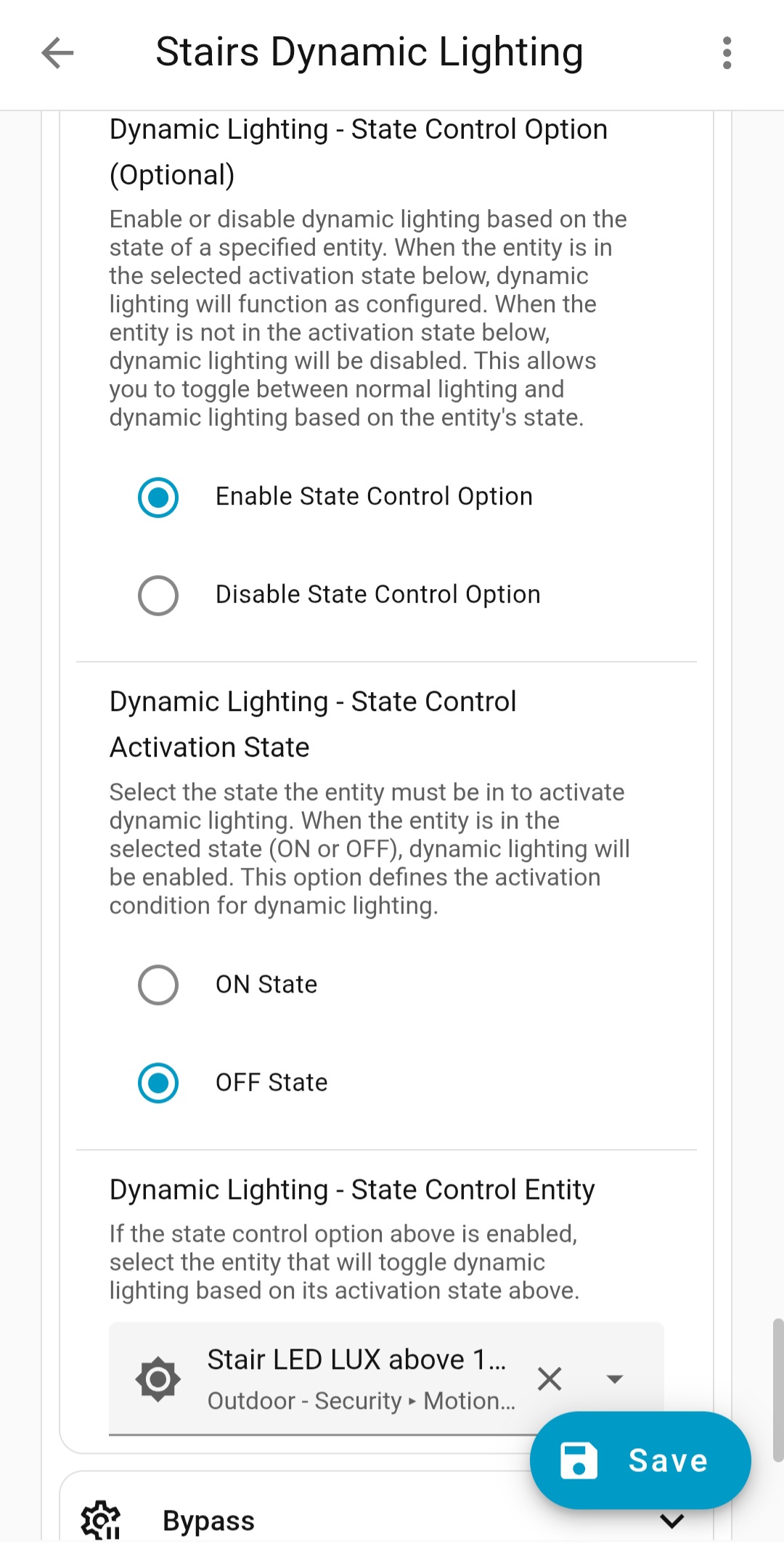
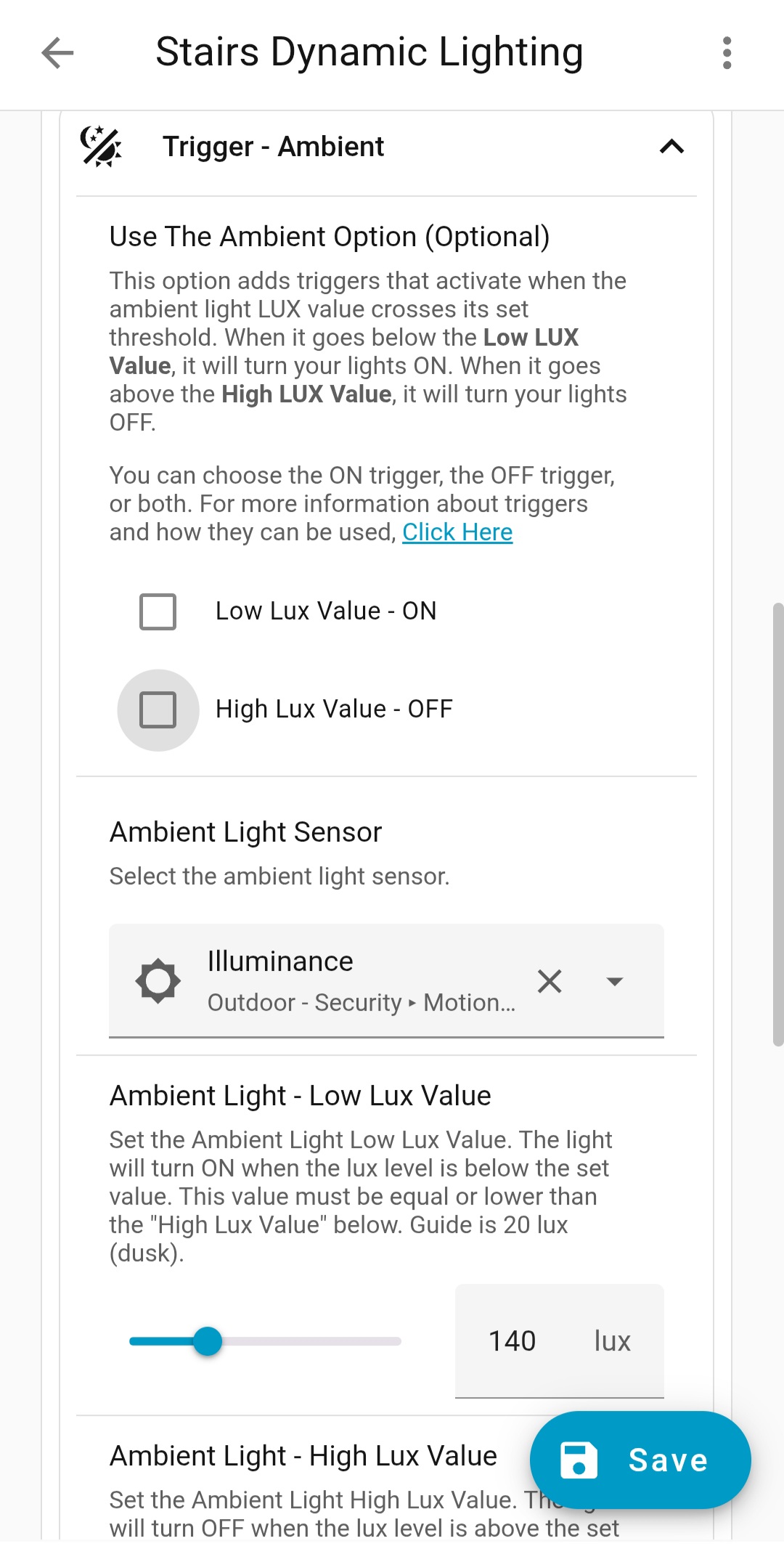
Try the enabling the HA Restart Option and you should be good.
Blacky 
It was enabled by default and I now disabled it purposefully 
I restarted HA and now the lights stay off. But it might be a combination of different factors of course. I will keep an eye on it.
Thanks!
Because you are just using Sun Elevation Falling - ON there is no way to evaluate when it should be OFF so it turns it ON. If you used it together with Sun Elevation Rising - OFF the the HA restart would work.
This was why I added the option for HA restart so you can have the options you would like to use.
Your welcome.
Enjoy
Blacky
I’m having some strange issues thats were never there, the light gets triggerd at 03:24 based on lux:
my code:
description: ""
use_blueprint:
  path: Blackshome/smart-light.yaml
  input:
    include_ambient:
      - ambient_low
      - ambient_high
    ambient_light_sensor: sensor.lux_sensor
    light_switch:
      entity_id: scene.ik_ben_thuis
    end_scenes:
      - scene.alle_lampen_uit
    ambient_light_value: 199
    ambient_light_value_off: 200
    include_bypass:
      - bypass_enabled_turn_on
      - bypass_enabled_turn_off
    bypass_lights_on:
      - input_boolean.verlichting_handmatig_schakelen
    bypass_lights_off:
      - input_boolean.verlichting_handmatig_schakelen
I cannot figure out where it’s goging wrong, especially because it worked flawless for some time. My first guess was the bypass but that switch have never been touched and is there ‘in case off’
Does someone can explain what is goging wrong? I dont have a tracing because it’s only shows the last 5
Suggestion: Notify users in you’re FAQ thats it’s possible to change the number of traces with
trace:
  stored_traces: 20
Thanks for your YAML.
There are a few things.
input boolean (Toggle Helper). They must be different or you may be confused on what the options do. When you turn ON your toggle helper select if you would like to (1) turn the lights ON or (2) turn the lights OFF. They both disable the automation and when you turn it OFF the automation will then be active.What is happening to your lux sensor at 03:24. When the lux goes from above 199 to below 199 it will turn the lights ON. Once ON when it goes above 200 it will turn them OFF.
Thanks for your suggestion but I am not part of Home Assistant. I just share my blueprints that I use in my home with the community as they may help someone.
Blacky
Will do, but that will not fix the issue i have
I just removed the bypass option because i dont use it
Thats correct, i have a lux helper with filter:
- platform: filter
name: "Lux sensor"
unique_id: average_lux
entity_id: sensor.bh1750_illuminance
filters:
- filter: time_simple_moving_average
window_size: "00:03"
- filter: time_throttle
window_size: "00:03"
I dont think this is happening because the sensor is 0 from (around) 20:15 till 07:00 so it should not be triggering the automation.
It’s impossible that the sensor is getting unvalid lux data because the sensor itself is on a rooftop with no access.
I have a helper switch (“Goodnight”) that turns on when i go to sleep and that prevents other automations as well to get fired. It turns off when i wake up based on my routine. Is there any chance i could use that?
Offcourse but you need to enter that piece of code inside the automation itself, like this, especially line 3 & 4:
alias: Automatische verlichting binnen
description: ""
trace:
  stored_traces: 20
use_blueprint:
path: Blackshome/smart-light.yaml
input:
include_ambient:
- ambient_low
- ambient_high
ambient_light_sensor: sensor.lux_sensor
light_switch:
entity_id: scene.ik_ben_thuis
end_scenes:
- scene.alle_lampen_uit
ambient_light_value: 199
ambient_light_value_off: 200
include_bypass: []
Hi @Blacky ,
I think there is a valid use-case for continuing to dim the lights beyond the -10 sun elevation.
Someone wants to continue dimming lights until a certain elevation threshold, but not specifically time-based. Yes, it’s completely dark between -10 and say -40 degrees, but you might prefer the lights to follow sun elevation rather than time. For example, when daylight savings/standard time changes the sun brightness during the evening time. It would be better to have the lights follow the sun instead of the time of day.
Would it be possible to make an update to the blueprint to extend the minimum elevations?
Thank you for this great blueprint!
Another questions mate,
Similar to your stairs lighting example, but I want leave the stair light on in the day at weekends at a set brightness. So as follows,
Week Days ( Mon to Fri) - Light off between 9am and 4pm
All Other times
If Lux is above 100, then brightness 25%
If Lux between 90 and 0, then brightness between 60% and 15%
Cheers
Russ
I will have a look at it, but it’s a bit more involved than it seems, there’s a specific reason why I set it up this way.
Blacky
So you good there. This is one automation.
Second automation, use DL but only active (see below).
Make a template sensor so when it is above 100 it is ON and then use this in the Dynamic Lighting - State Control Option. So when this sensor is OFF DL will run and when it is ON then Light Control = 25%.
Blacky
Sorry Blacky, what do you mean by a “Make a template sensor”
Sorry I should of explained in more detail.
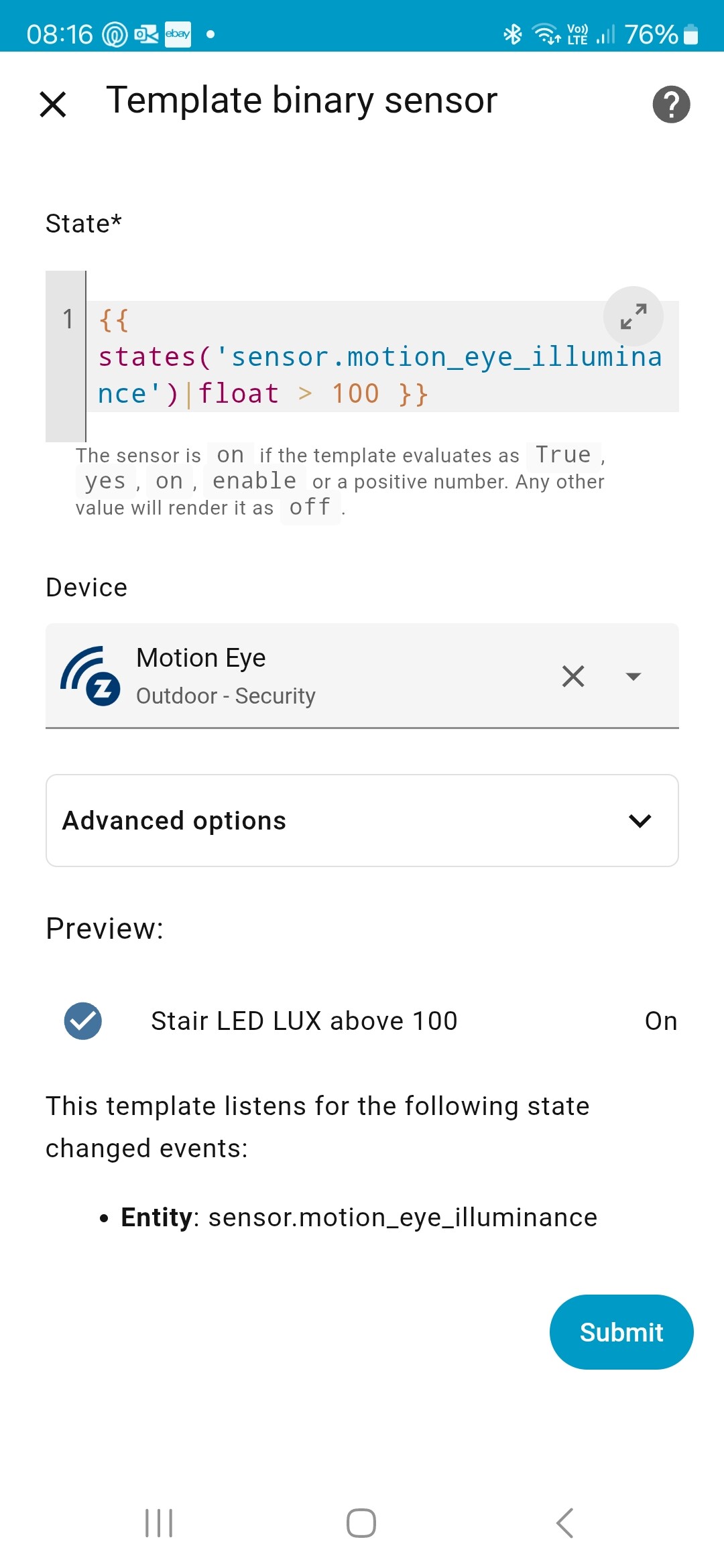
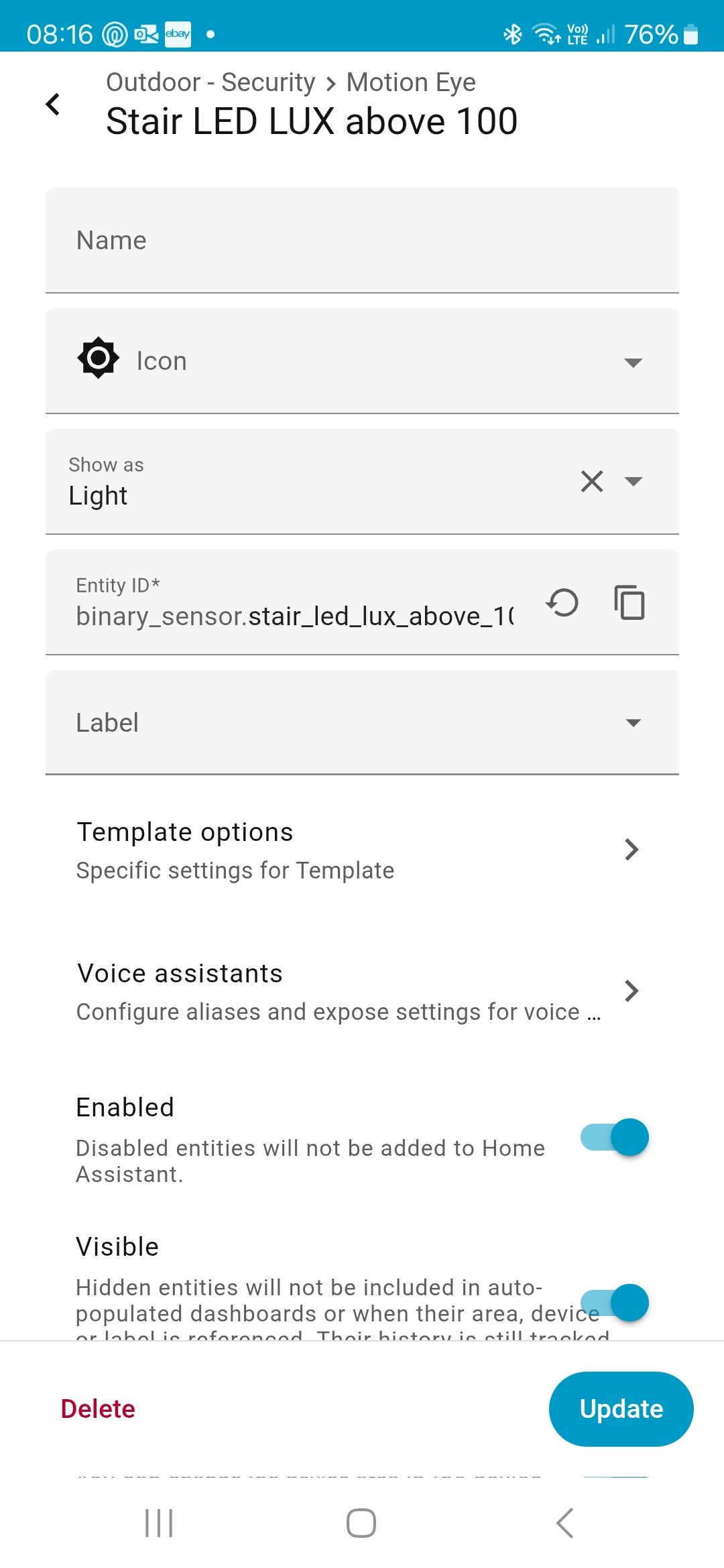
How to Create a Template Binary Sensor Helper.
Lux Above 100).sensor.your_lux_sensor with the actual entity ID of you lux sensor.{{ states('sensor.your_lux_sensor')|float > 100 }}
Once you have this helper you can now use it in Dynamic lighting. set up your Dynamic lighting and make sure you also:
Now when your helper is OFF Dynamic Lighting will run. Set up your If Lux between 90 and 0, then brightness between 60% and 15%
When your sensor goes above 100 it will turn ON disabling Dynamic Lighting. You then set your Light Control to If Lux is above 100, then brightness 25%
Hope that makes sense now.
Blacky
Hello @Blacky and thanks for your amazing blueprints!
I can’t explain why, since September 12th, my light turns on during the day when it shouldn’t.
Here’s the YAML of the light:
alias: Room 1
description: ""
use_blueprint:
  path: Blackshome/smart-light.yaml
  input:
    include_entity_state:
      - entity_on
      - entity_off
    entity_input: input_boolean.bouton_2_single_press
    light_switch:
      entity_id:
        - switch.eve_energy_20ebo8301
        - light.light_gc
    boolean_scenes_scripts: input_boolean.room_1_day_helper
    include_light_control:
      - use_transition
      - use_brightness
    include_dynamic_lighting: enable_sun_elevation_colour_brightness
    include_night_lights: night_lights_enabled
    night_lights_entity_state:
      - binary_sensor.toggle_night_helper
    night_lights:
      entity_id:
        - light.light_gc
        - switch.eve_energy_20ebo8301
    night_boolean_scenes_scripts: input_boolean.toggle_gc_night_helper
    include_night_light_control:
      - use_brightness
      - use_transition
      - if_lights_are_on_adjust_when_crossing_over
    end_scenes: []
    night_lights_conditions:
      - entity_state_enabled
    dynamic_lighting_min_brightness: 60
    dynamic_lighting_boolean: input_boolean.gc_dynamic_light
    include_night_light_colour_control: use_colour_temperature
    night_light_colour_temperature: 3000
The history shows it’s being activated by the Helper, but the Helper is disabled very early in the morning (around 7:00 AM) and remains disabled throughout the day. Despite that, the light keeps turning on by itself during the day.
trigger: state
id: t13
entity_id:
  - binary_sensor.toggle_night_helper
from: 'on'
to: 'off'
I have another light managed by the same blueprint, and it doesn’t behave this way—it doesn’t turn on during the day without an apparent reason. Here is the YAML of this light:
alias: Kitchen
description: ""
use_blueprint:
  path: Blackshome/smart-light.yaml
  input:
    entity_input: switch.veilleuse
    light_switch:
      entity_id: light.kitchen
    include_light_control:
      - use_transition
    light_transition_on: 2
    light_transition_off: 2
    include_dynamic_lighting: enable_sun_elevation_colour_brightness
    include_night_lights: night_lights_enabled
    night_lights_entity_state:
      - binary_sensor.toggle_night_helper
    night_lights:
      entity_id: light.kitchen
    include_night_light_control:
      - use_brightness
      - use_transition
      - if_lights_are_on_adjust_when_crossing_over
      - manage_scripts_crossing_over
    night_light_transition_on: 2
    night_light_transition_off: 2
    include_entity_state:
      - entity_on
      - entity_off
    night_lights_conditions:
      - entity_state_enabled
    include_night_light_colour_control: use_colour_temperature
    night_light_colour_temperature: 2300
    dynamic_lighting_min_brightness: 20
Can you help me figure out why it’s turning on during the day?
Hi Mate,
Thanks for writing out those instructions.
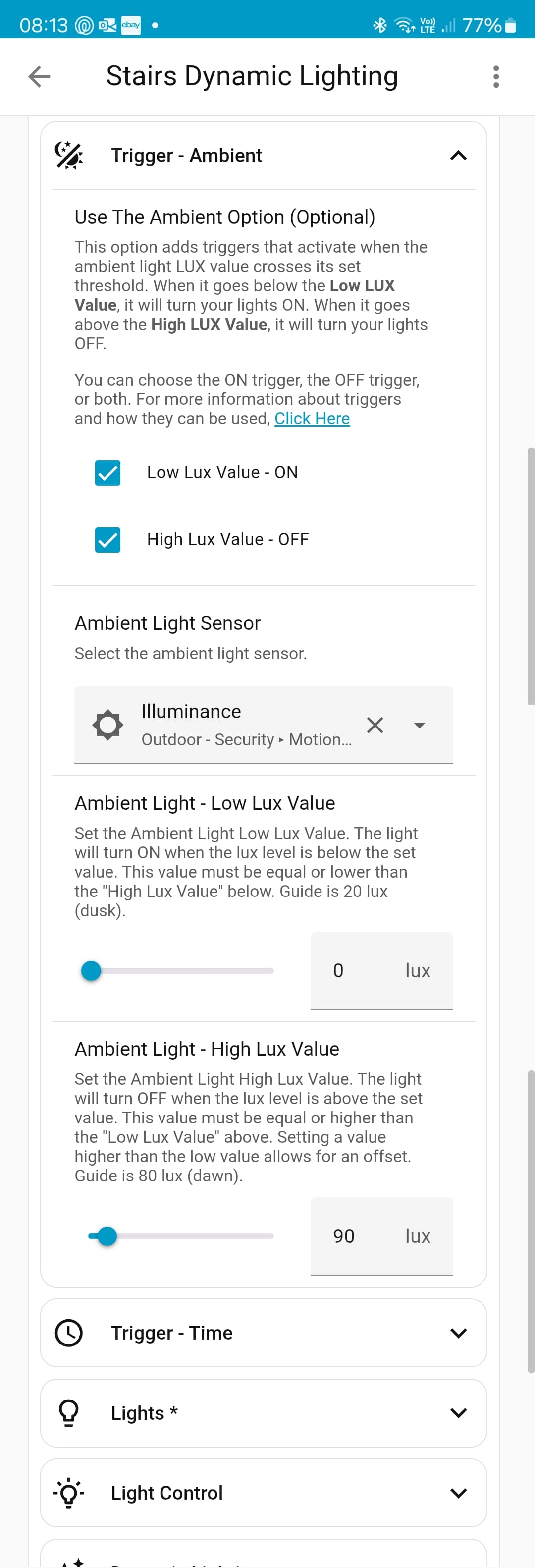
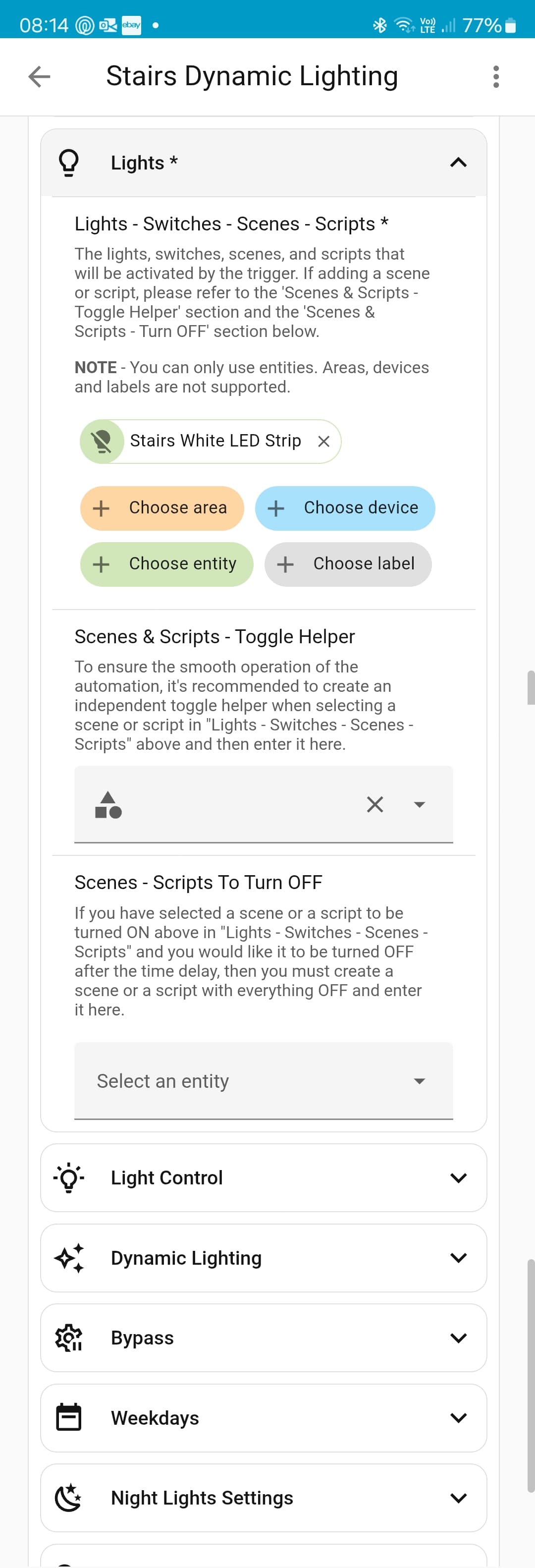
I think I have done everything you said but not sure its working. Below are screen shots of the settings,
Hi!
Thanks for this extensive blueprint and all the effort you put in it!
Regarding the dynamic lighting I do have a question about ways to disable the dynamic lighting without completely turning off the light.
Right now when I turn on the lights using a virtual push button (which is triggered by Hue wall modules) and activate the dynamic lighting this automation will stay active and in dynamic lightning mode. Hence, if I manually change the light brightness/temperature from within the Home Assistant dashboard (by manually changing the brightness or by selecting a specific scene) it will after a while be reverted to the appropriate dynamic lighting values according to the automation. This can be unwanted behaviour when for example reading a book and the brightness decreases by the automation.
So what would be the best way to let the automation know that the dynamic lighting shouldn’t be active anymore when manually changing brightness/temperature of the lights? I know about the State Control Option, but this requires a toggle entity (which could be triggered to “on” by the light switch) and updating this toggle entity when manually changing a light (is there a way to do this automatically when a light changes?).
I appreciate any ideas to get the light to stay on a specific brightness/temperature when manually changing the light 
Below the settings for the blueprint:
alias: Slaapkamer - Dynamic Light
description: ""
use_blueprint:
  path: Blackshome/smart-light.yaml
  input:
    light_switch:
      entity_id: light.hue_filament_bulb_slaapkamer
    include_entity_state: []
    end_scenes: []
    include_dynamic_lighting: enable_sun_elevation_colour_brightness
    dynamic_lighting_min_brightness: 35
    dynamic_lighting_max_colour_temp: 3285
    dynamic_lighting_min_colour_temp: 2202
    light_transition_on: 1
    include_light_control:
      - use_transition
    dynamic_lighting_sun_elevation_end_falling: -10
    dynamic_lighting_boolean: input_boolean.lamp_slaapkamer_helper
    button_input: input_button.lichtschakelaar_slaapkamer
    include_button:
      - button_on
      - button_off
    include_ha_restart: disable_ha_restart
Blacky
You would use the Dynamic Lighting - State Control Option. I am currently working on my  Manual Control Status Tracker blueprint and there is an option for when you change the brightness in the next release. I am just ironing out one bug at the moment and it should be out within a week. Once the new version of this blueprint is out you will be able to do what your asking so keep an eye out for it.
Blacky
@Blacky That’s great to hear!
Will there also be an option to track the temperature/color changes of lights?
Looking forward to try it out when the new version is released!
Hi Blacky,
Thank you mate, really appreciate you taking the time to reply.
Is this right
So do I need to turn both the low and high ambient check boxes off?
Anything else I need to change?
One other thing Im a bit lost with, is what part is setting then "above 100 lux set at 25% brightness "?
So you will be looking for the Manual Control Status Tracker blueprint. Once it is released if you have any questions just ask.
Blacky