Spotcast fails with 'serverTime' error

Hello everyone,

I’m trying to use Spotcast to play a specific Spotify playlist on my Echo Dot device via an automation in Home Assistant, but I’m running into issues.

Setup:

  • Home Assistant Core: 2025.5.3
  • Spotcast version: latest available via HACS
  • Echo Dot is correctly visible in the Spotify Connect list
  • Spotcast sp_dc and sp_key cookies were extracted fresh and added to configuration.yaml
  • Spotify entity: media_player.spotify_21iyvaydb2kcf4n7fmcebdmhi
  • Device name: "Pano's Echo Dot" (used in Spotcast call)

What I’ve tried:

  • Verified that Spotcast works by manually calling the service from Developer Tools → Services
  • Echo Dot is visible and connectable via the official Spotify app
  • Fired the play_spotify_on_echo_dot event in Developer Tools → Events
  • Restarted HA and cleared browser/app cache
  • Triple-checked sp_dc and sp_key are correct and not expired

I’ve seen this 'serverTime' error before in a few GitHub issues, but no clear resolution. Everything seems correctly configured, yet playback fails silently, and no music plays on the Echo Dot.

Any ideas or known fixes?
Happy to provide additional logs or try debugging steps. Thank you!

I had a working automation until recently, but I now get the same error.

As far as I can tell, nothing had changed on my end prior to it giving this error.

@panzeg @Ohyeah218
I believe you have to utilize SpotCcast v6 to correct this, as Spotify discontinued the ability to utilize the Spotify Web Player Cookie Credentials using the sp_dc and sp_key values a few weeks ago. I don’t believe HACS has been updated yet with the v6 release, which is probably why you are having issues if installing SpotCast from HACS. There is also a youtube video on how to upgrade to SpotCast v6 if it helps.

Other things you might consider

Check out the SpotifyPlus Integration; it can do everything that the HA Spotify integration can do, supports Spotify Connect enabled devices (Bose, Sonos, Chromecast, Amazon Alexa, Denon, JBL, and more), and provides 95+ custom services that can be used in HA automations and scripts. Spotcast not required.

There is also a SpotifyPlus Card user-interface that allows you to control the player, manage your Spotify favorites, as well as search the Spotify catalog. You have to install the SpotifyPlus integration first though, and get it configured before you can use the SpotifyPlus Card.

Both are easily installed via HACS.

Hope it helps!

3 Likes

Thanks. This worked!

I assume you are the creator of SpotifyPlus? What are the benefits of using SpotifyPlus over Spotcast?

1 Like

@DIY-techie
Yes, I am the author of SpotifyPlus. The biggest benefit (IMO) are the 95+ custom services that expose almost every endpoint of the Spotify Web API to HA automations and script.

The next big draw is the ability to awaken Chromecast devices, as well as Sonos devices.

At the end of the day you can replace both HA Spotify and Spotcast integrations with the SpotifyPlus integration, and have more functionality with the available custom services.

It really comes down to what you want to be able to do with Spotify in your HA environment.

1 Like

Very cool and ambitious. Think I need to try it some day :slight_smile:

1 Like

Hi,
have. you been able to do awakening of Google devices? or what is the workaround to have a script that instantly reproduces Spotify music and cast without having it to be currently running on mobile or other device

@alanmarchan17
I use SpotifyPlus Integration to do this.

If you want to continue using SpotCast, you have to utilize SpotCast v6 to correct this, as Spotify discontinued the ability to utilize the Spotify Web Player Cookie Credentials using the sp_dc and sp_key values in late May. I don’t believe HACS has been updated yet with the v6 release, which is probably why you are having issues if installing SpotCast from HACS. There is also a youtube video on how to upgrade to SpotCast v6 if it helps.

Other things you might consider

Check out the SpotifyPlus Integration; it can do everything that the HA Spotify integration can do, supports Spotify Connect enabled devices (Bose, Sonos, Chromecast, Amazon Alexa, Denon, JBL, and more), and provides 95+ custom services that can be used in HA automations and scripts. Spotcast not required.

There is also a SpotifyPlus Card user-interface that allows you to control the player, manage your Spotify favorites, as well as search the Spotify catalog. You have to install the SpotifyPlus integration first though, and get it configured before you can use the SpotifyPlus Card.

Both are easily installed via HACS.

Hope it helps!

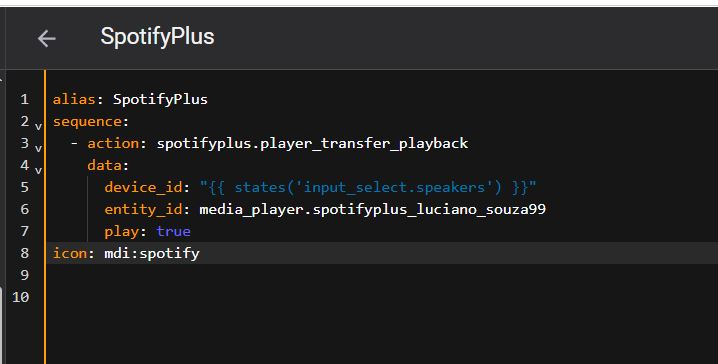
Hello, @thlucas can you help me? How can I make it play on multiple Alexas at the same time? I created a script, but when I change Alexa, it stops playing on the previous one, and I would like to know how to start this script to start playing at a specific volume.
Uploading: Script.JPG…
Uploading: Player.JPG…

@Lucianosouza99
I can’t see your screen captures / images in your previous post.

I think all that you need to do is to create a speaker group to play on multiple Alexa devices. I found the following on a Google search …

To create Alexa groups for Spotify, you’ll need to use the Alexa app to set up multi-room music groups. These groups allow you to play music on multiple Echo devices simultaneously. You can then select these groups within the Spotify app to control playback on your chosen devices.

Here’s how to set up multi-room music groups in the Alexa app:

  1. Open the Alexa app: Launch the Alexa app on your smartphone or tablet.
  2. Navigate to Devices: Tap the “Devices” icon, usually located at the bottom of the screen.
  3. Add a Group: Select the “+” icon (usually in the top right corner) and then choose “Combine Speakers.”
  4. Select Multi-Room Music: Choose “Multi-Room Music” from the available options.
  5. Name and Select Devices: Give your group a name (e.g., “Living Room,” “Upstairs”) and select the Echo devices you want to include in that group.
  6. Save the Group: Tap “Next” or “Save” to create your multi-room music group.

To play Spotify through these groups:

  1. Open the Spotify app: Launch the Spotify app on your phone or computer.
  2. Start Playing Music: Select a song, album, or playlist to begin playing music.
  3. Access Device Selection: Tap the device icon (usually a speaker icon) within the Spotify app.
  4. Choose an Alexa Group: Select the multi-room music group you created in the Alexa app as the output device.

@thlucas


@thlucas I have created the group in Alexa and I can use it, but I would like to use the devices playing together but not in a group when I used Spotcast I could do it, I used this document to make the dashboard, but after Spotcast stopped I can no longer use 2 devices playing without being a group created in Alexa Using your Spotify account in a HA dashboard to select speakers and broadcast

@Lucianosouza99
What does the states('input_select.speakers') value contain? It shoule either be a device name (e.g. Office Group) or a device id (e.g. 6f66ef4fbf687bbba393d8c38599aad484b30901) of a Spotify Connect remote identifier. Is it Echo Show 8 (based on your screenshot example)?

I am not sure how you were using SpotCast to play to multiple devices simultaneously … unless you were using Music Assistant, or some other underlying product that dynamically creates a Spotify Connect remote.

The SpotifyPlus Integration can only transfer playback to a single Spotify Connect remote identifier. The remote identifier can be a single device, or it could be a group name of multiple devices that are grouped together (in this case using the Alexa App).

Spot cast has been spotty Im working on changing over to music assistant

I was using groups to play on 2 or more google speakers in the Document link that was linked above that I wrote
but spot cast has been weird so im woking on changing to music assistant

Can anybody help me with installing Spotcast v6? The video mentioned above didn’t help me. I get stuck after clicking “Continue to the app” on the “Allow Spotify to connect to: Spotify for Desktop” page — it shows “This site can’t be reached.”
I’m not sure how to run the relay server script correctly (I’m using HA on a Raspberry Pi).

I also tried installing the Spotify Plus integration, but I got this error:
500 Internal Server Error — Server got itself in trouble.

My goal is simply to wake up my Chromecast from idle status.

Thank you.

@Tomm206
SpotifyPlus author here …
At what point in the installation instructions did you receive the 500 Internal Server Error — Server got itself in trouble. error? Are there any other messages in the HA System Log that relate to spotifyplus or spotifywebapipython?

It sounds like this and your SpotCast V6 problems are related, in that neither one can reach the Spotify authorization server (e.g. https://accounts.spotify.com/authorize) from your HA instance.

Thank you for your quick answer. I got this message (500 Internal Server Error — Server got itself in trouble.) after clicking on “Add the integration” then “Spotify Plus”.
I can normally use the Spotify integration when Chromecast is not idle.
See my log info:

Logger: aiohttp.server
Zdroj: /usr/local/lib/python3.13/site-packages/aiohttp/web_protocol.py:481
První výskyt: 12:17:44 (1 výskyt)
Naposledy logováno: 12:17:44

Error handling request from 127.0.0.1
Traceback (most recent call last):
  File "/usr/local/lib/python3.13/site-packages/aiohttp/web_protocol.py", line 510, in _handle_request
    resp = await request_handler(request)
           ^^^^^^^^^^^^^^^^^^^^^^^^^^^^^^
  File "/usr/local/lib/python3.13/site-packages/aiohttp/web_app.py", line 569, in _handle
    return await handler(request)
           ^^^^^^^^^^^^^^^^^^^^^^
  File "/usr/local/lib/python3.13/site-packages/aiohttp/web_middlewares.py", line 117, in impl
    return await handler(request)
           ^^^^^^^^^^^^^^^^^^^^^^
  File "/usr/src/homeassistant/homeassistant/components/http/security_filter.py", line 92, in security_filter_middleware
    return await handler(request)
           ^^^^^^^^^^^^^^^^^^^^^^
  File "/usr/src/homeassistant/homeassistant/components/http/forwarded.py", line 77, in forwarded_middleware
    return await handler(request)
           ^^^^^^^^^^^^^^^^^^^^^^
  File "/usr/src/homeassistant/homeassistant/components/http/request_context.py", line 26, in request_context_middleware
    return await handler(request)
           ^^^^^^^^^^^^^^^^^^^^^^
  File "/usr/src/homeassistant/homeassistant/components/http/ban.py", line 86, in ban_middleware
    return await handler(request)
           ^^^^^^^^^^^^^^^^^^^^^^
  File "/usr/src/homeassistant/homeassistant/components/http/auth.py", line 242, in auth_middleware
    return await handler(request)
           ^^^^^^^^^^^^^^^^^^^^^^
  File "/usr/src/homeassistant/homeassistant/components/http/headers.py", line 41, in headers_middleware
    response = await handler(request)
               ^^^^^^^^^^^^^^^^^^^^^^
  File "/usr/src/homeassistant/homeassistant/helpers/http.py", line 73, in handle
    result = await handler(request, **request.match_info)
             ^^^^^^^^^^^^^^^^^^^^^^^^^^^^^^^^^^^^^^^^^^^^
  File "/usr/src/homeassistant/homeassistant/components/http/decorators.py", line 83, in with_admin
    return await func(self, request, *args, **kwargs)
           ^^^^^^^^^^^^^^^^^^^^^^^^^^^^^^^^^^^^^^^^^^
  File "/usr/src/homeassistant/homeassistant/components/http/data_validator.py", line 74, in wrapper
    return await method(view, request, data, *args, **kwargs)
           ^^^^^^^^^^^^^^^^^^^^^^^^^^^^^^^^^^^^^^^^^^^^^^^^^^
  File "/usr/src/homeassistant/homeassistant/components/config/config_entries.py", line 181, in post
    return await self._post_impl(request, data)
           ^^^^^^^^^^^^^^^^^^^^^^^^^^^^^^^^^^^^
  File "/usr/src/homeassistant/homeassistant/components/config/config_entries.py", line 188, in _post_impl
    return await super()._post_impl(request, data)
           ^^^^^^^^^^^^^^^^^^^^^^^^^^^^^^^^^^^^^^^
  File "/usr/src/homeassistant/homeassistant/helpers/data_entry_flow.py", line 83, in _post_impl
    result = await self._flow_mgr.async_init(
             ^^^^^^^^^^^^^^^^^^^^^^^^^^^^^^^^
    ...<2 lines>...
    )
    ^
  File "/usr/src/homeassistant/homeassistant/config_entries.py", line 1446, in async_init
    flow, result = await self._async_init(flow_id, handler, context, data)
                   ^^^^^^^^^^^^^^^^^^^^^^^^^^^^^^^^^^^^^^^^^^^^^^^^^^^^^^^
  File "/usr/src/homeassistant/homeassistant/config_entries.py", line 1482, in _async_init
    flow = await self.async_create_flow(handler, context=context, data=data)
           ^^^^^^^^^^^^^^^^^^^^^^^^^^^^^^^^^^^^^^^^^^^^^^^^^^^^^^^^^^^^^^^^^
  File "/usr/src/homeassistant/homeassistant/config_entries.py", line 1704, in async_create_flow
    handler = await _async_get_flow_handler(
              ^^^^^^^^^^^^^^^^^^^^^^^^^^^^^^
        self.hass, handler_key, self._hass_config
        ^^^^^^^^^^^^^^^^^^^^^^^^^^^^^^^^^^^^^^^^^
    )
    ^
  File "/usr/src/homeassistant/homeassistant/config_entries.py", line 3752, in _async_get_flow_handler
    await _load_integration(hass, domain, hass_config)
  File "/usr/src/homeassistant/homeassistant/config_entries.py", line 3729, in _load_integration
    await async_process_deps_reqs(hass, hass_config, integration)
  File "/usr/src/homeassistant/homeassistant/setup.py", line 584, in async_process_deps_reqs
    await requirements.async_get_integration_with_requirements(
        hass, integration.domain
    )
  File "/usr/src/homeassistant/homeassistant/requirements.py", line 54, in async_get_integration_with_requirements
    return await manager.async_get_integration_with_requirements(domain)
           ^^^^^^^^^^^^^^^^^^^^^^^^^^^^^^^^^^^^^^^^^^^^^^^^^^^^^^^^^^^^^
  File "/usr/src/homeassistant/homeassistant/requirements.py", line 170, in async_get_integration_with_requirements
    await future
  File "/usr/src/homeassistant/homeassistant/requirements.py", line 159, in async_get_integration_with_requirements
    await self._async_process_integration(integration, done)
  File "/usr/src/homeassistant/homeassistant/requirements.py", line 182, in _async_process_integration
    await self.async_process_requirements(
        integration.domain, integration.requirements
    )
  File "/usr/src/homeassistant/homeassistant/requirements.py", line 264, in async_process_requirements
    self._raise_for_failed_requirements(name, missing)
    ~~~~~~~~~~~~~~~~~~~~~~~~~~~~~~~~~~~^^^^^^^^^^^^^^^
  File "/usr/src/homeassistant/homeassistant/requirements.py", line 292, in _raise_for_failed_requirements
    raise RequirementsNotFound(integration, [req])
homeassistant.requirements.RequirementsNotFound: Requirements for spotifyplus not found: ['numpy>=2.3.2'].

not sure probably also related:

Logger: homeassistant.util.package
Zdroj: util/package.py:159
První výskyt: 07:08:37 (12 výskytů)
Naposledy logováno: 07:13:39

* Unable to install package pyoverkiz==1.15.0: × No solution found when resolving dependencies: ╰─▶ Because pyoverkiz==1.15.0 depends on attrs>=21.2,<25.0 and attrs==25.3.0, we can conclude that pyoverkiz==1.15.0 cannot be used. And because you require pyoverkiz==1.15.0, we can conclude that your requirements are unsatisfiable.
* Unable to install package numpy>=2.3.2: × No solution found when resolving dependencies: ╰─▶ Because you require numpy>=2.3.2 and numpy==2.3.0, we can conclude that your requirements are unsatisfiable.
* Unable to install package pillow>=11.3.0: × No solution found when resolving dependencies: ╰─▶ Because you require pillow>=11.3.0 and pillow==11.2.1, we can conclude that your requirements are unsatisfiable.
* Unable to install package spotifywebapipython>=1.0.256: × No solution found when resolving dependencies: ╰─▶ Because spotifywebapipython==1.0.256 depends on pillow>=11.3.0 and pillow==11.2.1, we can conclude that spotifywebapipython==1.0.256 cannot be used. And because only spotifywebapipython<=1.0.256 is available and you require spotifywebapipython>=1.0.256, we can conclude that your requirements are unsatisfiable.

@Tomm206

The issue is due to minimum python package requirements not being met, so it cannot install the spotifywebapipython package. The SpotifyPlus integration requires this package to interface with the Spotify Web API.

* Unable to install package numpy>=2.3.2: × No solution found when resolving dependencies: ╰─▶ Because you require numpy>=2.3.2 and numpy==2.3.0, we can conclude that your requirements are unsatisfiable.

* Unable to install package pillow>=11.3.0: × No solution found when resolving dependencies: ╰─▶ Because you require pillow>=11.3.0 and pillow==11.2.1, we can conclude that your requirements are unsatisfiable.
* Unable to install package spotifywebapipython>=1.0.256: × No solution found when resolving dependencies:

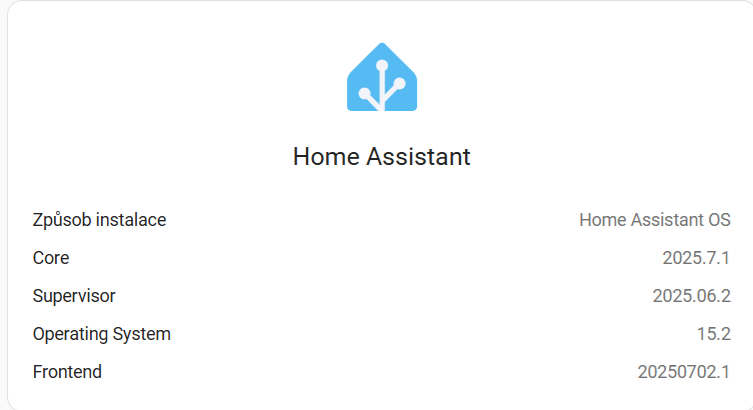
It appears that you have numpy==2.3.0 installed, which tells me that you are running an older version of Home Assistant since versions starting with 2025.8.x require numpy==2.3.2.

Questions

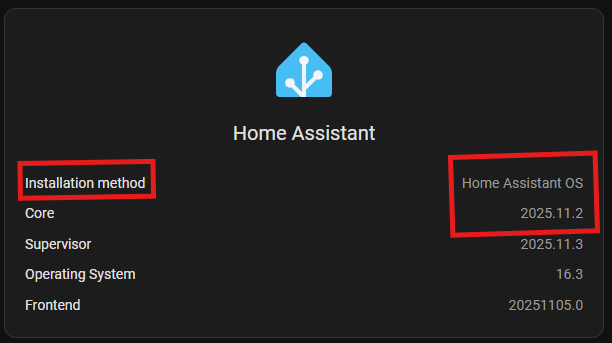
  1. What version of Home Assistant do you have installed?
  2. What is the Home Assistant installation type (e.g. Core? Container? OS? Supervised? etc).

I would suggest upgrading your HA instance to the latest if possible.

Yes, you are right I have an older version of Home Assistant than 2025.8.x. It has been a long time since I last upgraded. I usually do this when a new version appears on the Updates page, but there is no new version available.